
1. Product Overview
The DBPOWER G15 Jump Starter is a versatile portable device designed to provide emergency jump-starting for vehicles, act as a power bank for electronic devices, and offer illumination with its integrated LED flashlight. It delivers up to 2750A peak current, capable of starting 10.0L gasoline engines and 8.0L diesel engines. The unit features a 76.96Wh power bank capacity and includes smart clamp cables for safe operation.
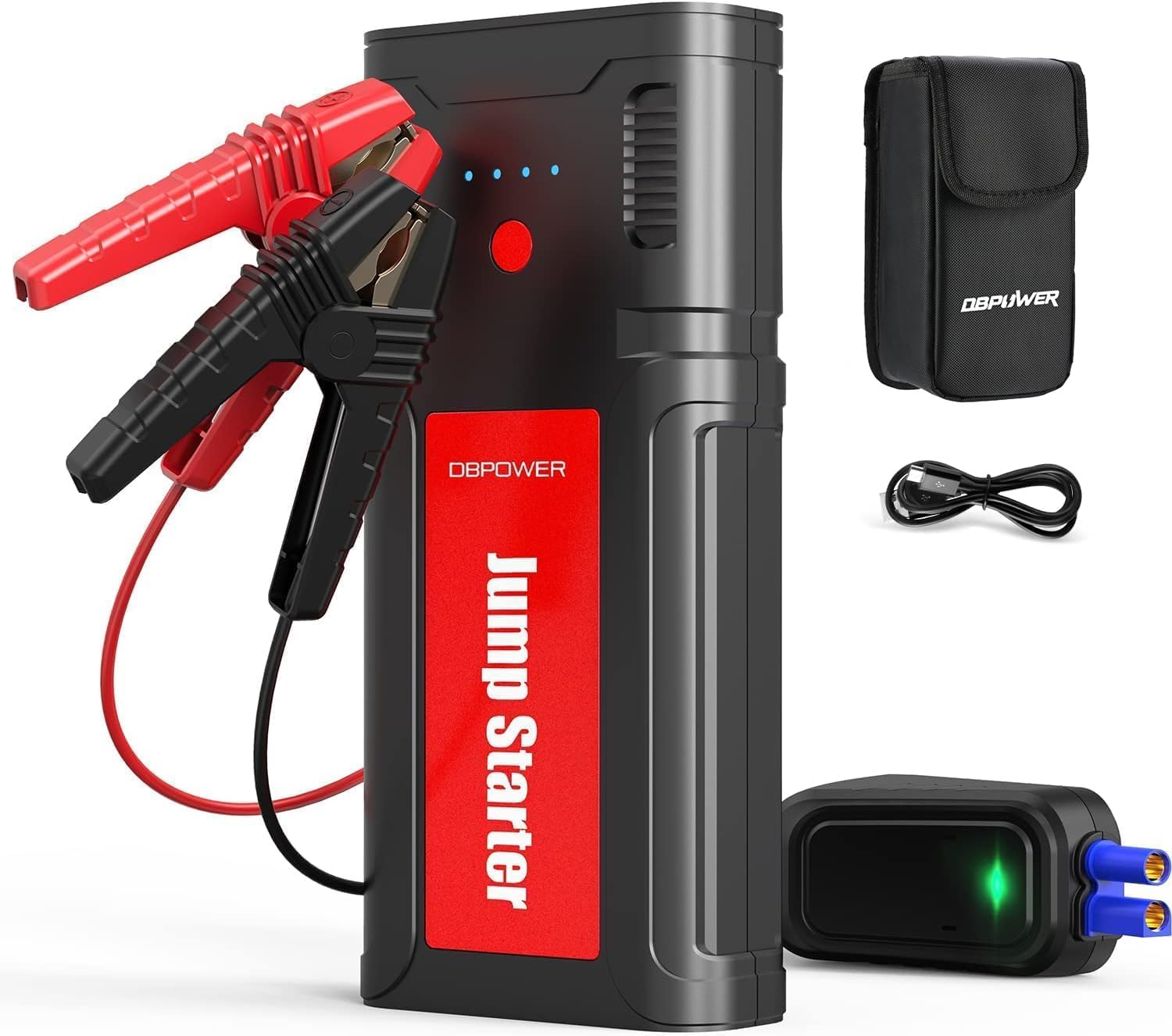
Figure 1: DBPOWER G15 Jump Starter with included accessories.
Key Features:
- High Peak Current: 2750A peak current for starting large engines (up to 10.0L gas / 8.0L diesel).
- Multi-Vehicle Compatibility: Suitable for 12V cars, trucks, motorcycles, boats, RVs, and tractors.
- Integrated Power Bank: 76.96Wh capacity with multiple USB outputs (5V/9V/12V 18W and 5V/2.1A) and a DC output (12-16V/10A) for charging electronic devices and powering car accessories.
- LED Flashlight: Features 3 modes (lighting, flash, SOS) for emergency illumination.
- Durable Construction: Made of rugged ABS material, waterproof, dustproof, and drop-proof for use in various environments.
2. What's in the Box
The DBPOWER G15 Jump Starter package includes the following items:
- G15 Jump Starter x1
- Smart Jump Cable x1
- USB Type-C Charging Cable x1
- Storage Case x1
- User Manual x1

Figure 2: All items included in the DBPOWER G15 Jump Starter package.
3. Specifications
| Brand | DBPOWER |
| Model | G15 |
| Peak Output Current | 2750 Amps |
| Battery Capacity | 76.96Wh |
| Engine Compatibility | Up to 10.0L Gas / 8.0L Diesel |
| USB Output 1 | 5V/9V/12V 18W |
| USB Output 2 | 5V/2.1A |
| DC Output | 12-16V/10A |
| Type-C Input/Output | 5V/3A |
| Operating Temperature | -4°F to 140°F (-20°C to 60°C) |
| Item Weight | 1.35 lbs (0.61 kg) |
| Product Dimensions | 7.5 x 3.5 x 1.4 inches (19 x 8.9 x 3.6 cm) |
| Safety Rating | RoHs Certified |
4. Safety Information
The DBPOWER G15 Jump Starter is equipped with multiple protection systems to ensure safe operation:
- Low/High Voltage Protection
- Over-Temperature Protection
- Short-Circuit Protection
- Reverse Polarity Protection
- Spark-Proof Protection
- Jump Starter Time Out Protection
These features help prevent damage from incorrect connections or sparks, allowing for quick and safe jump-starts even in extreme temperatures.

Figure 3: Safety protection systems integrated into the jump starter.
5. Setup
5.1 Initial Charging
Before first use, fully charge the DBPOWER G15 Jump Starter using the provided USB Type-C charging cable. Connect the Type-C cable to the unit's input/output port and the other end to a suitable USB power adapter (not included). The LED display will indicate the charging progress. Ensure the unit is fully charged for optimal performance.
5.2 Unit Overview
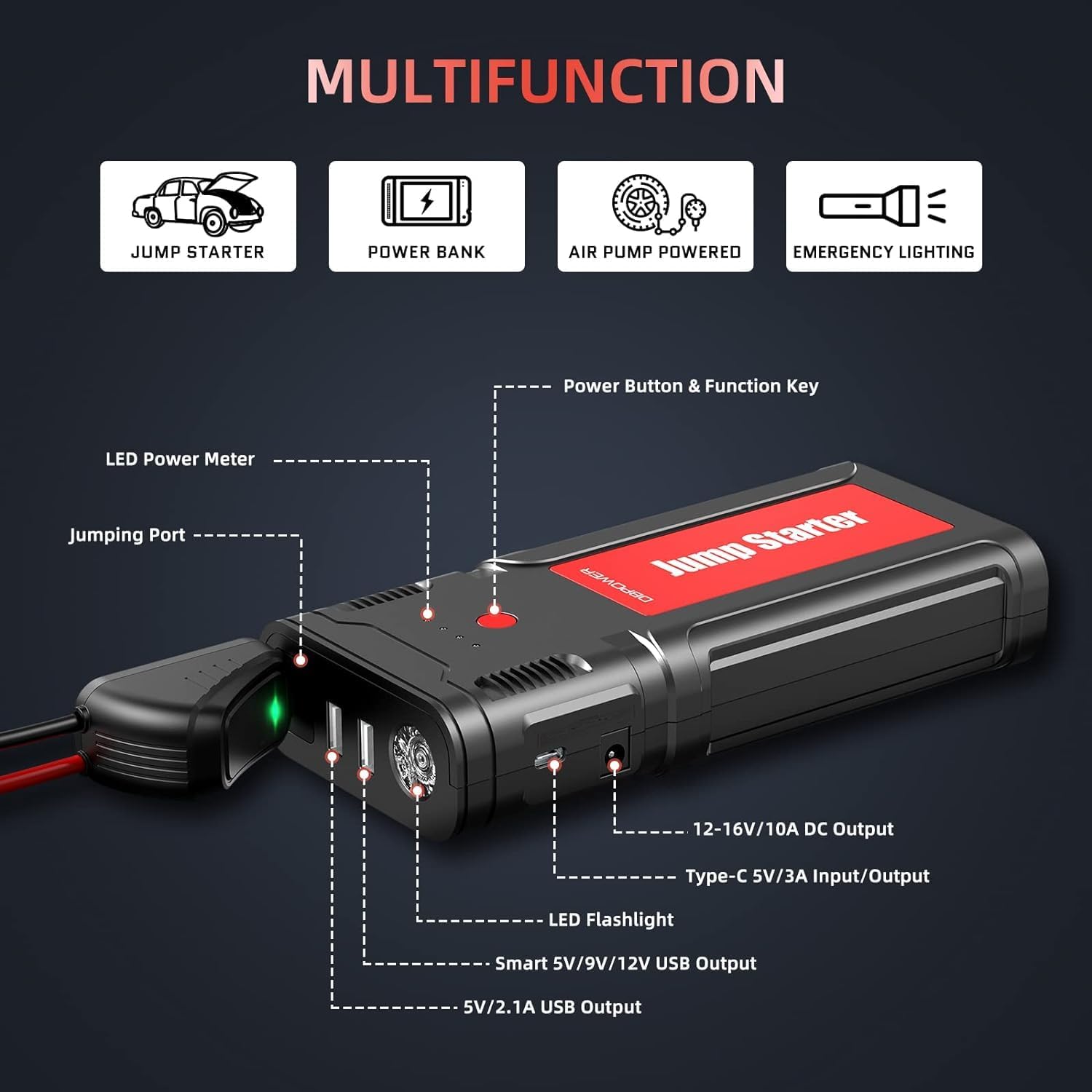
Figure 4: Labeled ports and functions of the DBPOWER G15 Jump Starter.
- LED Power Meter: Indicates remaining battery charge.
- Power Button & Function Key: Turns the unit on/off and cycles flashlight modes.
- Jumping Port: Connects to the smart jump cables.
- LED Flashlight: Provides illumination.
- USB Outputs: Two ports for charging electronic devices.
- DC Output: For powering 12-16V car accessories.
- Type-C Input/Output: For charging the unit or charging other devices.
6. Operating Instructions
6.1 Jump Starting a Vehicle
- Ensure the jump starter is at least 50% charged.
- Insert the smart jump cable into the jumping port of the jump starter.
- Connect the red (positive) clamp to the positive (+) terminal of the vehicle battery.
- Connect the black (negative) clamp to the negative (-) terminal of the vehicle battery.
- Once connected, the indicator light on the smart clamp will turn solid green, indicating it's safe to proceed.
- Start your vehicle's engine.
- Once the engine starts, immediately remove the smart jump cable from the vehicle battery terminals, then disconnect it from the jump starter unit.

Figure 5: Step-by-step process for jump starting a vehicle.
6.2 Using as a Power Bank
The DBPOWER G15 can charge various electronic devices:
- Connect your device's USB charging cable to one of the jump starter's USB output ports (Output 1 or Output 2).
- For 12-16V car accessories, use the DC output port with a compatible adapter (not included).
- The unit's LED power meter will show the remaining charge.

Figure 6: The jump starter functioning as a power bank for multiple devices.
6.3 Using the LED Flashlight
To activate the LED flashlight, press and hold the Power Button/Function Key for 2-3 seconds. Toggle through the modes by pressing the button briefly:
- Stable Light: For general illumination.
- Strobe Light: For signaling or attracting attention.
- SOS Signal: For emergency situations.
Video 1: Demonstration of the DBPOWER G15 Jump Starter's features, including the flashlight.
Description: This video provides a brief overview of the DBPOWER G15 Jump Starter, highlighting its compact size, various ports, and the functionality of its LED flashlight. It shows the unit being turned on and the flashlight modes being cycled.
7. Maintenance
7.1 Charging the Unit
To maintain optimal battery life, it is recommended to fully charge the jump starter every 3-6 months, even if not in use. This prevents deep discharge and prolongs the overall lifespan of the internal battery.
7.2 Storage
Store the DBPOWER G15 Jump Starter in its protective case in a cool, dry place. Avoid exposing the unit to direct sunlight or temperatures outside the recommended operating range of -4°F to 140°F (-20°C to 60°C) for extended periods.
8. Troubleshooting
If the jump starter does not operate as expected, please check the following:
- Unit Not Turning On: Ensure the power button is pressed and held for 2-3 seconds. Check if the battery is completely depleted and requires charging.
- Vehicle Not Starting: Verify that the smart jump cables are correctly connected to the battery terminals (red to positive, black to negative). Ensure the jump starter has sufficient charge (above 50%). Check for any error indicators on the smart clamp.
- Device Not Charging: Ensure the USB cable is properly connected to both the jump starter and the device. Verify the jump starter has sufficient charge.
For further assistance, refer to the detailed user manual or contact customer support.
9. Warranty and Support
For any questions, concerns, or technical support regarding your DBPOWER G15 Jump Starter, please contact our customer service team. We are committed to providing assistance and will respond to your inquiries within 24 hours.

