
VOMELON MFB1501D
VOMELON Rechargeable Milk Frother
Model: MFB1501D
Your guide to perfect frothed beverages.
Introduction
Thank you for choosing the VOMELON Rechargeable Milk Frother. This portable and powerful device is designed to create rich, creamy foam for your coffee, latte, cappuccino, matcha, hot chocolate, and other beverages. Its ergonomic design, two-speed operation, and rechargeable battery make it an ideal companion for both home and travel use.
What's Included
Your VOMELON Milk Frother package includes the following components:
- 1 x Rechargeable Milk Frother Unit
- 2 x Whisks (one single-loop, one double-loop)
- 1 x USB Charging Cable
- 1 x Stainless Steel Storage Tube
- 1 x User Manual (this document)
- 1 x 12-Month Service Card

Image: All components included in the VOMELON Milk Frother package.
Product Components
Familiarize yourself with the main parts of your VOMELON Milk Frother:
- Main Unit: Contains the motor, rechargeable battery, and control button.
- Detachable Whisk Head: Made from food-grade 304 stainless steel, easily attaches and detaches for cleaning and storage.
- USB Charging Outlet: Located on the main unit for convenient recharging.
- Adjustable 2-Speed Button: Controls the frothing speed.

Image: Detailed breakdown of the frother's components, highlighting the whisk, motor, and charging port.
Setup and Charging
Initial Charging
Before first use, fully charge your VOMELON Milk Frother. The built-in lithium-ion battery provides long-lasting power and eliminates the need for frequent battery replacement.
- Connect the small end of the provided USB charging cable to the USB charging outlet on the frother unit.
- Connect the larger end of the USB cable to a USB power source (e.g., computer USB port, USB wall adapter, power bank).
- The indicator light will show red during charging and turn green when fully charged.
- A full charge typically takes approximately 1.5 hours and can last for up to 30 uses.

Image: Steps for charging the frother using the included USB cable.
Attaching the Whisk
Select the desired whisk (single or double loop) and firmly insert it into the frother's motor shell until it clicks into place.
Operating Instructions
The VOMELON Milk Frother features a smart one-touch button operation with two speed settings for versatile use.
Basic Operation
- Prepare your beverage in a tall cup or container. For best frothing results with milk, ensure it is heated.
- Immerse the whisk head into the liquid you wish to froth or mix.
- Press the power button once to activate the frother at the lower speed (approximately 11,000 RPM).
- Press the power button a second time to switch to the higher speed (approximately 13,000 RPM) for faster and denser foam.
- Press the power button a third time to turn the frother off.
Applications
This versatile frother can be used for a variety of applications:
- Milk Frothing: Create creamy foam for lattes, cappuccinos, and hot chocolate.
- Matcha Tea: Whisk matcha powder into a smooth, lump-free tea.
- Eggs: Quickly beat eggs for omelets or scrambled eggs.
- Protein Shakes: Mix protein powder into liquids for a smooth consistency.
- Other Beverages: Ideal for mixing various hot and cold drinks.

Image: Examples of how the frother can be used for different ingredients and beverages.
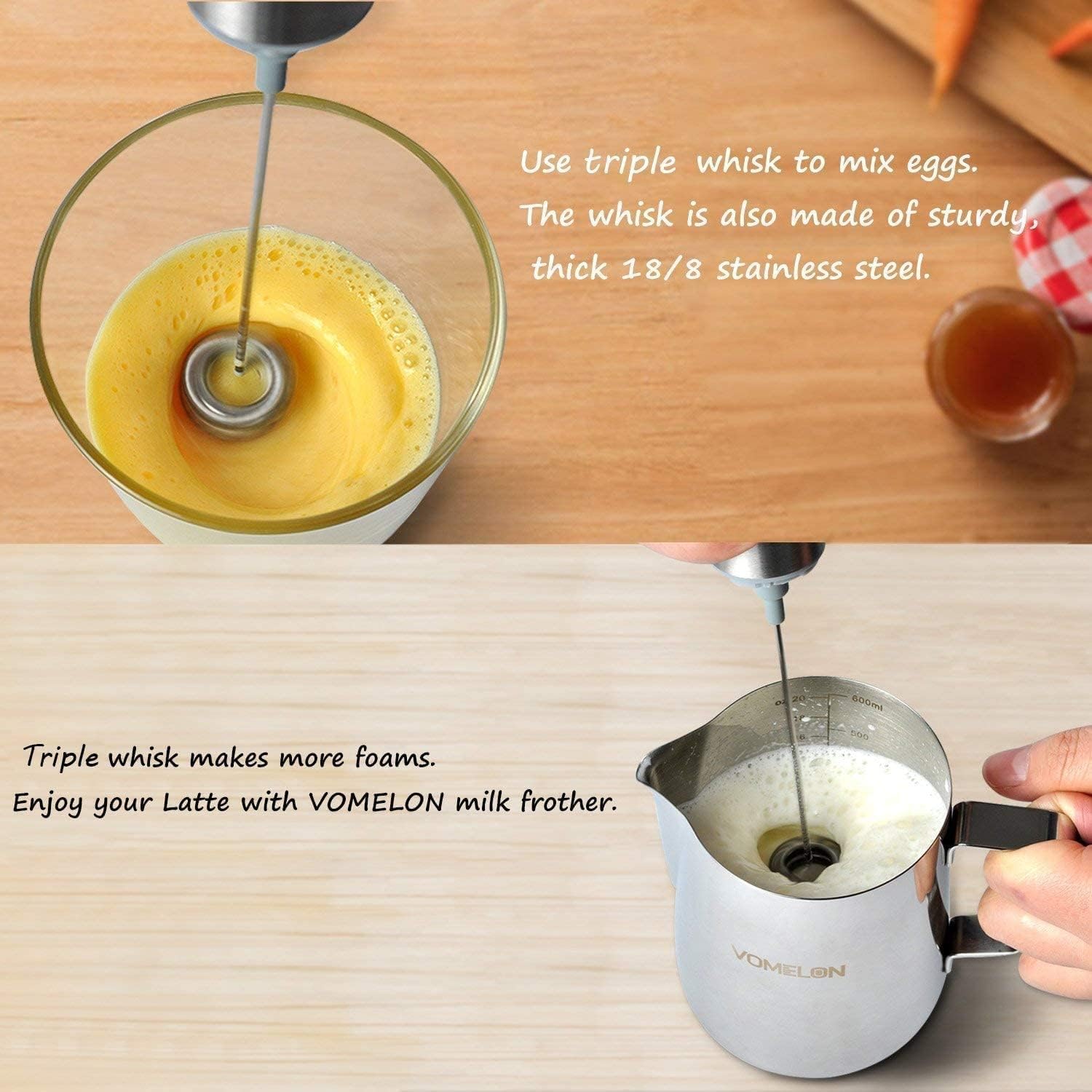
Image: The frother with a triple whisk, demonstrating its effectiveness for eggs and milk frothing.
Care and Maintenance
Proper cleaning and care will ensure the longevity and optimal performance of your VOMELON Milk Frother.
Cleaning
- After each use, detach the whisk head from the main unit.
- Rinse the whisk head directly under running water.
- The whisk head is also dishwasher safe for convenient cleaning.
- Do NOT immerse the main frother unit (handle with motor and battery) in water. Wipe it clean with a damp cloth if necessary.

Image: Instructions for cleaning the whisk head by rinsing or using a dishwasher.
Storage
Use the provided stainless steel storage tube to protect the whisk and frother unit when not in use or during travel. This helps prevent bending or damage to the whisk.
Troubleshooting
If you encounter issues with your VOMELON Milk Frother, refer to the following common problems and solutions:
| Problem | Possible Cause | Solution |
|---|---|---|
| Frother does not turn on or stops working. | Battery is depleted. | Charge the frother fully using the provided USB cable. Ensure the indicator light turns green when charging is complete. |
| Frother runs slowly or with reduced power. | Low battery charge. | Recharge the frother. |
| Whisk wobbles or detaches during use. | Whisk not properly attached. | Ensure the whisk is firmly inserted into the motor shell until it clicks into place. |
| Liquid overflows during frothing. | Cup is too full or frother is set to too high a speed for the liquid volume. | Use a taller cup or fill your cup halfway, froth, then add more liquid. Start on the lower speed setting. |
| Frother does not charge. | Faulty USB cable or power source; internal battery issue. | Try a different USB cable and a different USB power source. If the issue persists, contact customer support. |
Specifications
| Feature | Detail |
|---|---|
| Brand | VOMELON |
| Model Number | MFB1501D |
| Color | Silver |
| Material | Acrylonitrile Butadiene Styrene (ABS), Stainless Steel (304 Food-Grade) |
| Power Source | Rechargeable Battery Powered (Lithium Ion) |
| Speeds | 2 (approx. 11,000 RPM and 13,000 RPM) |
| Item Weight | 8.1 ounces |
| Package Dimensions | 9.13 x 4.49 x 1.73 inches |
| Special Features | Ergonomic Handle, Rechargeable, Detachable Whisks |
| Product Care Instructions | Dishwasher Safe (Whisk Head Only) |
Warranty and Support
Warranty Information
Your VOMELON Milk Frother comes with a 12-month service warranty from the date of purchase. Please refer to the included service card for specific terms and conditions. Keep your proof of purchase for warranty claims.
Customer Support
For any questions, concerns, or technical assistance not covered in this manual, please contact VOMELON customer support. You can typically find contact information on the product packaging, the included service card, or by visiting the official VOMELON website or the retailer's support page where you purchased the product.
When contacting support, please have your product model number (MFB1501D) and purchase details ready to expedite assistance.
Ask a question about this manual
Ask about setup, troubleshooting, compatibility, parts, safety, or missing instructions. Manuals+ will review the question and use this page’s manual context to help answer it.