Introduction
Thank you for purchasing the E-HOLISTIC LIFESTYLE WH-I2000 LCD Digital Electronic Kitchen Scale. This precision measuring tool is designed for accurate weighing of ingredients in the kitchen, as well as for other applications requiring precise measurements up to 500g with 0.01g increments. Please read this manual thoroughly before use to ensure proper operation and to maximize the lifespan of your scale.
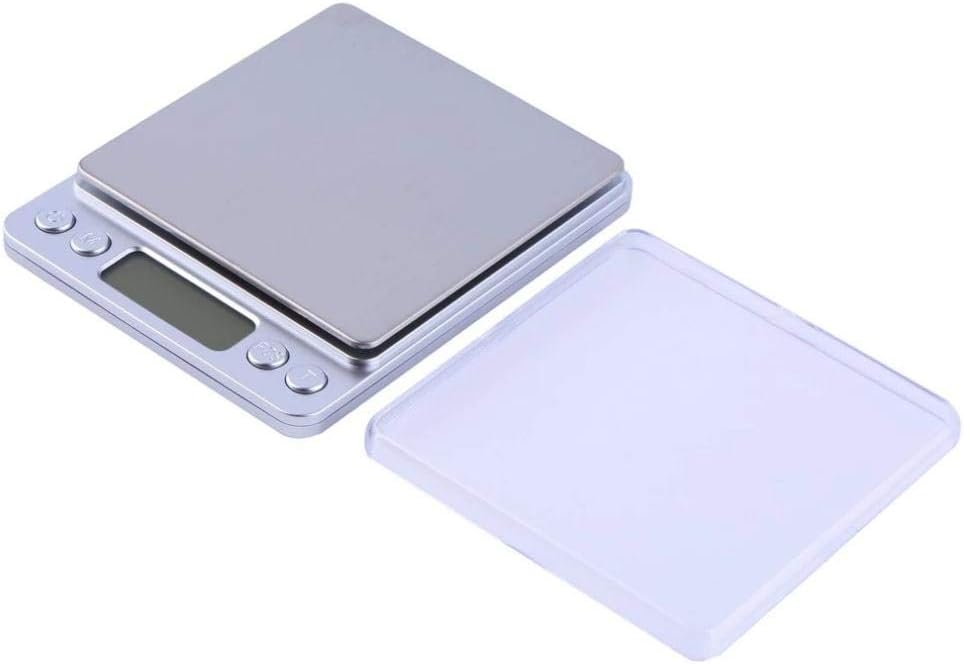
Image: The E-HOLISTIC LIFESTYLE WH-I2000 digital kitchen scale, featuring a silver weighing platform, an LCD display, and control buttons. A clear protective cover is shown alongside the scale.
Safety Information
- Do not overload the scale beyond its maximum capacity of 500g.
- Avoid dropping or subjecting the scale to strong impacts.
- Keep the scale away from water and extreme temperatures.
- Use the scale on a stable, flat, and level surface to ensure accurate readings.
- Do not disassemble the scale; refer to qualified personnel for repairs.
- Keep out of reach of children.
Product Overview
The WH-I2000 scale consists of the following main components:
- Weighing Platform: Stainless steel surface for placing items to be weighed.
- LCD Display: Shows weight readings, unit indicators, and battery status.
- Control Buttons:
- ON/OFF Button: Powers the scale on or off.
- MODE Button: Changes the weighing unit (g, oz, ct, gn, tl, ozt, dwt).
- TARE Button: Resets the display to zero, allowing for weighing items in a container.
- Battery Compartment: Located on the underside, for battery installation.
- Protective Cover: A clear plastic cover that can also be used as a weighing tray.
Setup
- Unpack: Carefully remove the scale from its packaging.
- Install Batteries: Open the battery compartment on the bottom of the scale. Insert the required batteries (typically AAA, check compartment for specific type and polarity) ensuring correct polarity. Close the compartment securely.
- Placement: Place the scale on a hard, flat, and stable surface, free from vibrations or drafts.
- Initial Power On: Press the ON/OFF button to turn on the scale. The display will show "88888" and then "0.00g" (or the last used unit).
Operating Instructions
Weighing an Item
- Ensure the scale is on a stable surface and powered on.
- If the display does not show "0.00g", press the TARE button to zero the scale.
- Gently place the item to be weighed onto the center of the weighing platform.
- Wait for the reading on the LCD display to stabilize. This is your item's weight.
Changing Weighing Units
The scale supports multiple weighing units. To change the unit:
- With the scale powered on, press the MODE button repeatedly.
- The unit will cycle through available options: grams (g), ounces (oz), carats (ct), grains (gn), taels (tl), troy ounces (ozt), and pennyweights (dwt).
- Stop pressing the button when your desired unit is displayed.
Tare Function (Zeroing a Container)
The tare function allows you to weigh items in a container by subtracting the container's weight.
- Place an empty container (e.g., a bowl or the protective cover) onto the weighing platform.
- Wait for the weight of the container to display.
- Press the TARE button. The display will reset to "0.00g" (or the current unit).
- Now, add the items you wish to weigh into the container. The display will show only the net weight of the items.
- To clear the tare, remove all items and the container from the platform, then press TARE again if the display does not return to zero automatically.
Auto-Off Function
To conserve battery life, the scale is equipped with an auto-off function that will turn off the device after a period of inactivity (typically 60-180 seconds, depending on the model). To turn off manually, press and hold the ON/OFF button.
Maintenance
- Cleaning: Wipe the scale with a soft, damp cloth. Do not use abrasive cleaners or immerse the scale in water.
- Storage: Store the scale in a clean, dry place at room temperature. Avoid extreme heat or cold.
- Battery Replacement: If the display shows a low battery indicator (e.g., "LO"), replace the batteries promptly. Remove batteries if the scale will not be used for an extended period.
- Calibration: While the scale is factory calibrated, prolonged use or significant impacts may affect accuracy. Refer to the manufacturer's website or contact support for calibration instructions if needed.
Troubleshooting
| Problem | Possible Cause | Solution |
|---|---|---|
| Scale does not turn on. | Dead or incorrectly installed batteries. | Check battery polarity or replace batteries. |
| Inaccurate readings. | Unstable surface, overloaded, or needs calibration. | Place on a flat, stable surface. Do not exceed 500g. Consider calibration. |
| "LO" displayed. | Low battery power. | Replace batteries. |
| "O-Ld" or "EEEE" displayed. | Overload error. | Remove item immediately. Do not exceed 500g. |
Specifications
- Model: WH-I2000
- Capacity: 500g
- Accuracy: 0.01g
- Units: g, oz, ct, gn, tl, ozt, dwt
- Display: LCD with backlight
- Power: AAA Batteries (not specified, common for such scales)
- Material: Plastic body, Stainless Steel platform
- Features: Tare function, Auto-off, Overload indication, Low battery indication
Warranty and Support
E-HOLISTIC LIFESTYLE products are manufactured to high-quality standards. For warranty information or technical support, please refer to the original purchase documentation or visit the official E-HOLISTIC LIFESTYLE website. Please have your model number (WH-I2000) and purchase date ready when contacting support.
For further assistance, you may contact customer service via the retailer where the product was purchased or through the brand's official channels.


