1. Product Overview
This manual provides instructions for the Ewbob SEIP compatible replacement remote control, designed for use with various SEIP garage door drive models and receivers. This remote operates on a 433.92 MHz frequency and utilizes rolling code technology.
Important Note: Access to your existing receiver/opener is required for programming this remote control. Please ensure you have access before attempting to program.

This image displays the Ewbob SEIP compatible remote control, featuring a black casing with chrome-plated edges and a sturdy metal carabiner clip. The remote has four grey numbered buttons (1, 2, 3, 4) for operation.
2. Compatibility
Before purchasing or attempting to program, verify that your original remote and garage door system are compatible with this replacement remote. This remote is compatible with specific SEIP models and frequencies.
Compatible SEIP Remote Models:
- SEIP SKR-433
- SEIP SKR433-1
- SEIP SKR433-3
- SEIP SKRJ433
Compatible SEIP Garage Door Drive Models:
- RP60A
- TM50
- TM60
- TM80
- TS75
- TS100
- SE 130 TS
Compatible SEIP Receiver Models:
- EKR1MCG
- EKR4MD
- EKR4SP439
Note: This remote operates at 433.92 MHz with rolling code. Ensure your original remote and receiver match these specifications. If unsure, consult your original system's documentation or contact a qualified technician.
3. Setup (Programming)
Programming this compatible remote typically involves pairing it directly with your SEIP garage door receiver. The exact steps may vary depending on your specific receiver model. Always refer to your original SEIP receiver's instruction manual for precise programming procedures.
General Programming Steps (Consult Receiver Manual for Details):
- Locate the Receiver: Identify the programming button or learn button on your SEIP garage door opener's receiver unit. This button is often labeled 'Learn', 'Code', or 'Prog'.
- Activate Learn Mode: Press and release the programming button on the receiver. An indicator light on the receiver (if present) may illuminate or flash, indicating it is in learn mode. This mode is usually active for a short period (e.g., 10-30 seconds).
- Transmit from New Remote: While the receiver is in learn mode, press and hold the desired button on your new Ewbob compatible remote control for 2-3 seconds.
- Confirm Pairing: The receiver's indicator light may flash, change color, or turn off to confirm successful pairing. Release the button on the remote.
- Test Operation: After programming, test the remote control by pressing the programmed button. The garage door should respond.
If the remote does not program successfully, repeat the steps. Ensure you are within close proximity to the receiver during the programming process.
4. Operating Instructions
Once programmed, the remote control is ready for use. Each button on the remote can be assigned to control a specific function or garage door, depending on how it was programmed with your receiver.
- Opening/Closing the Door: Press the programmed button on the remote control. The garage door will activate (open or close).
- Stopping the Door: Press the same programmed button again while the door is in motion to stop it.
The typical transmission distance for this remote is 25-50 meters (approximately 82-164 feet) in open space. Open space implies an environment free from interference or physical obstructions. Obstacles such as garage doors, brick walls, or other structures can significantly reduce the effective range of the remote control.
5. Maintenance
Battery Replacement:
The remote control is powered by a 12V DC 27A battery. If the remote's range decreases significantly or it stops responding, the battery may need replacement.
- Open the Casing: Carefully locate the seam on the remote control casing. Use a small flat-head screwdriver or a similar tool to gently pry open the casing.
- Remove Old Battery: Identify the battery compartment. Remove the old 12V DC 27A battery, noting its orientation (+/- terminals).
- Insert New Battery: Insert a new 12V DC 27A battery, ensuring it is placed with the correct polarity.
- Close Casing: Carefully snap the remote control casing back together until it is securely closed.
- Test Remote: Test the remote control to ensure it is functioning correctly after battery replacement.
Dispose of old batteries responsibly according to local regulations.
6. Troubleshooting
If you encounter issues with your Ewbob SEIP compatible remote control, refer to the following troubleshooting guide:
| Problem | Possible Cause | Solution |
|---|---|---|
| Remote does not work or has reduced range. | Low or dead battery. | Replace the 12V DC 27A battery (refer to Maintenance section). |
| Remote does not work. | Remote not programmed correctly. | Re-program the remote control to your receiver (refer to Setup section). Ensure you follow your receiver's specific programming instructions. |
| Remote works intermittently or has very short range. | Interference from other radio frequency devices or physical obstructions. | Ensure there are no strong sources of radio interference nearby. Try operating the remote closer to the receiver. |
| Remote is not compatible. | Original remote or receiver is not listed in compatibility section. | Verify compatibility with the list provided in Section 2. This remote is specifically for 433.92 MHz rolling code SEIP systems. |
7. Specifications
| Feature | Specification |
|---|---|
| Item Condition | Third-party replacement remote control |
| Decoder IC | Rolling Code |
| Frequency | 433.92 MHz |
| Operating Voltage | 12V DC |
| Battery Type | 27A (included) |
| Transmission Distance | 25-50m (in open space, without interference) |
| Connector Type | Radio Frequency |
| Model Name | RP60A |
| Compatible Devices | SEIP Garage Doors |
| Special Features | Ergonomic design |
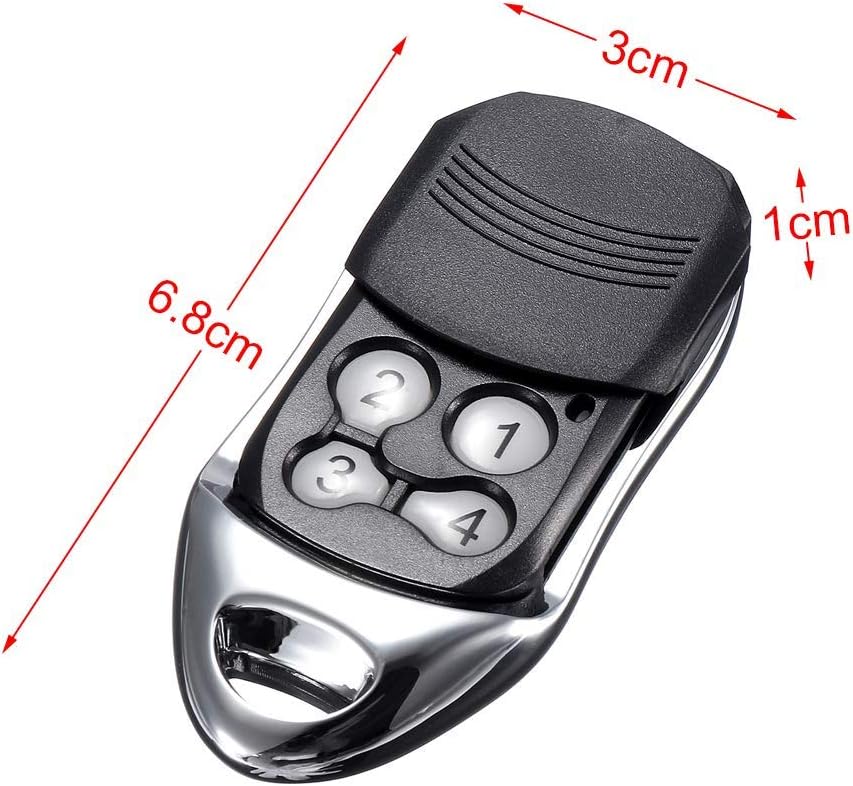
This image illustrates the physical dimensions of the remote control. The remote measures approximately 6.8 cm in length, 3 cm in width, and 1 cm in thickness.