
Introduction
This manual provides instructions for the UltraPro 40957 Outdoor Digital Timer. This device is designed to automate the ON/OFF cycles of electrical devices, particularly outdoor and seasonal lighting, using programmable settings. It features a 24-hour cycle, dual grounded outlets, and weather-resistant construction. Please read these instructions thoroughly before use to ensure proper operation and safety.
Important Safety Information
- For outdoor use, connect the timer only to a Ground Fault Circuit Interrupter (GFCI) protected receptacle.
- Do not immerse the timer in water or other liquids.
- Ensure the total electrical load of connected devices does not exceed the timer's specified ratings (125V, 50/60Hz, 1875W (15A) general/resistive, 1250W (10A) tungsten, ½ HP).
- Do not use with extension cords that are not rated for outdoor use.
- Keep children away from the timer and connected devices.
Product Overview
The UltraPro 40957 timer features a digital display and multiple buttons for programming. It includes two grounded outlets for connecting devices and a mounting loop for secure installation.

Figure 1: Front view of the UltraPro 40957 Outdoor Digital Timer, showing the LCD screen and control buttons.

Figure 2: Key features of the timer, including the mounting loop, programmable ON/OFF buttons, amber LED indicator lights, and custom countdown button.
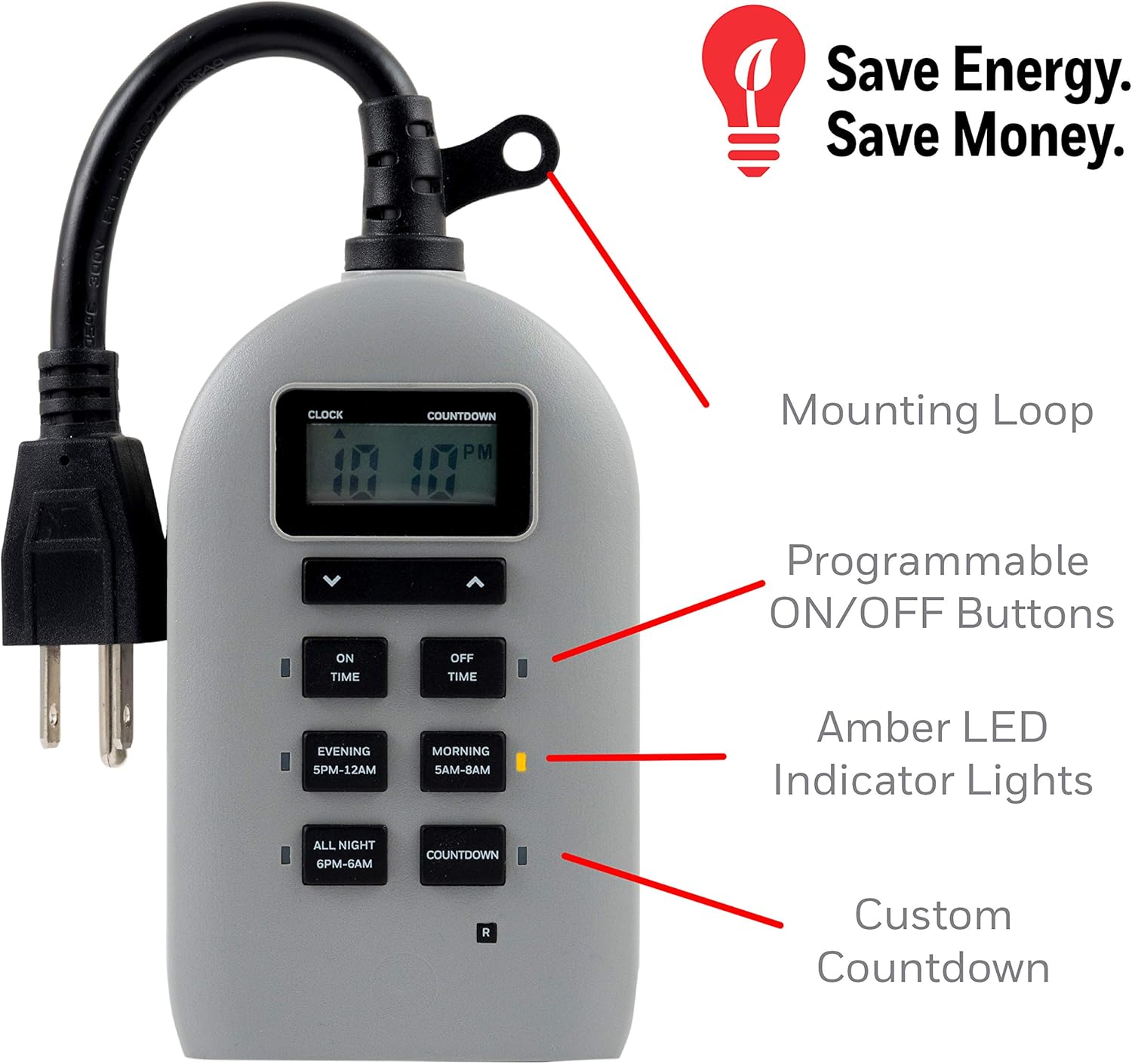
Figure 3: Dimensions of the UltraPro 40957 timer: approximately 7.25 inches (18.42 cm) in height, 3.5 inches (8.89 cm) in width, and 3.6 inches (9.14 cm) in depth.
Setup
Initial Power-Up and Time Setting
- Plug the timer into a standard 120V AC outlet. The LCD screen should illuminate.
- The timer may have a built-in battery, allowing initial programming before plugging in.
- To set the current time, use the UP and DOWN arrow buttons located below the display. Hold the buttons to quickly adjust the hours and minutes.
- Press the CLOCK button to confirm the current time setting.
Mounting the Timer
The timer includes a built-in mounting loop and keyhole slots for convenient installation near an outdoor GFCI outlet.
- Identify a suitable location near a GFCI protected outdoor outlet.
- Use the keyhole mount on the back of the timer to hang it securely on a screw or nail.
- Ensure the timer is positioned to prevent water accumulation and is easily accessible for programming.

Figure 4: Rear view of the timer showing the keyhole mount for installation and the two grounded outlets.
Operating Instructions
The UltraPro 40957 timer offers custom ON/OFF programming, preset schedules, and a countdown function.
Setting Custom ON/OFF Times
- Press the ON TIME button. The display will show the current ON time setting.
- Use the UP and DOWN arrow buttons to adjust the desired ON time.
- Press the OFF TIME button. The display will show the current OFF time setting.
- Use the UP and DOWN arrow buttons to adjust the desired OFF time.
- Ensure the amber indicator lights next to the ON TIME and OFF TIME buttons are illuminated to activate the custom schedule. Pressing these buttons toggles the lights.
- The timer will now activate and deactivate connected devices according to your custom schedule.
Using Preset Schedules
The timer includes three convenient preset schedules:
- EVENING (5 PM - 12 AM): Activates devices from 5:00 PM to 12:00 AM.
- MORNING (5 AM - 8 AM): Activates devices from 5:00 AM to 8:00 AM.
- ALL NIGHT (6 PM - 6 AM): Activates devices from 6:00 PM to 6:00 AM.
To activate a preset schedule, simply press the corresponding button (EVENING, MORNING, or ALL NIGHT). The amber indicator light for the selected preset will illuminate.
Countdown Function
The countdown function allows you to set a specific duration for the timer to remain ON before turning OFF.
- Press the COUNTDOWN button.
- Use the UP and DOWN arrow buttons to set the desired countdown duration (from 1 minute to 24 hours).
- The timer will immediately turn ON and begin counting down. Once the countdown reaches zero, the timer will turn OFF.

Figure 5: Examples of setting custom ON/OFF times and activating preset schedules (Evening, Morning, All Night).

Figure 6: The timer connected to outdoor string lights, demonstrating a typical application for automated lighting.
Video 1: An instructional video demonstrating the setup and programming of the UltraPro Outdoor Outlet Timer. This video provides a visual guide to setting the time and various schedules.
Maintenance
The UltraPro 40957 timer is designed for durability and weather resistance. Regular maintenance is minimal.
- Cleaning: Wipe the timer with a damp cloth to remove dirt or debris. Do not use harsh chemicals or abrasive cleaners. Ensure the timer is unplugged before cleaning.
- Weather Resistance: The timer is suitable for outdoor use. However, for prolonged life, avoid direct exposure to extreme weather conditions such as heavy rain, snow, or direct sunlight for extended periods. Ensure the outlets are facing downwards when mounted to prevent water entry.

Figure 7: The timer is designed to be weather-resistant, making it suitable for outdoor applications such as controlling holiday decorations.
Troubleshooting
If you encounter issues with your UltraPro 40957 timer, refer to the following common solutions:
- Display is blank or unreadable: Ensure the timer is securely plugged into a functioning outlet. If the timer has an internal battery, it may require a period of charging when first plugged in. Some users have reported issues with the display becoming unreadable if the internal battery fails to charge properly.
- Timer not activating/deactivating at set times:
- Verify that the current time is set correctly.
- Check that the ON/OFF times or preset schedules are programmed accurately.
- Ensure the amber indicator lights for the desired program (Custom ON/OFF or Preset) are illuminated.
- Confirm that the connected device is functioning and properly plugged into the timer's outlets.
- Connected devices do not receive power:
- Check the GFCI outlet for tripped breakers. Reset if necessary.
- Ensure the timer itself is receiving power.
- Verify that the timer is in an 'ON' state according to its program.
- Inaccurate timing: If the timer's clock drifts, ensure it is consistently powered. Unplugging for extended periods may affect timekeeping if the internal battery is low.
If these steps do not resolve the issue, please contact customer support.
Specifications
| Brand | UltraPro |
| Model Number | 40957 |
| Color | Gray |
| Material | Plastic |
| Product Dimensions (D x W x H) | 3.6" x 3.5" x 7.25" (9.14 cm x 8.89 cm x 18.42 cm) |
| Item Weight | 8.48 ounces (240 grams) |
| Power Ratings | 125V, 50/60Hz, 1875W (15A) General/Resistive, 1250W (10A) Tungsten, ½ HP |
| Outlets | 2 Grounded Outlets |
| Compatibility | LED, CFL, Incandescent, Halogen bulbs |
| Certifications | CSA Listed |
Warranty and Support
For warranty information or technical support, please refer to the documentation included with your product or visit the UltraPro official website. Contact information for customer service is typically provided in the product packaging.


