
Tecno TEO 4800
Tecno TEO 4800 48L Electric Oven Instruction Manual
Model: TEO 4800
Introduction
Thank you for purchasing the Tecno TEO 4800 48L Electric Oven. This manual provides important information for the safe and efficient operation, maintenance, and troubleshooting of your new appliance. Please read it thoroughly before use and keep it for future reference.
Important Safety Instructions
- Read all instructions before using the oven.
- Do not touch hot surfaces. Use oven mitts or pot holders.
- To protect against electrical shock, do not immerse cord, plugs, or the appliance in water or other liquid.
- Close supervision is necessary when any appliance is used by or near children.
- Unplug from outlet when not in use and before cleaning. Allow to cool before putting on or taking off parts.
- Do not operate any appliance with a damaged cord or plug, or after the appliance malfunctions or has been damaged in any manner.
- The use of accessory attachments not recommended by the appliance manufacturer may cause hazards or injury.
- Do not use outdoors.
- Do not let cord hang over edge of table or counter, or touch hot surfaces.
- Do not place on or near a hot gas or electric burner, or in a heated oven.
- Extreme caution must be used when moving an appliance containing hot oil or other hot liquids.
- To disconnect, turn any control to "OFF", then remove plug from wall outlet.
- Do not use appliance for other than intended use.
- Oversized foods or metal utensils must not be inserted in a toaster oven as they may create a fire or risk of electric shock.
- A fire may occur if the oven is covered or touching flammable material, including curtains, drapes, walls, and the like, when in operation.
- Do not place any of the following materials in the oven: paper, cardboard, plastic, and the like.
- Do not store any materials other than manufacturer's recommended accessories in this oven when not in use.
- Do not cover crumb tray or any part of the oven with metal foil. This will cause overheating of the oven.
Product Overview
The Tecno TEO 4800 is a 48-liter capacity electric oven designed for versatile cooking. It features multiple functions, a timer, and temperature control for various culinary needs.
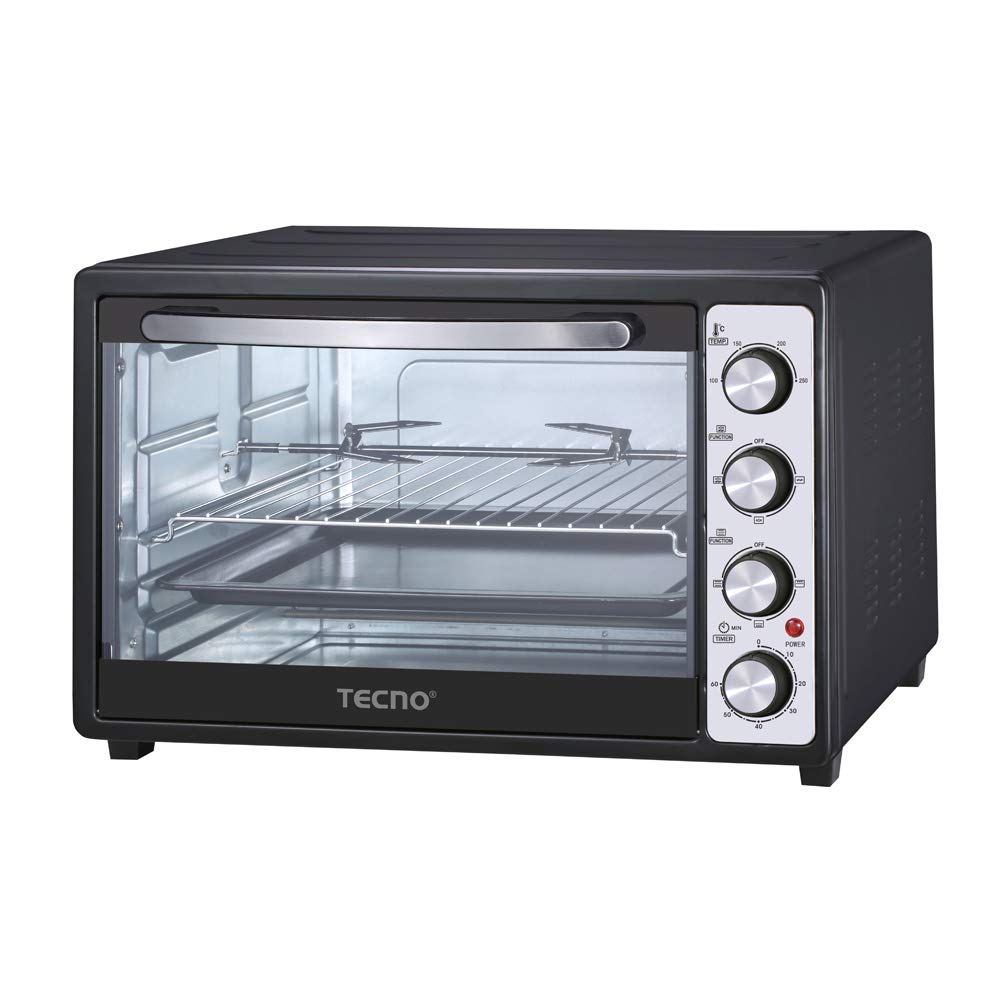
Figure 1: Tecno TEO 4800 Electric Oven with overall dimensions (Width: 56.5cm, Depth: 42.5cm, Height: 35.5cm).
Key Features:
- 48-Liter capacity
- 6 Multi-functions
- 60-minute timer
- Stainless steel heating elements
- 100°C to 250°C temperature setting
- Equipped with rotisserie, convection fan, and oven lamp
- 1800W high power
Included Accessories:
- Baking tray
- Wire rack
- Rotisserie set
Setup and First Use
Unpacking:
- Carefully remove the oven and all accessories from the packaging.
- Remove any packing materials, stickers, or labels from the oven.
- Wipe the exterior of the oven with a damp cloth. Clean the baking tray, wire rack, and rotisserie set with warm, soapy water. Rinse and dry thoroughly.
Placement:
- Place the oven on a stable, heat-resistant, and level surface.
- Ensure there is adequate clearance (at least 10-15 cm) on all sides and above the oven for proper ventilation.
- Do not place the oven near flammable materials such as curtains or drapes.
- Ensure the power cord is not touching any hot surfaces.
Electrical Connection:
- Plug the oven into a grounded electrical outlet. Ensure the voltage rating of the oven matches your power supply.
- The oven operates at 1800W. Avoid using extension cords if possible; if necessary, use a heavy-duty extension cord rated for the oven's wattage.
Before First Use (Burn-in):
It is recommended to perform a "burn-in" cycle before cooking food to eliminate any manufacturing odors.
- Open a window or ensure good ventilation in the room.
- Set the temperature control to 250°C.
- Set the function control to "Bake" (top and bottom heating elements).
- Set the timer to 15-20 minutes.
- Allow the oven to run until the timer expires. A slight odor or smoke may be present; this is normal.
- Turn off the oven and allow it to cool completely.
Operating Instructions
The Tecno TEO 4800 features three control knobs for temperature, function, and timer.
Figure 2: Close-up of the control panel showing temperature, function, and timer knobs.
Control Knobs:
- Temperature Control Knob (Top): Adjusts the oven temperature from 100°C to 250°C.
- Function Control Knob (Middle): Selects the cooking mode. The 6 multi-functions typically include:
- Off
- Upper Heating
- Lower Heating
- Upper & Lower Heating (Bake)
- Upper & Lower Heating with Convection
- Upper Heating with Rotisserie
- Upper & Lower Heating with Convection and Rotisserie
- Timer Control Knob (Bottom): Sets the cooking time up to 60 minutes. The oven will automatically turn off when the timer expires. A "Stay On" function may also be available for continuous operation.
General Cooking Steps:
- Place food on the baking tray or wire rack. Ensure proper clearance from heating elements.
- Close the oven door securely.
- Turn the Temperature Control Knob to the desired temperature.
- Turn the Function Control Knob to select the appropriate cooking mode (e.g., Bake, Convection, Rotisserie).
- Turn the Timer Control Knob to the desired cooking time. The power indicator light will illuminate.
- When cooking is complete, the timer will chime, and the oven will turn off.
- Carefully remove food using oven mitts.
Using the Convection Fan:
The convection fan circulates hot air for faster and more even cooking. Select a function that includes the convection fan symbol.
Using the Rotisserie:
- Assemble the rotisserie spit and forks, securing the food (e.g., whole chicken) firmly in the center.
- Insert one end of the rotisserie spit into the drive socket on the right side of the oven interior.
- Rest the other end of the spit on the support bracket on the left side.
- Select a function that includes the rotisserie symbol.
- Set temperature and timer as required.
Care and Maintenance
Cleaning:
- Always unplug the oven from the power outlet and allow it to cool completely before cleaning.
- Exterior: Wipe the exterior surfaces with a damp cloth and mild detergent. Do not use abrasive cleaners or scouring pads.
- Interior: Wipe the interior walls with a damp cloth and mild detergent. For stubborn stains, a non-abrasive oven cleaner designed for conventional ovens can be used, following the product instructions carefully. Ensure all cleaner residue is removed.
- Accessories: The baking tray, wire rack, and rotisserie set can be washed in warm, soapy water. Rinse thoroughly and dry completely before storing or reusing.
- Crumb Tray: Regularly remove and clean the crumb tray located at the bottom of the oven to prevent grease buildup and potential fire hazards.
- Do not immerse the oven body, cord, or plug in water or any other liquid.
Storage:
Ensure the oven is clean and completely dry before storing. Store in a cool, dry place.
Troubleshooting
| Problem | Possible Cause | Solution |
|---|---|---|
| Oven does not turn on. | Not plugged in. Power outlet not working. Timer not set. | Ensure the oven is securely plugged into a working outlet. Check the circuit breaker. Turn the timer knob to the desired cooking time. |
| Food not cooking evenly. | Incorrect temperature or function setting. Overcrowding the oven. Food placed too close to heating elements. | Verify temperature and function settings. Avoid placing too much food in the oven at once. Adjust rack position to ensure even heat distribution. Use convection function for better circulation. |
| Smoke or unusual odor during operation. | Food spills or grease buildup. First use burn-in odor. | Unplug and allow to cool. Clean the interior and crumb tray thoroughly. This is normal for first use; ensure good ventilation. If smoke persists, unplug and contact customer support. |
| Rotisserie not turning. | Rotisserie spit not properly seated. Food too heavy or unbalanced. Incorrect function selected. | Ensure the spit is correctly inserted into the drive socket and resting on the support. Reduce food weight or rebalance. Select a function that includes the rotisserie symbol. |
If the problem persists after attempting these solutions, please contact Tecno customer support.
Specifications
| Model | TEO 4800 |
| Brand | Tecno |
| Capacity | 48 Liters |
| Wattage | 1800 Watts |
| Temperature Range | 100°C - 250°C |
| Timer | Up to 60 minutes |
| Functions | 6 Multi-functions (Bake, Convection, Rotisserie, etc.) |
| Dimensions (D x W x H) | 42.5 cm x 56.5 cm x 35.5 cm |
| Material | Stainless Steel (heating elements) |
| Control Type | Knob |
| Included Components | Oven, Wire Rack, Baking Tray, Rotisserie Set |
Warranty and Support
Warranty Information:
The Tecno TEO 4800 Electric Oven comes with a 1 Year Manufacturer Warranty. Please retain your proof of purchase for warranty claims. The warranty covers manufacturing defects under normal household use. It does not cover damage resulting from misuse, accident, alteration, neglect, or unauthorized repair.
Customer Support:
For technical assistance, warranty claims, or service inquiries, please contact Tecno customer support. Refer to the official Tecno website or your purchase documentation for the most current contact information.
Note: Do not attempt to repair the appliance yourself. Unauthorized repairs will void the warranty.
Ask a question about this manual
Ask about setup, troubleshooting, compatibility, parts, safety, or missing instructions. Manuals+ will review the question and use this page’s manual context to help answer it.