
Introduction
The Skullcandy Sesh True Wireless In-Ear Earbuds offer a truly wireless and simple audio experience. Designed for convenience and portability, these earbuds provide clear sound and essential controls for your daily activities. They are built to be sweat, water, and dust resistant, making them suitable for various environments.
What's in the Box
- Skullcandy Sesh True Wireless Earbuds
- Charging Case
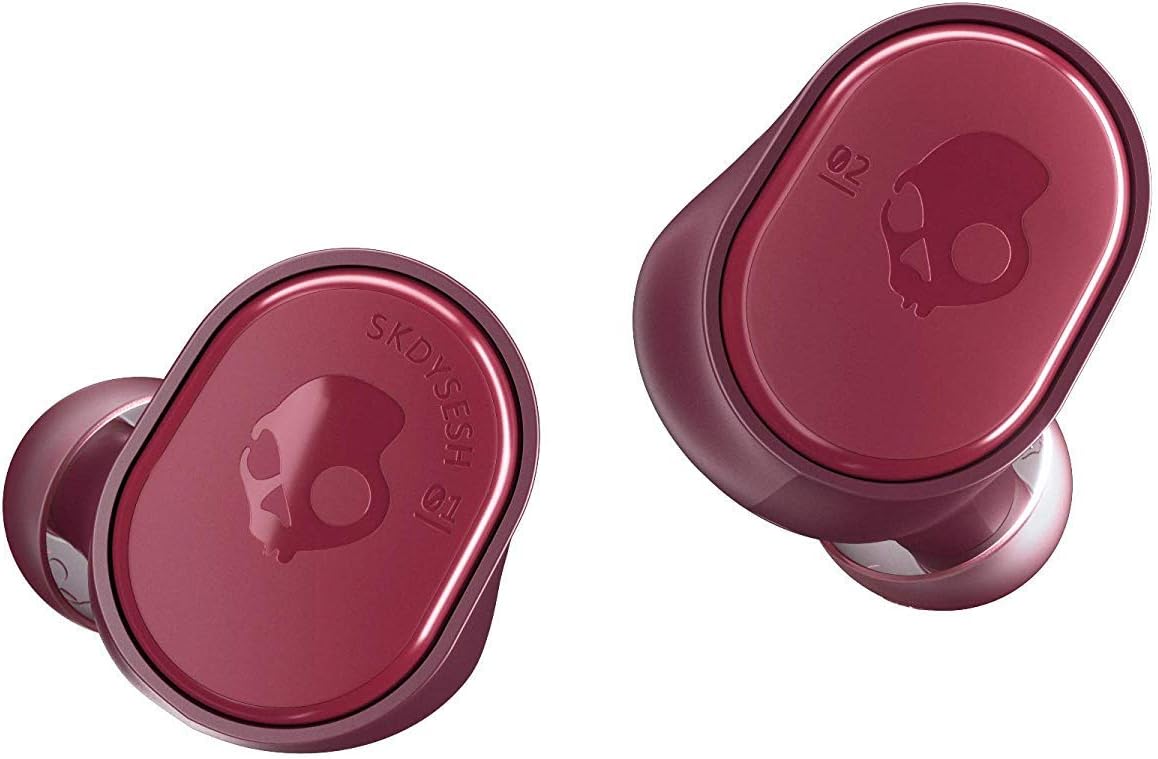
Image: The Skullcandy Sesh True Wireless Earbuds in Moab color, showcasing their compact design.
Setup
Initial Charging
Before first use, ensure your Skullcandy Sesh earbuds and charging case are fully charged. Place both earbuds into the charging case. The LED indicators on the earbuds will turn red while charging and turn off when fully charged. The charging case itself has LED indicators to show its battery level.

Image: Skullcandy Sesh Earbuds resting inside their charging case, with blue indicator lights visible on the case.
First Time Pairing
For the initial pairing with your device, follow these steps:
- Remove both earbuds from the charging case. They will automatically power on and enter pairing mode.
- On your device (smartphone, tablet, etc.), go to your Bluetooth settings.
- Select "Sesh" from the list of available Bluetooth devices.
- You will hear a voice prompt confirming that your earbuds are connected.
Video: Official Skullcandy guide on first-time pairing for Sesh True Wireless Earbuds.
Operating Instructions
On-Board Controls
The Skullcandy Sesh earbuds feature intuitive controls directly on each bud:
- Play/Pause: Press either earbud once.
- Volume Up: Quickly press the right earbud twice.
- Volume Down: Quickly press the left earbud twice.
- Track Forward: Press and hold the right earbud for 2 seconds.
- Track Backward: Press and hold the left earbud for 2 seconds.
- Answer/End Call: Press either earbud once.
- Reject Call: Press and hold either earbud for 2 seconds.
- Activate Voice Assistant: Quickly press either earbud three times.
Video: Detailed explanation of the on-board controls for Skullcandy Sesh True Wireless Earbuds.
Mono Mode (Single Bud Use)
You can use only the left earbud in Mono Mode to stay aware of your surroundings while still enjoying audio or taking calls. The left earbud is the primary bud and supports this feature.
- Ensure both earbuds are initially paired to your device.
- Place the right earbud back into the charging case.
- The left earbud will continue to function for both phone calls and music.
- To return to stereo mode, simply take the right earbud out of the case.
Video: Instructions on how to use a single earbud (Mono Mode) with Skullcandy Sesh.
Maintenance
To ensure the longevity and optimal performance of your Skullcandy Sesh earbuds, regular maintenance is recommended.
Cleaning
Gently wipe the earbuds and charging case with a soft, dry, lint-free cloth. Avoid using abrasive materials or harsh chemicals. Ensure charging contacts are clean and free of debris.
Storage
When not in use, store the earbuds in their charging case to protect them and keep them charged. Store in a cool, dry place away from extreme temperatures.
Troubleshooting
Pairing Issues / Resetting Earbuds
If you experience issues with pairing or connectivity, try resetting your earbuds:
- Place both earbuds back into the charging case. Ensure the LED indicators turn red.
- On your device, turn off Bluetooth and remove "Sesh" from your device's paired list.
- Remove only the left earbud from the case. It will be in a non-connected state.
- Press the button on the left earbud 6 times. The LED will flash red, and the earbud will power off and reset. Place it back in the case.
- Repeat the same process for the right earbud: remove it from the case, press the button 6 times, and place it back in the case.
- Remove both earbuds from the case. They will automatically power on and pair to each other (you'll hear a single beep). The left earbud's LED will flash red and blue, indicating it's in pairing mode.
- Turn your device's Bluetooth back on and re-pair to "Sesh". You will hear a voice prompt confirming connection.
Video: Troubleshooting guide for pairing issues with Skullcandy Sesh True Wireless Earbuds.
Specifications
| Feature | Detail |
|---|---|
| Model Name | Sesh |
| Connectivity Technology | Bluetooth 5.0 |
| Battery Life | Up to 10 hours total (3 hours in buds + 7 hours in charging case) |
| Water Resistance Level | IP55 (Sweat, Water, and Dust Resistant) |
| Noise Control | Sound Isolation |
| Control Type | Volume Control, Track Control, Call Control, Voice Assistant Activation |
| Item Weight | 5 ounces |
| Product Dimensions | 7.24 x 4.21 x 1.58 inches |
Warranty and Support
Skullcandy offers a "Fearless Use Promise" for Sesh earbuds. This means if you lose or damage any part of your Sesh earbuds, Skullcandy will replace the missing or damaged part at a minimal cost, with no questions asked.
For detailed warranty information and support, please refer to the official Skullcandy website or the User Guide PDF provided with your product.
- Official User Guide (PDF): Download User Guide
- Official Warranty Information (PDF): Download Warranty
- Visit Skullcandy Store: Skullcandy Official Store