
1. Product Overview
The Schneider SC600SND is a versatile 2.0 channel soundbar designed to enhance your audio experience. It offers a total output power of 30W (15W x 2) and supports multiple connectivity options including Bluetooth, HDMI (ARC), Optical, and Aux. A unique feature of this soundbar is its convertible design, allowing it to be used as a single horizontal unit or split into two vertical speaker columns.

Image 1.1: The Schneider SC600SND Soundbar in its standard monoblock configuration.
2. Setup
2.1 Unpacking and Placement
Carefully remove all components from the packaging. Ensure you have the soundbar unit, remote control, and 3.5mm Jack cable.
The SC600SND soundbar offers two primary placement options:
- Monoblock Configuration: Use the soundbar as a single horizontal unit, ideal for placing below your television.
- Split Column Configuration: The soundbar can be separated into two vertical speaker columns. This allows for flexible placement on either side of your television or entertainment unit. To split, gently twist and pull the two halves apart at the central connection point. Attach the provided bases to each column for stability.

Image 2.1: Detail of the central connection point, allowing the soundbar to be split into two columns.
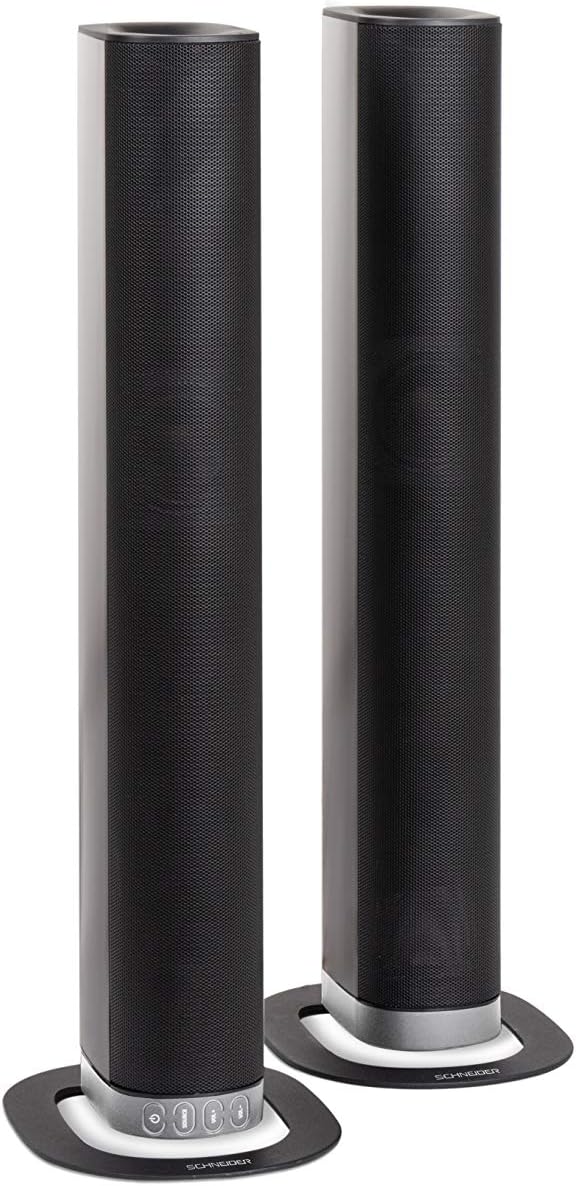
Image 2.2: The soundbar configured as two independent vertical speaker columns.
2.2 Connecting to Power
Connect the power cable to the soundbar's power input and then to a suitable wall outlet. The soundbar will enter standby mode.
2.3 Audio Connections
Choose one of the following methods to connect your audio source:
- HDMI (ARC): For optimal audio quality and control, connect an HDMI cable from the soundbar's HDMI ARC port to your TV's HDMI ARC port. This allows your TV remote to control the soundbar's volume.
- Optical: Connect an optical cable from the soundbar's OPTICAL input to your TV's optical output.
- AUX: Use the included 3.5mm Jack cable to connect the soundbar's AUX input to the headphone jack or audio output of your device (e.g., TV, smartphone, MP3 player).
- Bluetooth: For wireless connection, refer to the Bluetooth pairing instructions in the Operating section.
3. Operating Instructions
3.1 Power On/Off
Press the Power button on the soundbar or the remote control to turn the unit on or off.
3.2 Source Selection
Press the SOURCE button on the soundbar or the remote control to cycle through the available input sources: Bluetooth (BT), HDMI (ARC), Optical, and AUX.

Image 3.1: On-unit control buttons for power, source selection, and volume adjustment.
3.3 Volume Control
Use the VOL+ and VOL- buttons on the soundbar or remote control to adjust the volume. Press the MUTE button on the remote to temporarily silence the audio.
3.4 Bluetooth Pairing
- Select Bluetooth as the source input. The soundbar will enter pairing mode, indicated by a flashing LED.
- On your mobile device (smartphone, tablet, etc.), enable Bluetooth and search for available devices.
- Select "SC600SND" from the list of devices.
- Once paired, the LED indicator on the soundbar will stop flashing and remain solid. You can now play audio wirelessly from your device.
3.5 Sound Modes
The remote control includes dedicated buttons for different sound modes to optimize your listening experience:
- NEWS: Enhances vocal clarity for news broadcasts and dialogue.
- MOVIE: Provides a more immersive soundstage for films.
- MUSIC: Optimizes audio for music playback.

Image 3.2: The included remote control with dedicated buttons for power, source, volume, mute, and sound modes.
4. Maintenance
To ensure the longevity and optimal performance of your soundbar, follow these maintenance guidelines:
- Cleaning: Use a soft, dry cloth to clean the exterior surfaces of the soundbar. Do not use liquid cleaners, aerosols, or abrasive materials, as these can damage the finish or internal components.
- Ventilation: Ensure that the soundbar's ventilation openings are not blocked. Proper airflow prevents overheating.
- Storage: If storing the soundbar for an extended period, disconnect it from power and store it in a cool, dry place, away from direct sunlight and extreme temperatures.
- Handling: Avoid dropping or subjecting the soundbar to strong impacts.
5. Troubleshooting
If you encounter issues with your SC600SND soundbar, refer to the following common problems and solutions:
- No Power:
- Ensure the power cable is securely connected to both the soundbar and a working power outlet.
- Check if the power outlet is functional by plugging in another device.
- No Sound:
- Verify that the correct input source (HDMI, Optical, AUX, Bluetooth) is selected on the soundbar.
- Increase the volume on both the soundbar and your connected audio source (e.g., TV, smartphone).
- Ensure the soundbar is not muted.
- Check all audio cables for secure connections and damage. Try a different cable if possible.
- If using HDMI ARC, ensure your TV's HDMI ARC function is enabled in its settings.
- Poor Sound Quality / Distorted Audio:
- Adjust the volume levels to avoid distortion.
- Try switching between the different sound modes (NEWS, MOVIE, MUSIC) to see if one improves the audio for your content.
- Ensure the soundbar is placed on a stable surface and not vibrating excessively.
- If using Bluetooth, ensure your device is within range and there are no obstructions causing interference.
- Bluetooth Pairing Issues:
- Ensure the soundbar is in Bluetooth pairing mode (flashing LED).
- Make sure your device's Bluetooth is enabled and it is searching for new devices.
- Move your device closer to the soundbar.
- If previously paired, try unpairing and re-pairing the device.
- Remote Control Not Working:
- Check and replace the batteries in the remote control.
- Ensure there are no obstructions between the remote control and the soundbar's sensor.
- Point the remote directly at the soundbar.
6. Specifications
| Feature | Specification |
|---|---|
| Model Number | SC600SND |
| Channels | 2.0 |
| Output Power | 30W (15W x 2) |
| Connectivity Technology | Bluetooth, HDMI (ARC), Optical, Aux |
| Wireless Communication | Bluetooth |
| Control Method | Remote Control |
| Speaker Type | Soundbar |
| Speaker Size | 2 Inches |
| Power Source | Cable Electric |
| Product Dimensions (Monoblock) | 80.5 x 6.2 x 9 cm |
| Product Weight | 2.5 Kilograms |
| Included Components | Remote Control, 3.5mm Jack Cable |
| Color | Black |
7. Warranty and Support
7.1 Limited Warranty
This Schneider SC600SND Soundbar is covered by a Limited Warranty. Please refer to the warranty card included with your product or contact your retailer for specific terms and conditions regarding warranty coverage and duration.
7.2 Customer Support
For technical assistance, troubleshooting beyond this manual, or warranty claims, please contact the retailer where you purchased the product or visit the official Schneider website for support information.


