1. Introduction
Thank you for choosing the Aowasi 10-Inch Digital Day Calendar Clock. This device is designed to provide clear, easy-to-read time, day, and date information, making it ideal for seniors, individuals with impaired vision, or those experiencing memory loss. Its large display, auto-dimming feature, and multiple alarm options ensure convenience and reliability.

Image 1: Aowasi 10-Inch Digital Day Calendar Clock with Remote Control
2. Key Features
- 10-Inch Large Display: Clearly spells out the full day of the week, month, and date in large, non-abbreviated text.
- Auto-Dimming Function: Automatically dims at 7:00 PM (10cd/M2) and brightens at 7:00 AM (50cd/M2). Manual brightness adjustment (levels 1-10) is also available.
- 8 Alarm Options: Includes 5 customizable daily alarms and 3 dedicated medication reminders (Morning, Afternoon, Evening).
- 8 Languages: Supports English, French, German, Polish, Italian, Spanish, Dutch, and Swedish.
- Time Modes: Displays time in 12 or 24-hour format with A.M./P.M. indicators.
- Date Modes: Supports MM/DD/YY and DD/MM/YY formats.
- Battery Backup: Automatically saves date and time settings during power disconnection and restores them upon reconnection.
- Remote Control: Simplifies setting time, alarms, and language.

Image 2: Overview of Clock Features
3. Package Contents
Please check the package for the following items:
- Aowasi 10-Inch Digital Day Calendar Clock
- Remote Control
- AC Power Adapter
- Detachable Standing Bracket
- User Manual (this document)
4. Setup
- Connect Power: Plug the AC power adapter into the DC Power Port on the back of the clock, then plug the adapter into a standard electrical outlet. The clock will power on automatically.
- Initial Settings: The clock typically comes pre-set with the correct time and date. If adjustments are needed, use the included remote control or the buttons on the back of the clock to navigate the menu.
- Attach Stand (Optional): If placing on a tabletop, insert the detachable standing bracket into the slot on the back of the clock.
- Wall Mounting (Optional): Use the keyhole slots on the back of the clock to mount it securely on a wall.

Image 3: Back Panel of the Clock with Ports
5. Operating Instructions
The clock can be operated using the buttons on the back or the remote control for easier access.
5.1. Setting Time and Date
- Press the MENU button on the remote or the back of the clock to access the settings.
- Use the UP/DOWN arrows to navigate to "Set Time" or "Set Date".
- Press ENTER to select, then use UP/DOWN to adjust values and LEFT/RIGHT to move between fields.
- Press MENU again to exit the settings.
5.2. Alarm Options
The clock offers 5 customizable alarms and 3 pre-set medication reminders.
- From the menu, navigate to "Morning medication reminder", "Afternoon medication reminder", "Evening medication reminder", or "Alarm01" through "Alarm05".
- Press ENTER to select. You can set the time, frequency (e.g., daily, weekdays), and sound for custom alarms. Medication reminders can be toggled ON/OFF and their times adjusted.
- Press MENU to save and exit.

Image 4: Medication Reminders Display
5.3. Auto-Dimming and Brightness
The clock automatically adjusts its brightness. You can also manually set the brightness levels for day and night.
- In the menu, find "Brightness-day" and "Brightness-night".
- Use UP/DOWN arrows to adjust the brightness level from 1 to 10.
- To disable auto-dimming, locate the "Auto Dimming" option (if available in your model's firmware) and set it to OFF.

Image 5: Auto-Dimming Feature Comparison
5.4. Language and Display Modes
Select your preferred language and customize how time and date are displayed.
- Navigate to "Language" in the menu to choose from the 8 available languages.
- Select "Time Mode" for 12-hour or 24-hour display.
- Select "Date Mode" for MM/DD/YY or DD/MM/YY format.

Image 6: Language Options

Image 7: Various Time of Day Displays
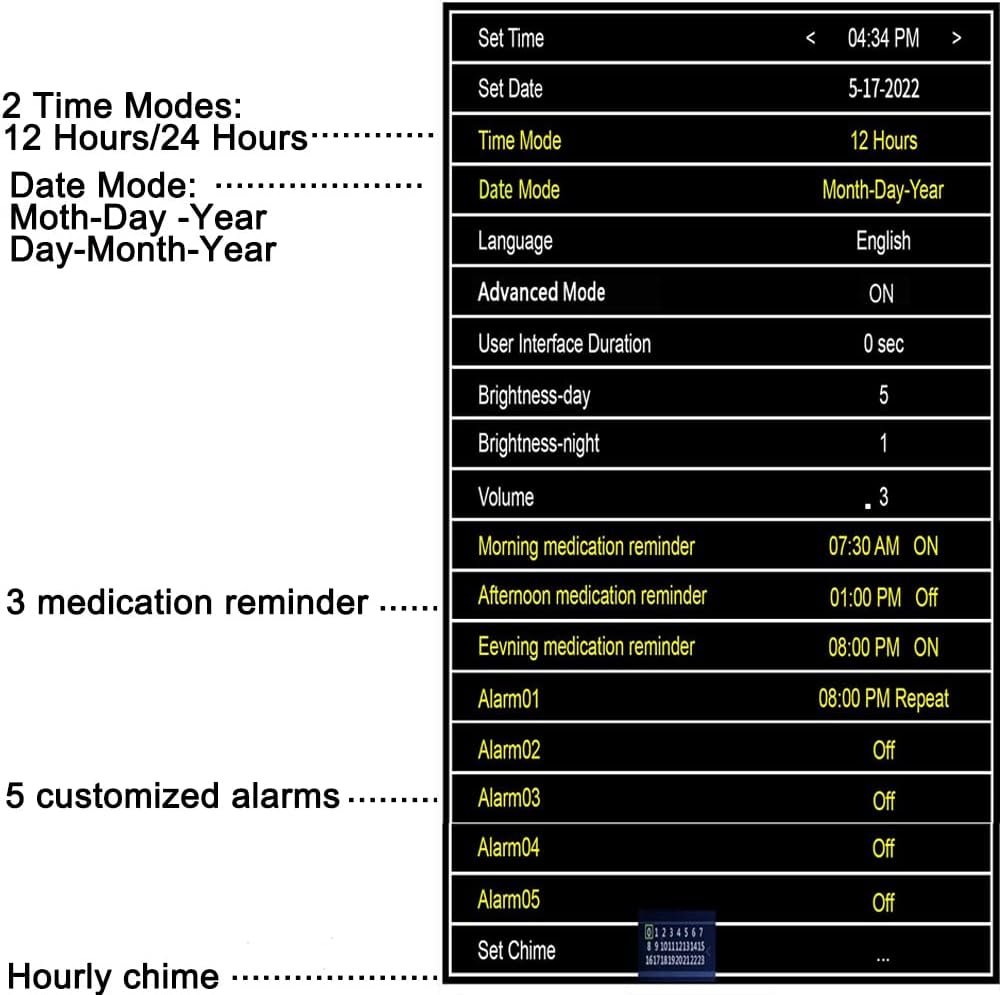
Image 8: Menu Settings Overview
5.5. Product Demonstration Video
Video 1: Demonstrating the Aowasi Digital Day Calendar Clock's Display
This video highlights the clock's large, easy-to-read display, showing how it clearly presents the time, day, and date. It also demonstrates the clock's visibility in both well-lit and dark environments, emphasizing its non-disturbing light output at night.
6. Placement Options
The Aowasi Digital Day Calendar Clock offers versatile placement options:
- Tabletop: Use the included detachable standing bracket to place the clock on any flat surface, such as a nightstand, desk, or shelf.
- Wall Mount: The clock features keyhole slots on its back for easy and secure wall mounting.

Image 9: Versatile Placement Options

Image 10: Clock Dimensions
7. Maintenance
To ensure the longevity and optimal performance of your Aowasi Digital Day Calendar Clock:
- Cleaning: Gently wipe the screen and body with a soft, dry, lint-free cloth. Avoid using abrasive cleaners or chemical sprays.
- Environment: Keep the clock in a dry environment, away from direct sunlight, extreme temperatures, and high humidity.
- Power: Use only the provided AC power adapter.
8. Troubleshooting
| Problem | Possible Cause | Solution |
|---|---|---|
| Clock does not power on. | Power adapter not connected or faulty. | Ensure the AC power adapter is securely plugged into the clock and a working electrical outlet. Try a different outlet. If the adapter is faulty, contact customer support for a replacement. |
| Display is too bright or too dim. | Brightness settings need adjustment or auto-dimming is not functioning as expected. | Access the menu and adjust "Brightness-day" and "Brightness-night" levels manually. If auto-dimming is desired, ensure it is enabled in the settings. |
| Time or date is incorrect. | Incorrect manual setting or power interruption. | Use the remote control to re-enter the correct time and date in the settings menu. The clock has a battery backup for minor power interruptions, but significant changes may require manual reset. |
| Alarms are not sounding. | Alarm is turned off or volume is too low. | Check the alarm settings in the menu to ensure the desired alarms are enabled and the volume is set to an audible level. |
9. Specifications
| Feature | Detail |
|---|---|
| Brand | Aowasi |
| Model Number | 1000 |
| Display Type | Digital |
| Screen Size | 10 inches |
| Product Dimensions | 10.1"W x 7.2"H |
| Power Source | Corded Electric |
| Material | Acrylonitrile Butadiene Styrene (Plastic) |
| Item Weight | 1.65 pounds (0.75 Kilograms) |
| Batteries | 1 Lithium Ion battery required (included) |
| Mounting Type | Wall Mount or Tabletop |
| Special Features | Calendar Display, Day Mode, Large Display, Auto-Dimming, Alarms |
10. Warranty and Support
Aowasi is committed to customer satisfaction. While a specific warranty period is not detailed, the manufacturer offers a satisfaction guarantee. If you are not completely satisfied with your purchase, you may be eligible for a refund. For any questions, technical assistance, or support regarding your Aowasi Digital Day Calendar Clock, please contact Aowasi Customer Service.
The clock features a battery backup system to automatically save date and time settings if power is disconnected, ensuring the correct time is displayed upon reconnection.


