
Introduction
Thank you for choosing the VASAGLE LCD27BKV1 Mobile Filing Cabinet. This manual provides essential information for the safe assembly, operation, and maintenance of your new office furniture. Please read these instructions carefully before beginning assembly and retain them for future reference.
Safety Information
To ensure safe use and prevent damage, please observe the following:
- Keep the product away from sharp or hot objects.
- Avoid prolonged contact of the product with water.
- The cabinet was not designed to be used without the provided casters. Ensure all casters are properly installed before use.
- Do not exceed the maximum static load capacity of 50 kg.
Setup and Assembly
The VASAGLE LCD27BKV1 filing cabinet requires assembly. Detailed assembly instructions and all necessary mounting hardware are included with your purchase. Thanks to numbered parts and clear, illustrated instructions, assembly is designed to be straightforward.
Assembly Steps Overview:
- Unpack and Verify: Carefully unpack all components and compare them against the parts list provided in the assembly manual. Ensure all parts are present and undamaged.
- Prepare Components: Lay out all numbered parts on a clean, soft surface to prevent scratches.
- Follow Instructions: Refer to the step-by-step illustrations in the included manual. Each step will guide you through attaching components using the provided hardware.
- Install Casters: Attach the five casters to the base of the cabinet. Ensure the two casters with brakes are positioned as indicated in the manual for optimal stability.
- Assemble Drawers: Construct the two drawers, ensuring the hanging file bars are correctly installed.
- Insert Drawers: Slide the assembled drawers into the cabinet frame.
- Final Checks: Once assembled, gently test the drawers and casters to ensure smooth operation and stability.

Figure 1: Exploded view of cabinet components for assembly.

Figure 2: Example of a typical assembly step, showing rod insertion.
Operating Instructions
The VASAGLE LCD27BKV1 mobile filing cabinet is designed for efficient organization and storage in your office or home environment.
Using the Drawers:
- The two spacious drawers are equipped with adjustable hanging bars, suitable for various file sizes, including A4 documents.
- To open a drawer, gently pull the handle. To close, push until it is fully seated.
- The top drawer features a mechanical lock. Insert the key and turn to lock or unlock both drawers simultaneously. Keep the keys in a safe place.
Mobility and Stability:
- The cabinet is equipped with five smooth-rolling casters for easy movement. Two of these casters have brakes.
- To move the cabinet, ensure the brakes on the casters are disengaged.
- To fix the cabinet in place, engage the brakes on the designated casters by pressing down on the lever.
- An additional caster located at the front of the bottom drawer provides enhanced stability when the drawer is open, preventing tipping.
Printer Stand Functionality:
The sturdy top surface of the cabinet can serve as a convenient printer stand, optimizing your workspace.
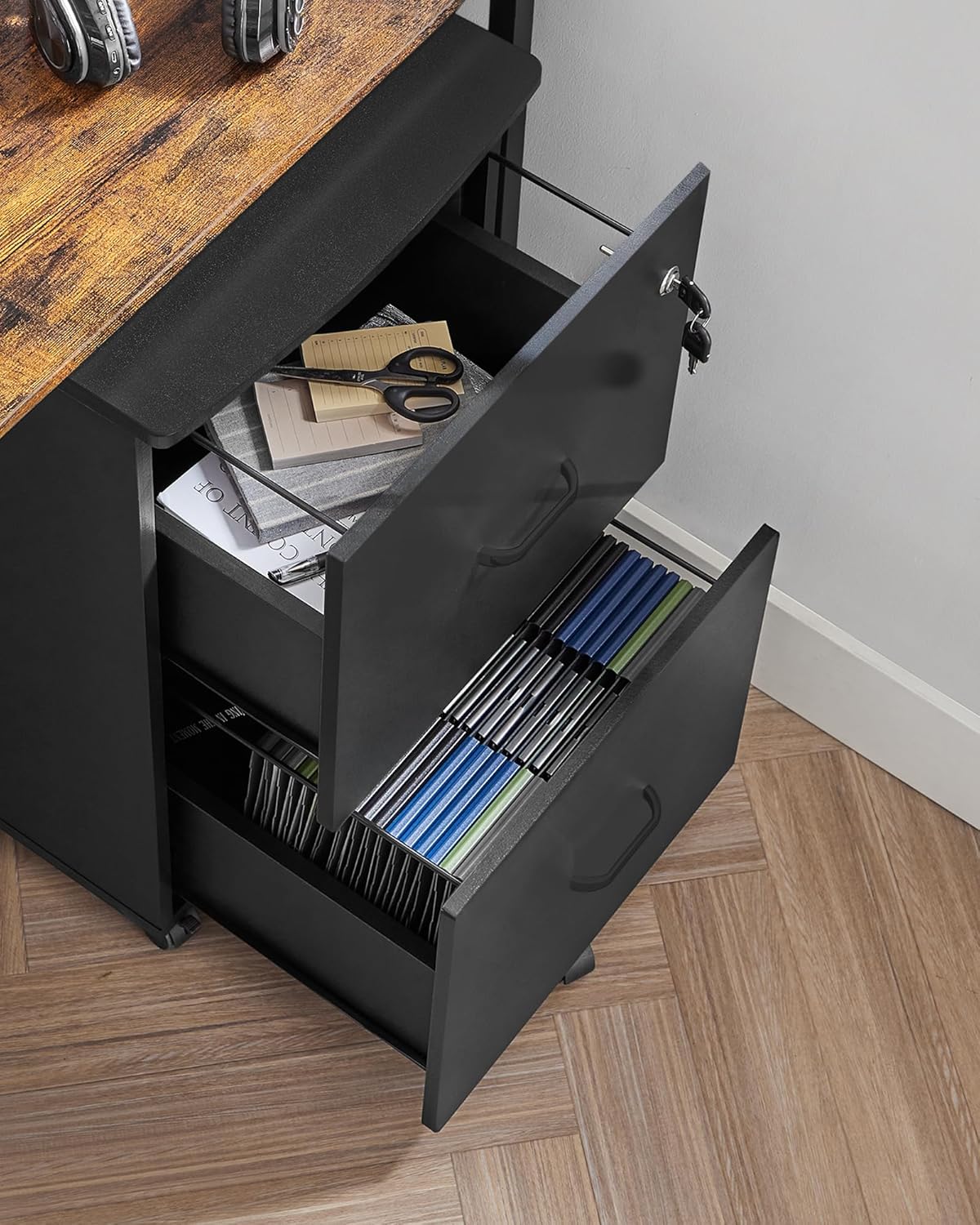
Figure 3: Drawers open, demonstrating storage capacity.

Figure 4: Detail of hanging file organization within a drawer.
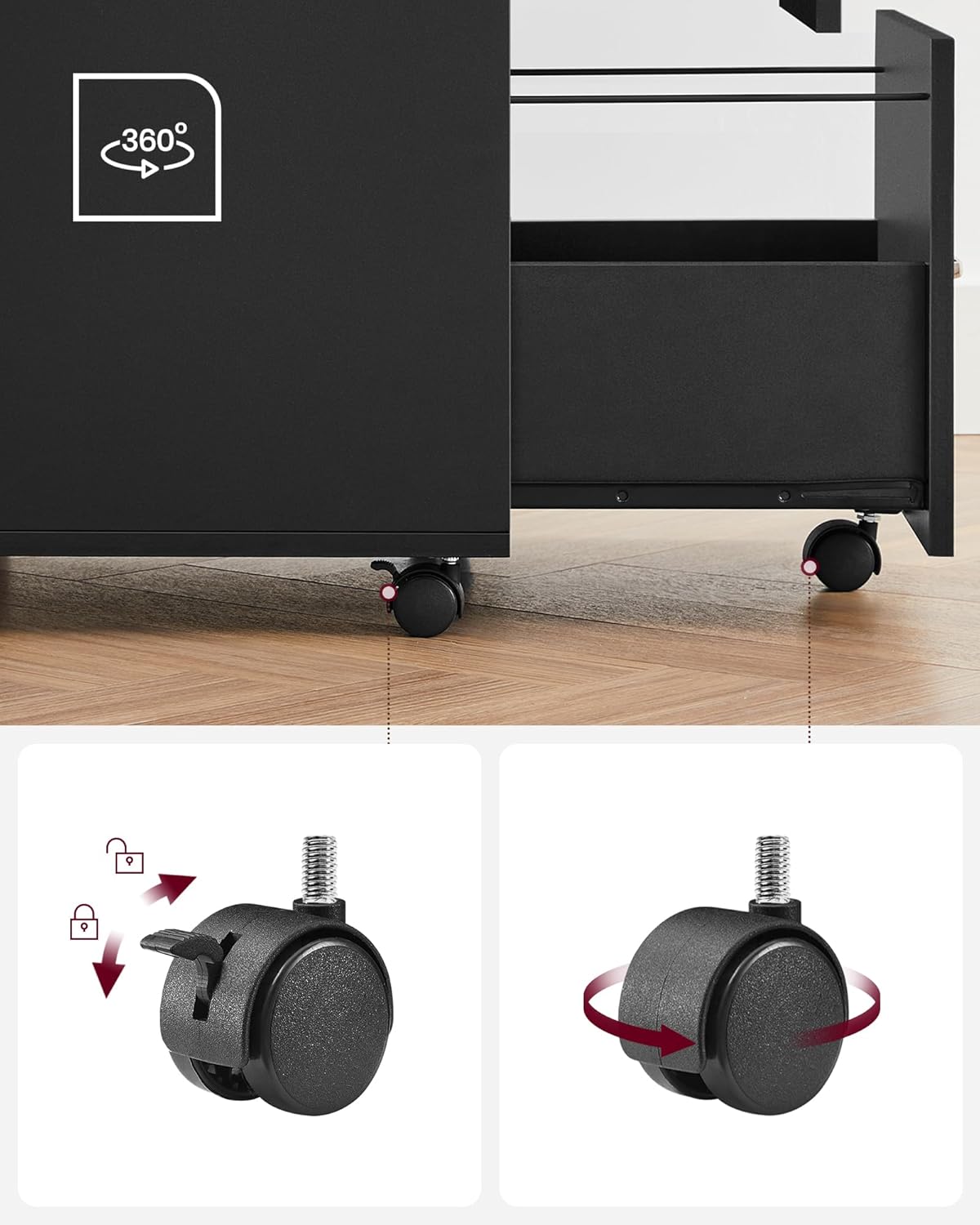
Figure 5: Detail of the casters, including the locking feature.
Maintenance
To maintain the appearance and longevity of your filing cabinet:
- Cleaning: Wipe surfaces with a soft, dry cloth. For stubborn marks, a slightly damp cloth can be used, followed immediately by a dry cloth. Avoid abrasive cleaners or harsh chemicals.
- Inspection: Periodically check all screws and fittings to ensure they remain tight. Retighten if necessary.
- Casters: Keep casters free of debris to ensure smooth movement.
Troubleshooting
If you encounter any issues with your VASAGLE LCD27BKV1 filing cabinet, please refer to the following common solutions:
- Drawers not sliding smoothly: Check that the drawer slides are clean and free of obstructions. Ensure all assembly screws for the slides are securely tightened.
- Cabinet unstable: Verify that all casters are properly installed and tightened. Ensure the two braking casters are engaged when the cabinet needs to remain stationary. Check that the additional caster under the bottom drawer is functioning correctly.
- Lock not working: Ensure the key is fully inserted and turned correctly. Check for any obstructions preventing the locking mechanism from engaging.
- Missing parts: If you find any parts missing during assembly, please contact customer support immediately.
Specifications
| Model Number | LCD27BKV1 |
| Brand | VASAGLE |
| Color | Black |
| Material | E1-grade MDF panel, PVC, Metal (frame) |
| Overall Dimensions (D x W x H) | 43 cm x 44.5 cm x 72 cm |
| Item Weight | 18.2 kg |
| Maximum Static Load Capacity | 50 kg |
| Number of Drawers | 2 |
| Lock Type | Mechanical Lock |
| Casters | 5 (2 with brakes) |
| Assembly Required | Yes |

Figure 6: Product dimensions.
Warranty Information
Specific warranty details for the VASAGLE LCD27BKV1 Mobile Filing Cabinet are not provided in this manual. Please refer to your purchase documentation or contact the retailer/manufacturer for information regarding warranty coverage and terms.
Customer Support
For any questions, concerns, or assistance with your VASAGLE LCD27BKV1 Mobile Filing Cabinet, please contact:
- The retailer from whom you purchased the product.
- The official VASAGLE customer service channels, typically found on their website or product packaging.
Please have your model number (LCD27BKV1) and purchase date ready when contacting support.