
1. Introduction
This manual provides detailed instructions for the installation, operation, and maintenance of your reiga 54-inch Silver DC Motor Smart Ceiling Fan with Light. Please read this manual thoroughly before installation and use to ensure safe and efficient operation. Keep this manual for future reference.

Figure 1: reiga 54-inch Silver DC Motor Smart Ceiling Fan with Light.
2. Safety Information
WARNING: To reduce the risk of fire, electric shock, or personal injury, always follow these instructions:
- Ensure the power is turned off at the circuit breaker before installation or servicing.
- All electrical wiring must be performed by a qualified electrician and comply with local and national electrical codes.
- The mounting structure must be capable of supporting the weight of the fan (at least 35 lbs).
- Do not bend the blade holders during installation, balancing, or cleaning.
- Maintain a minimum clearance of 7 feet from the floor to the bottom of the fan blades.
- Do not operate the fan with damaged blades or housing.
3. Package Contents
Verify that all components are present before beginning installation:
- DC Motor Fan Body
- 5 Fan Blades (Acrylonitrile Butadiene Styrene - ABS)
- LED Light Kit
- Remote Control
- Downrods (6-inch and 10-inch options)
- Mounting Bracket
- Hardware Pack (screws, washers, wire nuts)

Figure 2: Key components of the reiga ceiling fan.
4. Product Features
- DC Motor: Delivers ultra-powerful air movement with mute rotation and long service life.
- Remote Control: All operations can be controlled by the remote, including lighting dimming, 6 wind speeds, and timing (1/3/8 hours) sleep shutdown. Fan and illumination can be operated separately.
- Downrod Mounting: Includes 6-inch and 10-inch downrods. The downrod diameter is 0.83 inches.
- Two-way Rotation: Reversible control function allows switching airflow direction for summer (downward) and winter (upward) to optimize room temperature and reduce energy costs.
- Applicable Area: Suitable for rooms between 100 sq.ft and 250 sq.ft, such as living rooms and bedrooms.
- Quiet Performance: Multi-capacitor for quiet operation and maximum air movement.
- Dimmable LED Light: Features adjustable color temperature (Warm White 3000K, Full Light 3000K+5700K, Cool White 5700K).

Figure 3: Whisper-quiet operation for a comfortable environment.

Figure 4: Adjustable light color temperatures.
5. Setup and Installation
Professional installation is recommended for safety and optimal performance. Ensure all power is disconnected at the main circuit breaker before proceeding.
5.1. Mounting the Fan
- Secure the mounting bracket to the ceiling junction box.
- Assemble the downrod to the fan motor housing, feeding wires through.
- Hang the fan assembly onto the mounting bracket.
5.2. Wiring Connections
Connect the fan's electrical wires to the household wiring according to the provided wiring diagram. Ensure all connections are secure and insulated.
5.3. Attaching Blades and Light Kit
- Attach the fan blades to the motor housing using the provided screws.
- Connect the LED light kit wires and secure the light kit to the fan body.
For a visual guide on installation, please refer to the official installation video:
Video 1: Installation guide for the reiga 836 model ceiling fan. This video demonstrates the assembly and mounting process.
6. Operating Instructions
Your reiga ceiling fan can be controlled via the included remote control, a smart app, or voice commands (if integrated with compatible smart home systems).

Figure 5: Control options for the reiga smart ceiling fan.
6.1. Remote Control Functions
- Fan Speed: Select from 6 available speeds.
- Light Control: Turn the light on/off, adjust brightness, and change color temperature (Warm White, Full Light, Cool White).
- Timer: Set the fan to automatically turn off after 1, 3, or 8 hours.
- Reverse Function: Switch between summer (downward airflow) and winter (upward airflow) modes.

Figure 6: Reversible function for year-round comfort.
6.2. Smart App and Voice Control
The fan is Wi-Fi enabled and can be controlled via a dedicated smart app. This allows for advanced scheduling and remote operation. It is also compatible with voice control systems like Amazon Alexa and Google Assistant for hands-free operation.

Figure 7: Schedule and timer functions via smart app.
7. Maintenance
Regular maintenance ensures the longevity and optimal performance of your ceiling fan.
- Cleaning: Use a soft, damp cloth to clean the fan blades and motor housing. Do not use abrasive cleaners or solvents.
- Tighten Screws: Periodically check and tighten all screws on the fan blades and mounting hardware.
- Dusting: Dust the fan regularly to prevent accumulation that can affect performance and balance.
8. Troubleshooting
If you encounter issues with your fan, refer to the following common problems and solutions:
| Problem | Possible Cause | Solution |
|---|---|---|
| Fan does not start | No power, loose wiring, remote battery dead | Check circuit breaker, verify wiring connections, replace remote battery. |
| Light does not work | Loose wiring, LED module failure | Check light kit wiring, contact customer support for LED module replacement. |
| Fan wobbles | Loose blades, unbalanced blades, loose mounting | Tighten blade screws, use balancing kit (if included), ensure mounting bracket is secure. |
| Remote not responding | Battery dead, remote not paired | Replace remote battery, refer to remote pairing instructions in the full manual. |
If the problem persists after attempting these solutions, please contact reiga customer support.
9. Specifications
| Specification | Detail |
|---|---|
| Brand | reiga |
| Model Number | ae0ad8a1-4f07-486b-a640-acd3c034fec0 |
| Size | 54 inches |
| Color | Brush Nickel |
| Material | Metal (housing), Acrylonitrile Butadiene Styrene (ABS) (blades) |
| Motor Type | DC Motor |
| Number of Blades | 5 |
| Number of Speeds | 6 |
| Light Type | LED |
| Wattage | 35 watts |
| Voltage | 110 Volts |
| Noise Level | 35 Decibels |
| Air Flow Capacity | 7700 Cubic Feet Per Minute |
| Control Method | App, Remote, Voice |
| Special Features | App Operable, Wi-Fi Enabled, Reversible Function, Timer |
| Product Dimensions | 54"D x 54"W x 14.5"H |
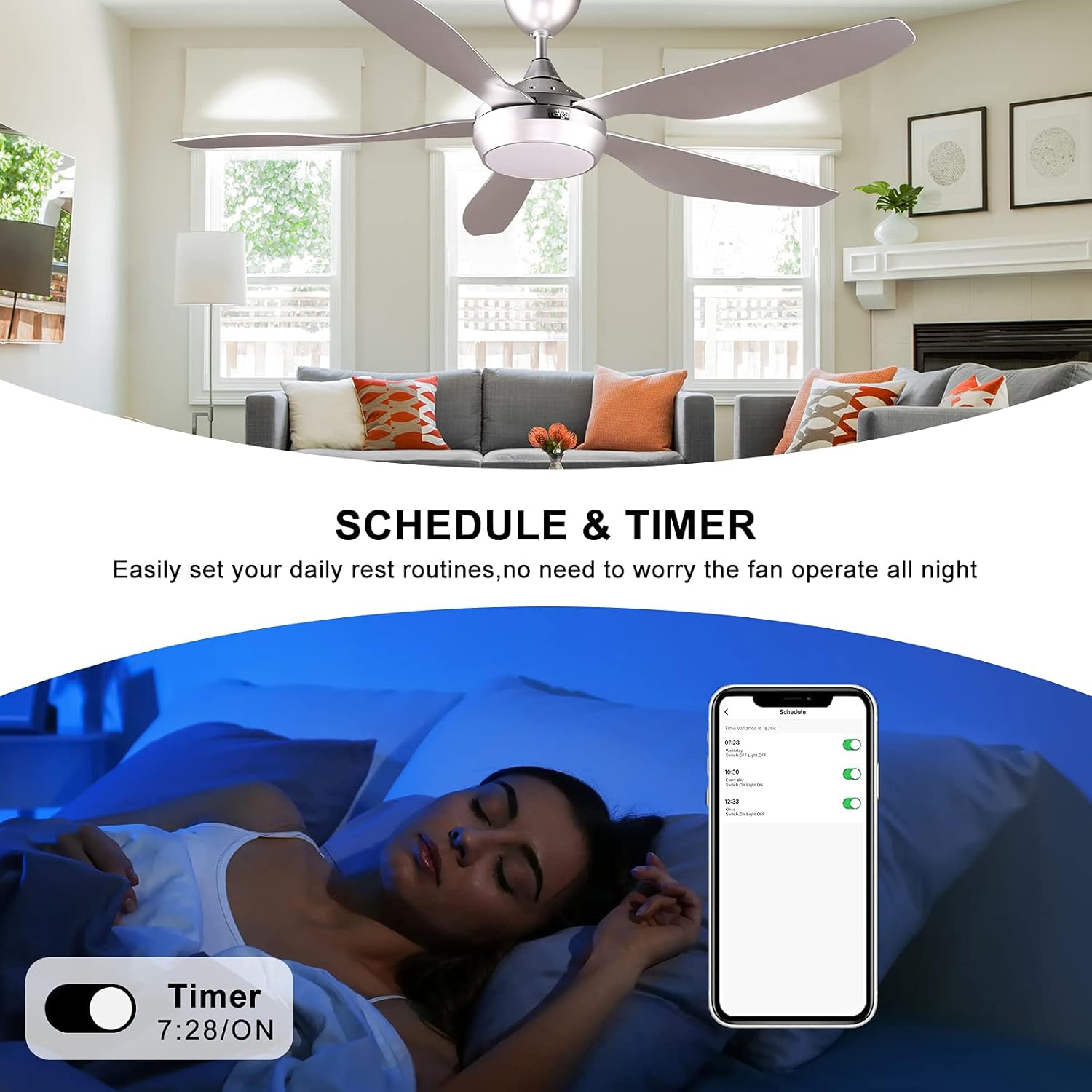
Figure 8: Product dimensions.
10. Warranty and Support
Your reiga ceiling fan is covered by the manufacturer's warranty. Please refer to the warranty card included in your package for specific terms and conditions. For technical support, replacement parts, or warranty claims, please contact reiga customer service through the retailer where the product was purchased or visit the official reiga website.