
Uwell Amulet Watch Kit
Uwell Amulet Watch Kit User Manual
Model: Amulet Watch Kit | Brand: Uwell
Introduction
The Uwell Amulet is the world's first watch-style pod system. This innovative device can be worn as a watch using its comfortable silicone strap or used as a standalone pod. Its compact and discreet design allows for easy portability. The carefully engineered airway provides a restricted draw, mimicking the feel of a traditional cigarette, ensuring a satisfying vaping experience. Uwell's Pro-FOCS flavor testing technology optimizes heating temperature and material quality to fully restore e-liquid flavor.

Image: The Uwell Amulet Watch Kit, showing the device and its retail packaging.
What's in the Box
Please check the package contents upon unboxing to ensure all items are present:
- Uwell Amulet Pod System Device
- Silicone Watch Strap
- Amulet Pod (pre-installed or separate)
- USB Charging Cable
- User Manual

Image: The Uwell Amulet pod device detached from its silicone watch strap, illustrating the two main components.
Setup
- Charge the Device: Before first use, fully charge the Amulet device. Connect the USB charging cable to the charging port on the device and plug the other end into a suitable USB power source. The screen will indicate charging status.
- Install the Pod: If the pod is not already installed, gently insert it into the device until it clicks into place. Ensure it is securely seated.
- Fill the Pod: Remove the pod from the device. Locate the silicone stopper on the side or bottom of the pod. Open the stopper and carefully fill the pod with your preferred e-liquid. Close the stopper firmly to prevent leaks.
- Prime the Coil: After filling, wait at least 5-10 minutes before vaping. This allows the e-liquid to fully saturate the coil, preventing dry hits and extending coil life.
- Attach to Strap (Optional): If you wish to wear the Amulet as a watch, slide the device into the silicone watch strap until it is securely fitted.
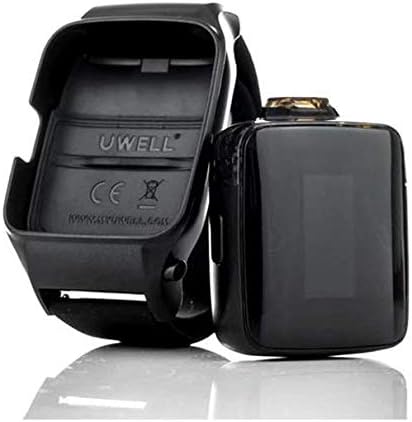
Image: The Uwell Amulet pod device separated from its watch strap, showing how it can be removed for filling or charging.
Operating Instructions
- Power On/Off: Press the side button five times rapidly to turn the device on or off. The screen will display the Uwell logo upon startup.
- Vaping: The Uwell Amulet is draw-activated. Simply inhale from the mouthpiece to activate the device and produce vapor. There are no buttons to press during vaping.
- Screen Orientation: The Amulet features a rotatable screen. To change the screen orientation, press the side button three times rapidly. This allows for comfortable viewing whether worn on the left or right wrist.
- Check Battery Level: The current battery level is displayed on the screen. Charge the device when the battery indicator is low.

Image: The Uwell Amulet Watch Kit being worn on a user's wrist, demonstrating its watch-style functionality and screen display.
Maintenance
- Pod Replacement: When the flavor diminishes or a burnt taste occurs, it's time to replace the pod. Gently pull the old pod out of the device and insert a new, filled pod.
- Cleaning: Regularly clean the contact points between the pod and the device with a dry cotton swab to ensure optimal connection. Wipe the exterior of the device and strap with a soft, damp cloth. Do not submerge the device in water.
- Charging: Charge the device using the provided USB cable. Avoid using damaged cables or chargers. Do not overcharge the battery.
- Storage: Store the device in a cool, dry place away from direct sunlight and extreme temperatures. Keep out of reach of children and pets.

Image: The Uwell Amulet pod device and its empty watch strap, highlighting the pod's display screen and the slot for insertion.
Troubleshooting
| Problem | Possible Cause | Solution |
|---|---|---|
| No vapor production | Low battery; Pod not properly installed; No e-liquid; Clogged airway; Faulty coil. | Charge device; Re-insert pod; Refill pod; Clean mouthpiece/airway; Replace pod. |
| Burnt taste | Coil not primed; E-liquid level too low; Coil needs replacement. | Wait 5-10 minutes after filling; Refill pod; Replace pod. |
| Leaking pod | Silicone stopper not sealed; Overfilled pod; Damaged pod. | Ensure stopper is closed tightly; Do not overfill; Replace pod. |
| Device not turning on | Low battery; Not activated correctly. | Charge device; Press side button five times rapidly. |
Specifications
- Brand: Uwell
- Model: Amulet Watch Kit
- Battery: 1 Lithium Ion (included)
- Dimensions (Package): 11.9 x 9 x 5.3 cm
- Weight (Package): 190 g
- Special Feature: Compact, Watch-style design, Rotatable screen, Draw-activated
- Included Components: Silicone strap, Pod
- ASIN: B07VMHBSFY
- UPC/GTIN: 726962653886
Warranty and Support
Uwell products are manufactured to high standards. For warranty information, please refer to the warranty card included in your product packaging or visit the official Uwell website. Keep your proof of purchase for any warranty claims.
For technical support, troubleshooting assistance beyond this manual, or general inquiries, please contact Uwell customer service through their official website or authorized distributors. Do not attempt to repair the device yourself, as this may void the warranty and cause damage.
Ask a question about this manual
Ask about setup, troubleshooting, compatibility, parts, safety, or missing instructions. Manuals+ will review the question and use this page’s manual context to help answer it.