1. Product Overview
The RaceFace Aeffect 35 Stem is engineered for XC/Trail riding, offering a robust and lightweight solution for connecting your handlebars to your bike's steerer tube. It features a refined design and is constructed from high-quality 6061 Aluminium, ensuring durability and performance. This stem is designed for handlebars with a 35mm diameter and steerer tubes with a 1 1/8" diameter. Its reversible +/- 6-degree rise allows for customization of your riding position.

Image 1: An angled view of the RaceFace Aeffect 35 Stem, showcasing its black finish and the "Aeffect" branding. This image highlights the overall shape and design of the stem.
2. Key Features
- Material: Forged and CNC machined from 6061 Aluminium for strength and light weight.
- Intended Use: Optimized for XC (Cross Country) and Trail riding.
- Rise: Reversible +/- 6-degree rise, allowing riders to fine-tune handlebar height and position.
- Steer Tube Diameter: Compatible with 1 1/8" steerer tubes.
- Stack Height: Compact 39mm stack height.
- Bar Diameter: Designed for 35mm diameter handlebars.
- Length: 50mm length.
- Weight: Approximately 166g.
- Color: Black finish.
3. Setup and Installation
Proper installation of your RaceFace Aeffect 35 Stem is crucial for safety and performance. If you are unsure about any step, it is recommended to seek assistance from a qualified bicycle mechanic.
3.1. Tools Required
- Torque wrench with appropriate hex bit (usually 4mm or 5mm).
- Grease (for bolts and steerer tube).
- Clean rags.
3.2. Installation Steps
- Prepare Steerer Tube: Ensure your bike's steerer tube is clean and free of burrs. Apply a thin layer of grease to the inside of the stem's steerer clamp area and the steerer tube itself.
- Position Stem: Slide the stem onto the steerer tube. Ensure the stem is oriented correctly (RaceFace logo facing forward). If you wish to use the +/- 6-degree rise, orient the stem accordingly.
- Install Top Cap: Place any necessary spacers above or below the stem, then install the top cap and bolt. Tighten the top cap bolt just enough to remove play from the headset, allowing the fork to turn freely without binding. Do not overtighten.
- Align Stem: Align the stem with the front wheel. This can be done by standing in front of the bike and sighting down the fork and stem.
- Tighten Steerer Clamp Bolts: Alternately tighten the two steerer clamp bolts on the side of the stem to the manufacturer's recommended torque specification. For the RaceFace Aeffect 35 Stem, refer to the markings on the stem or consult the RaceFace website for precise torque values. Typically, these are around 5-7 Nm. Tighten in small increments to ensure even clamping.
- Install Handlebar: Open the faceplate of the stem. Clean the handlebar clamping area on both the stem and the handlebar. Position your 35mm diameter handlebar in the stem's clamp.
- Tighten Faceplate Bolts: Install the faceplate bolts. Tighten these bolts in a cross-pattern (e.g., top-left, bottom-right, top-right, bottom-left) to the manufacturer's recommended torque specification. This is critical for handlebar security. Again, refer to RaceFace's guidelines, but a common range is 5-7 Nm. Ensure even gaps between the faceplate and the stem body.
- Final Checks: Double-check all bolts for proper torque. Ensure the handlebars are securely clamped and do not rotate. Verify that the headset has no play and the steering is smooth.

Image 2: A side view of the RaceFace Aeffect 35 Stem, showing the steerer tube clamp and the handlebar clamp. This view helps in understanding the orientation during installation.
4. Operating and Usage
Once installed, the RaceFace Aeffect 35 Stem provides a secure connection between your bike's fork and handlebars, directly influencing your steering and riding position.
- Riding Position Adjustment: The +/- 6-degree reversible rise allows you to choose between a more aggressive, lower handlebar position or a more upright, comfortable position by simply flipping the stem.
- Steering Response: The stem's length (50mm) and stiffness contribute to the bike's steering response. A shorter stem generally provides quicker, more direct steering, often preferred for technical trail riding and downhill.
- Compatibility: Ensure your handlebars have a 35mm clamp diameter and your fork's steerer tube is 1 1/8" for proper fitment.

Image 3: A direct front view of the RaceFace Aeffect 35 Stem, highlighting the handlebar clamp area and the "Aeffect" logo. This perspective is useful for verifying handlebar alignment.
5. Maintenance
Regular maintenance will extend the life of your RaceFace Aeffect 35 Stem and ensure safe operation.
- Regular Inspection: Periodically inspect the stem for any signs of damage, cracks, or deformation, especially after a crash or hard impact.
- Bolt Torque Check: Regularly check the torque of all stem bolts (steerer clamp and faceplate bolts) using a torque wrench. Vibrations from riding can cause bolts to loosen over time. Always adhere to the recommended torque specifications.
- Cleaning: Clean the stem with mild soap and water. Avoid harsh chemicals or abrasive cleaners that could damage the finish.
- Greasing: If you remove the stem, clean and re-grease the steerer tube and bolt threads before reinstallation.
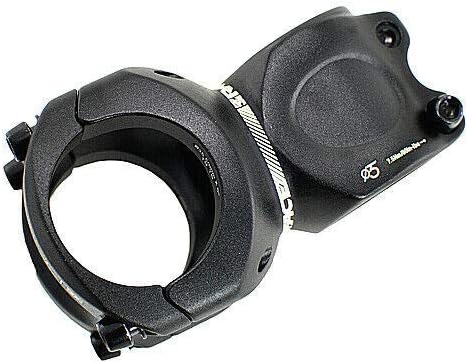
Image 4: An angled top-down view of the RaceFace Aeffect 35 Stem, showing the bolt heads for both the steerer tube and handlebar clamps. This view is helpful for maintenance and torque checks.
6. Troubleshooting
If you encounter issues with your stem, consider the following common problems and solutions:
- Handlebars Slipping:
- Cause: Insufficient torque on faceplate bolts, dirty clamping surfaces, or incorrect handlebar diameter.
- Solution: Ensure handlebars are 35mm diameter. Clean handlebar and stem clamping surfaces. Re-tighten faceplate bolts to specified torque in a cross-pattern. Consider using carbon assembly paste if recommended for your handlebar material.
- Stem Rotating on Steerer Tube:
- Cause: Insufficient torque on steerer clamp bolts, or headset top cap not tightened enough before clamping stem.
- Solution: Loosen steerer clamp bolts. Re-tighten headset top cap bolt to remove play, then re-tighten steerer clamp bolts to specified torque.
- Creaking Noises:
- Cause: Loose bolts, dry interfaces, or contamination.
- Solution: Disassemble, clean, and re-grease (where appropriate) all contact points (steerer tube, handlebar, bolt threads) and reassemble. Check all stem bolts for proper torque.
If problems persist, consult a professional bicycle mechanic.

Image 5: An alternative angled view of the RaceFace Aeffect 35 Stem, providing another perspective on its design and bolt locations. Useful for visual reference during troubleshooting.
7. Specifications
| Attribute | Value |
|---|---|
| Material | Forged and CNC machined 6061 Aluminium |
| Use | XC/Trail |
| Rise | +/- 6° reversible |
| Steer Tube Diameter | 1 1/8" |
| Stack Height | 39mm |
| Bar Diameter | 35mm |
| Length | 50mm |
| Weight | Approx. 166g |
| Color | Black |
| Item Package Dimensions | 5 x 3.6 x 0.8 inches |
| Package Weight | 0.2 Kilograms |
| Item Weight | 188 Grams |
8. Warranty and Support
The RaceFace Aeffect 35 Stem comes with a 1-year warranty from the manufacturer. This warranty typically covers defects in materials and workmanship under normal use.
For warranty claims, technical support, or further inquiries, please contact RaceFace customer service directly through their official website or authorized distributors. Keep your proof of purchase for warranty validation.
Manufacturer: RaceFace


