
APEKX BE1018
APEKX True Wireless Bluetooth 5.0 Sports Earbuds User Manual
Model: BE1018
Introduction
Thank you for choosing APEKX True Wireless Bluetooth 5.0 Sports Earbuds. These earbuds are designed to provide a high-fidelity audio experience with the freedom of wireless connectivity, perfect for sports and active lifestyles. Featuring IPX7 waterproofing, a secure fit, and a portable charging case, they ensure your music accompanies you wherever you go. This manual provides detailed instructions on how to set up, operate, and maintain your earbuds for optimal performance.

Image: APEKX True Wireless Bluetooth 5.0 Sports Earbuds in their open charging case, showcasing the pink earhooks.
Packaging Contents
Please check the package contents to ensure all items are present:
- APEKX True Wireless Earbuds (Left and Right)
- Portable Charging Case
- USB Charging Cable
- User Manual
- Grey Over-Ear Earhooks (1 pair)
- Small Earhooks (2 pairs, pink)
- Ear Caps (multiple sizes)

Image: Display of all items included in the product packaging, including earbuds, charging case, cables, and various earhook and ear cap options.
Product Overview
Familiarize yourself with the components of your APEKX earbuds and charging case:
- Power / Multi-function Button: Controls power, playback, calls, and voice assistant.
- LED Indicator: Displays status for power, pairing, and charging.
- Microphone: For hands-free calls.
- Interchangeable Earhooks: Provide a secure fit for various activities.
- Charging Pins: Connect to the charging case for power.
- Charging Box: Provides additional battery life for on-the-go charging.

Image: Detailed diagram pointing out the Power/Multi-function Button, LED Indicator, Microphone, Interchangeable Earhooks, and Charging Pins on the earbuds. Also shows battery life information: 4 hours from a single charge, plus 18 hours from the charging box for a total of 22 hours playtime.

Image: The earbuds in their charging case, alongside various earhook and ear cap accessories, highlighting their comfortable design.
Setup
Initial Charging
Before first use, fully charge both the earbuds and the charging case. Connect the USB charging cable to the charging case and a power source. The LED indicators on the earbuds and case will show charging status. A full charge typically takes 1-2 hours.
Pairing with Your Device
Follow these steps to pair your APEKX earbuds with your Bluetooth-enabled device:
- Ensure the charging case has power. Press the button on the charging case; both earbuds will show a red light.
- Take both earbuds out of the charging case. They will automatically enter pairing mode, indicated by flashing LED lights.
- On your device (smartphone, tablet, etc.), go to Bluetooth settings and turn Bluetooth on.
- Search for available devices and select "TWS Earbuds-L" from the list.
- Confirm pairing if prompted. Once connected, the earbud LED indicators will stop flashing or show a steady light.
The earbuds will automatically turn off and recharge when placed back into the charging case after each use.
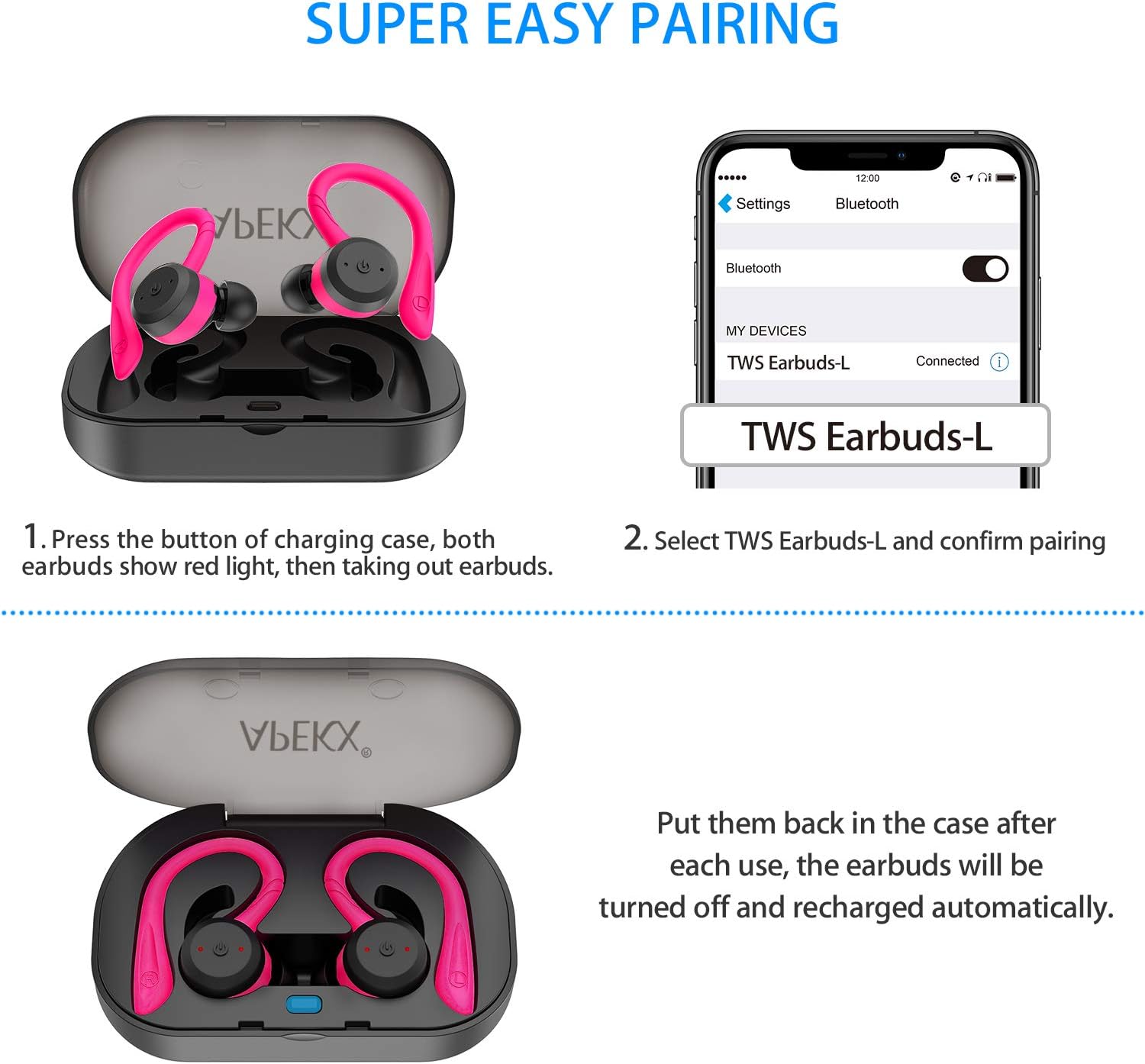
Image: Visual guide demonstrating the pairing process, showing the earbuds in the case with red lights, and a smartphone screen displaying "TWS Earbuds-L" as a connected Bluetooth device.
Operating Instructions
Power On/Off
- Power On: Take the earbuds out of the charging case, and they will power on automatically. Alternatively, press and hold the Multi-function Button on each earbud for 3 seconds.
- Power Off: Place the earbuds back into the charging case, and they will power off automatically. Alternatively, press and hold the Multi-function Button on each earbud for 5 seconds.
Music Playback
- Play/Pause: Press the Multi-function Button once on either earbud.
- Next Track: Double-press the Multi-function Button on the Right earbud.
- Previous Track: Double-press the Multi-function Button on the Left earbud.
- Volume Up: Triple-press the Multi-function Button on the Right earbud.
- Volume Down: Triple-press the Multi-function Button on the Left earbud.
Call Management
- Answer/End Call: Press the Multi-function Button once on either earbud.
- Reject Call: Press and hold the Multi-function Button for 2 seconds on either earbud.
Voice Assistant
- Activate Voice Assistant (Siri/Google Assistant): Press and hold the Multi-function Button for 1.5 seconds on either earbud.
Maintenance
Cleaning
Regularly clean your earbuds and charging case to ensure optimal performance and hygiene. Use a soft, dry, lint-free cloth. For ear tips, you may gently wipe them with a slightly damp cloth and mild soap, then dry thoroughly before reattaching. Do not use harsh chemicals or abrasive materials.
Storage
When not in use, store the earbuds in their charging case to protect them from dust and damage. Store the case in a cool, dry place away from direct sunlight and extreme temperatures.
Water Resistance (IPX7)
The APEKX earbuds feature an IPX7 waterproof rating, meaning they can withstand immersion in water up to 1 meter for 30 minutes. This makes them suitable for intense workouts and use in rainy conditions. However, the charging case is not waterproof. Do not submerge the charging case in water. Ensure earbuds are dry before placing them back into the charging case to prevent damage to the charging pins.

Image: APEKX Earbuds in their charging case, with text highlighting their IPX7 waterproof and sweat-proof capabilities, shown with water droplets.
Troubleshooting
If you encounter issues with your earbuds, please refer to the following common solutions:
| Problem | Possible Cause | Solution |
|---|---|---|
| Earbuds not pairing with device | Earbuds not in pairing mode; Bluetooth off on device; previously paired device interfering. | Ensure earbuds are taken out of case to enter pairing mode. Turn Bluetooth off and on again on your device. Forget previous pairings on your device. |
| Only one earbud working | Earbuds not properly synced; one earbud out of battery. | Place both earbuds back into the charging case, then take them out together. Ensure both earbuds are charged. |
| Earbuds not charging | Charging pins dirty; charging cable faulty; case out of battery. | Clean charging pins on earbuds and case. Try a different USB cable. Ensure charging case is charged. |
| Low volume or poor sound quality | Ear tips not sealed properly; earbud grilles blocked; low battery. | Try different sized ear tips for a better seal. Clean earbud grilles. Charge earbuds fully. |
Specifications
- Model: BE1018
- Connectivity Technology: Wireless
- Wireless Communication Technology: Bluetooth 5.0
- Water Resistance Level: IPX7 (Earbuds only)
- Battery Life: Approximately 4 hours (earbuds), up to 22 hours total with charging case
- Item Weight: 4 Ounces (total package)
- Product Dimensions: 4.7 x 3.4 x 2 inches
- Batteries: 3 Lithium Ion batteries required (included)
- Color: Pink
- Ear Placement: In Ear
- Form Factor: In Ear
- Noise Control: Active Noise Cancellation
- Material: Silicone
Warranty and Support
APEKX products are manufactured with high-quality standards. For any product-related inquiries, technical support, or warranty claims, please refer to the contact information provided on the product packaging or the official APEKX website. Please retain your proof of purchase for warranty service.
For further assistance, please visit the official APEKX store page: APEKX Store on Amazon
Ask a question about this manual
Ask about setup, troubleshooting, compatibility, parts, safety, or missing instructions. Manuals+ will review the question and use this page’s manual context to help answer it.