
Estry CS-ALP88TW
Estry Replacement Battery User Manual
Model: CS-ALP88TW
Introduction
This manual provides essential information for the safe and effective use of your Estry replacement battery, model CS-ALP88TW. This battery is designed as a high-quality replacement for ALINCO DJ-series radios, including models DJ-500, DJ-10, DJ-100, DJ-289G, DJ-A10, DJ-A11, DJ-A41, DJ-W100, and DJ-W500, and is compatible with the EBP-88H battery part number.
Safety Information
Please read and understand all safety precautions before using this battery. Failure to follow these instructions may result in fire, electric shock, injury, or damage to the battery or device.
- Do not disassemble, open, or service the battery pack.
- Do not crush, puncture, short external contacts, or dispose of in fire or water.
- Do not store above 60°C (140°F).
- Use only with the battery pack designated for this product.
- Keep out of reach of children.
- If the battery leaks, avoid contact with the fluid. If contact occurs, flush with water and seek medical attention.
Product Overview
The Estry replacement battery is a high-capacity Li-ion battery designed for reliable performance. It features a robust casing and precise contacts for secure connection to your compatible device.
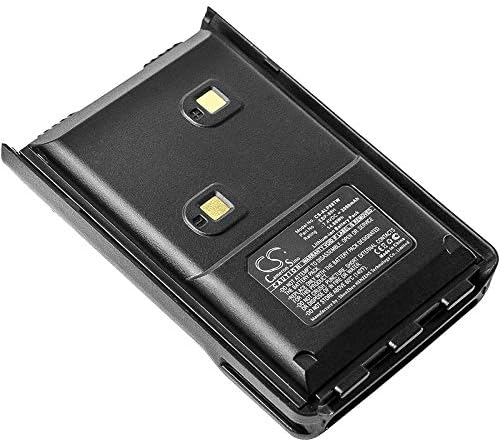
Figure 1: Top view of the battery, highlighting the product label with specifications.
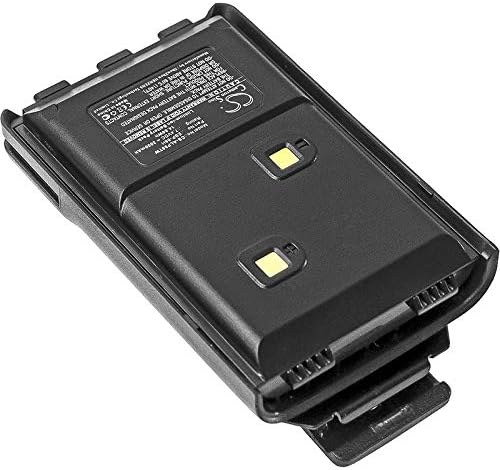
Figure 2: Angled view of the battery, providing a perspective of its overall shape and label placement.

Figure 3: Bottom view of the battery with the belt clip, showing the charging contacts.

Figure 4: Detailed view of the battery label, showing key specifications and warnings.
Setup and Installation
Before first use, it is recommended to fully charge the battery.
Charging the Battery:
- Connect your compatible ALINCO radio (with the battery attached) to its original charger or a compatible charger.
- Ensure the charging indicator on your radio or charger confirms that charging has begun.
- Allow the battery to charge until the indicator shows a full charge. This may take several hours for the initial charge.
Installing the Battery:
- Ensure your ALINCO radio is powered off.
- Align the battery with the battery compartment on the back of your radio.
- Slide the battery into place until it clicks securely. Ensure all latches are engaged.
- To remove, disengage the battery latches (if present on your radio model) and slide the battery out.
Operating Guidelines
This battery operates as a power source for your compatible ALINCO radio. Proper usage ensures optimal performance and longevity.
- Always use the battery within the specified operating temperature range of your radio.
- Avoid completely discharging the battery frequently, as this can reduce its lifespan.
- For best performance, charge the battery before it is fully depleted.
- If the radio indicates low battery, recharge it promptly.
Maintenance
Proper maintenance helps extend the life of your battery.
- Cleaning: Use a dry, soft cloth to clean the battery contacts periodically. Do not use harsh chemicals or abrasive materials.
- Storage: If storing the battery for an extended period, charge it to approximately 50-70% capacity. Store in a cool, dry place away from direct sunlight and extreme temperatures. Recharge every 3-6 months to prevent deep discharge.
- Disposal: Do not dispose of the battery in household waste. Follow local regulations for proper disposal of lithium-ion batteries. Many electronics retailers and recycling centers offer battery recycling programs.
Troubleshooting
| Problem | Possible Cause | Solution |
|---|---|---|
| Battery not charging | Loose connection; dirty contacts; faulty charger; battery too hot/cold. | Ensure secure connection. Clean battery and charger contacts. Try a different charger. Allow battery to reach room temperature. |
| Short operating time | Battery not fully charged; battery nearing end of life; high power consumption by device. | Ensure full charge. Consider replacing battery if it's old. Reduce device power settings if possible. |
| Battery not fitting correctly | Incorrect model; obstruction in compartment. | Verify battery model compatibility. Check for debris in the battery compartment. |
Specifications
- Model Number: CS-ALP88TW
- Compatible Part Number: EBP-88H
- Battery Type: Li-ion (Lithium-ion)
- Voltage: 7.4V
- Capacity: 2000mAh (14.80Wh)
- Dimensions: 86.72 x 52.66 x 28.76mm (3.41 x 2.07 x 1.13 inches)
- Weight: 150g / 5.29oz
- Certifications: ISO9001, RoHS, CE
Warranty and Support
This Estry replacement battery comes with a 12-month warranty and a 14-day money-back guarantee from the date of purchase.
For technical support, warranty claims, or any inquiries, please contact your retailer or the manufacturer directly. When contacting support, please have your product model number (CS-ALP88TW) and purchase details ready.
Note: Warranty may be void if the battery label is removed or if the battery has been tampered with.
Ask a question about this manual
Ask about setup, troubleshooting, compatibility, parts, safety, or missing instructions. Manuals+ will review the question and use this page’s manual context to help answer it.