
1. Introduction
The FSP Hydro G PRO 1000W Power Supply (Model HG2-1000) is an IEC62368 certified unit designed for stable and efficient power delivery to your computer system. This power supply features an 80 Plus Gold certification, ensuring high energy efficiency, and a full modular design for simplified cable management. It incorporates advanced safety features and a compact form factor.

Image 1.1: FSP Hydro G PRO 1000W Power Supply, front-top view.
2. Safety Information
Please read and follow these safety guidelines carefully before installing or operating the power supply:
- Ensure the power supply is disconnected from the main power outlet before installation or maintenance.
- Do not open the power supply casing. High voltages are present inside, which can cause electric shock.
- Install the power supply in a well-ventilated area to prevent overheating.
- Use only the modular cables provided with the power supply. Using incompatible cables may damage the unit or connected components.
- Avoid exposing the power supply to moisture or extreme temperatures.
- This product is designed for use with personal computers. Do not use it for other applications.
3. Package Contents
Verify that all items are present in the package:
- FSP Hydro G PRO 1000W Power Supply Unit
- Modular Cable Set (including 20+4 Pin ATX, 4+4 Pin CPU, PCI-E 6+2 Pin, SATA, SATA/MOLEX, SATA/MOLEX/FLOPPY cables)
- AC Power Cord
- Mounting Screws
- User Manual (this document)

Image 3.1: Included modular cables for the FSP Hydro G PRO power supply.

Image 3.2: Cable length and connector type diagram for the 1000W model.
4. Setup and Installation
Follow these steps to install your FSP Hydro G PRO power supply:
- Prepare your PC case: Ensure your PC case has adequate space for the power supply (dimensions: 5.91 x 5.91 x 3.39 inches / 150 x 150 x 86 mm).
- Mount the Power Supply: Secure the power supply unit into the designated bay in your PC case using the provided mounting screws.
- Connect Modular Cables:
- Identify the necessary cables for your components (Motherboard, CPU, PCI-e, Peripherals like SATA/Molex).
- Plug the required modular cables into the corresponding ports on the power supply. The ports are clearly labeled.
- Connect the other end of each cable to your motherboard, CPU, graphics card(s), and storage devices.
- Connect AC Power: Once all internal connections are secure, plug the AC power cord into the power supply's AC inlet, then connect the other end to a wall outlet or surge protector.
- Power On: Ensure the main power switch on the power supply is in the 'ON' position.

Image 4.1: Clearly labeled modular ports for easy cable connection.

Image 4.2: Fully modular design for simplified installation and cable management.
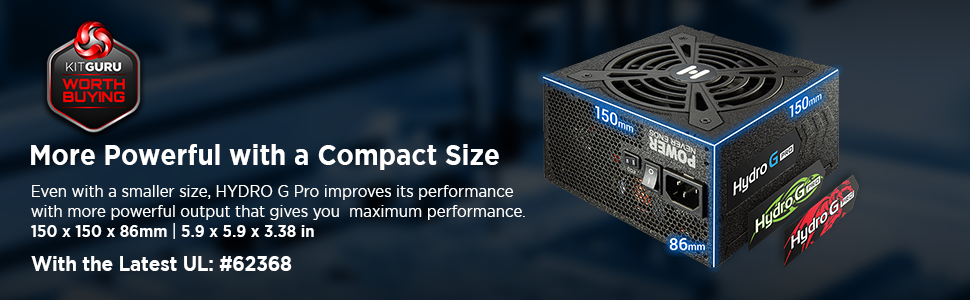
Image 4.3: Compact dimensions (150mm x 86mm x 170mm) for space-saving installation.
5. Operating Instructions
5.1. ECO Fan Switch
The FSP Hydro G PRO features an ECO fan switch, allowing you to control the fan operation for quieter performance.
- ECO ON: In this mode, the fan will remain off under low load conditions (typically below 30% load) for silent operation. The fan will automatically activate when the load increases to maintain optimal temperatures.
- ECO OFF: In this mode, the fan operates continuously, adjusting its speed based on the power supply's temperature and load.

Image 5.1: ECO switch for fan control, enabling silent operation at low loads.

Image 5.2: The ECO switch allows for a quieter computing experience by stopping the fan at low power consumption.
5.2. Fluid Dynamic Bearing (FDB) Fan
The power supply is equipped with a 120mm Fluid Dynamic Bearing (FDB) fan, which provides quiet operation and extended lifespan compared to traditional fan bearings.
Video 5.1: Official FSP video demonstrating the Hydro G PRO Power Supply's features, including Off-Wet Technology and fan operation. This video highlights the product's durability and quiet performance.
6. Maintenance
To ensure optimal performance and longevity of your power supply:
- Keep the power supply and its ventilation grilles free from dust accumulation. Use compressed air to gently clean dust from the fan and vents periodically.
- Ensure proper airflow within your PC case to prevent heat buildup.
- Do not attempt to disassemble or repair the power supply. This will void the warranty and poses a safety risk.
7. Troubleshooting
If you encounter issues with your FSP Hydro G PRO power supply, refer to the following common problems and solutions:
| Problem | Possible Cause | Solution |
|---|---|---|
| No power to components | Power cable loose, main switch off, faulty outlet, internal short. | Check AC power cord connection. Ensure power supply main switch is ON. Test outlet with another device. Verify all modular cables are securely connected. |
| System crashes or reboots | Insufficient power, overheating, faulty component. | Ensure total system wattage does not exceed PSU capacity. Check for proper ventilation. Monitor component temperatures. If issues persist, consult a professional. |
| Fan not spinning (ECO mode) | Normal operation under low load. | This is expected behavior in ECO ON mode. The fan will activate when the load increases. If the fan never spins even under high load, switch ECO mode OFF to force continuous fan operation. If it still doesn't spin, contact support. |
| Unusual noises | Loose screws, fan obstruction, coil whine. | Check if the PSU is securely mounted. Ensure no cables are obstructing the fan. Minor coil whine can be normal; if it's loud or persistent, contact support. |
If troubleshooting steps do not resolve the issue, please contact FSP customer support for further assistance.
8. Specifications
| Feature | Detail |
|---|---|
| Brand | FSP |
| Series | Hydro G PRO |
| Model Number | PS-FS-HG2P1000 |
| Item Weight | 7.26 pounds |
| Product Dimensions (LxWxH) | 5.91 x 5.91 x 3.39 inches (150 x 150 x 86 mm) |
| Form Factor | ATX |
| Output Wattage | 1000 Watts |
| Efficiency Certification | 80 Plus Gold |
| Power Supply Design | Full Modular |
| Cooling Method | Air (120mm Fluid Dynamic Bearing Fan) |
| Compatible Devices | Personal Computer |
| Connector Type | ATX |
| ATX Standard | ATX12V V2.52 |
| Capacitors | Full Japanese electrolytic capacitors |

Image 8.1: The 80 Plus Gold certification ensures high power efficiency.
9. Warranty and Support
The FSP Hydro G PRO 1000W Power Supply comes with a 10-Year Warranty, providing long-term assurance for your investment.
For technical support, warranty claims, or further inquiries, please visit the official FSP website or contact their customer service department. Keep your proof of purchase for warranty validation.

Image 9.1: FSP provides 10-year support for the Hydro G PRO series.


