
Introduction
The Rain Bird F38260 6-Station Expansion Module is designed to increase the station capacity of compatible Rain Bird irrigation controllers. This module allows for easy expansion of your watering system to manage additional zones.
This module is compatible with Rain Bird ESP-Me and ESP-SMTe series irrigation controllers only.
Setup and Installation
The F38260 expansion module is designed for hot-swappable installation, meaning it can be installed without powering down the main controller unit. This ensures a convenient and uninterrupted setup process.
- Identify Available Slot: Locate an empty module slot within your compatible Rain Bird ESP-Me or ESP-SMTe controller. These slots are typically found behind the controller's front panel.
- Insert Module: Align the expansion module with the chosen slot. Gently push the module firmly into the slot until it is securely seated. You should feel a slight click or resistance as it connects.
- Verify Connection: Once inserted, the controller should automatically detect the new stations. Refer to your main controller's user manual for instructions on how to verify the newly added stations and configure them.
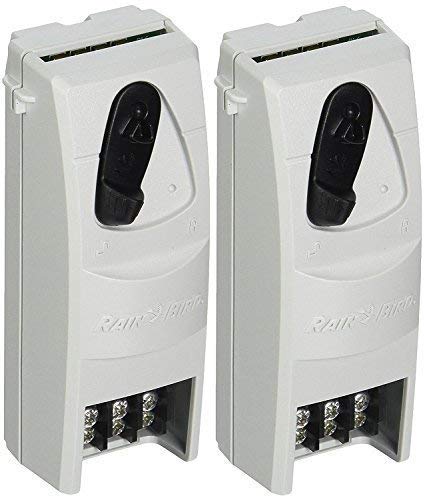
Figure 1: The Rain Bird F38260 6-Station Expansion Module. This image shows the module's grey casing, the black locking mechanism on the side, and the terminal block at the bottom for wiring connections. The top edge reveals the connector pins for insertion into the controller.
Operation
Once the F38260 expansion module is successfully installed, the additional six stations will become available for programming through your main Rain Bird ESP-Me or ESP-SMTe controller. All programming and operational functions for these new stations are managed directly via the main controller's interface.
Please refer to your specific Rain Bird ESP-Me or ESP-SMTe controller's user manual for detailed instructions on programming irrigation schedules, setting run times, and managing zones.
Maintenance
The Rain Bird F38260 expansion module requires minimal maintenance. To ensure optimal performance and longevity:
- Keep Clean: Periodically inspect the module and its connections for dust or debris. Use a soft, dry cloth to gently clean the exterior.
- Environmental Conditions: Ensure the controller and module are installed in an environment within the specified operating temperature range and protected from direct moisture or extreme weather conditions.
- Secure Connections: Occasionally check that the module remains firmly seated in its slot within the controller.
Troubleshooting
If you encounter issues after installing the F38260 expansion module, consider the following:
- Module Not Detected:
- Ensure the module is fully and securely inserted into an available slot.
- Verify that your main controller is a compatible model (ESP-Me or ESP-SMTe).
- If the controller was powered down during installation (though not required), try restarting the controller.
- Station Malfunction:
- Check the wiring connections for the specific station at the terminal block.
- Consult your main controller's manual for troubleshooting specific station errors or diagnostic features.
- General Controller Issues: If the entire controller is malfunctioning, refer to its dedicated user manual for comprehensive troubleshooting steps.
For persistent issues, contact Rain Bird customer support or a certified irrigation professional.
Specifications
| Feature | Detail |
|---|---|
| Model | F38260 |
| Compatibility | Rain Bird ESP-Me, ESP-SMTe Controllers |
| Number of Stations | 6 |
| Material | Plastic |
| Item Weight | 0.3 Pounds |
| Operating Temperature | Up to 158 Degrees Fahrenheit (70°C) |
Warranty and Support
For information regarding product warranty, please refer to the documentation provided with your original Rain Bird controller or visit the official Rain Bird website. For technical support or assistance, please contact Rain Bird customer service directly.
Rain Bird Official Website: www.rainbird.com