
1. Introduction
This manual provides essential information for the installation, setup, operation, and maintenance of your EVGA GeForce RTX 2080 Super Black Gaming graphics card. This high-performance graphics card is powered by the NVIDIA Turing architecture, delivering advanced gaming realism, speed, power efficiency, and immersive experiences. It features real-time Ray Tracing, artificial intelligence, and programmable shading to enhance your PC gaming experience.
2. Safety Information
Please read and follow these safety guidelines to prevent damage to your product or personal injury:
- Always disconnect power from your computer before installing or removing any components.
- Wear an anti-static wrist strap or frequently touch a grounded metal object to discharge static electricity, which can damage sensitive electronic components.
- Handle the graphics card by its edges to avoid touching the components on the PCB.
- Ensure proper ventilation within your computer case to prevent overheating.
- Keep the graphics card away from liquids and extreme temperatures.
- Do not attempt to repair the card yourself. Refer all servicing to qualified personnel.
3. Package Contents
Verify that your package contains the following items:
- EVGA GeForce RTX 2080 Super Black Gaming Graphics Card
- User Manual (this document)
4. Product Overview
The EVGA GeForce RTX 2080 Super Black Gaming graphics card is designed for high-performance gaming and demanding applications. Key features include:
- Real Boost Clock: 1815 MHz for enhanced performance.
- Memory: 8192 MB GDDR6 for high-speed data access.
- Ray Tracing: Real-time ray tracing capabilities for cutting-edge, hyper-realistic graphics.
- Cooling: Dual HDB fans for efficient cooling and reduced acoustic noise.
- Software: Compatible with EVGA Precision X1 software for advanced overclocking and monitoring.
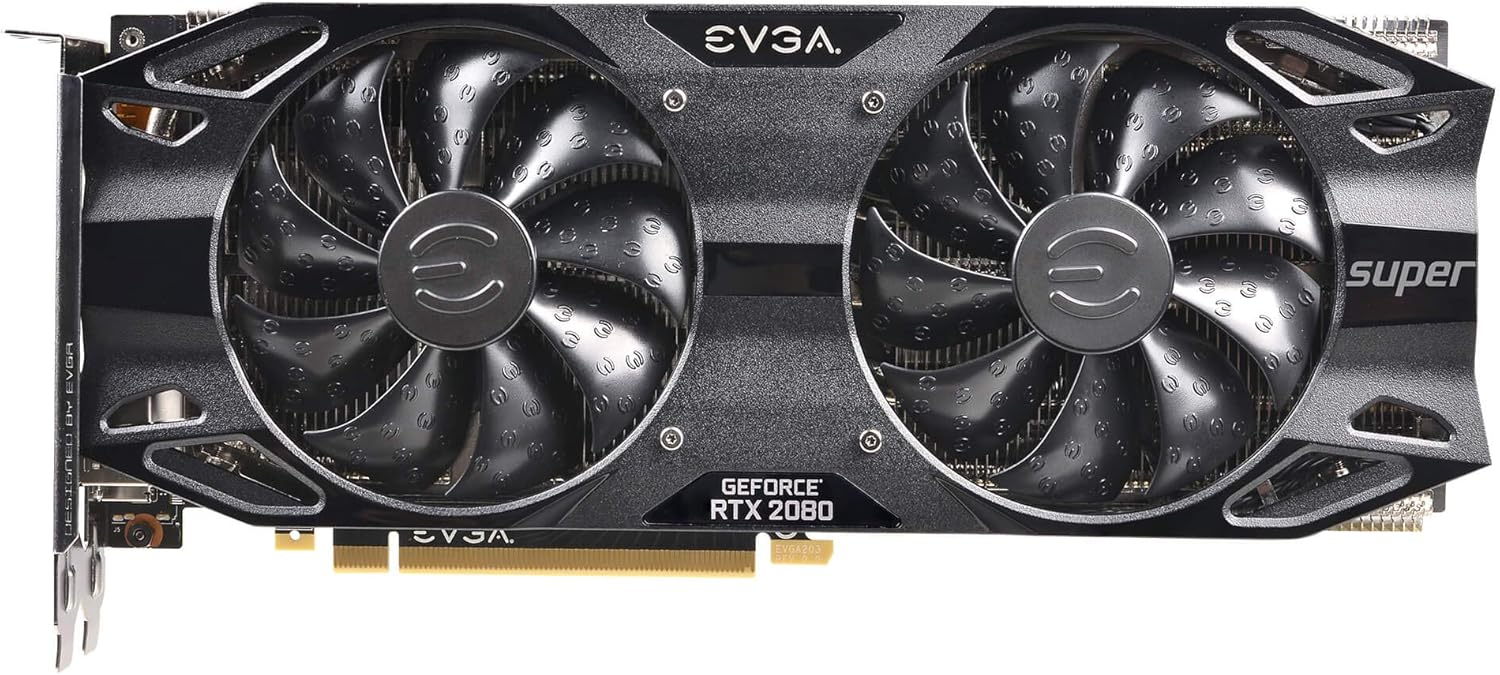
Figure 4.1: Front view of the EVGA GeForce RTX 2080 Super Black Gaming graphics card, showcasing its dual HDB fans.

Figure 4.2: Angled view of the graphics card, highlighting the cooling shroud and "Super" branding.

Figure 4.3: Rear view of the graphics card showing the display output ports, including DisplayPort (DP) and HDMI.

Figure 4.4: Rear view of the graphics card's Printed Circuit Board (PCB), showing various components and circuitry.
5. Installation
Before you begin, ensure your computer is powered off and unplugged from the wall outlet. Refer to your computer's motherboard manual for specific PCIe slot information.

Figure 5.1: EVGA Installation Guide banner, indicating general installation procedures.
5.1 Pre-Installation Checklist
- Ensure your power supply unit (PSU) has sufficient wattage and the necessary PCIe power connectors (e.g., 8-pin or 6+2-pin).
- Confirm your computer case has adequate space for the graphics card (dimensions: 10.62 x 1.54 x 4.38 inches).
- Remove any existing graphics card drivers from your operating system.
5.2 Physical Installation Steps
- Open your computer case and locate an available PCI Express x16 slot on your motherboard.
- Remove the metal bracket covers from the back of your computer case corresponding to the graphics card's I/O panel.
- Carefully align the graphics card with the PCIe slot and press down firmly until it is securely seated. You should hear a click from the slot's retention clip.
- Secure the graphics card to the case with screws through the I/O bracket.
- Connect the required PCIe power cables from your power supply to the graphics card's power connectors. Ensure all connectors are fully seated.
- Close your computer case.
6. Driver Setup
After physical installation, you need to install the latest drivers for your graphics card.
- Connect your monitor to one of the graphics card's display outputs (DisplayPort or HDMI).
- Power on your computer. It may boot into a lower resolution or use a generic display driver initially.
- Visit the official NVIDIA website (www.nvidia.com/drivers) or the EVGA support website (www.evga.com/support/download/) to download the latest drivers for your GeForce RTX 2080 Super.
- Run the downloaded driver installer and follow the on-screen instructions. A system restart may be required.
- Consider installing EVGA Precision X1 software for advanced monitoring, fan control, and overclocking capabilities.
7. Operating Your Graphics Card
Once drivers are installed, your EVGA GeForce RTX 2080 Super is ready for use. The card automatically adjusts its clock speeds and fan speeds based on workload and temperature.
- Gaming: Launch your favorite games. The card will utilize its powerful GPU to render graphics at high frame rates and resolutions.
- Display Settings: Adjust display resolution, refresh rate, and other settings through your operating system's display settings or the NVIDIA Control Panel.
- Monitoring: Use EVGA Precision X1 or other third-party tools to monitor GPU temperature, clock speeds, fan speeds, and utilization.
- Ray Tracing: Enable Ray Tracing in supported games for enhanced visual fidelity.
8. Maintenance
Regular maintenance helps ensure optimal performance and longevity of your graphics card.
- Dust Removal: Periodically clean dust from the graphics card's fans and heatsink using compressed air. Ensure the computer is powered off and unplugged before cleaning. Hold the fan blades gently to prevent them from spinning rapidly during cleaning.
- Driver Updates: Keep your graphics drivers updated to the latest version from NVIDIA's official website for performance improvements and bug fixes.
- Temperature Monitoring: Regularly monitor GPU temperatures, especially during heavy loads, to ensure it stays within safe operating limits.
9. Troubleshooting
If you encounter issues, refer to the following common troubleshooting steps:
| Problem | Possible Solution |
|---|---|
| No display output after installation. |
|
| System crashes or freezes during gaming. |
|
| Poor performance in games. |
|
10. Specifications
Below are the technical specifications for the EVGA GeForce RTX 2080 Super Black Gaming graphics card (Model: 08G-P4-3081-KR):
| Feature | Detail |
|---|---|
| Graphics Coprocessor | NVIDIA GeForce RTX 2080 Super |
| Brand | EVGA |
| Model Number | 08G-P4-3081-KR |
| Graphics RAM Size | 8 GB GDDR6 |
| Memory Speed | 15500 MHz |
| Real Boost Clock | 1815 MHz |
| Video Output Interface | HDMI, DisplayPort |
| Max Screen Resolution | 1920 x 1080 (Note: Higher resolutions are supported, this might be a default or minimum listed) |
| Item Weight | 3.31 pounds |
| Product Dimensions (LxWxH) | 10.62 x 1.54 x 4.38 inches |
| Manufacturer | EVGA |
| Date First Available | July 23, 2019 |
11. Warranty and Support
For detailed warranty information and technical support, please visit the official EVGA website.
- EVGA Support: www.evga.com/support/
- Product Registration: Register your product on the EVGA website to ensure full warranty coverage and access to support resources.
Note: Warranty terms and conditions may vary by region. Please consult the EVGA website for the most current information.