
Estry CS-PMS200SL
Estry Replacement Battery User Manual
For Pure Jongo S3, Evoke D6/F4, Jongo S340b, Sensia 200D, Connect F1 (Model CS-PMS200SL)
1. Important Safety Information
WARNING: To reduce the risk of fire or burns, read instructions in operating guide before using the battery.
- Do not attempt to disassemble, open or service the battery pack.
- Replace only with the battery pack designated for this product.
- Do not crush, puncture, short external contacts or dispose of in fire or water.
- Do not store above 60°C (140°F).
- This battery features built-in protection against overcharge, over-discharge, over-voltage, and short circuits to ensure safe and durable use.
- The battery is RoHS approved (toxic-free) and holds CE and ISO9001 certificates for quality assurance.
2. Product Overview
The Estry CS-PMS200SL is a high-quality lithium-ion replacement battery designed to power various Pure audio devices. It provides reliable performance and is manufactured to meet original specifications, ensuring compatibility and safety.

Figure 1: Estry CS-PMS200SL Replacement Battery. This image shows the battery with its model number (CS-PMS200SL), voltage (3.7V), capacity (8800mAh), and safety warnings clearly visible on the label.
3. Compatible Models and Part Numbers
This replacement battery is compatible with the following devices and battery part numbers:
3.1 Compatible Devices:
- PURE Jongo S3
- PURE Evoke D6
- PURE Evoke F4
- PURE Jongo S340b
- PURE Sensia 200D Connect
3.2 Compatible Battery Part Number:
- F1
Tip: Before purchase, confirm your device model and existing battery part number carefully to ensure compatibility.
4. Specifications
| Feature | Detail |
|---|---|
| Model Number | CS-PMS200SL |
| Battery Type | Lithium-Ion |
| Capacity | 8800mAh (32.56Wh) |
| Voltage | 3.7V |
| Dimensions | 70.50 x 73.50 x 19.00mm (2.78 x 0.75 x 2.89 inches) |
| Weight | 200g / 7.05oz |
| Certifications | ISO9001, RoHS, CE |
5. Setup and Installation
This section outlines the general procedure for replacing your device's battery. Specific steps may vary slightly depending on your device model. Always refer to your device's original manual for detailed instructions on battery compartment access.
- Power Off Device: Ensure your device is completely powered off and disconnected from any power sources before beginning the battery replacement process.
- Locate Battery Compartment: Identify and open the battery compartment on your device. This often involves removing a cover or panel.
- Remove Old Battery: Carefully disconnect and remove the old battery. Note its orientation for correct installation of the new battery.
- Insert New Battery: Align the Estry replacement battery (CS-PMS200SL) with the battery contacts in the compartment. Gently push it into place until it is securely seated.
- Secure Compartment: Close and secure the battery compartment cover.
- Initial Charge: It is recommended to fully charge the new battery before its first use.
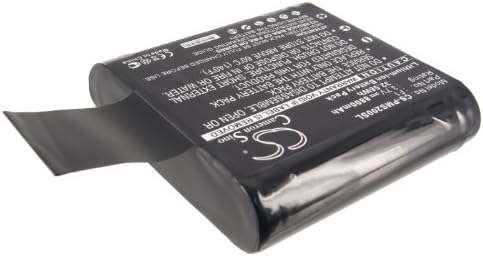
Figure 2: Side view of the Estry CS-PMS200SL Replacement Battery. This angle highlights the compact design and the protective wrapping of the battery pack.
6. Operating Instructions
Once the Estry replacement battery is installed and fully charged, your device is ready for use. The battery operates automatically with your device.
- Power On: Turn on your device as you normally would.
- Monitor Battery Level: Use your device's display or indicators to monitor the battery charge level.
- Recharging: When the battery level is low, connect your device to its original charger to recharge the battery.
7. Maintenance and Storage
Proper care and storage can extend the life of your Estry replacement battery.
- Regular Charging: Avoid completely draining the battery frequently. Recharge it before it reaches critically low levels.
- Avoid Extreme Temperatures: Do not expose the battery to extreme heat or cold. Store it in a cool, dry place, ideally between 0°C and 25°C (32°F and 77°F).
- Long-Term Storage: If storing the battery for an extended period, charge it to about 50-60% capacity. Recharge it every 3-6 months to prevent deep discharge.
- Cleaning: Keep battery contacts clean and free of dust or debris. Use a dry cloth if necessary.

Figure 3: Top-down view of the Estry CS-PMS200SL Replacement Battery. This view emphasizes the overall shape and size of the battery pack.
8. Troubleshooting
If you encounter issues with your Estry replacement battery, consider the following common solutions:
- Battery Not Charging:
- Ensure the charger and charging cable are functioning correctly.
- Verify that the battery is properly seated in the device.
- Check for any debris or corrosion on the battery and device contacts.
- Short Battery Life:
- Confirm the battery is fully charged before use.
- Reduce power consumption settings on your device (e.g., screen brightness, Wi-Fi/Bluetooth usage).
- Ensure the battery is not exposed to extreme temperatures during use.
- Device Not Powering On:
- Verify the battery is correctly installed and charged.
- Attempt to power on the device while connected to its charger.
If problems persist, please refer to the "Warranty and Support" section for further assistance.
9. Warranty and Support
9.1 Warranty Information:
The Estry replacement battery comes with a 12-month Warranty and a 14-day Money Back Guarantee from the date of purchase. This warranty covers manufacturing defects and ensures the battery meets its stated specifications.
9.2 Customer Support:
For technical assistance, warranty claims, or any questions regarding your Estry replacement battery, please contact the seller or manufacturer. Provide your purchase details and a clear description of the issue for prompt support.
Note: For specific device-related issues not directly related to battery performance, please consult your device manufacturer's support resources.
Ask a question about this manual
Ask about setup, troubleshooting, compatibility, parts, safety, or missing instructions. Manuals+ will review the question and use this page’s manual context to help answer it.