
1. Introduction
Thank you for choosing the ICQN 42 Liter Mini Oven. This appliance is designed for versatile cooking, baking, and roasting, offering convenience and efficiency for your kitchen. With its 1300W power, convection function, and precise temperature control, it is suitable for a wide range of culinary tasks. Please read this manual carefully before using the appliance to ensure safe and optimal operation. Keep this manual for future reference.

Figure 1.1: Front view of the ICQN 42 Liter Mini Oven, showcasing its compact design and control panel.
2. Important Safety Instructions
When using electrical appliances, basic safety precautions should always be followed to reduce the risk of fire, electric shock, and injury to persons.
- Read all instructions before using the oven.
- Do not touch hot surfaces. Use handles or knobs. Always use oven mitts or pot holders when handling hot materials.
- To protect against electric shock, do not immerse cord, plugs, or the appliance itself in water or other liquid.
- Close supervision is necessary when any appliance is used by or near children.
- Unplug from outlet when not in use and before cleaning. Allow to cool before putting on or taking off parts, and before cleaning the appliance.
- Do not operate any appliance with a damaged cord or plug, or after the appliance malfunctions or has been damaged in any manner. Contact customer service for assistance.
- The use of accessory attachments not recommended by the appliance manufacturer may cause injuries.
- Do not use outdoors.
- Do not let cord hang over edge of table or counter, or touch hot surfaces.
- Do not place on or near a hot gas or electric burner, or in a heated oven.
- Extreme caution must be used when moving an appliance containing hot oil or other hot liquids.
- Do not use the appliance for other than intended use.
- Always attach plug to appliance first, then plug cord into the wall outlet. To disconnect, turn any control to "off", then remove plug from wall outlet.
- Oversize foods or metal utensils must not be inserted in a toaster oven as they may create a fire or risk of electric shock.
- A fire may occur if the oven is covered or touching flammable material, including curtains, drapes, walls, and the like, when in operation.
- Do not place any of the following materials in the oven: paper, cardboard, plastic, or anything that could easily burn.
- Do not store any materials, other than manufacturer's recommended accessories, in this oven when not in use.
- Do not cover crumb tray or any part of the oven with metal foil. This will cause overheating of the oven.
- The oven features a double-glazed door for improved thermal performance and safety, but surfaces can still become hot during operation.
3. Product Overview and Components
Familiarize yourself with the parts of your ICQN Mini Oven before first use.
3.1. Main Components
- Oven Unit: The main body of the mini oven.
- Control Panel: Located on the right side, featuring three rotary knobs for Timer, Temperature, and Cooking Function.
- Double Glazed Door: Provides insulation and allows viewing of food. Designed for easy cleaning.
- Heating Elements: Upper and lower heating elements for various cooking modes.
- Convection Fan: Circulates hot air for even cooking.
- Interior Light: Illuminates the oven cavity.
3.2. Included Accessories
- Baking Tray: For baking and roasting. Dimensions: 39.2 x 34 cm.
- Wire Rack: For grilling or placing dishes.
- Handle Tongs: For safely removing hot baking trays and wire racks.

Figure 3.1: Detailed view of the control panel, showing the timer, temperature, and function selection knobs.

Figure 3.2: The included baking tray, wire rack, and handle tongs.
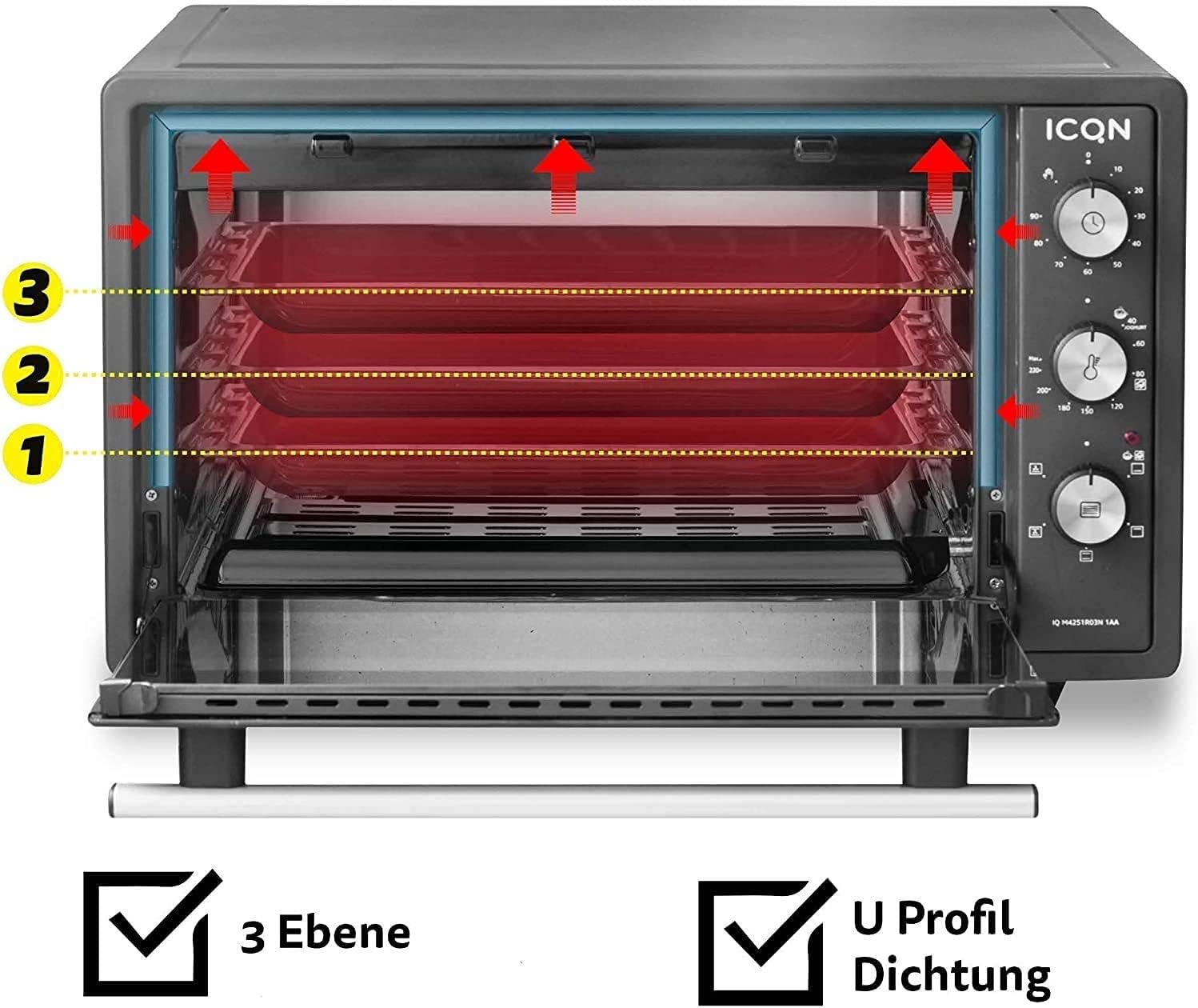
Figure 3.3: The oven interior showing three possible rack levels for flexible cooking.
4. Setup
4.1. Unpacking
- Carefully remove the oven and all accessories from the packaging.
- Remove any protective films, stickers, or packaging materials from the oven and its accessories.
- Inspect the appliance for any signs of damage. Do not use if damaged.
4.2. Placement
- Place the oven on a stable, flat, heat-resistant surface.
- Ensure adequate ventilation around the oven. Maintain a minimum clearance of 10 cm (4 inches) on all sides and above the oven to allow for proper heat dissipation.
- Do not place the oven near flammable materials such as curtains, tablecloths, or walls that are not heat-resistant.
- Ensure the power cord is not pinched or touching hot surfaces.
4.3. Initial Cleaning and First Use (Burn-Off)
- Before first use, wipe the interior and accessories with a damp cloth and mild detergent. Dry thoroughly.
- To eliminate any manufacturing odors, operate the oven empty for approximately 15 minutes.
- Plug the oven into a grounded electrical outlet.
- Set the temperature knob to 230°C.
- Set the function knob to Top and Bottom Heat with Convection.
- Set the timer knob to 15 minutes.
- A slight odor or smoke may be present during this initial burn-off; this is normal. Ensure the area is well-ventilated.
- After 15 minutes, turn the timer to "OFF" and unplug the oven. Allow it to cool completely before use.
5. Operating Instructions
The ICQN Mini Oven offers various functions for diverse cooking needs.
5.1. Control Knobs
- Top Knob (Timer): Sets the cooking time up to 90 minutes. Can also be set to continuous operation (stay-on function).
- Middle Knob (Temperature): Adjusts the temperature from 40°C to 230°C.
- Bottom Knob (Function Selector): Selects the desired cooking mode.
5.2. Cooking Functions
The oven features 5 primary cooking functions, plus defrost and yogurt functions:
- Top and Bottom Heat: Standard baking and roasting.
- Top Heat: Ideal for browning the top of dishes.
- Bottom Heat: Suitable for crisping bases or slow cooking.
- Convection (Fan-assisted): Circulates hot air for faster and more even cooking, ideal for large roasts or multiple trays.
- Top and Bottom Heat with Convection: Combines traditional heating with fan circulation for comprehensive cooking.
- Defrost Function: Gently thaws frozen food.
- Yogurt Function: Maintains a low, consistent temperature (around 40°C) for homemade yogurt preparation.
5.3. General Operation Steps
- Place the wire rack or baking tray at the desired level inside the oven. The oven has three rack levels.
- Place your food on the baking tray or in an oven-safe dish on the wire rack.
- Close the oven door securely.
- Select the desired cooking function using the bottom knob.
- Set the desired temperature using the middle knob (40°C - 230°C).
- Set the cooking time using the top timer knob. The oven will start heating. An indicator light will illuminate.
- When the set time expires, the oven will automatically turn off and a bell will sound. If using the continuous operation mode, manually turn the timer knob to "OFF" when cooking is complete.
- Carefully remove the cooked food using oven mitts and the handle tongs for the tray/rack.
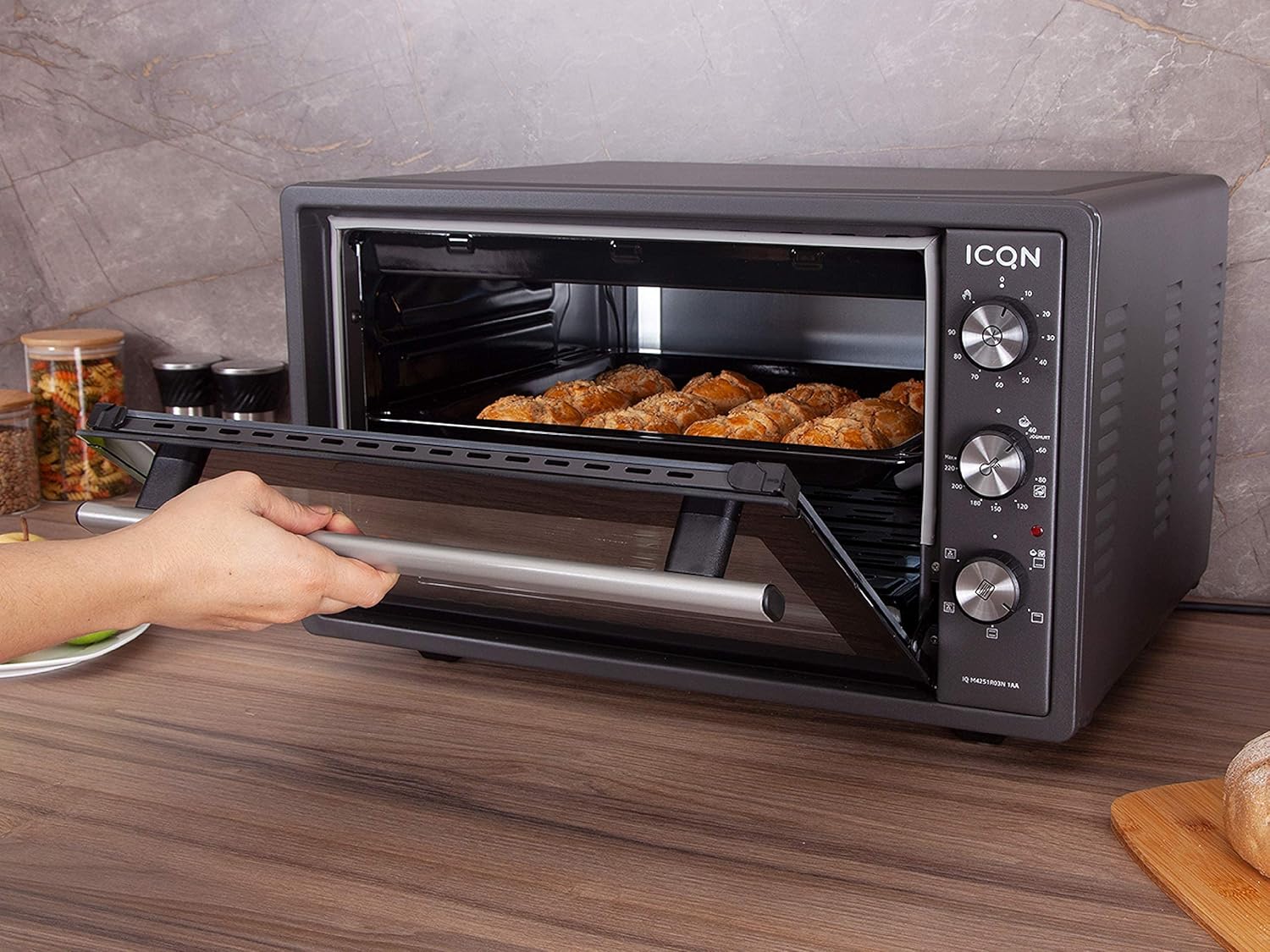
Figure 5.1: The mini oven in operation, showing food being baked inside.
6. Maintenance and Cleaning
Regular cleaning ensures the longevity and optimal performance of your oven. Always unplug the oven and allow it to cool completely before cleaning.
6.1. Interior Cleaning
- The oven interior is enamelled, making it easier to clean.
- Wipe the interior surfaces with a damp cloth and mild, non-abrasive detergent.
- For stubborn stains, a paste of baking soda and water can be applied, left for a few minutes, then wiped clean.
- Do not use abrasive cleaners, scouring pads, or metal utensils, as these can damage the enamel finish.
- Ensure the interior is completely dry before next use.
6.2. Exterior Cleaning
- Wipe the exterior surfaces with a soft, damp cloth.
- Do not use harsh chemicals or abrasive cleaners.
- Ensure no water enters the control panel or electrical components.
6.3. Double Glazed Door Cleaning
The double-glazed door can be disassembled for thorough cleaning between the glass panes.

Figure 6.1: Illustration showing how to disassemble the double-glazed door for cleaning the inner and outer glass panes.

Figure 6.2: Close-up view of the double-glazed door, highlighting the inner and outer glass components.
- Refer to Figure 6.1 and 6.2 for guidance.
- Carefully follow the instructions to remove the inner glass pane.
- Clean both glass panes with a glass cleaner or a damp cloth and mild detergent.
- Ensure the glass panes are completely dry before reassembling.
- Reassemble the door carefully, ensuring all components are correctly seated.
6.4. Accessory Cleaning
- The baking tray, wire rack, and handle tongs can be washed with warm soapy water.
- Rinse thoroughly and dry completely before storing or reusing.
7. Troubleshooting
If you encounter issues with your ICQN Mini Oven, please refer to the following table before contacting customer service.
| Problem | Possible Cause | Solution |
|---|---|---|
| Oven does not turn on. | Not plugged in; power outage; timer not set. | Ensure the oven is securely plugged into a working outlet. Check your household's circuit breaker. Set the timer knob to a desired cooking time or to the continuous "ON" position. |
| Food is not cooking evenly. | Incorrect rack position; uneven food placement; convection fan issue. | Adjust rack position for optimal heat distribution. Ensure food is spread evenly on the tray. If the convection fan is not working, contact customer service. |
| Oven produces smoke during operation. | Food residue burning; initial burn-off. | Clean the oven interior and accessories thoroughly. If it's the first use, this is normal (see Section 4.3). If smoke persists, unplug and contact customer service. |
| Timer does not work. | Timer knob malfunction. | Ensure the knob is turned past the 0 mark to activate the timer. If it still doesn't work, contact customer service. |
| Oven door does not close properly. | Obstruction; hinge issue. | Check for any obstructions preventing the door from closing. If hinges are damaged, contact customer service. |
If the problem persists after trying these solutions, please contact ICQN customer service. Do not attempt to repair the appliance yourself.
8. Specifications
| Brand | ICQN |
| Model Number | IQ M4251R03N 1AA |
| Capacity | 42 Liters |
| Power | 1300 Watts |
| Dimensions (L x W x H) | 53.2 x 45.85 x 35.35 cm |
| Weight | 13 Kilograms |
| Material | Enamelled interior, Double Glazed Door |
| Temperature Range | 40°C to 230°C |
| Timer | Up to 90 minutes, continuous operation |
| Special Features | Convection fan, 3 rack levels, U-profile seal for thermal performance, Yogurt function |
| Included Components | Baking tray, wire rack, handle tongs |

Figure 8.1: Dimensions of the ICQN Mini Oven (Length x Width x Height).
9. Warranty and Support
ICQN stands behind the quality of its products.
- Warranty: This product comes with a 2-year warranty from the date of purchase.
- Customer Service: Our service center, based in Germany, is available 24 hours a day, 365 days a year to assist you.
- Lifetime Support: You also benefit from lifetime support from our dedicated ICQN service center.
- For warranty claims or technical assistance, please contact ICQN customer support through the retailer or the official ICQN website.


