
Noma B07VHZFPR5
Contents
NOMA Medium Air Purifier User Manual
Model: B07VHZFPR5
1. Introduction
Thank you for choosing the NOMA Medium Air Purifier. This manual provides important information for the proper setup, operation, and maintenance of your air purifier. Please read this manual thoroughly before using the appliance and keep it for future reference.
The NOMA True HEPA Air Purifier is designed to improve indoor air quality by effectively removing allergens, dust, pet dander, and other airborne particles from rooms up to 200 square feet. Its advanced filtration system and intelligent features ensure a cleaner and healthier living environment.
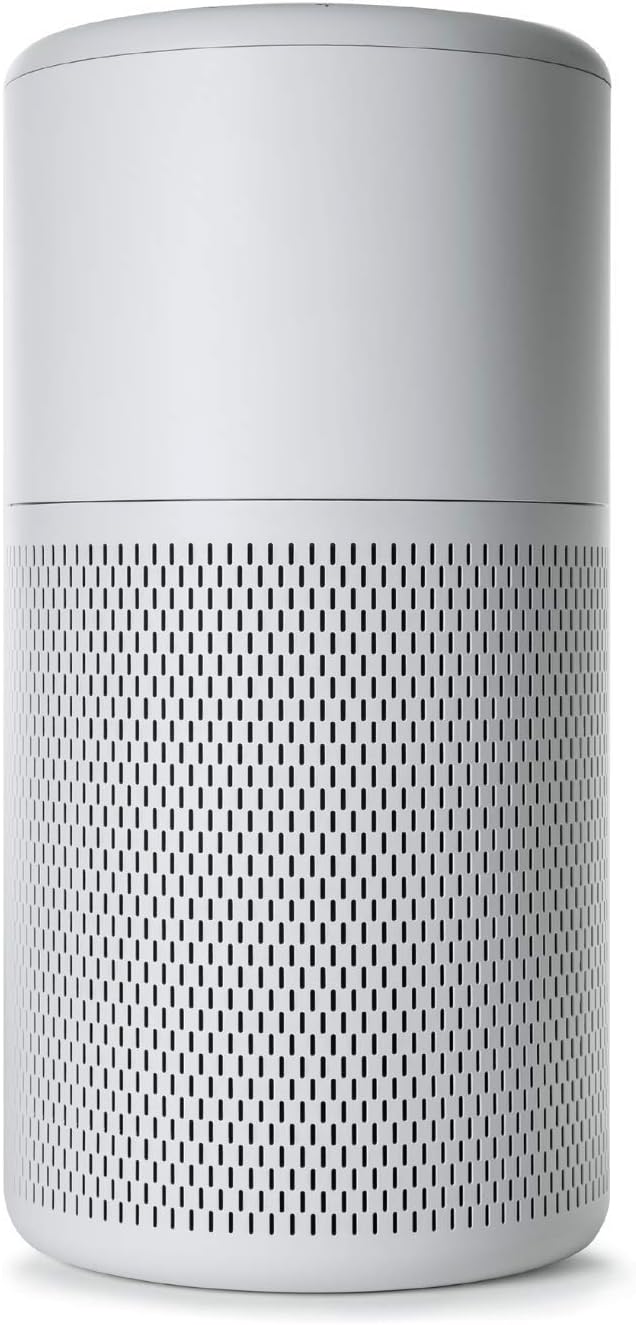
Image 1.1: Front view of the NOMA Medium Air Purifier, showcasing its cylindrical design and perforated lower section for air intake.
2. Important Safety Instructions
To reduce the risk of fire, electric shock, or injury, please observe the following safety precautions:
- Always unplug the air purifier before moving it, opening the grille, changing filters, or whenever the unit is not in use.
- Do not operate any fan with a damaged cord or plug. Discard fan or return to an authorized service facility for examination and/or repair.
- Do not run cord under carpeting. Do not cover cord with throw rugs, runners, or similar coverings. Do not route cord under furniture or appliances. Arrange cord away from traffic area and where it will not be tripped over.
- Use the air purifier only for its intended household use as described in this manual. Any other use not recommended by the manufacturer may cause fire, electric shock, or injury to persons.
- Do not use outdoors.
- Do not place the air purifier near heat sources such as radiators, heat registers, stoves, or other appliances that produce heat.
- Do not operate where aerosol (spray) products are being used or where oxygen is being administered.
- Do not allow foreign objects to enter ventilation or exhaust opening as this may cause an electric shock or damage the air purifier.
- Do not block air openings or place on a soft surface, such as a bed or sofa, where openings may become blocked.
- This appliance has a polarized plug (one blade is wider than the other). To reduce the risk of electric shock, this plug is intended to fit in a polarized outlet only one way. If the plug does not fit fully in the outlet, reverse the plug. If it still does not fit, contact a qualified electrician. Do not attempt to defeat this safety feature.
3. Product Features
The NOMA Medium Air Purifier is equipped with several key features designed for optimal air purification and user convenience:
- Air Quality Indicator Ring: A visual indicator that changes color to reflect the current air quality in your environment. Blue signifies excellent air quality, pink indicates average, and red denotes poor air quality.
- True HEPA Air Filtration: Captures 99.97% of airborne particles as small as 0.3 microns, including allergens, dust, and pet dander.
- Washable Pre-Filter: An additional pre-filter designed to trap larger particles like pet hair, extending the lifespan and performance of the True HEPA filter.
- Ionizer Switch: Activates an ionizer that releases negatively charged ions, which attach to positively charged particles, making them easier for the air purifier to capture.
- 3 Speed Settings: Offers low, medium, and high fan speeds to suit different purification needs. The low setting is particularly quiet for nighttime use.
- Auto-Shut Off Timer: Programmable timer settings for 2, 4, or 8 hours, allowing for convenient operation and energy saving.
- Easy Touch Technology: Features a "Secret-Until-Lit" control panel where lights are visible when active and disappear when off, providing a sleek design. The control panel lights are also dimmable.
- Clean Air Delivery Rate (CADR): Rated at 130 cubic feet per minute, ensuring efficient air purification for rooms up to 200 square feet.

Image 3.1: Overview of the NOMA Air Purifier's key features, including Clean Air Delivery Rate, True HEPA Filtration, 3 Speed Fan, Ionizer Switch, Indicator Ring, and Washable Pre-Filter.

Image 3.2: The NOMA Air Purifier positioned in a living room, illustrating its compact size and its Clean Air Delivery Rate (CADR) of 130 cubic feet per minute.
4. Setup and Installation
Follow these steps to set up your NOMA Medium Air Purifier:
- Unpack the Unit: Carefully remove the air purifier from its packaging. Retain packaging materials for future storage or transport.
- Remove Filter Packaging: Before first use, open the bottom cover of the air purifier and remove the True HEPA filter and washable pre-filter from their protective plastic packaging.
- Install Filters: Place the True HEPA filter back into the unit, ensuring it is seated correctly. Then, place the washable pre-filter over the HEPA filter. Close the bottom cover securely.
- Placement: Place the air purifier on a firm, level surface. Ensure there is at least 6 inches (15 cm) of clear space around all sides of the unit for proper air circulation. Avoid placing it directly against walls or furniture.
- Connect Power: Plug the power cord into a standard 120V AC electrical outlet.

Image 4.1: Hands demonstrating the installation of the washable pre-filter over the True HEPA filter, ensuring proper fit within the air purifier.
5. Operating Instructions
Familiarize yourself with the control panel and its functions:

Image 5.1: Top view of the NOMA Air Purifier's control panel, showing the illuminated Air Quality Indicator Ring and touch controls.
5.1 Power On/Off
- To turn the unit ON, touch the Power button (⏻) on the control panel. The unit will start in the default fan speed setting.
- To turn the unit OFF, touch the Power button again.
5.2 Adjusting Fan Speed
- Touch the Fan Speed button (☰) repeatedly to cycle through the available fan speeds: Low, Medium, High.
- The selected speed will be indicated by the corresponding light on the control panel.
- For quiet operation, especially during sleep, select the Low speed setting.
5.3 Ionizer Function
- The ionizer helps to trap fine particles by releasing negative ions.
- To activate the ionizer, locate the physical Ionizer switch on the top rear of the unit and slide it to the "ON" position.
- To deactivate, slide the switch to the "OFF" position.

Image 5.2: Close-up view of the Ionizer switch located on the top surface of the air purifier, showing its ON/OFF positions.
5.4 Setting the Timer
- To set the auto-shut off timer, touch the Timer button (⏱) repeatedly.
- You can select 2 hours, 4 hours, or 8 hours. The corresponding indicator light will illuminate.
- The unit will automatically turn off after the selected time period.
- To cancel the timer, cycle through the options until no timer indicator light is illuminated.
5.5 Air Quality Indicator Ring
- The LED ring on the top of the unit provides real-time air quality feedback:
- Blue: Excellent air quality.
- Pink: Average air quality.
- Red: Poor air quality.
5.6 Dimmable Control Panel Lights
- To dim the control panel lights for nighttime use, touch the Dimmer button (🔆).
- Touch it again to return to full brightness.
6. Maintenance and Filter Replacement
Regular maintenance ensures optimal performance and extends the life of your air purifier.
6.1 Cleaning the Washable Pre-Filter
- The washable pre-filter should be cleaned regularly, approximately every 2-4 weeks, depending on air quality and usage.
- Steps:
- Unplug the air purifier from the power outlet.
- Turn the unit upside down and twist the bottom cover counter-clockwise to unlock and remove it.
- Carefully remove the washable pre-filter.
- Wash the pre-filter under cool running water. You may use a mild detergent if necessary.
- Allow the pre-filter to air dry completely before reinstalling. Do not use a dryer or direct heat.
- Reinstall the dry pre-filter and True HEPA filter, then secure the bottom cover.
6.2 Replacing the True HEPA Filter
- The True HEPA filter cannot be washed and must be replaced. The filter replacement indicator light on the control panel will illuminate when it's time to replace the filter (typically every 6-8 months, depending on usage).
- Steps:
- Unplug the air purifier from the power outlet.
- Turn the unit upside down and twist the bottom cover counter-clockwise to unlock and remove it.
- Remove the old True HEPA filter (and washable pre-filter if still attached).
- Dispose of the old filter responsibly.
- Unpack the new True HEPA filter and insert it into the unit.
- Reinstall the washable pre-filter over the new HEPA filter.
- Secure the bottom cover by twisting it clockwise until locked.
- Plug in the unit. With the unit powered on, press and hold the Filter Reset button (often combined with the Timer or Fan Speed button, refer to control panel icons) for 3-5 seconds until the indicator light turns off.
- Replacement filters can be purchased from authorized NOMA retailers or online.
6.3 General Cleaning
- Wipe the exterior of the air purifier with a soft, dry cloth.
- Do not use abrasive cleaners, waxes, or solvents.
- Do not immerse the unit in water or any other liquid.
7. Troubleshooting Guide
If you experience issues with your NOMA Medium Air Purifier, please refer to the following common problems and solutions:
| Problem | Possible Cause | Solution |
|---|---|---|
| Unit does not turn on. |
|
|
| Airflow is weak or noise increases. |
|
|
| Air quality indicator always shows red/pink. |
|
|
| Ionizer not working. |
|
|
If the problem persists after trying these solutions, please contact NOMA customer support.
8. Product Specifications
| Feature | Specification |
|---|---|
| Brand | NOMA |
| Model | B07VHZFPR5 |
| Colour | White |
| Product Dimensions (L x W x H) | 22.86 x 22.86 x 48.26 cm (9 x 9 x 19 inches) |
| Item Weight | 3.33 kg (7.34 lbs) |
| Power Source | AC |
| Power/Wattage | 22 watts |
| Control Method | Touch Control |
| Filter Type | True HEPA, Washable Pre-Filter |
| Particle Retention Size | 0.3 Micron |
| Recommended Floor Area | Up to 200 Square Feet |
| Clean Air Delivery Rate (CADR) | 130 cubic feet per minute |
9. Warranty and Customer Support
NOMA products are manufactured to high-quality standards. For specific warranty information, please refer to the warranty card included with your purchase or visit the official NOMA website. Keep your purchase receipt as proof of purchase for warranty claims.
For technical assistance, troubleshooting beyond this guide, or to inquire about replacement parts, please contact NOMA customer support:
- Website: www.noma.ca (Example link, actual link may vary)
- Phone: Refer to your product packaging or NOMA website for regional contact numbers.
When contacting support, please have your product model number (B07VHZFPR5) and purchase date available.
Ask a question about this manual
Ask about setup, troubleshooting, compatibility, parts, safety, or missing instructions. Manuals+ will review the question and use this page’s manual context to help answer it.