
Bewinner Bewinnerqcro60k8g1-02
Bewinner Mini FHD 1080P Media Player User Manual
Model: Bewinnerqcro60k8g1-02
Introduction
This manual provides detailed instructions for the setup, operation, and maintenance of your Bewinner Mini FHD 1080P Media Player. Please read this manual thoroughly before using the device to ensure proper functionality and to maximize your viewing experience. This compact media player is designed to support a wide range of high-definition video and audio formats, offering versatile connectivity options for your home entertainment system.
Safety Warnings
 To avoid suffocation hazard, keep this plastic bag away from babies and children.
This warning is crucial for safe handling of packaging materials. Always dispose of plastic bags properly or store them out of reach of infants and young children.
- Do not expose the device to rain or moisture.
- Do not disassemble the device. Refer all servicing to qualified personnel.
- Ensure proper ventilation around the device to prevent overheating.
- Use only the provided power adapter.
- Keep the device away from direct sunlight, heat sources, and extreme temperatures.
- Avoid dropping or subjecting the device to strong impacts.
Product Overview
The Bewinner Mini FHD 1080P Media Player is a compact and versatile device designed for playing various media files on your television or display. It supports a wide array of video, audio, and image formats, and features multiple connectivity options for external storage and display.

Figure 1: Top view of the Bewinner Mini FHD 1080P Media Player, showing its compact design and various supported formats listed on the top panel.
Key Features:
- Strong Compatibility: Supports all mainstream high-definition movies with perfect 1080p decoding and encoding up to 100 Mbps.
- Versatile Storage Support: Compatible with USB drives, portable hard drives (up to 2.5T/3.5 inch), and SD cards.
- Compact and Aesthetic Design: Small footprint, ideal for placement next to your TV.
- Rich Video Output Interfaces: Features real HDMI 1.3 digital interface, YUV component video output, and AV composite video output.
- Extensive Video Decoding: Supports RM/RMVB (real8/9/10) up to 1920x1080, H.264 (MKV, MOV, AVI, M2TS, TP, TRP, IFO, ISO) at 1080P, and WMV9/VC-1 at 1080P.
- Multi-language OSD & Subtitle Support: Offers multi-language On-Screen Display (OSD) and supports external SRT subtitles with adjustable size, position, and color.
- Breakpoint Playback: Resumes playback from where you left off.
- Super Remote Control Reception: Effective range up to 5 meters, with a special long-range infrared remote control for reliable operation up to 12 meters without interference.
- High-Quality Power Supply: Includes a 5.4V/2A power supply capable of powering an external 2.5-inch 1TB hard drive.
Setup
Follow these steps to set up your Bewinner Mini FHD 1080P Media Player:
1. Connecting to Power
- Locate the DC 5.4V/2A power input port on the media player.
- Connect the provided power adapter to this port.
- Plug the power adapter into a suitable electrical outlet (AC 100-240V 50/60Hz).
- The power indicator light on the device should illuminate.
2. Connecting to Your TV/Display
The media player offers multiple video output options. Choose the one that best suits your display device.
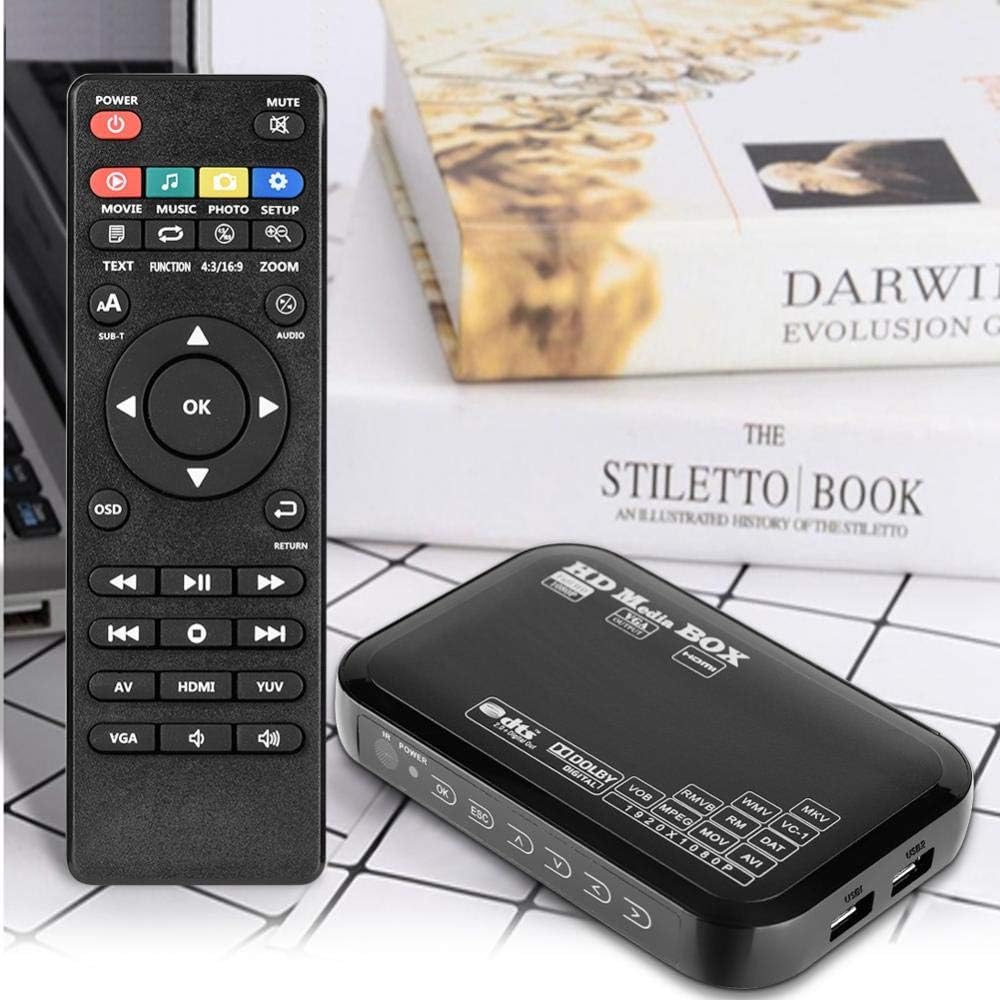
Figure 2: The media player connected to a television, demonstrating its use in a home entertainment setup.
- HDMI Connection (Recommended for HD):
- Connect one end of an HDMI cable (not included) to the HDMI 1.3 HD Interface port on the media player.
- Connect the other end of the HDMI cable to an HDMI input port on your TV or display.
- Select the corresponding HDMI input on your TV using its remote control.
- AV Composite Video Connection:
- Connect the AV cable (included) to the AV output ports on the media player (Yellow for video, Red for right audio, White for left audio).
- Connect the other end of the AV cable to the corresponding AV input ports on your TV.
- Select the corresponding AV input on your TV.
- VGA Connection:
- Connect a VGA cable (not included) to the VGA output port on the media player.
- Connect the other end of the VGA cable to a VGA input port on your display.
- Note: VGA only transmits video. You will need separate audio cables for sound if using VGA.

Figure 3: Detailed view of the media player's input and output ports, including power, AV, HDMI, VGA, and USB connections.
3. Inserting Storage Media
The media player supports various external storage devices:
- USB Drives/Hard Drives: Insert your USB flash drive or external USB hard drive into one of the USB ports on the side of the player.
- SD/MMC Cards: Insert your SD or MMC card into the SD Card Slot.

Figure 4: The compact size of the media player, easily held in one hand, highlighting its portability.
Operating Instructions
Once the device is connected and powered on, you can navigate its functions using the included remote control.
Remote Control Functions:

Figure 5: The remote control for the media player, showing various buttons for navigation and media playback.
- Power Button: Turns the device on/off.
- Navigation Buttons (Up, Down, Left, Right, OK): Used to navigate menus and select options.
- Return/ESC: Go back to the previous menu or exit current function.
- Volume +/-: Adjust audio volume.
- Play/Pause, Stop, Fast Forward, Rewind: Standard media playback controls.
- Movie, Music, Photo, Setup: Direct access buttons for different media types and settings.
- OSD: Access On-Screen Display settings.
- SUB-T: Subtitle control.
- AV/HDMI/YUV: Select video output mode.
- MUTE: Mute/unmute audio.
The remote control has a super reception unit with an effective range of up to 5 meters, and can operate up to 12 meters without interference under optimal conditions.
Media Playback:
After connecting your storage device, the player will typically display a menu allowing you to browse files. Use the navigation buttons on the remote to select the desired media type (Movie, Music, Photo) and then browse your files.
- Supported Video Formats: MKV, AVI, TS/TP, M2TS, RM/RMVB, MOV, VOB, FLV, WMV.
- Supported Audio Formats: MP3, OGG, WMA, APE.
- Supported Image Formats: JPEG, GIF, PNG, BMP.
- Supported Encoding: DTS, AC3, FLAC, AAC.
- Subtitle Support: Supports external SRT, SSA, SUB subtitle formats. You can adjust subtitle size, position, and color via the OSD menu.
- Breakpoint Playback: The device supports resuming playback from the last stopped point.
Maintenance
Proper maintenance ensures the longevity and optimal performance of your media player.
- Cleaning: Use a soft, dry cloth to clean the exterior of the device. Do not use liquid cleaners or aerosols.
- Storage: When not in use for extended periods, store the device in a cool, dry place away from direct sunlight and extreme temperatures.
- Ventilation: Ensure the device has adequate airflow around it. Do not block ventilation openings.
- Power Off: Always power off the device properly before disconnecting it from power or storage media.
Troubleshooting
If you encounter issues with your media player, refer to the following common problems and solutions:
| Problem | Possible Cause / Solution |
|---|---|
| No power / Device does not turn on. |
|
| No video output. |
|
| No audio output. |
|
| Remote control is unresponsive or slow. |
|
| Cannot read USB drive/SD card. |
|
| Playback issues (stuttering, unsupported format). |
|
Specifications
| Feature | Detail |
|---|---|
| Product Dimensions | 14.5 x 9.5 x 2 cm; 390 grams |
| Manufacturer | Bewinner |
| Model Number | Bewinnerqcro60k8g1-02 |
| Connectivity Technology | HDMI, USB |
| Connector Type | Component |
| Special Feature | Portable |
| Resolution | 1080p |
| Supported Internet Services | Spotify (Note: This might be a misinterpretation from the source data, as a simple media player typically doesn't support streaming services directly. It's included as per source.) |
| Controller Type | Remote Control |
| Form Factor | TV Box |
| Color | EU (likely refers to power plug type) |
| Compatible Devices | Television |
| Power Input | AC 100-240V 50/60Hz |
| Power Output | DC 5.4V / 2A |
| Operating Temperature | -5°C to +50°C |
| TV System | PAL/NTSC |
| Video Output | 1.0+/-0.2Vp-p, 75Ω |
| Audio Output | 2.0 +/- 0.2V (RMS) |
| Signal-to-Noise Ratio | ≥ 80dB |
| Storage Media Support | USB Hard Disk, USB Disk, SD/MMC/MS Card, SDHC |
| Hard Disk Format Support | FAT16 / FAT32 / NTFS |
Note: Specifications are subject to change without notice.
Warranty and Support
Specific warranty information for the Bewinner Mini FHD 1080P Media Player is not provided within this manual. For details regarding warranty coverage, returns, or technical support, please refer to the product packaging, the retailer's website where you purchased the device, or contact Bewinner customer service directly.
You may also find additional support resources, FAQs, and updated drivers (if applicable) on the official Bewinner website.
For general inquiries or assistance, please visit the Bewinner brand page on Amazon.sa.
Ask a question about this manual
Ask about setup, troubleshooting, compatibility, parts, safety, or missing instructions. Manuals+ will review the question and use this page’s manual context to help answer it.