
1. Product Overview
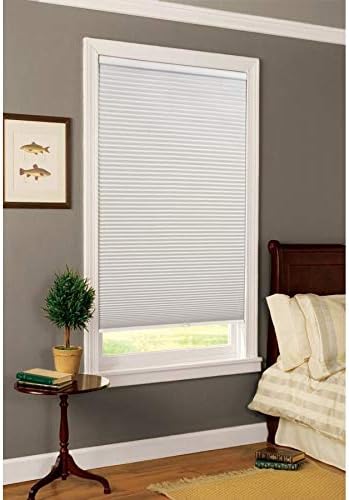
The allen + roth White Blackout Cordless Cellular Shade is designed to provide complete privacy and block outside light, making it ideal for bedrooms and media rooms. Its single-cell, durable non-woven polyester fabric offers additional insulation against temperature fluctuations. The cordless design ensures safe operation for households with children and pets, allowing for easy adjustment without cords.
2. Safety Information
This cellular shade features a cordless design, which significantly enhances safety by eliminating hazardous cords. This design is particularly beneficial for homes with young children and pets, reducing the risk of entanglement and strangulation. Always ensure the shade is installed correctly and operates smoothly to maintain its safety features.
3. Package Contents
Verify that all components are present before beginning installation:
- Cordless Cellular Shade
- Mounting Brackets
- Installation Hardware (screws, anchors)
4. Setup and Installation
The shade can be installed either inside or outside the window frame. Hardware is provided for installation. Proper measurement and secure mounting are crucial for optimal performance and safety.
4.1. Preparation
- Measure: Carefully measure your window opening to ensure the shade fits correctly.
- Tools Required: Drill, screwdriver, measuring tape, pencil.
4.2. Mounting Brackets
Position the mounting brackets according to your desired installation (inside or outside mount). Mark the screw locations with a pencil. Drill pilot holes if necessary, then secure the brackets using the provided screws. Ensure brackets are level and securely fastened. It is recommended to use appropriate screws for your wall material to ensure a strong hold.
4.3. Attaching the Shade
Align the headrail of the cellular shade with the installed mounting brackets. Insert the top flange of the headrail into the bracket. Gently lift the headrail slightly and push upwards to snap the bottom part of the headrail into the bracket's groove. Ensure both ends of the shade's headrail are securely clicked into place within the brackets.
5. Operating Instructions
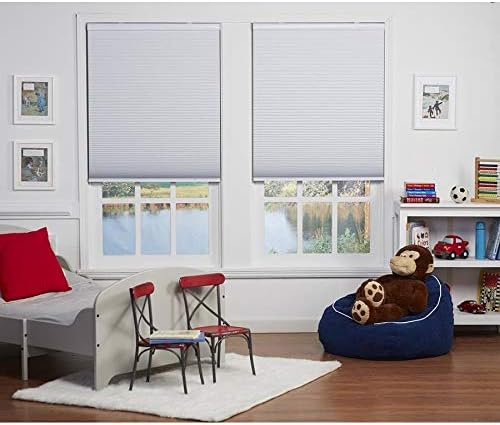
The cordless design allows for simple and smooth operation.
- To Lower the Shade: Grasp the bottom rail of the shade firmly with both hands. Gently pull the shade downwards to the desired position.
- To Raise the Shade: Grasp the bottom rail of the shade firmly with both hands. Gently push the shade upwards to the desired position. The shade will hold its position once released.

6. Maintenance
To maintain the appearance and functionality of your cellular shade, follow these care instructions:
- Cleaning: Spot clean only. Use a soft, damp cloth with mild soap and water for any stains. Blot gently and avoid rubbing vigorously.
- Dusting: Regularly dust the shade with a soft brush or vacuum with a brush attachment on a low setting.

7. Troubleshooting
If you encounter issues with your cellular shade, consider the following:
- Shade Does Not Stay Up/Down: Ensure the shade's internal spring mechanism is functioning correctly. If the shade slips, try raising it fully and then lowering it slowly to reset the mechanism.
- Difficulty Raising/Lowering: Check for any obstructions in the window frame or along the shade's path. Ensure the bottom rail is grasped evenly when operating.
- Shade Appears Uneven: Verify that the mounting brackets are level and securely installed. An uneven installation can cause the shade to hang improperly.
- Mounting Screws Stripping: If mounting screws strip during installation, replace them with higher-quality screws suitable for your wall material to ensure a secure and lasting installation.
8. Specifications
| Feature | Detail |
|---|---|
| Brand | allen + roth |
| Model Number | 70750 |
| Color | White |
| Material | Polyester |
| Product Dimensions (L x W) | 64"L x 39"W |
| Size | 39"W x 64"H |
| Operation Mode | Manual |
| Closure Type | Cordless |
| Additional Features | Blackout, Cordless |
| Mounting Type | Outside Mount (also suitable for Inside Mount) |
| Product Care Instructions | Spot Clean Only |
| UPC | 354838497885 |
| ASIN | B07VG13JPX |
9. Warranty and Support
For specific warranty information or technical support, please refer to the documentation included with your purchase or contact allen + roth customer service directly. Keep your proof of purchase for any warranty claims.