
1. Introduction
The WFCO WF-8540-S Power Center is designed to provide a clean, constant 13.6 VDC nominal output, ensuring reliable operation for your electronics and appliances. This 40 Amp unit features automatic three-stage charging to extend battery life and is engineered to comply with FCC Class B standards, preventing interference with other electronic devices. This manual provides essential information for the safe and efficient installation, operation, and maintenance of your power center.
2. Key Features
- Amperage: 40 Amp output for robust power delivery.
- Nominal Output: Consistent 13.6 VDC for stable operation.
- Automatic Three-Stage Charging: Extends battery life with intelligent charging modes.
- Output Voltage Modes:
- 13.2 VDC range "float" mode
- 13.6 VDC range "absorption" mode
- 14.4 VDC range "bulk" charge mode
- DC Circuit Connection: Utilizes Screw Terminals for secure and straightforward wiring.
- FCC Class B Compliant: Designed to minimize interference with televisions, radios, and other signals.
- Cooling Fan: Operates only when needed, ensuring quiet performance.
- Universal Fit: Suitable for a wide range of applications.
3. Installation Instructions
Safety First: Before beginning installation, ensure all power sources are disconnected. Consult a qualified electrician if you are unsure about any steps.
- Mounting: Select a dry, well-ventilated location for the power center. Ensure adequate clearance for air circulation and access to terminals. Secure the unit firmly using appropriate fasteners.
- AC Wiring: Connect the AC input to a suitable 120 VAC power source. The WF-8540-S is designed for a 30 Amp main AC breaker. Follow all local electrical codes.
- DC Wiring (Screw Terminals):
- Identify the positive (+) and negative (-) DC output terminals.
- Connect the DC loads (e.g., lights, pumps, appliances) to the appropriate DC branch circuits. The unit supports up to thirteen DC branch circuits, including three 30 Amp circuits.
- Use appropriately sized wire for each circuit.
- Securely fasten wires under the screw terminals, ensuring no loose strands.
- The unit features LED lights that illuminate to indicate open circuits, aiding in troubleshooting.
- Battery Connection: Connect the power center to your 12V battery bank. Ensure correct polarity (positive to positive, negative to negative). The power center will automatically manage battery charging.
- Final Check: Double-check all connections for tightness and correct polarity before restoring power.
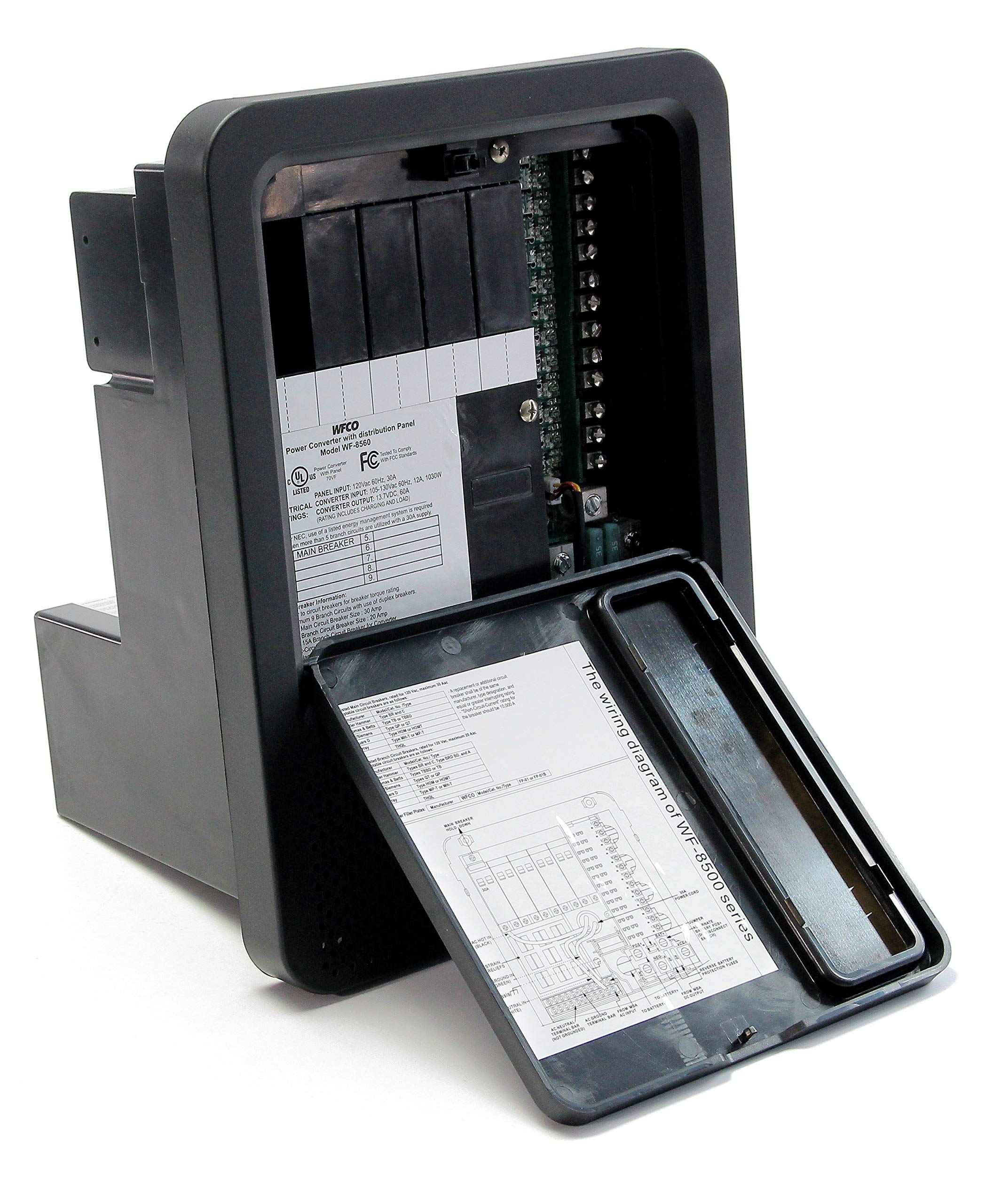
Figure 1: WFCO WF-8540-S Power Center. This image shows the front view of the power center, highlighting the screw terminals for DC connections and the overall compact design.
4. Operation
Once properly installed and connected, the WF-8540-S Power Center operates automatically to provide stable DC power and manage battery charging.
4.1. Power Output
The unit provides a continuous 13.6 VDC nominal output to power your 12V appliances and electronics directly from the AC shore power. When AC power is disconnected, the unit will draw power from the connected battery.
4.2. Automatic Three-Stage Battery Charging
The power center automatically transitions between three charging modes to optimize battery health and longevity:
- Bulk Mode (14.4 VDC): This mode rapidly recharges a depleted battery, delivering maximum current until the battery reaches approximately 90% charge.
- Absorption Mode (13.6 VDC): Once the battery is mostly charged, the voltage drops slightly to safely complete the charging process, bringing the battery to 100% without overcharging.
- Float Mode (13.2 VDC): After the battery is fully charged, the power center maintains a lower voltage to keep the battery topped off and prevent self-discharge, ensuring it's always ready for use.
4.3. Cooling Fan Operation
The internal cooling fan activates only when necessary to dissipate heat, ensuring quiet operation during periods of low load or cooler ambient temperatures.
5. Maintenance
Regular maintenance ensures optimal performance and longevity of your WF-8540-S Power Center.
- Periodic Inspection: Annually inspect all wiring connections for tightness and signs of corrosion. Loose connections can lead to overheating and poor performance.
- Cleaning: Keep the power center's ventilation openings clear of dust and debris to ensure proper airflow for cooling. Use a soft, dry cloth for exterior cleaning. Do not use liquid cleaners.
- Battery Check: Regularly check your battery's water levels (if applicable) and terminal condition. Ensure terminals are clean and free of corrosion.
- Fuse/Breaker Check: If a DC circuit is not functioning, check the corresponding fuse or circuit breaker on the power center. The LED indicators will help identify open circuits. Replace fuses with ones of the same type and rating.
6. Troubleshooting
This section provides solutions to common issues you might encounter with your power center.
| Problem | Possible Cause | Solution |
|---|---|---|
| No DC power output |
|
|
| Battery not charging |
|
|
| Cooling fan runs constantly or loudly |
|
|
7. Specifications
| Feature | Detail |
|---|---|
| Model | WF-8540-S |
| Manufacturer | WFCO |
| Amperage | 40 Amp |
| Nominal Output Voltage | 13.6 VDC |
| Charging Modes | 14.4 VDC (Bulk), 13.6 VDC (Absorption), 13.2 VDC (Float) |
| DC Circuit Connection | Screw Terminals |
| Compliance | FCC Class B |
| Item Weight | 7.43 pounds |
| Package Dimensions | 14.3 x 10.2 x 9.5 inches |
8. Warranty and Support
For specific warranty information, please refer to the documentation included with your product or visit the official WFCO website. For technical support, troubleshooting assistance, or to inquire about replacement parts, please contact WFCO customer service.
WFCO Official Website: www.wfcoelectronics.com
Note: Product specifications and features are subject to change without notice.


