
1. Introduction
This manual provides essential information for the safe and effective use of your LORDONE 2-Pack 3600mAh P108 Lithium-Ion Batteries. These batteries are designed as replacements and compatible power sources for a wide range of Ryobi 18V ONE+ cordless tools.
Please read this manual thoroughly before using the batteries to ensure proper operation, maximize battery life, and prevent potential hazards.

Image 1.1: Two LORDONE 3600mAh P108 Lithium-Ion batteries.
2. Important Safety Instructions
WARNING: Read all safety warnings and instructions. Failure to follow the warnings and instructions may result in electric shock, fire, and/or serious injury.
- Charge Properly: Always use a compatible Ryobi 18V original charger. Do not use non-approved chargers.
- Avoid Short Circuits: Do not short-circuit the battery terminals. Keep batteries away from metal objects like keys, coins, paper clips, and jewelry.
- Do Not Incinerate: Do not dispose of batteries in fire. They may explode.
- Protect from Water: Do not expose batteries to water or rain.
- Temperature Control: Do not charge or store batteries in extreme temperatures. Recommended storage temperature is between 0°C and 40°C (32°F and 104°F).
- Handle with Care: Do not drop, puncture, or disassemble the battery. If the battery casing is damaged, do not use it.
- Recycle Responsibly: Dispose of used batteries according to local regulations. Do not discard with household waste.
- Children Safety: Keep batteries out of reach of children.

Image 2.1: Built-in safety features of the LORDONE P108 battery.
3. Setup and Initial Charge
Your LORDONE P108 batteries are shipped with a partial charge for safety. It is recommended to fully charge them before first use.
3.1 Charging the Battery
- Select a Charger: Use an original Ryobi 18V battery charger. The LORDONE P108 batteries are fully compatible with these chargers.
- Insert Battery: Slide the battery firmly into the charger until it clicks into place.
- Monitor Charging: Refer to your charger's indicator lights for charging status. The battery's built-in LED indicator will also show its charge level.
- Full Charge: Once fully charged, remove the battery from the charger. Do not leave batteries on the charger indefinitely.

Image 3.1: LORDONE P108 battery compatibility with Ryobi 18V chargers.
4. Operating Instructions
4.1 Installing the Battery
- Ensure the power tool is turned off.
- Align the battery with the battery port on your Ryobi 18V ONE+ tool.
- Slide the battery into the tool until you hear a click, indicating it is securely latched.
4.2 Removing the Battery
- Ensure the power tool is turned off.
- Press the battery release button (refer to Image 4.1 for location).
- Slide the battery out of the tool.
4.3 Power Indicator
The LORDONE P108 battery features a built-in LED power indicator to display the remaining charge level. Press the button next to the indicator lights to check the status:
- 4 Bars: 75-100% charge
- 3 Bars: 50-75% charge
- 2 Bars: 25-50% charge
- 1 Bar: 0-25% charge (recharge soon)

Image 4.1: Battery features including connector, connect button, and LED indicator.
4.4 Compatibility
The LORDONE P108 batteries are compatible with a wide range of Ryobi 18V ONE+ tools and battery models, including but not limited to:
- Battery Models: P102, P103, P104, P105, P107, P108, P109, P190, P191, P122, BPL-1815, BPL-1820G, BPL18151, BPL1820.
- Tool Models: BID-1801M, BID-180L, BID1821, BIW180, CAD-180L, CAG-180M, CAP-1801M, CCC-1801M, CCC-180L, CCD-1801, CCG-1801M, CCG-180L, CCS-1801/DM, CCS-1801/LM, CCS-1801D, CCS-1801LM, CCW-180L, CDA-18021B, CDA1802, CDA18021B, CDA18022B, CDA1802M, CDC-181M, CID-1802M, CID-1803L, CID-1803M, CID-182L, CID-183L, CFA-180M, CFP-180FM, CFP-180S, CFP-180SM, CHD-1801M, CHI-1802M, CHP-1802M, CHV-180L, CHV-18WDM, CJS-180L, CJS-180LM, CJSP-1801QEOM, CJSP-180QEO, OBL-1801, OGS-1820, OHT-1850, OLT-1830, OPS-1820, ORS-1801, OWD-1801M, P200, P201, P203, P204, P206, P2060, P208B, P210, P211, P220, P221, P230, P234G, P236, P240, P241, P246, P271, P2000, P2002, P2100, P2102, P2105, P2400, P250, P2500, P2600, P2603, P300, P301, P310, P3200, P3300, P3310, P340, P400, P410, P420, P430, P500, P501, P506, P510, P514, P520, P521, P522, P530, P540, P570.
Note:
- These batteries are not compatible with Ryobi cordless saw P551, Ryobi 18V radio, lamps (e.g., Ryobi P742, Ryobi P746).
- Always ensure the battery is fully seated and latched in the tool before operation.
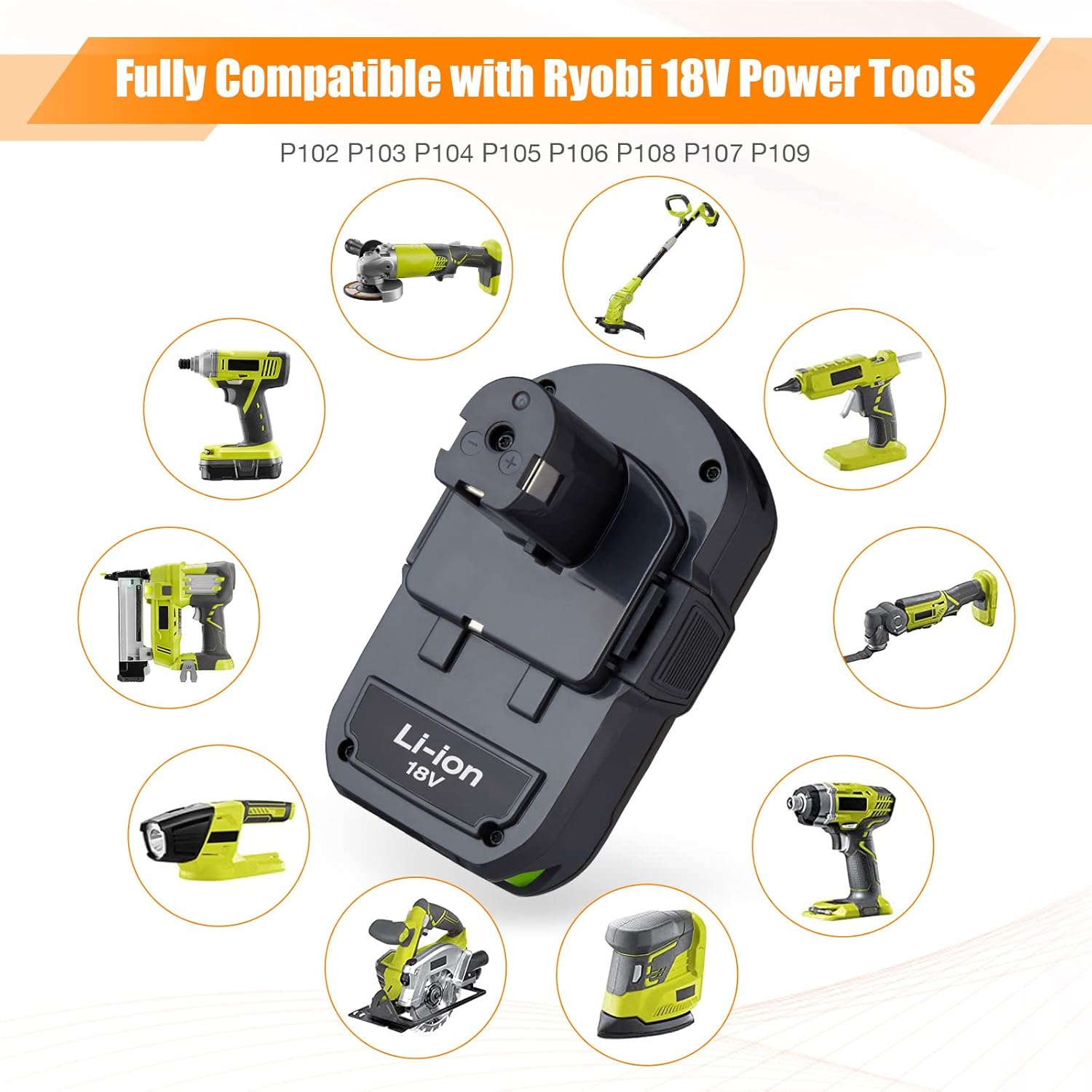
Image 4.2: LORDONE P108 battery compatibility with Ryobi 18V power tools.
5. Maintenance and Storage
5.1 General Care
- Keep the battery clean and dry. Wipe with a soft, dry cloth if necessary.
- Inspect the battery for any signs of damage before each use. Do not use a damaged battery.
- Avoid exposing the battery to direct sunlight or heat sources.
5.2 Storage
- Store batteries in a cool, dry place, away from moisture and direct heat.
- For long-term storage, charge the battery to approximately 50% capacity. Fully discharged batteries can be damaged if stored for extended periods.
- Do not store batteries with metal objects that could short-circuit the terminals.
6. Troubleshooting
If you encounter issues with your LORDONE P108 battery, refer to the following common problems and solutions:
| Problem | Possible Cause | Solution |
|---|---|---|
| Battery not charging | Not properly seated in charger; faulty charger; battery too hot/cold; damaged battery. | Ensure battery is fully inserted. Try a different compatible charger. Allow battery to reach room temperature. Inspect for damage; discontinue use if damaged. |
| Battery not powering tool | Battery not fully charged; not properly seated in tool; tool malfunction; incompatible tool. | Check charge level with LED indicator and recharge if needed. Ensure battery is fully inserted. Test with another battery or tool. Verify tool compatibility (see Section 4.4). |
| Reduced run time | Battery not fully charged; battery nearing end of life; extreme operating conditions. | Ensure full charge before use. Battery capacity naturally degrades over time. Avoid using in very hot or cold environments. |
| Battery gets hot during use/charging | Normal operation under heavy load; overcharging; internal fault. | Some warmth is normal. If excessively hot, discontinue use and allow to cool. Ensure charger is compatible. If problem persists, discontinue use and contact support. |
7. Product Specifications
- Model: P108
- Battery Type: Lithium-Ion (Li-ion)
- Voltage: 18V
- Capacity: 3600mAh (3.6Ah)
- Quantity: 2 Batteries per package
- Item Weight: Approximately 1.79 pounds (per pack of 2)
- Package Dimensions: 11.14 x 4.09 x 3.5 inches
- Compatibility: Designed for Ryobi 18V ONE+ System Cordless Tools and Original Chargers.

Image 7.1: Key specifications of the LORDONE P108 battery.
8. Warranty and Customer Support
8.1 Warranty Information
LORDONE provides a 12-month warranty for these batteries from the date of purchase. Additionally, a 30-day money-back guarantee is offered. This warranty covers defects in materials and workmanship under normal use.
The warranty does not cover damage caused by misuse, abuse, unauthorized modification, improper storage, or natural wear and tear.
8.2 Customer Support
For any questions, concerns, or warranty claims, please contact LORDONE customer service through the retailer where the product was purchased. Please have your purchase details and product model number (P108) ready when contacting support.