1. Important Safety Instructions
Please read all instructions carefully before using the V-Guard VIC 10 V3 Induction Cooktop. Retain this manual for future reference. Failure to follow these instructions may result in electric shock, fire, or serious injury.
- Electrical Safety: Ensure the power supply matches the cooktop's requirements. Do not use damaged cords or plugs. Avoid operating with wet hands.
- Placement: Place the cooktop on a stable, flat, heat-resistant surface. Ensure adequate ventilation around the unit. Do not block air vents.
- Cookware: Use only induction-compatible cookware. Non-compatible cookware will not heat.
- Heat Warning: The ceramic glass surface will be hot after cooking. Do not touch immediately. Keep children away from the cooktop during and after use.
- Foreign Objects: Do not place metallic objects (knives, forks, spoons, lids, cans, aluminum foil) on the cooktop surface as they may become hot.
- Cleaning: Always unplug the cooktop before cleaning. Do not immerse the unit in water or any other liquid.
- Maintenance: Do not attempt to repair or modify the cooktop yourself. Contact authorized service personnel for any repairs.
2. Product Overview
The V-Guard VIC 10 V3 Induction Cooktop is designed for efficient and safe cooking. It features advanced technology for precise temperature control and energy saving.
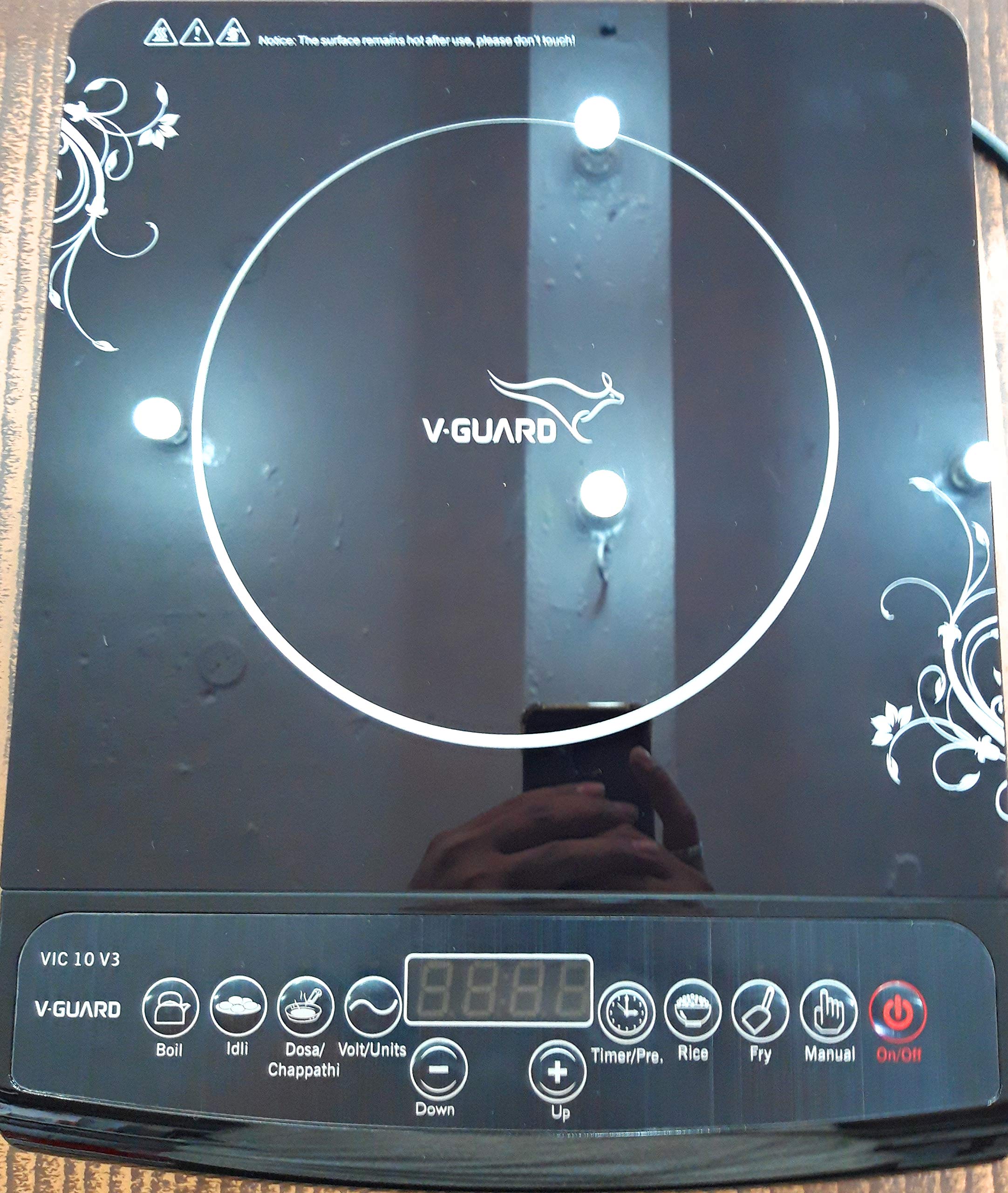
Image 1: Front view of the V-Guard VIC 10 V3 Induction Cooktop, showcasing its sleek black ceramic glass surface and control panel.
Key Features:
- Soft Touch Controls: Intuitive and easy-to-use control panel.
- Advanced IGBT Technology: Utilizes a 25 Amps IGBT for stable and efficient performance.
- A-Grade Crystalline Ceramic Glass: Durable and easy-to-clean cooking surface.
- 4-Digit LED Display: Clear display for power, temperature, and timer settings.
- 6 Cooking Functions: Pre-set functions for various cooking needs.
- 10 Power and Temperature Settings: Allows precise control over cooking intensity.
- 4-Hour Timer Function: For convenient unattended cooking.
- 24-Hour Preset Function: Schedule cooking to start at a later time.
- Voltage Protection: Features low and high voltage cut-off for safety and appliance longevity.
- Energy Monitoring: Special feature to check electricity consumption and line voltage.
3. Setup and First Use
3.1 Unpacking
Carefully remove the cooktop from its packaging. Check for any damage. Keep packaging materials away from children.
3.2 Placement
- Place the cooktop on a dry, stable, and level surface.
- Ensure there is at least 10 cm of clear space around all sides for proper ventilation.
- Do not place near water sources, heat sources, or flammable materials.
3.3 Power Connection
- Plug the power cord into a grounded electrical outlet. Ensure the outlet meets the cooktop's power requirements.
- The cooktop will emit a beep, and the LED display may briefly illuminate, indicating it is in standby mode.
4. Operating Instructions
4.1 Basic Operation
- Place induction-compatible cookware centrally on the ceramic glass surface.
- Press the ON/OFF button to turn on the cooktop. The display will show a default power level or function.
- Select your desired cooking function or adjust power/temperature.
- To stop cooking, press the ON/OFF button again. The cooktop will enter standby mode.
4.2 Cooking Functions
The VIC 10 V3 offers 6 pre-set cooking functions. Press the 'Function' button repeatedly to cycle through the available options. Each function is optimized for specific cooking tasks and will automatically set a default power/temperature and time. Refer to the physical manual for specific details on each function.
4.3 Power and Temperature Settings
After selecting a cooking function or in manual mode, use the '+' and '-' buttons to adjust the power level or temperature. The cooktop provides 10 stages of power/temperature settings for precise control.
4.4 Timer Function
To set a cooking timer (up to 4 hours):
- While cooking, press the 'Timer' button.
- Use the '+' and '-' buttons to set the desired cooking duration.
- The cooktop will automatically turn off once the timer expires.
4.5 Preset Function
The 24-hour preset function allows you to schedule cooking to start at a specific time.
- In standby mode, press the 'Preset' button.
- Use the '+' and '-' buttons to set the desired delay time (when cooking should start).
- Select your desired cooking function and power/temperature settings.
- The cooktop will start cooking automatically after the set delay time.
4.6 Voltage and Consumption Check
This feature allows you to monitor the current line voltage and electricity consumption. Press the dedicated button (if available, or refer to the physical manual for button combination) to cycle through these display modes.
5. Maintenance and Cleaning
Regular cleaning and maintenance will ensure the longevity and optimal performance of your induction cooktop.
- Before Cleaning: Always unplug the cooktop from the power outlet and allow it to cool completely.
- Ceramic Glass Surface: Wipe with a soft, damp cloth and mild detergent. For stubborn stains, use a non-abrasive ceramic cooktop cleaner. Do not use abrasive pads, scouring powders, or harsh chemicals.
- Control Panel: Wipe gently with a soft, dry cloth. Avoid excessive moisture.
- Air Vents: Ensure the air vents on the bottom and sides are free from dust and debris. Use a soft brush or vacuum cleaner to clear them.
- Storage: If storing for an extended period, ensure the cooktop is clean and dry. Store in a cool, dry place.
6. Troubleshooting
If you encounter issues with your V-Guard VIC 10 V3 Induction Cooktop, please refer to the following common problems and solutions before contacting customer service.
| Problem | Possible Cause | Solution |
|---|---|---|
| Cooktop does not turn on. | No power supply; loose plug; power outage. | Check power cord connection; ensure outlet is functional; check household circuit breaker. |
| Cookware not heating. | Non-induction compatible cookware; cookware not centered; small cookware. | Use induction-compatible cookware; center cookware on the cooking zone; use cookware with a base diameter of at least 12 cm. |
| Display shows an error code. | Overheating; internal fault; voltage fluctuation. | Turn off and unplug the cooktop, let it cool. If error persists, contact customer service. The low/high voltage cut-off feature protects the unit during fluctuations. |
| Fan continues to run after turning off. | Normal cooling process. | This is normal. The fan will stop automatically once the internal components have cooled down. |
If the problem persists after attempting these solutions, please contact V-Guard customer support.
7. Specifications
| Feature | Detail |
|---|---|
| Brand | V-Guard |
| Model | VIC 10 V3 |
| Colour | Black |
| Material | Plastic (Body), A-Grade Crystalline Ceramic Glass (Surface) |
| Heating Elements | 1 |
| Power Source | Electricity |
| Item Weight | 1 kg 990 g |
| Country of Origin | India |
8. Warranty and Support
The V-Guard VIC 10 V3 Induction Cooktop comes with a 10-day replacement policy from the date of purchase, subject to terms and conditions. For detailed warranty information, including coverage and duration, please refer to the warranty card provided with your product.
For technical assistance, service requests, or any queries regarding your product, please contact V-Guard customer support:
- V-Guard Customer Service: Please refer to the contact details provided in your product packaging or visit the official V-Guard website.
- When contacting support, please have your product model (VIC 10 V3) and purchase details ready.


