
Easytry123 Replacement Remote for Philips TVs
Easytry123 Replacement Remote Control User Manual
For Philips LED LCD HDTV TV Models: 32PHT4002, 43PHT4002, 32PHT4001 Series
1. Introduction
This manual provides essential instructions for the Easytry123 Replacement Remote Control. This remote is designed as a direct replacement for original remote controls used with various Philips LED LCD HDTV TV models, including the 32PHT4002, 43PHT4002, and 32PHT4001 series. It operates using infrared (IR) technology and does not require any programming or setup codes. Simply insert batteries and begin use.
Important Note: This is a replacement remote and may not support all advanced functions or smart TV features present on some original remotes. Please ensure your original remote's appearance matches this replacement for optimal compatibility.
2. Safety Information
- Keep batteries out of reach of children.
- Do not mix old and new batteries, or different types of batteries.
- Remove batteries if the remote control will not be used for an extended period.
- Dispose of used batteries according to local regulations.
- Avoid exposing the remote control to direct sunlight, heat sources, or moisture.
3. Package Contents
- 1 x Easytry123 Replacement Remote Control
Note: Batteries (2 x AAA) are not included and must be purchased separately.
4. Product Overview
The following image illustrates the layout of the remote control and its primary buttons.

Image 4.1: Front view of the Easytry123 Replacement Remote Control. This image displays the full array of buttons, including power, channel, volume, navigation, and playback controls, arranged ergonomically on the black remote.
Button Functions:
- Power (●): Turns the TV on or off.
- Source: Selects input sources (HDMI, AV, etc.).
- TV: Switches to TV mode.
- Navigation Pad (Up, Down, Left, Right, OK): Navigates menus and confirms selections.
- Back/Exit Menu: Returns to the previous screen or exits the current menu.
- Home/Smart TV: Accesses the TV's home screen or smart TV features.
- Top Menu: Opens the main menu.
- Audio: Adjusts audio settings.
- Options: Displays context-sensitive options.
- Guide: Opens the electronic program guide.
- CH+/CH-: Changes channels up or down.
- VOL+/VOL-: Increases or decreases volume.
- Mute: Mutes or unmutes the TV sound.
- Number Buttons (0-9): Direct channel selection.
- Playback Controls (Play, Pause, Stop, Rewind, Fast Forward): Controls media playback.
- Color Buttons (Red, Green, Yellow, Blue): Accesses specific functions within menus or applications.
- Subtitle: Toggles subtitles on/off.
- Text: Accesses teletext (if supported by TV).
5. Setup
5.1 Battery Installation
The remote control requires two (2) AAA batteries for operation. Follow these steps to install them:
- Locate the battery compartment cover on the back of the remote control.
- Press down on the tab and slide the cover downwards to remove it.
- Insert two AAA batteries, ensuring the positive (+) and negative (-) terminals align correctly with the markings inside the compartment.
- Slide the battery compartment cover back into place until it clicks securely.

Image 5.1: Back view of the remote control with the battery compartment cover removed, revealing the empty battery slots.
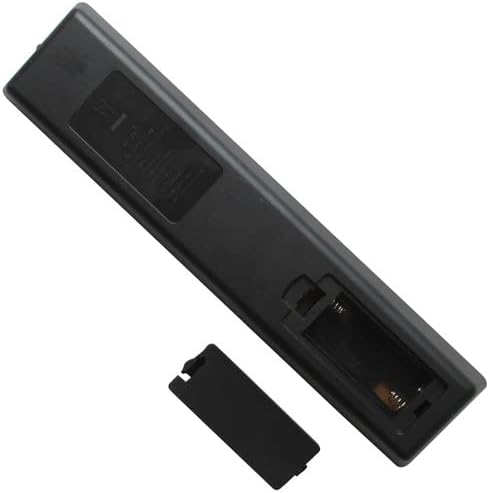
Image 5.2: Back view of the remote control with two AAA batteries correctly inserted into the battery compartment.
The remote control is now ready for use. No programming or pairing is required.
6. Operating Instructions
To operate your TV with the Easytry123 Replacement Remote Control:
- Point the remote control directly towards the infrared receiver on your Philips TV.
- Ensure there are no obstructions between the remote control and the TV.
- Press the desired button to perform the corresponding function (e.g., Power, Volume Up, Channel Down).
The effective operating range is typically up to 8 meters (26 feet) without obstacles.
7. Troubleshooting
| Problem | Possible Cause / Solution |
|---|---|
| Remote control is not working. |
|
| Remote control works intermittently. |
|
| Some buttons do not function. |
|
8. Specifications
- Brand: Easytry123
- Compatible Devices: Philips LED LCD HDTV Televisions (Models: 32PHT4002/98, 43PHT4002/98, 43PHT4002/56, 43PHT4002/05, 32PHT4001, 32PHT4001/12)
- Connectivity Technology: Infrared (IR)
- Controller Type: Button Control
- Special Feature: Ergonomic, Direct Replacement (no setup required)
- Power Source: 2 x AAA Batteries (not included)
9. Warranty and Support
As a replacement product, specific warranty details may vary. Please refer to the retailer or seller (Easytry123) from whom you purchased this remote control for information regarding warranty coverage and customer support. For general troubleshooting not covered in this manual, ensure your TV's original manual is consulted for specific TV functions.
Ask a question about this manual
Ask about setup, troubleshooting, compatibility, parts, safety, or missing instructions. Manuals+ will review the question and use this page’s manual context to help answer it.