1. Introduction
This manual provides essential information for setting up, operating, maintaining, and troubleshooting your ASUS TUF FX505DT Gaming Laptop. Please read this guide thoroughly to ensure optimal performance and longevity of your device.
The ASUS TUF Gaming FX505DT is a robust gaming laptop featuring a 15.6-inch 120Hz Full HD display, powered by an AMD Ryzen 5 R5-3550H processor and NVIDIA GeForce GTX 1650 graphics. It is designed for demanding applications and gaming, incorporating durable construction and efficient cooling.

Front view of the ASUS TUF FX505DT Gaming Laptop, showcasing its display and keyboard.
2. What's in the Box
Verify that all items are present in the packaging:
- ASUS TUF FX505DT Gaming Laptop
- Power Adapter & Cord
- User Guide (this document)
- Warranty Card
3. Initial Setup
3.1. Connecting the Power Adapter
Before first use, connect the power adapter to the laptop and a power outlet. This ensures the battery charges and provides stable power for initial setup.
- Plug the AC adapter into the power connector on the left side of the laptop.
- Connect the power cord to the AC adapter.
- Plug the power cord into a wall outlet.
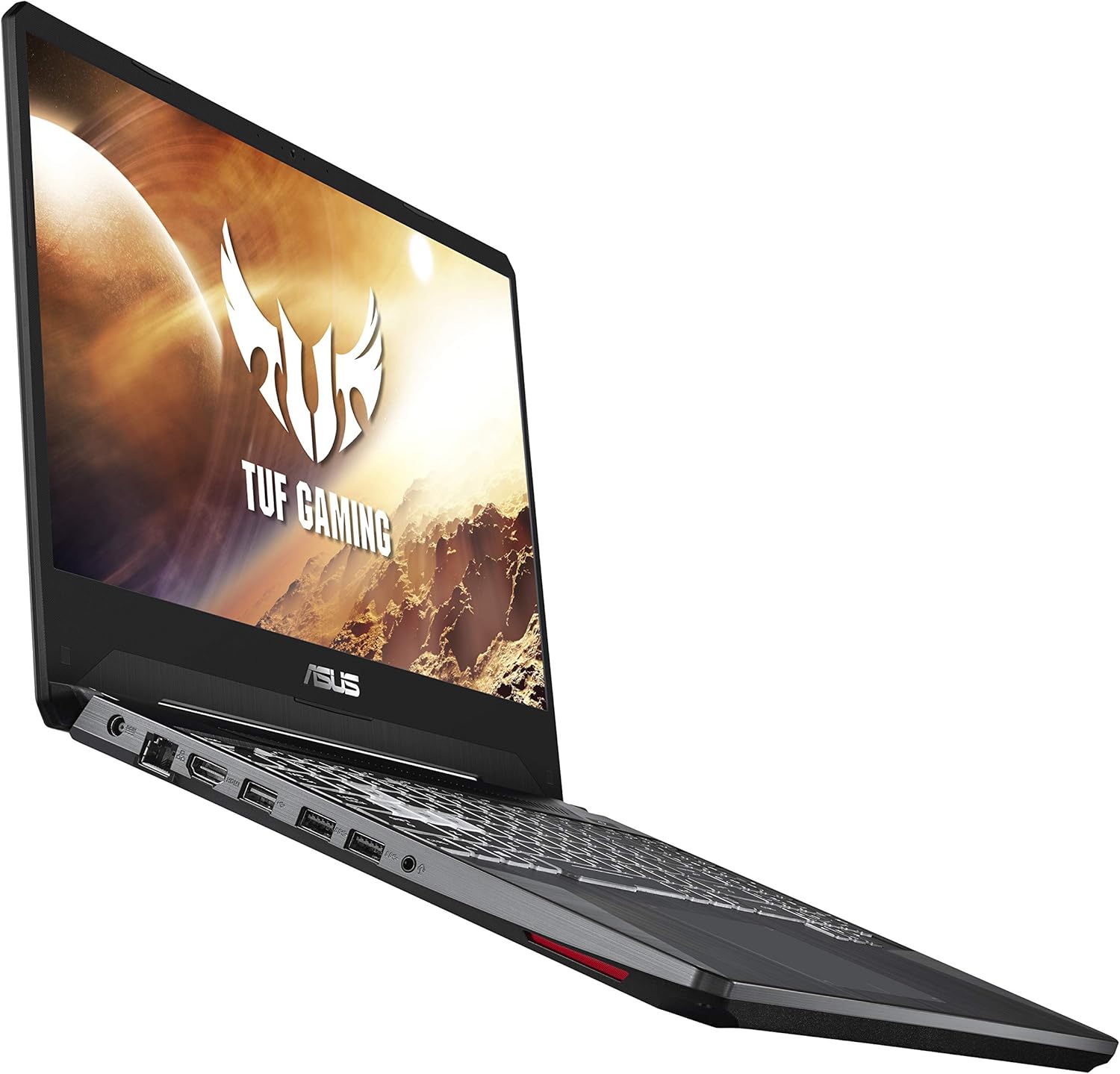
Side view of the ASUS TUF FX505DT, illustrating the placement of various ports, including the power input.
3.2. First Power On and Windows Setup
Press the power button located on the top-right of the keyboard. Follow the on-screen instructions to complete the Windows 10 Home setup process. This includes selecting your region, language, and setting up user accounts.
3.3. Connecting Peripherals
Utilize the available USB ports (1x USB 2.0, 2x USB 3.0) to connect external devices such as a mouse, keyboard, or external storage. The laptop also features an HDMI port for connecting to external displays.
4. Operating Your Laptop
4.1. Keyboard Features
The ASUS TUF FX505DT features a Hyperstrike Keyboard with RGB backlighting, designed for durability with a 20-million keystroke lifespan. You can customize the RGB lighting effects through the pre-installed ASUS Armoury Crate software.

The Hyperstrike Keyboard with customizable RGB backlighting, offering enhanced visibility and personalization.
The keyboard is also built to MIL-STD-810G military standard for durability, ensuring resilience against everyday wear and tear.

Close-up of the durable keyboard, highlighting its MIL-STD-810G military standard certification for robustness.
4.2. Display
Experience smooth visuals on the 15.6-inch Full HD (1920x1080) IPS-type display with a 120Hz refresh rate, ideal for fast-paced gaming and multimedia consumption.
4.3. Cooling System
The laptop incorporates a dual-fan cooling system with anti-dust technology to maintain optimal temperatures during intensive use and prolong component lifespan.
4.4. Wireless Connectivity
Connect to networks using Gigabit Wave 2 Wi-Fi 5 (802.11AC) for high-speed wireless internet access. Bluetooth connectivity is also available for pairing wireless peripherals.
5. Maintenance and Care
5.1. Cleaning
- Screen: Use a soft, lint-free cloth lightly dampened with water or a screen cleaner. Avoid harsh chemicals.
- Chassis: Wipe with a soft, dry cloth. For stubborn dirt, use a slightly damp cloth.
- Keyboard: Use compressed air to remove dust and debris from between keys.
5.2. Ventilation
Ensure the laptop's ventilation openings are not obstructed to prevent overheating. Avoid placing the laptop on soft surfaces like beds or carpets during operation.
5.3. Battery Care
To maximize battery lifespan, avoid frequently discharging the battery completely. It is recommended to keep the laptop plugged in when possible, especially during gaming or resource-intensive tasks.
5.4. Software Updates
Regularly update your Windows operating system, graphics drivers, and ASUS utilities (e.g., Armoury Crate) to ensure optimal performance, security, and compatibility.
6. Troubleshooting
This section addresses common issues you might encounter. For more complex problems, refer to the ASUS support website or contact customer service.
6.1. Laptop Not Powering On
- Ensure the power adapter is securely connected to both the laptop and a working power outlet.
- Verify the power outlet is functional by plugging in another device.
- If the battery is completely drained, allow it to charge for at least 30 minutes before attempting to power on.
6.2. Display Issues
- No image on screen: Ensure the laptop is powered on. If an external monitor is connected, try disconnecting it or pressing Fn + F8 (or the appropriate function key for display output) to cycle display modes.
- Flickering or distorted image: Update your graphics drivers. Check for physical damage to the screen or cable connections if using an external monitor.
6.3. Performance Issues
- Slow performance: Close unnecessary applications. Check Task Manager for processes consuming high CPU or RAM. Ensure sufficient free space on the SSD.
- Overheating: Ensure ventilation vents are clear. Consider using a cooling pad. Update drivers and BIOS.
- Gaming performance: Ensure the laptop is plugged in and set to a high-performance power plan. Update NVIDIA graphics drivers.
7. Technical Specifications
Below are the key technical specifications for the ASUS TUF FX505DT Gaming Laptop (Model: FX505DT-AH51):

Visual representation highlighting the 8GB DDR4 RAM and 256GB SSD storage components.
| Feature | Specification |
|---|---|
| Model Name | TUF FX505DT-AH51 |
| Processor | AMD Ryzen 5 R5-3550H (Quad-core, 3.7 GHz Max Boost) |
| Graphics | NVIDIA GeForce GTX 1650 (4GB GDDR5 Dedicated) |
| Display | 15.6-inch Full HD (1920x1080) IPS-Type, 120Hz |
| RAM | 8GB DDR4 (2666 MHz) |
| Storage | 256GB NVMe PCIe SSD |
| Operating System | Windows 10 Home (64-bit) |
| Wireless Connectivity | Gigabit Wave 2 Wi-Fi 5 (802.11AC), Bluetooth |
| Ports | 1x USB 2.0, 2x USB 3.0, 1x HDMI, 1x Ethernet (RJ-45), 1x Audio Combo Jack |
| Keyboard | RGB Backlit Hyperstrike Keyboard (20-million keystroke durability) |
| Dimensions (LxWxH) | 14.1 x 10.1 x 1 inches |
| Weight | 4.8 pounds |
| Battery | 1 Lithium Metal battery required |
8. Warranty and Support
8.1. Warranty Information
Your ASUS TUF FX505DT Gaming Laptop comes with a standard manufacturer's warranty. Please refer to the included Warranty Card for specific terms, conditions, and duration of your warranty coverage. Keep your proof of purchase for warranty claims.
8.2. Customer Support
For technical assistance, driver downloads, or further support, please visit the official ASUS support website. You can also find contact information for ASUS customer service in your region on their website or in the warranty documentation.


