
1. Introduction
The Canon EF 70-200mm f/2.8L IS USM Telephoto Zoom Lens is a high-performance lens designed for Canon SLR cameras. This manual provides essential information for the proper use, care, and maintenance of your lens to ensure optimal performance and longevity. Please read this manual thoroughly before using the product.
2. Product Overview
This section highlights the key features and components of the Canon EF 70-200mm f/2.8L IS USM lens.
- EF Mount: Compatible with Canon SLR cameras.
- Telephoto Zoom Lens: Offers a versatile focal length range of 70-200mm.
- f/2.8L Constant Maximum Aperture: Provides excellent low-light performance and shallow depth of field across the entire zoom range.
- Image Stabilizer (IS): Reduces camera shake for sharper images, especially in low light or at longer focal lengths.
- Ultra-low Dispersion (UD) Glass: Minimizes chromatic aberrations for high image quality.
- Inner Focusing: The lens length does not change during focusing.
- Full-time Manual Focus: Allows manual focus adjustment even in autofocus mode.
- Circular Aperture: Contributes to attractive background blur (bokeh).
- Weather-Sealed Construction: Provides protection against dust and moisture.
Product Views

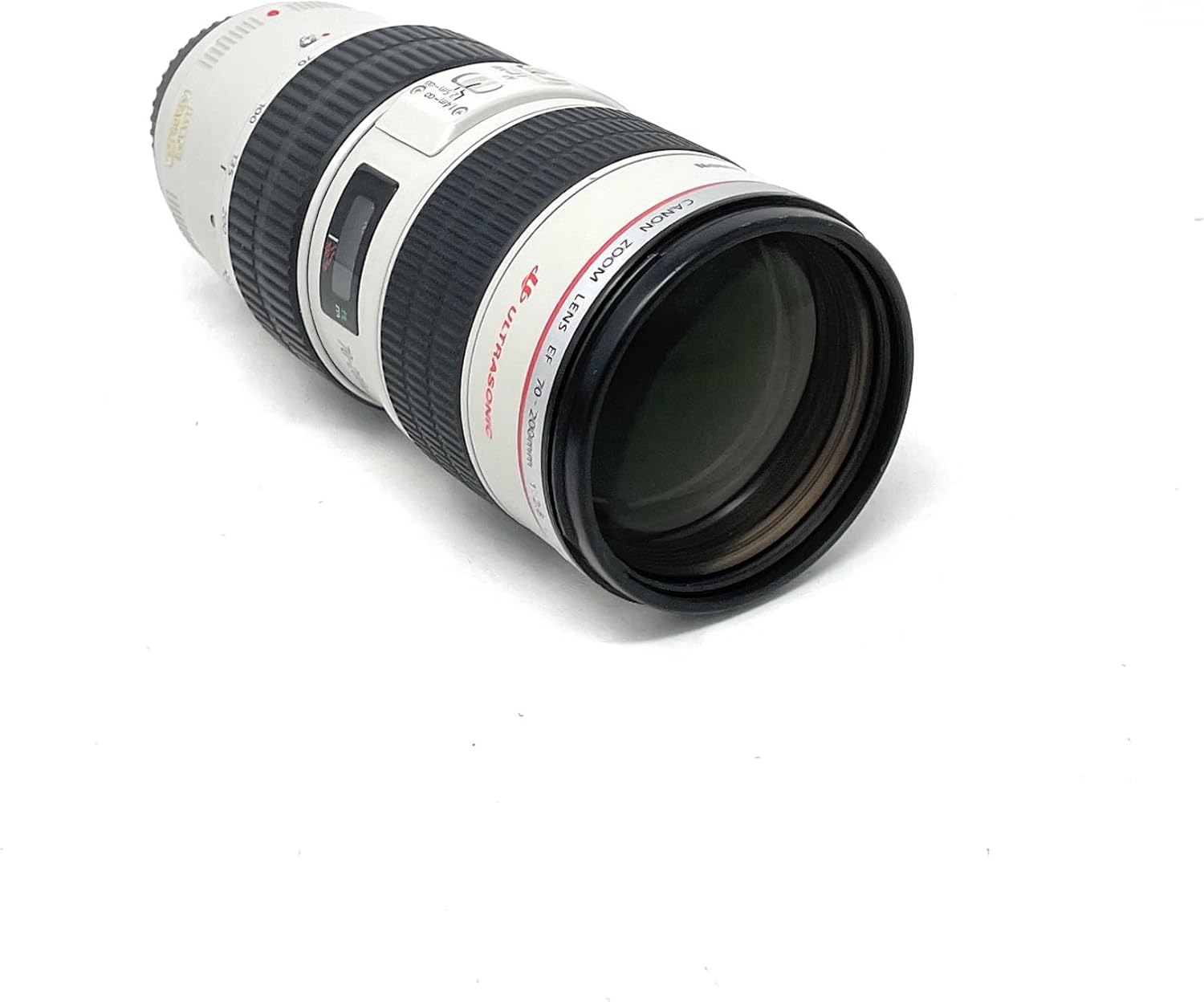


Informational Videos
Video 2.1: A closer look at the Canon EF 70-200mm f/2.8L IS USM lens, demonstrating its features and build quality.
Video 2.2: Review highlighting the image stabilization capabilities of the Canon EF 70-200mm f/2.8L IS USM lens.
Video 2.3: Demonstration of the Canon EF 70-200mm f/2.8L IS USM lens in a wedding photography context.
Video 2.4: A detailed review of the Canon EF 70-200mm lens, covering its features and performance.
Video 2.5: A demonstration and review of the Canon 70-200mm f/2.8L lens.
Video 2.6: A review describing the Canon 70-200mm as an "Ultimate Lens".
Video 2.7: An honest review of the Canon 70-200mm f/2.8 IS RF lens, discussing its features and performance.
3. Setup
Attaching the Lens
- Ensure both the camera and lens are powered off.
- Remove the rear lens cap and the camera body cap.
- Align the red index mark on the lens with the red index mark on the camera body.
- Insert the lens into the camera mount and turn it clockwise until it clicks into place.
Detaching the Lens
- Ensure the camera is powered off.
- While pressing the lens release button on the camera body, turn the lens counter-clockwise until it stops.
- Remove the lens and attach the rear lens cap.
Attaching the Lens Hood (ET-86)
Align the red dot on the lens hood with the red dot on the front of the lens, then turn the hood clockwise until it clicks into place. The lens hood helps to prevent flare and protect the front element.
Using the Tripod Mount Ring
The lens includes a tripod mount ring for better balance when using the lens on a tripod, especially due to its weight. Attach the tripod mount ring to the lens and secure it before mounting the assembly onto a tripod.
4. Operating the Lens
Focus Mode Switch (AF/MF)
- AF (Autofocus): For automatic focusing. The camera will focus on the subject.
- MF (Manual Focus): For manual focusing. Rotate the focusing ring to adjust focus.
Image Stabilizer Switch (ON/OFF)
Set to ON to activate the Image Stabilizer, which compensates for camera shake. Set to OFF when using a tripod or when a fast shutter speed is sufficient to prevent blur.
Stabilizer Mode Switch (MODE 1/MODE 2)
- MODE 1: Corrects vibration in all directions (vertical and horizontal). Suitable for general photography.
- MODE 2: Corrects vertical vibration only. Ideal for panning shots where you move the camera horizontally to follow a moving subject.
Focus Range Limiter Switch
This switch allows you to limit the autofocus range, which can speed up focusing when your subject is within a known distance range.
- 1.4m - ∞: Full focus range (from 1.4 meters to infinity).
- 2.5m - ∞: Limits focus to subjects 2.5 meters or further away. Useful for distant subjects like sports or wildlife.
Zooming
Rotate the zoom ring to adjust the focal length from 70mm to 200mm. The lens features inner zooming, meaning its physical length does not change when zooming.
5. Maintenance
- Cleaning the Lens: Use a lens blower to remove dust, then gently wipe with a clean, soft lens cloth. For stubborn smudges, use a lens cleaning solution specifically designed for optical elements.
- Storage: Store the lens with both front and rear caps attached in a cool, dry, and well-ventilated area. Avoid extreme temperatures and high humidity.
- Handling: Avoid exposing the lens to direct sunlight for extended periods, as this can damage the internal elements. Do not drop or subject the lens to strong impacts.
6. Troubleshooting
- Autofocus is slow or inaccurate:
- Ensure the AF/MF switch is set to AF.
- Check the focus range limiter switch; set it to the full range (1.4m - ∞) if the subject distance is unknown or close.
- Ensure there is sufficient light for the autofocus system to operate effectively.
- Clean the lens contacts on both the lens and camera body.
- Images are blurry despite Image Stabilizer being ON:
- Verify that the Image Stabilizer switch is indeed ON.
- Ensure the shutter speed is appropriate for the lighting conditions and subject movement.
- If using a tripod, consider turning the Image Stabilizer OFF as it can sometimes introduce blur when the camera is completely stable.
- Lens not recognized by camera:
- Ensure the lens is securely attached to the camera body.
- Clean the electrical contacts on both the lens and camera body with a clean, dry cloth.
- Restart the camera with the lens attached.
7. Specifications
| Feature | Detail |
|---|---|
| Brand | Canon |
| Model Name | Canon EF 70-200mm f/2.8L IS USM |
| Focal Length | 70-200 millimeters |
| Maximum Aperture | f/2.8 |
| Lens Type | Telephoto Zoom |
| Compatible Mountings | Canon EF |
| Compatible Camera Models | All Canon EOS DSLR and mirrorless cameras (with adapter) |
| Focus Type | Auto/Manual |
| Image Stabilization | Optical |
| Photo Filter Size | 77 Millimeters |
| Item Weight | 1814.36 Grams |
| Water Resistance Level | Water Resistant |
| UPC | 683193818432 |
8. Warranty and Support
This product is covered by a 90-day limited warranty. For detailed terms and conditions, please refer to the warranty information provided at the time of purchase or contact Canon customer support. For technical assistance or service inquiries, please visit the official Canon support website or contact their customer service line.
For Amazon Renewed products, a 90-day replacement or refund is typically offered under the Amazon Renewed Guarantee.