
1. Introduction
This instruction manual provides essential information for the proper use and maintenance of your MagLite ML150LR-A2155 Rechargeable Battery Pack. This battery pack is designed as a replacement for MagLite ML150LR and ML150LRX rechargeable flashlights. It is crucial to read and understand these instructions before installation and operation to ensure safety and optimal performance.
Compatibility: This battery pack is compatible with MagLite ML150LR and ML150LRX rechargeable flashlights. It is not compatible with the shorter ML150LRS or ML150LRXS models.
2. Safety Information
Please observe the following safety precautions to prevent injury or damage to the battery and flashlight:
- California Proposition 65 Warning: This product contains chemicals known to the State of California to cause cancer and birth defects or other reproductive harm.
- Do not disassemble, modify, or short-circuit the battery pack.
- Do not expose the battery to water, fire, or extreme temperatures (above 60°C / 140°F or below -10°C / 14°F).
- Keep the battery out of reach of children and pets.
- Use only the charger specifically designed for your MagLite ML150LR or ML150LRX flashlight. Using an incompatible charger may cause damage or fire.
- If the battery shows signs of damage, leakage, or overheating, discontinue use immediately and dispose of it properly.
3. Setup and Installation
Follow these steps to install the replacement battery pack into your MagLite ML150LR or ML150LRX flashlight:
- Ensure the flashlight is turned off and disconnected from any charging source.
- Unscrew the tail cap or the designated battery compartment cover of your MagLite ML150LR/ML150LRX flashlight. Refer to your flashlight's original manual for specific instructions on accessing the battery compartment.
- Carefully remove the old battery pack.
- Insert the new MagLite ML150LR-A2155 Rechargeable Battery Pack, ensuring the positive (+) and negative (-) terminals align correctly with the flashlight's contacts. The battery is designed to fit in one orientation.
- Securely reattach the tail cap or battery compartment cover. Do not overtighten.

Image: MagLite ML150LR-A2155 Rechargeable Battery Pack, indicating compatibility with ML150LR(X) models.
4. Operating and Charging
Once installed, the battery pack operates within your MagLite ML150LR or ML150LRX flashlight. To charge the battery:
- Connect your MagLite ML150LR/ML150LRX flashlight to its original, compatible charging base or adapter.
- Ensure the charging indicator light on the flashlight or charger illuminates, indicating a proper connection and charging in progress.
- The flashlight's battery is designed to recharge to approximately 80% capacity in about half an hour. A full charge may take longer.
- Do not leave the flashlight on the charger indefinitely after it is fully charged, although modern chargers often have overcharge protection.
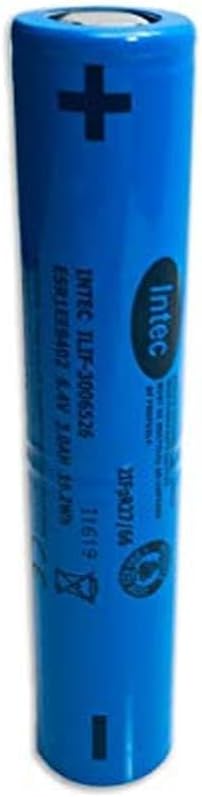
Image: Side view of the MagLite ML150LR-A2155 Rechargeable Battery Pack, showing its cylindrical form and terminal markings.
5. Maintenance
Proper maintenance extends the life of your battery pack:
- Storage: If storing the battery pack for an extended period, ensure it is charged to approximately 50-70% capacity. Store in a cool, dry place away from direct sunlight and extreme temperatures.
- Cleaning: Keep the battery contacts clean and free of debris. Use a dry, clean cloth to wipe them if necessary.
- Disposal: Lithium-ion batteries must be recycled or disposed of properly. Do not dispose of in household waste. Consult your local regulations for battery recycling centers.

Image: Another view of the MagLite ML150LR-A2155 Rechargeable Battery Pack, highlighting its robust construction.
6. Troubleshooting
If you encounter issues with your battery pack, consider the following:
- Flashlight not turning on: Ensure the battery is correctly installed and fully charged. Check the flashlight's contacts for dirt or corrosion.
- Battery not charging: Verify that the flashlight is properly seated in its charging base or that the charging cable is securely connected. Check if the charger is receiving power. Ensure the battery contacts are clean.
- Reduced run time: Over time, all rechargeable batteries experience a decrease in capacity. If the run time is significantly reduced, it may be time to replace the battery pack.
For more complex issues or if troubleshooting steps do not resolve the problem, refer to your MagLite ML150LR/ML150LRX flashlight's original instruction manual or contact MagLite customer support.
7. Specifications
| Model Number | ML150LR-A2155 |
| Battery Type | Lithium Ion (Li-Ion) |
| Capacity | 1800 mAh |
| Voltage | 6 Volts |
| Item Weight | 4.8 ounces (approx. 136 grams) |
| Material | Plastic (casing) |
| Compatibility | MagLite ML150LR, ML150LRX Flashlights |
8. Warranty and Support
Warranty: Based on the provided product information, a specific warranty description for this battery pack is not applicable. Please refer to your original flashlight's warranty information or contact MagLite directly for details regarding replacement parts.
Customer Support: For further assistance, technical support, or inquiries regarding your MagLite products, please visit the official MagLite website or contact their customer service department.
