
1. Introduction
This manual provides essential information for the safe and effective use of your Estry replacement battery, model CS-EPT800VX. This battery is designed as a compatible replacement for various Shark vacuum cleaner models, including XBT800, SV800, SV800C, SV800CH, VX63, XBT800W, and XSB800CH. Please read this manual thoroughly before installation and operation to ensure optimal performance and safety.
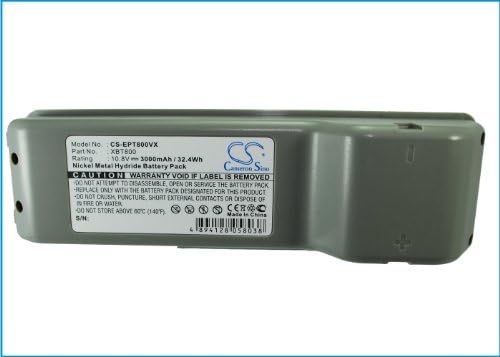
Image 1.1: Estry Replacement Battery. This image shows the overall appearance of the Estry replacement battery, a grey rectangular unit designed to fit compatible Shark vacuum models.
2. Safety Information
Observe the following safety precautions to prevent injury or damage to the battery and device:
- Do not attempt to disassemble, open, or service the battery pack. This can void the warranty and pose safety risks.
- Do not crush, puncture, short external contacts, or dispose of in fire or water. Such actions can lead to fire, explosion, or chemical burns.
- Do not store above 60°C (140°F). High temperatures can degrade battery performance and safety.
- Replace only with the battery pack designated for this product. Using an incompatible battery may cause damage or injury.
- Keep the battery away from children.
- Dispose of used batteries according to local regulations. Do not dispose of with household waste.
3. Setup and Installation
Before installing the new battery, ensure your Shark vacuum cleaner is turned off and unplugged from its charger. Refer to your specific Shark vacuum model's user manual for detailed battery compartment access instructions.
- Locate the Battery Compartment: Identify the battery compartment on your Shark vacuum. This is typically secured with screws or a latch.
- Remove Old Battery: Carefully open the compartment and disconnect the old battery. Note the orientation of the connectors.
- Insert New Battery: Align the Estry replacement battery (Model CS-EPT800VX) with the connectors in the compartment. Ensure a secure fit.
- Secure Compartment: Close the battery compartment and secure it with any screws or latches that were removed.
- Initial Charge: It is recommended to fully charge the new battery before its first use.
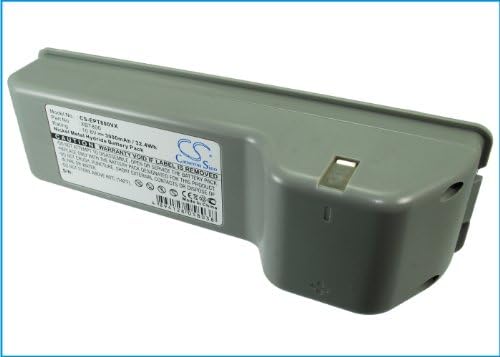
Image 3.1: Estry Battery Side View. This image displays a side view of the Estry replacement battery, highlighting the product label with model number and safety warnings.
4. Operating Instructions
4.1 Charging the Battery
- Use only the original charger supplied with your Shark vacuum cleaner.
- Connect the vacuum cleaner to its charger. The charging indicator on your vacuum will typically illuminate to show it is charging.
- Allow the battery to charge fully before its first use and after each use for optimal performance. A full charge typically takes several hours.
- Avoid leaving the battery on the charger for extended periods after it is fully charged, though modern chargers often have overcharge protection.
4.2 Using the Vacuum
Once the battery is fully charged, operate your Shark vacuum cleaner as per its original instructions. The Estry replacement battery is designed to provide comparable performance to the original battery.
5. Maintenance and Storage
- Regular Charging: For best battery life, avoid completely draining the battery before recharging. Recharge after each significant use.
- Storage: If storing the battery for an extended period (more than one month), store it in a cool, dry place at approximately 50% charge. Recharge the battery every 3-6 months to prevent deep discharge.
- Cleaning: Keep the battery contacts clean and free of dust or debris. Use a dry cloth to wipe them if necessary.
- Temperature: Operate and store the battery within recommended temperature ranges (typically 0°C to 40°C or 32°F to 104°F) to maximize its lifespan.
6. Troubleshooting
| Problem | Possible Cause | Solution |
|---|---|---|
| Battery not charging | Charger not connected properly; faulty charger; battery contacts dirty; battery too hot/cold. | Ensure charger is securely connected. Check charger for damage. Clean battery contacts. Allow battery to reach room temperature. |
| Short run time | Battery not fully charged; battery degradation; vacuum cleaner issue. | Ensure full charge cycle. If battery is old, consider replacement. Consult Shark vacuum manual for vacuum-specific issues. |
| Vacuum not turning on | Battery not installed correctly; battery completely discharged; vacuum fault. | Re-install battery, ensuring secure connection. Charge battery. Consult Shark vacuum manual. |
7. Product Specifications
- Model Number: CS-EPT800VX
- Battery Type: Ni-MH (Nickel Metal Hydride)
- Voltage: 10.8V
- Capacity: 3000mAh (32.40Wh)
- Dimensions: 193.80 x 57.90 x 69.50mm (7.63 x 2.28 x 2.74 inches)
- Weight: 720g (1.59 pounds)
- Certifications: ISO9001, RoHS, CE
- Compatible Shark Models: XBT800, SV800, SV800C, SV800CH, VX63, XBT800W, XSB800CH

Image 7.1: Estry Battery Angled View. This image provides an angled perspective of the replacement battery, showing its form factor and connection points.
8. Warranty and Support
The Estry replacement battery is manufactured with strict quality control and holds CE, RoHS, and ISO9001 certifications, ensuring quality assurance. For specific warranty details, please refer to the purchase documentation or contact your retailer.
If you have questions regarding compatibility, installation, or performance, please contact Estry customer support. When contacting support, please provide your battery details or pictures for professional assistance.
Note: The warranty may be void if the label is removed or if the battery is disassembled.