
RAM MOUNTS RAM-HOL-PD4-238AU
RAM Mounts Quick-Grip XL Phone Holder with Ball (RAM-HOL-PD4-238AU) User Manual
Model: RAM-HOL-PD4-238AU | Brand: RAM MOUNTS
Introduction
The RAM Mounts Quick-Grip XL Phone Holder with B Size 1" Ball is designed to securely hold a variety of large phones and other devices in demanding environments. This manual provides essential information for the proper setup, operation, and maintenance of your phone holder, ensuring reliable performance and device protection.
What's in the Box
- Quick-Grip XL Phone Holder
- B Size 1" RAM Rubber Ball
- Assembly Hardware (various lengths for customization)

Image: The main components of the RAM Mounts Quick-Grip XL Phone Holder, including the holder itself, the B size 1" ball, and various assembly hardware.
Setup Instructions
- Attach the B Size 1" Ball: Secure the included B size 1" RAM rubber ball to the back of the Quick-Grip XL Phone Holder using the provided assembly hardware. Ensure screws are tightened appropriately for a firm connection.
- Mount the Holder: Connect the assembled phone holder to any compatible B size RAM double socket arm (sold separately) or other mounting base. The ball and socket technology allows for flexible positioning.
- Adjust Side Supports: The holder features adjustable side supports. Use the provided screws and slots to customize the width to fit your specific device, ensuring a snug and secure fit.
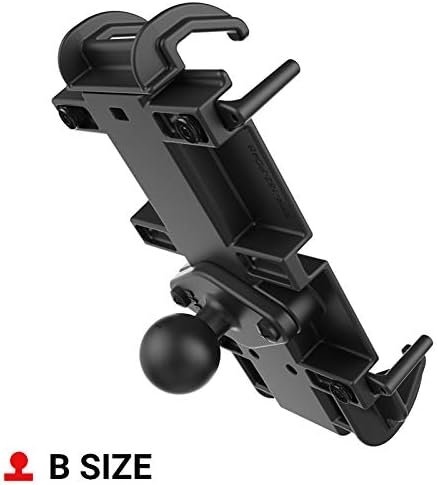
Image: Rear view of the Quick-Grip XL Phone Holder showing the integrated B size 1" ball for attachment to compatible RAM mounting systems.
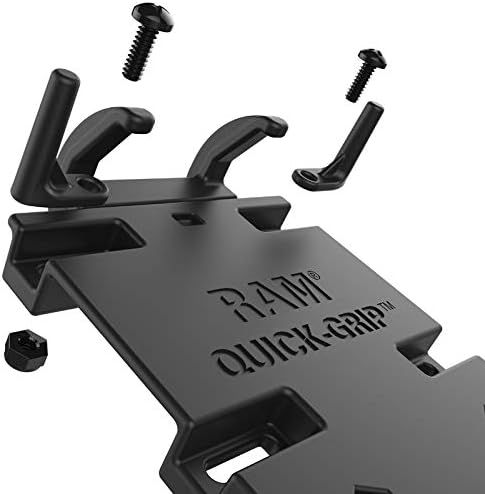
Image: Detailed view of the assembly hardware for the Quick-Grip XL, illustrating the screws and adjustable components for securing the holder.
Operating Instructions
- Inserting Your Device: With one hand, gently push the top arm of the Quick-Grip XL holder upwards to expand the grip. Carefully slide your phone into the holder, ensuring it rests securely against the bottom supports. Release the top arm to allow the spring-loaded mechanism to firmly grip your device.
- Removing Your Device: To remove your phone, simply push the top arm upwards again to release the tension, and carefully slide your device out.
- Adjusting Viewing Angle: Loosen the knob on the double socket arm (if applicable) to adjust the angle and orientation of your phone. Tighten the knob once the desired position is achieved.
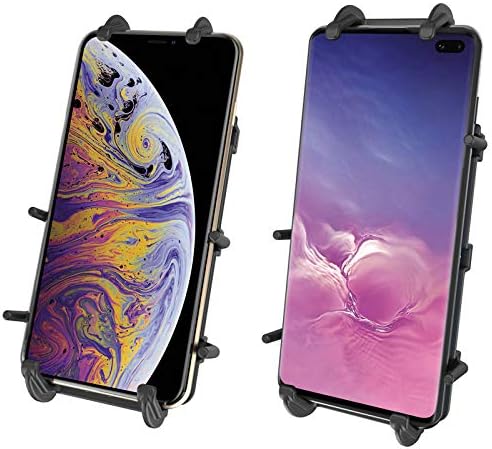
Image: Examples of various smartphones securely held within the Quick-Grip XL Phone Holder, demonstrating its adaptability to different device sizes.
Video: Official RAM Mounts video demonstrating the X-Grip Phone Holders, showcasing their secure grip and ease of use for various devices.
Features
- Spring-loaded holder with adjustable side supports for a secure fit for various large phones and devices.
- Easy one-hand insertion and removal of your phone.
- Includes B size 1" RAM rubber ball for connection to any B size RAM double socket arm.
- Ball and socket technology provides near-infinite adjustability for optimal viewing angles.
- Constructed from powder-coated, marine-grade aluminum and high-strength composite for durability and reliability.
Specifications
| Attribute | Detail |
|---|---|
| Product Dimensions | 5 x 5 x 5 inches |
| Item Weight | 5.8 ounces |
| Item Model Number | 71-7153 |
| Brand | RAM MOUNTS |
| Compatible Devices | Smartphones (Apple iPhone 12-17 series, Google Pixel, Motorola Moto, Samsung Galaxy S/Note/A series, Garmin DriveTrack, etc.) |
| Mounting Type | Vehicle Mount |
| Holder Dimensions | Height Range: 5.75" - 7.25", Width Range: 2.625" - 3.625", Max Depth: .72" |
| Special Features | Assembly Hardware Included, Warning: Exposure to vibrations, like those generated by high-powered motorcycle engines, might impact iPhone cameras. |
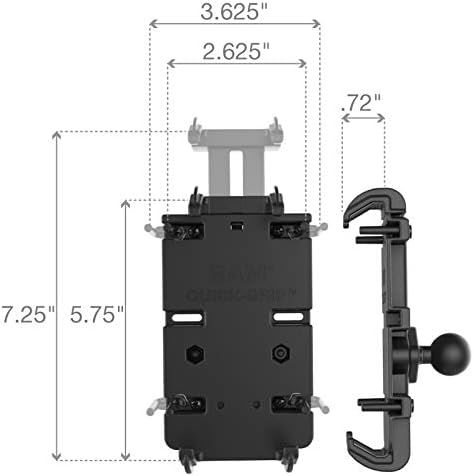
Image: Diagram illustrating the adjustable dimensions of the Quick-Grip XL Phone Holder, including height, width, and depth ranges.

Image: A compatibility chart showing various phone models from different brands that fit the PD4 series, including the Quick-Grip XL.
Maintenance
- Cleaning: Wipe the holder with a damp cloth to remove dust and grime. Avoid harsh chemicals that may damage the composite material or rubber components.
- Inspection: Periodically check all screws and connection points to ensure they remain tight. Re-tighten as necessary to maintain secure mounting.
- Rubber Components: Inspect the rubber tips and side supports for wear or damage. Replace if necessary to ensure optimal grip and device protection.
Troubleshooting
- Device Not Secure: Ensure the side supports are adjusted correctly for your device's width and depth. The spring-loaded mechanism should provide firm pressure. Check that the rubber tips are intact and not worn.
- Mount Loosens: Verify that all connection points, especially the double socket arm knob and the screws attaching the ball to the holder, are fully tightened.
- Vibration Concerns: For high-vibration environments (e.g., motorcycles), consider using an optional tether (sold separately) for added security. Be aware of potential impacts on phone cameras as noted in the specifications.
Warranty and Support
The RAM Mounts Quick-Grip XL Phone Holder is backed by a lifetime warranty, reflecting the manufacturer's commitment to quality and durability. For warranty claims, technical support, or further assistance, please refer to the official RAM MOUNTS website or contact their customer service directly.
Official RAM MOUNTS Website: www.rammount.com
Related documentsRAM-HOL-PD4-238AU


Ask a question about this manual
Ask about setup, troubleshooting, compatibility, parts, safety, or missing instructions. Manuals+ will review the question and use this page’s manual context to help answer it.