
1. Introduction
1.1 Product Overview
This manual provides essential information for the Estry CS-MLE100SL replacement battery, designed for various Excalibur metal detectors. This battery is a high-quality Ni-MH power source intended to restore the operational capacity of your compatible metal detector.
1.2 Key Features
- High Quality: Manufactured to exact specifications, ensuring safe and durable use.
- Protection: Features overcharge, over-discharge, over-voltage, and short-circuit protection.
- Capacity: 1400mAh, 16.80Wh, 12.0V Ni-MH battery type.
- Certifications: ISO9001, RoHS, and CE certified for quality assurance and toxic-free materials.
- Dimensions: 108.42 x 34.10 x 32.00mm.
- Weight: Approximately 300g (10.58oz).
1.3 Safety Information
Please read and understand all safety instructions before using this product. Failure to follow these instructions may result in fire, electric shock, or injury.
- Do not attempt to disassemble, open, or service the battery pack.
- Replace only with the battery pack designated for this product.
- Do not crush, puncture, short external contacts, or dispose of in fire or water.
- Do not store above 60°C (140°F).
- Keep out of reach of children.
- Dispose of batteries according to local regulations.
2. Compatibility
This replacement battery is compatible with the following metal detector models and battery part numbers:
2.1 Compatible Metal Detector Models
- Excalibur 1000 Metal Detector
- Excalibur 800 Metal Detector
- Excalibur II Metal Detector
- Excalibur II PODS
- Excalibur SWORD
- Sword Detector
2.2 Compatible Battery Part Number
- TER51140
Before purchase, please confirm the compatible model and battery part number carefully. If unsure, consult your device's original manual or contact the manufacturer.
3. Specifications
Detailed specifications for the Estry CS-MLE100SL battery:
| Specification | Value |
|---|---|
| Model Number | CS-MLE100SL |
| Battery Type | Ni-MH (Nickel Metal Hydride) |
| Voltage | 12.0V |
| Capacity | 1400mAh |
| Watt-Hours (Wh) | 16.80Wh |
| Product Dimensions | 108.42 x 34.10 x 32.00mm (4.27 x 1.26 x 1.34 inches) |
| Item Weight | 300g (10.58oz) |
| Certifications | ISO9001, RoHS, CE |
4. Setup and Installation
This section outlines the general procedure for replacing the battery. Always refer to your specific metal detector's instruction manual for detailed, model-specific battery replacement steps.
4.1 Battery Replacement Procedure
- Power Off: Ensure your metal detector is completely powered off before beginning the replacement process.
- Locate Battery Compartment: Identify the battery compartment on your Excalibur metal detector. This is typically secured with screws or a latch.
- Open Compartment: Carefully open the battery compartment. You may need a screwdriver or other tool depending on your model.
- Remove Old Battery: Disconnect the old battery from its connector. Note the orientation of the connector to ensure correct installation of the new battery. Carefully remove the old battery from the compartment.
- Insert New Battery: Connect the new Estry CS-MLE100SL battery to the corresponding connector in the compartment. Ensure the connection is secure and correctly oriented.
- Position Battery: Carefully place the new battery into the compartment, ensuring it fits snugly without forcing.
- Close Compartment: Securely close the battery compartment. If there are screws, tighten them appropriately, but do not overtighten.
- Initial Charge: It is recommended to fully charge the new battery before its first use. Refer to the "Operating" section for charging instructions.
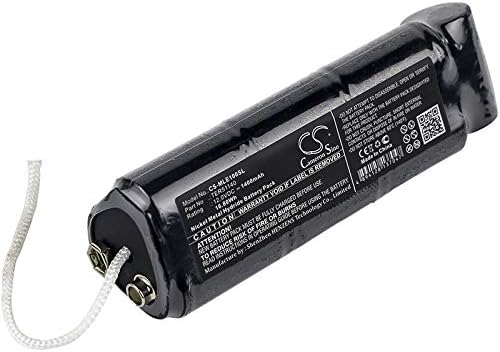
Figure 4.1: Estry CS-MLE100SL replacement battery, showing its overall form factor and connection points.
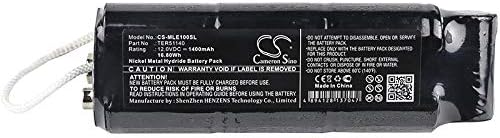
Figure 4.2: Top view of the Estry CS-MLE100SL battery, displaying the model number, part number, rating, and safety warnings.
5. Operating Instructions
5.1 Charging the Battery
This Ni-MH battery requires proper charging to ensure optimal performance and longevity. Always use a charger compatible with Ni-MH batteries and specifically designed for your metal detector model, if applicable.
- First Use: Fully charge the battery before its initial use.
- Charging Process: Connect the metal detector (with the new battery installed) to its designated charger. Follow the charging indicators on your metal detector or charger.
- Charging Time: Charging time will vary depending on the charger and the battery's discharge level. Avoid overcharging by disconnecting the charger once the battery is full, if your charger does not have automatic cut-off.
- Temperature: Charge the battery at room temperature (10°C to 40°C / 50°F to 104°F) for best results.
5.2 General Usage
Once installed and charged, the battery powers your metal detector. The operational duration will depend on the metal detector's power consumption and usage patterns.
- Power On/Off: Use the power controls on your metal detector as per its original manual.
- Battery Level: Monitor the battery level indicator on your metal detector to avoid unexpected power loss during operation.
- Recharging: Recharge the battery when the metal detector indicates a low battery level to prevent deep discharge, which can reduce battery life.
6. Maintenance
Proper maintenance extends the life of your battery and ensures reliable performance.
6.1 Battery Care
- Avoid Deep Discharge: Do not allow the battery to completely drain before recharging.
- Regular Charging: If the battery is not used for extended periods, charge it every 3-6 months to maintain its capacity.
- Clean Contacts: Periodically inspect and clean the battery contacts and the metal detector's battery compartment contacts with a dry cloth to ensure good electrical connection.
- Temperature Exposure: Avoid exposing the battery to extreme temperatures (hot or cold) for prolonged periods, as this can degrade performance and shorten lifespan.
6.2 Storage
- Charge Level: Store the battery with a partial charge (around 50%) if it will not be used for a long time. Do not store fully charged or fully discharged.
- Storage Environment: Store the battery in a cool, dry place, away from direct sunlight and corrosive materials.
- Protection: If storing outside the device, ensure the battery terminals are protected from short circuits (e.g., by placing it in a protective case or using electrical tape over the terminals).
7. Troubleshooting
If you encounter issues with your Estry replacement battery, consider the following common troubleshooting steps:
| Problem | Possible Cause | Solution |
|---|---|---|
| Battery not charging |
|
|
| Short operating time |
|
|
| Device not powering on |
|
|
If problems persist after attempting these solutions, please contact customer support.
8. Warranty and Support
8.1 Warranty Information
This Estry replacement battery comes with a 12-month Warranty and a 14-day Money Back Guarantee from the date of purchase. This warranty covers manufacturing defects and issues arising from normal use.
The warranty does not cover damage caused by misuse, unauthorized modification, accident, or improper installation.
8.2 Customer Support
For technical assistance, warranty claims, or any questions regarding your Estry replacement battery, please contact the manufacturer or seller through the platform where the product was purchased. Provide your model number (CS-MLE100SL) and purchase details for faster service.