
1. Introduction
This manual provides detailed instructions for the assembly, configuration, operation, and maintenance of your Bestier L-Shaped Computer Desk. Please read this manual thoroughly before beginning assembly or use to ensure proper setup and longevity of your product.
The Bestier L-Shaped Computer Desk is designed for versatility, offering configurations as an L-shaped corner desk or a long, two-person desk. It features a durable P2 grade particle board desktop and a sturdy metal frame, suitable for various home and office environments.
2. Key Features
- Adjustable Configuration: Easily switch between a 59.45-inch L-shaped corner desk and a 95.5-inch long desk to suit different space requirements and user needs.
- Spacious Workspace: Provides ample surface area for multiple monitors, laptops, documents, and other office essentials.
- Ergonomic Design: Includes a free computer monitor stand to promote a correct sitting posture and reduce strain.
- Durable Construction: Crafted from P2 grade environment-friendly particle board and a sturdy metal X-frame with wide steel tubes for enhanced stability and load-bearing capacity.
- Material Properties: Desktop is waterproof, heat-resistant, and anti-scratch for long-lasting use.
3. Setup and Assembly
Assembly of the Bestier L-Shaped Computer Desk is required. Please ensure all components are present before beginning. Refer to the included assembly guide for step-by-step instructions and diagrams.
3.1. Unpacking and Component Check
Carefully unpack all parts from the packaging. Verify that all hardware and desk components are accounted for against the parts list provided in the separate assembly guide. If any parts are missing or damaged, contact customer support immediately.
3.2. Configuration Options
The desk offers two primary configurations:
- L-Shaped Corner Desk: Ideal for maximizing space in corners, providing a 59.45-inch L-shaped layout.
- Long Desk: Suitable for larger spaces or two-person workstations, offering a 95.5-inch straight layout.
Decide on your preferred configuration before starting assembly, as this will dictate the arrangement of the desk sections and support frames.
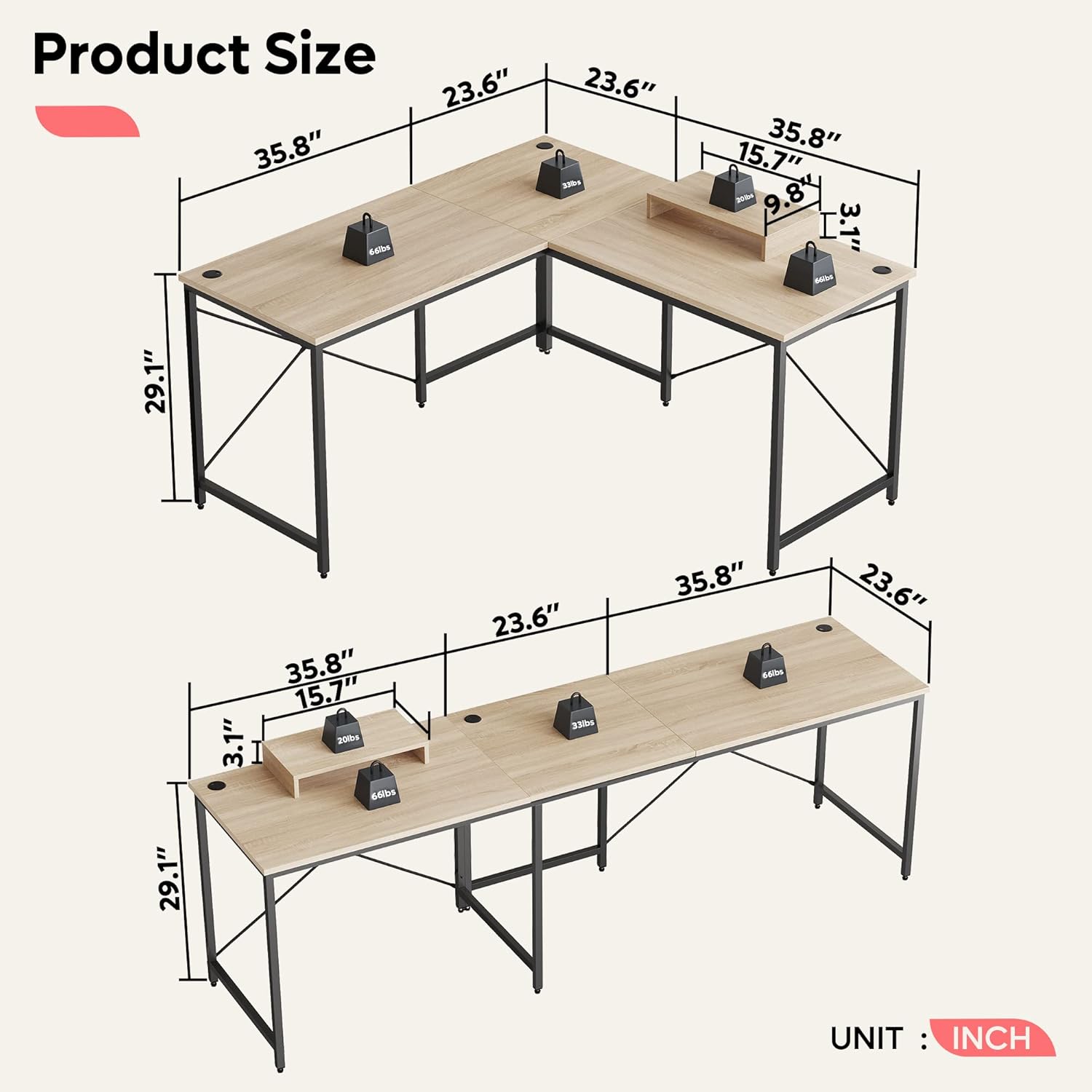
Figure 1: Product dimensions and configuration options. The top diagram shows the L-shaped configuration with dimensions 35.8" x 23.6" for each main section and a 15.7" x 9.8" monitor stand. The bottom diagram shows the long desk configuration, measuring 95.5" in total length. Both configurations are 29.1" high.

Figure 2: Example of the Bestier L-shaped computer desk configured for two users in an office environment. The desk is light wood with a black metal frame, featuring two computer monitors, a laptop, and a monitor stand.

Figure 3: Example of the Bestier computer desk configured as a long desk, suitable for two workstations. The desk is light wood with a black metal frame, featuring two computer monitors, a laptop, and a monitor stand.
4. Operation and Usage
Once assembled, the Bestier L-Shaped Computer Desk is ready for use. Its design provides a stable and spacious surface for various activities.
4.1. Workspace Utilization
The large desktop surface accommodates multiple monitors, keyboards, mice, and other peripherals. The integrated cable management grommets help keep your workspace tidy by routing cables efficiently.
4.2. Monitor Stand
Utilize the included monitor stand to elevate your screen to an ergonomic height, promoting better posture and reducing neck and eye strain during prolonged use.
5. Care and Maintenance
Proper care will ensure the longevity and appearance of your Bestier L-Shaped Computer Desk.
5.1. Cleaning
- For daily cleaning, wipe the desktop and metal frame with a soft, damp cloth.
- Avoid using harsh chemicals, abrasive cleaners, or polishes, as these can damage the finish.
- Promptly wipe up any spills to prevent water damage, especially on the edges.
5.2. Protection
- While the desktop is waterproof, heat-resistant, and anti-scratch, it is recommended to use coasters for drinks and protective pads under hot items or sharp objects to further preserve the surface.
- Periodically check and tighten all screws and fasteners to maintain stability.

Figure 4: Close-up view of the desk's P2 Class Environment-Friendly protection particle board, highlighting its waterproof, heat-resistant, and anti-scratch properties.
6. Troubleshooting
This section addresses common issues you might encounter with your desk.
6.1. Desk Wobbles
- Ensure all screws and bolts are securely tightened.
- Verify that the desk is placed on a level surface. Adjust any leveling feet if present.
- Check that all frame components are correctly assembled according to the instructions.
6.2. Parts Missing or Damaged
- Before assembly, carefully check the contents against the parts list in the assembly guide.
- If any parts are missing or damaged upon arrival, contact Bestier customer support for assistance.
7. Product Specifications
| Feature | Specification |
|---|---|
| Brand | Bestier |
| Model Number | B07V6DHYGJ |
| Product Dimensions (L-shape) | 151D x 151W x 82H Centimeters (approx. 59.45" D x 59.45" W x 32.3" H) |
| Product Dimensions (Long Desk) | Approx. 242.5W x 60D x 82H Centimeters (approx. 95.5" W x 23.6" D x 32.3" H) |
| Colour | Oak |
| Style | Modern |
| Base Material | Metal, Wood |
| Top Material Type | Environment-Friendly Thick P2 Particle Board |
| Special Feature | Adjustable Configuration (L-shape or Long Desk), Free Monitor Stand |
| Room Type | Office, Home Office |
| Item Weight | 25.8 Kilograms (approx. 56.9 lbs) |
| Assembly Required | Yes |
8. Warranty and Support
Bestier provides a warranty for this product as follows:
- Standard Warranty: All Bestier products come with a 12-month free service warranty from the date of purchase.
- Extended Service: To potentially receive an extended service period, please follow the steps outlined in the physical manual included with your product to become a Bestier VIP.
For warranty claims, technical support, or inquiries regarding missing/damaged parts, please contact Bestier customer service through the contact information provided in your product packaging or on the official Bestier website.


