1. Product Overview
The Synology DS620slim is a compact yet powerful 6-bay Network Attached Storage (NAS) device designed to enhance productivity and provide robust data management solutions for your workspace. It offers seamless file synchronization, solid backup capabilities, and secure safeguarding of critical services. With support for 4K video transcoding, it is also ideal for streaming ultra-high-definition media content.

Figure 1: Front view of the Synology DS620slim, showcasing its six accessible drive bays.
Product Overview Video
Video 1: An official product overview of the Synology DS620slim, demonstrating its key features and compact design.
2. Key Features
- Compact 6-Bay Design: Mini-sized yet powerful, designed to maximize work productivity and blend seamlessly into any work environment.
- Flexible Storage: Features 6 drive bays for 2.5-inch HDDs and SSDs, offering better RAID flexibility.
- High Performance: Achieves over 220 MB/s reading and 190 MB/s writing speeds, even with encrypted data transmission.
- Expandable Memory: Comes with 2GB DDR3L memory, expandable up to 6GB.
- 4K Video Transcoding: Supports dual-channel H.265/H.264 4K video transcoding on the fly.
- Advanced Btrfs File System: Offers 65,000 system-wide snapshots and 1,024 snapshots per shared folder, ensuring data integrity and recovery.
- Maximum Single Volume Size: Supports up to 108 TB.
3. Setup and Installation
Setting up your Synology DS620slim is a straightforward process. For detailed step-by-step instructions, please refer to the official Installation Manual (PDF).
3.1. Unboxing and Initial Inspection
Carefully remove all components from the packaging. Verify that all items listed in the packing list are present and undamaged. The package typically includes the DS620slim unit, power adapter, power cord, and Ethernet cables.

Figure 2: Angled view of the Synology DS620slim, highlighting its sleek design.
3.2. Drive Installation
The DS620slim supports 2.5-inch SATA HDDs or SSDs. To install drives:
- Locate the drive trays on the front of the unit.
- Gently pull the drive tray handle to remove it from the bay.
- Place your 2.5-inch drive into the tray and secure it with the provided screws.
- Slide the drive tray back into the bay until it clicks into place.
- Repeat for all desired drives.

Figure 3: Front view of the DS620slim with some drive bays open, illustrating the easy drive installation process.
3.3. Connecting Power and Network
Connect the power adapter to the DS620slim and plug it into a power outlet. Connect one or both Ethernet ports on the rear of the NAS to your network router or switch using the provided Ethernet cables.

Figure 4: Rear view of the Synology DS620slim, showing the power input, dual LAN ports, and USB ports.
4. Operating Your DS620slim
The Synology DS620slim operates on the intuitive DiskStation Manager (DSM) operating system, accessible via a web browser. DSM provides a rich set of features for file management, data backup, multimedia streaming, and more.
4.1. Initial Setup with DSM
After connecting your NAS, use Synology Assistant (available for download from Synology's website) or a web browser to find your DS620slim on the network and initiate the DSM installation. Follow the on-screen prompts to create your administrator account, set up storage pools, and create volumes.
4.2. File Management and Sharing
DSM's File Station allows you to manage files and folders on your NAS. You can easily create shared folders, set user permissions, and access your data from various devices, including computers, mobile phones, and tablets.
4.3. Data Backup and Synchronization
Utilize DSM's comprehensive backup solutions, such as Hyper Backup, to back up data from your NAS to various destinations, including external drives, remote Synology NAS, or cloud services. Synology Drive allows for seamless file synchronization across multiple devices.
5. Maintenance
Regular maintenance ensures the longevity and optimal performance of your Synology DS620slim.
- Software Updates: Regularly check for and install DSM updates to ensure you have the latest features, security patches, and bug fixes.
- Drive Health Check: Periodically check the health status of your installed drives using DSM's Storage Manager. Replace any failing drives promptly.
- System Logs: Monitor system logs for any unusual activity or error messages.
- Dust Removal: Ensure proper airflow by regularly cleaning dust from the fan and vents. Power off the unit before cleaning.
- Data Backup: Maintain a consistent backup strategy for your critical data.
6. Troubleshooting
If you encounter issues with your DS620slim, consider the following common troubleshooting steps:
- No Power: Ensure the power adapter is securely connected to both the NAS and a working power outlet. Check the power cord.
- Network Connectivity Issues: Verify Ethernet cable connections. Check your router and network settings. Ensure the NAS has a valid IP address.
- Drive Status Lights: Refer to the LED indicators on the front panel. A blinking orange light often indicates a drive issue. Consult the DSM Storage Manager for details.
- Cannot Access DSM: Try accessing DSM using Synology Assistant. Ensure your computer is on the same network as the NAS.
- Performance Issues: Check CPU and RAM usage in DSM's Resource Monitor. Ensure sufficient free space on volumes.
For more advanced troubleshooting or persistent issues, please visit the official Synology Support website or contact their customer service.
7. Specifications
| Feature | Detail |
|---|---|
| Model Name | DS620slim |
| Drive Bays | 6 (2.5" SATA HDD/SSD) |
| Memory | 2GB DDR3L (expandable up to 6GB) |
| Dimensions (LxWxH) | 6.89 x 5.94 x 4.76 inches |
| Weight | 3.08 pounds |
| Max Single Volume Size | 108 TB |
| Material | Metal |
| Color | white |
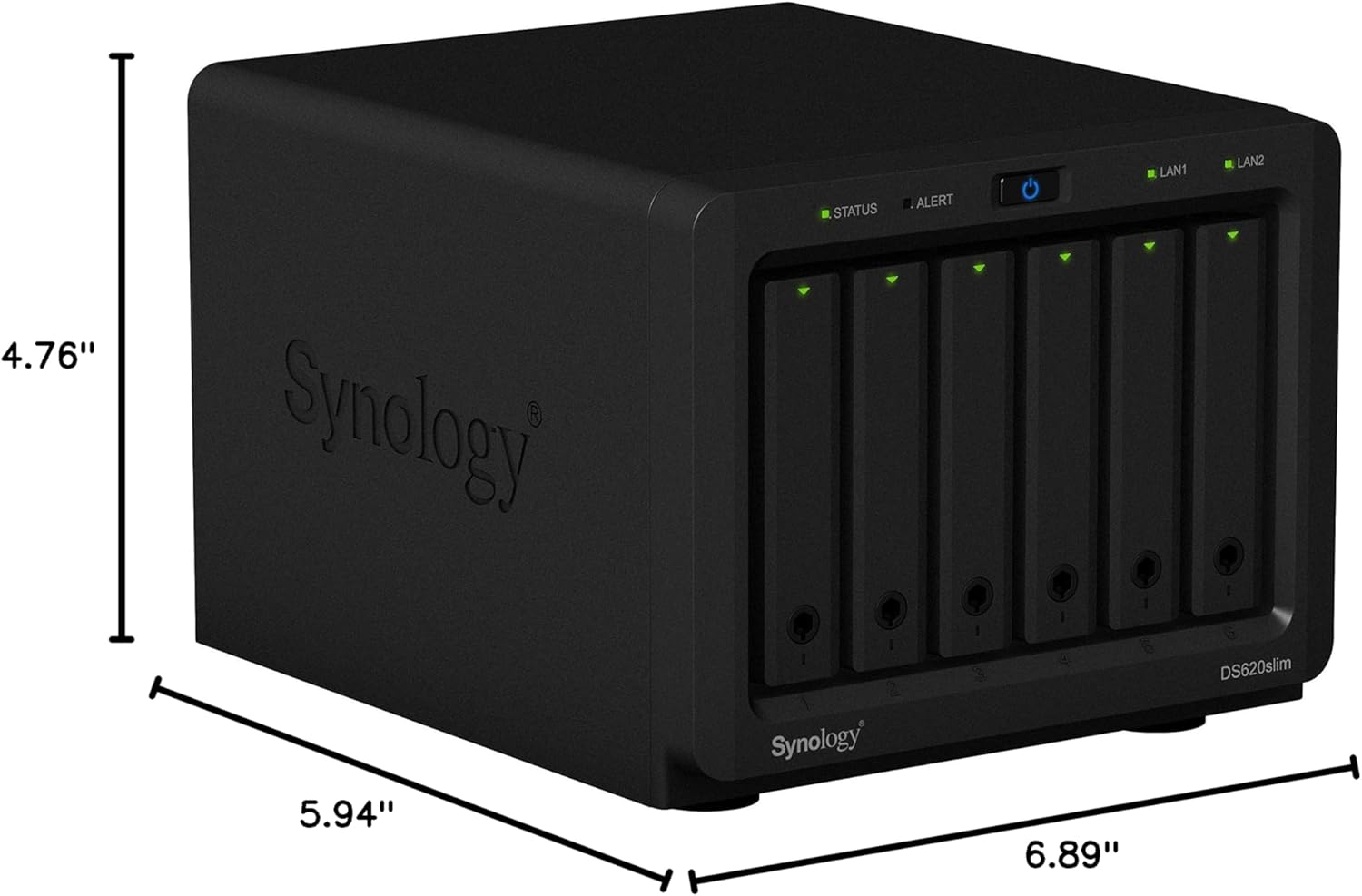
Figure 5: Dimensions of the Synology DS620slim.
8. Warranty and Support
The Synology DS620slim is backed by Synology's 2-year limited warranty. This warranty covers defects in materials and workmanship under normal use.
For warranty claims, technical assistance, or further support, please visit the official Synology website:
You may also find helpful resources, FAQs, and community forums on their support portal.


