
1. Introduction
The GAMEMAX GX700 is a high-performance 700W power supply unit (PSU) designed for desktop computers. Featuring 80 Plus Gold certification, it delivers high energy efficiency, reducing power consumption and heat generation. The Active Power Factor Correction (PFC) ensures stable and reliable power delivery to your system components. This manual provides essential information for the safe installation, operation, maintenance, and troubleshooting of your GX700 power supply.
2. Safety Information
- Do not open the PSU casing. High voltages are present inside, even when the unit is unplugged. Opening the casing voids the warranty and poses a risk of electric shock.
- Ensure the power supply is disconnected from the AC outlet before installation or handling.
- Install the PSU in a well-ventilated area. Do not block the fan or ventilation openings.
- Use only the cables provided with the power supply.
- Connect the correct cables to the appropriate components. Incorrect connections can damage your system.
- This product is designed for indoor use only. Do not expose it to water, high humidity, or extreme temperatures.
3. Package Contents
Verify that your package contains the following items:
- GAMEMAX GX700 700W Power Supply Unit
- AC Power Cord
- Mounting Screws
- Cable Ties (for cable management)
- User Manual (this document)
4. Setup and Installation
Follow these steps to install your GAMEMAX GX700 power supply:
4.1 Physical Installation
- Ensure your computer is powered off and unplugged from the wall outlet.
- Open your computer case.
- Carefully place the GAMEMAX GX700 into the power supply mounting bay of your PC case. Ensure the fan is oriented correctly for optimal airflow (typically facing downwards or upwards, depending on your case design).
- Secure the PSU to the case using the provided mounting screws.

Image: Angled view of the GAMEMAX GX700 Power Supply, showing the fan grill and side branding. This illustrates the unit's external appearance before installation.
4.2 Cable Connections
Connect the necessary cables to your motherboard and other components:
- 24-Pin ATX Motherboard Connector: Connect this main power cable to the corresponding port on your motherboard.
- 8-Pin (4+4) EPS/CPU Connector: Connect this to the CPU power port on your motherboard. Some motherboards may require only 4 pins.
- PCIe (6+2 Pin) Connectors: Use these to power your graphics card(s). Connect the 6-pin or 8-pin configuration as required by your GPU.
- SATA Power Connectors: Connect these to SATA devices such as SSDs, HDDs, and optical drives.
- Molex (4-Pin Peripheral) Connectors: Use these for older peripherals or case fans that require Molex power.
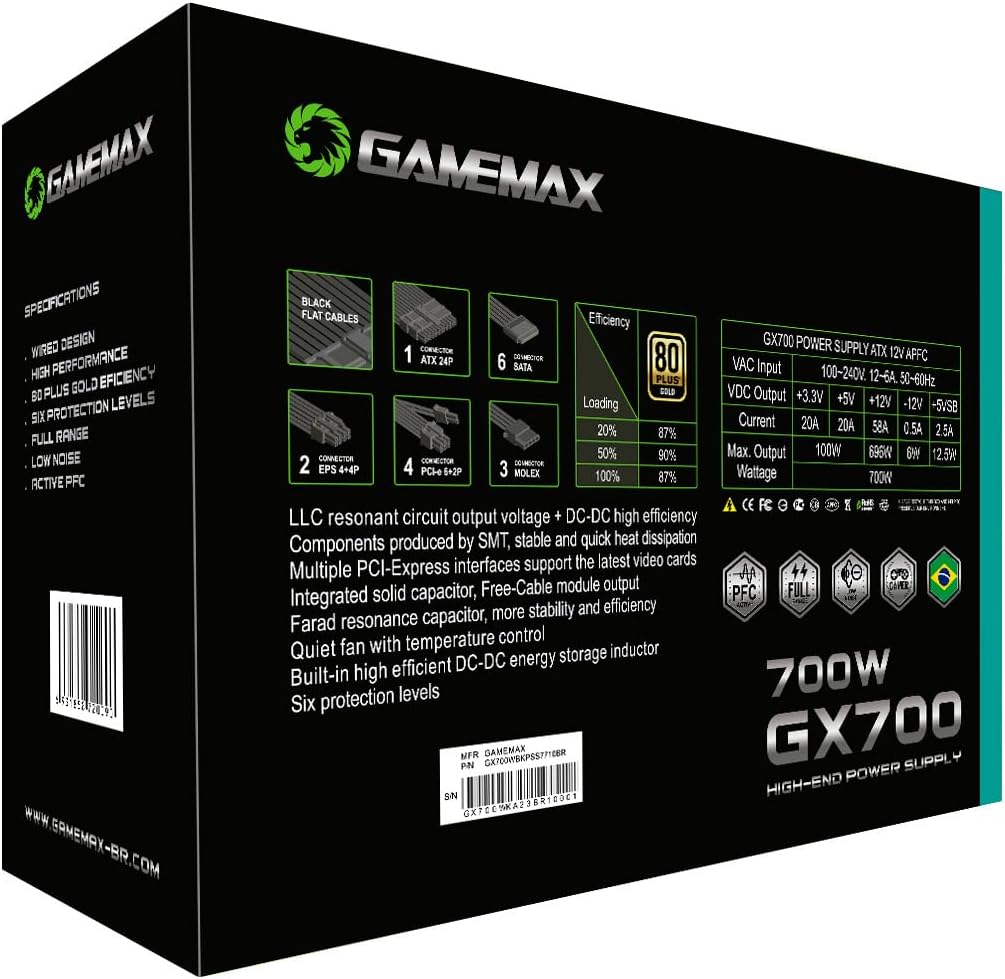
Image: Side view of the GAMEMAX GX700 Power Supply, showing the permanently attached and bundled power cables. This illustrates the various connectors available for system components.
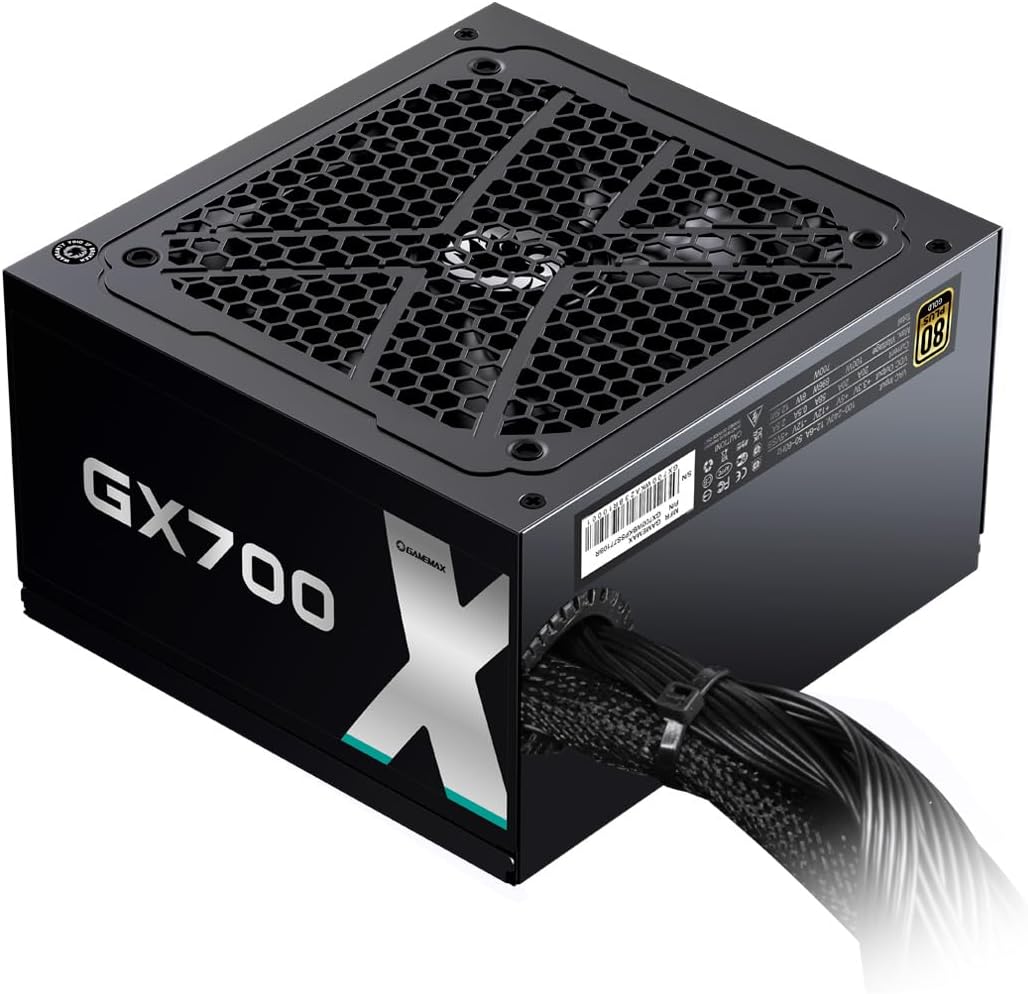
Image: Rear panel of the GAMEMAX GX700 Power Supply, showing the AC power input and the power switch. This is where the main power cord connects.
- Once all components are connected, organize the cables using cable ties for better airflow and aesthetics.
- Close your computer case.
- Connect the AC power cord to the PSU and then to a wall outlet.
5. Operating Instructions
The GAMEMAX GX700 is designed for straightforward operation.
- Power On: After connecting all cables and the AC power cord, flip the power switch on the back of the PSU to the 'I' (On) position. Then, press the power button on your computer case.
- Power Off: Shut down your computer through the operating system. Once the system is off, you can flip the power switch on the back of the PSU to the 'O' (Off) position for complete power disconnection.
- 80 Plus Gold Efficiency: This certification indicates that the PSU operates at a high efficiency (typically 87-90% at 20-100% load), meaning less energy is wasted as heat, contributing to lower electricity bills and a cooler system.
- Active PFC: The Active Power Factor Correction circuit ensures that the power supply draws power from the AC mains more efficiently, providing a stable and clean power output to your components.
6. Maintenance
Proper maintenance helps ensure the longevity and optimal performance of your power supply.
- Cleaning: Periodically clean the exterior of the PSU and the fan grill to prevent dust buildup. Use compressed air to gently clear dust from the fan blades and vents. Ensure the PSU is powered off and unplugged before cleaning.
- Environment: Operate the PSU in a clean, dry, and well-ventilated environment. Avoid placing it near heat sources or in direct sunlight.
- Cable Management: Ensure cables are neatly routed and do not obstruct airflow within the computer case.
7. Troubleshooting
If you encounter issues with your GAMEMAX GX700, refer to the following common problems and solutions:
| Problem | Possible Cause | Solution |
|---|---|---|
| System does not power on. | Loose power cable, PSU switch off, faulty component. | Check AC power cord connection. Ensure PSU switch is 'On'. Verify all internal power cables are securely connected. Test with minimal components (motherboard, CPU, RAM). |
| System powers on but no display. | Graphics card not powered, monitor cable loose. | Ensure PCIe power cables are correctly connected to the graphics card. Check monitor connections. |
| System crashes or restarts randomly. | Overload, overheating, unstable power. | Ensure PSU wattage is sufficient for all components. Check for proper ventilation and dust buildup. Verify all power connections are secure. |
| Loud fan noise from PSU. | Dust buildup, fan malfunction. | Clean the PSU fan and vents with compressed air. If noise persists, contact support. |
If the problem persists after trying these solutions, please contact GAMEMAX customer support.
8. Specifications
The following table details the technical specifications of the GAMEMAX GX700 Power Supply:
| Feature | Description |
|---|---|
| Brand | GAMEMAX |
| Model Number | GX700WBKPSS7710BR |
| Output Power | 700 Watts |
| Efficiency Certification | 80 Plus Gold |
| Power Factor Correction | Active PFC |
| Form Factor | ATX |
| Cooling Method | Air (Integrated fan) |
| Fan Count | 1 |
| Power Supply Design | Non-modular |
| Compatible Devices | Computer, Gaming PC, High-performance PC |
| Connector Types | ATX, EPS, Molex, PCI Express |
| Maximum Input Voltage | 132 Volts (AC) |
| Minimum Input Voltage | 100 Volts (AC) |
| Item Dimensions (L x W x H) | 25 x 17 x 9.2 centimeters |
| Item Weight | 1.75 Kilograms |
| System Bus Connector Type | 8 Pin |

Image: Detailed view of the GAMEMAX GX700 packaging, highlighting the technical specifications and cable types. This provides a quick reference for product features.

Image: Internal view of the GAMEMAX GX700 Power Supply, showcasing its components such as capacitors and heatsinks. This illustrates the internal build quality.
9. Warranty and Support
The GAMEMAX GX700 Power Supply comes with a 12-month manufacturer's warranty. This warranty covers defects in materials and workmanship under normal use.
For technical support, warranty claims, or further assistance, please contact GAMEMAX customer service through their official website or the retailer where the product was purchased. Please have your product model number (GX700) and proof of purchase ready when contacting support.