
Introduction
This manual provides essential information for the safe and effective use of your TESSAN US to India Type D Travel Power Adapter. Please read these instructions carefully before use and retain for future reference.
Safety Instructions
IMPORTANT: This is NOT a voltage converter. This adapter is designed for use with dual voltage devices (100V to 250V). It will not convert 220V to 110V or vice versa. Ensure your electronic devices are compatible with the local voltage (typically 220V-240V in Type D countries) before plugging them into this adapter. Failure to do so may result in damage to your device or personal injury.
Always check the voltage requirements of your device before use. High-power appliances such as hair dryers, straighteners, curling irons, and electric razors often require a voltage converter, not just an adapter. Verify your device's voltage range printed on the product or its power adapter.
Do not expose the adapter to liquids, extreme temperatures, or direct sunlight. Do not disassemble or attempt to repair the adapter. Keep out of reach of children.

Image: Important warning regarding voltage conversion. The image shows the adapter with a red warning text stating it is not a voltage converter and advises checking device voltage. Below are crossed-out icons for a hair dryer, straightener, electric toothbrush, and razor, indicating these devices may not be compatible without a voltage converter.
Product Overview
The TESSAN US to India Type D Travel Power Adapter is a compact and versatile solution for charging your electronic devices in countries using Type D outlets. It features a 3-in-1 input design, allowing you to power multiple devices simultaneously.
- 1 American Socket: Accepts standard North American 2 or 3-prong flat pin plugs (including polarized).
- 2 USB Charging Ports: Dual smart charging USB ports provide up to 2.4A output, ideal for charging smartphones, tablets, and other USB-powered devices.
- LED Indicator: A soft indicator light illuminates when the adapter is powered, confirming functionality.

Image: Front view of the TESSAN adapter, highlighting the universal socket (100-250V) and the two dual USB ports (Output 2.4A Max) with an LED indicator in the center.

Image: A close-up, angled view of the TESSAN US to India Type D Travel Power Adapter, showcasing its compact design and the front-facing American socket and two USB ports.
Setup
To set up your TESSAN Type D adapter, ensure you are in a country that utilizes the Type D plug standard. The adapter features three round prongs on the back, characteristic of Type D outlets.
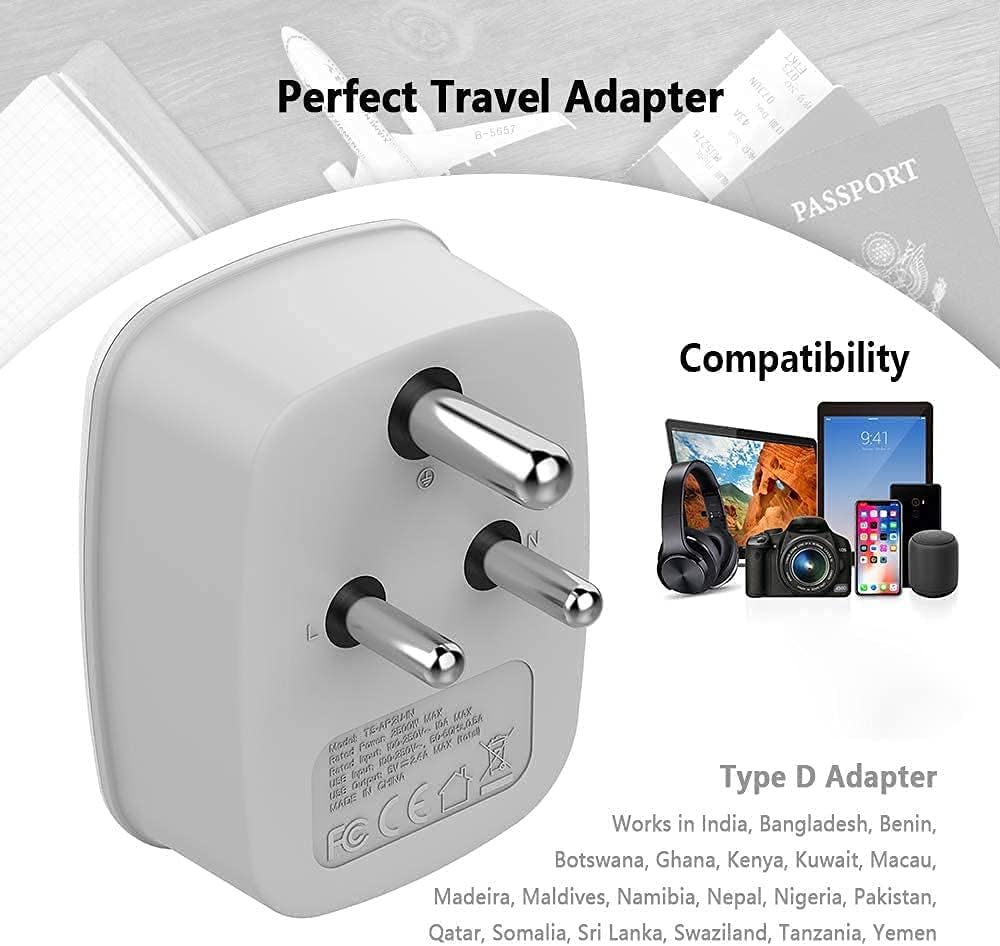
Image: Rear view of the TESSAN adapter, clearly showing the three round Type D prongs. The image also lists compatible countries such as India, Bangladesh, Maldives, Nepal, and Pakistan.

Image: A multi-view image displaying the dimensions of the TESSAN Type D adapter from various angles (front, side, back), indicating its compact size of approximately 2.8 inches in height, 2.0 inches in depth, and 2.1 inches in width.
Operating Instructions
- Verify Device Compatibility: Before plugging in any device, confirm it is dual voltage (100V-250V) to avoid damage.
- Plug into Wall Outlet: Insert the TESSAN adapter's Type D prongs firmly into a compatible wall socket. The soft LED indicator on the adapter's front will illuminate, confirming power is supplied.
- Connect Devices:
- For AC powered devices, plug your North American 2 or 3-prong plug into the universal socket on the front of the adapter.
- For USB-powered devices, connect your USB charging cables to the two USB ports located at the bottom of the adapter.
- Charge Simultaneously: You can charge up to three devices (one AC, two USB) concurrently. The adapter is designed to provide efficient charging for all connected devices.

Image: The TESSAN adapter plugged into a wall outlet, simultaneously charging a laptop, a smartphone, and a tablet, demonstrating its multi-device charging capability.

Image: The TESSAN adapter in use on a bedside table, plugged into a wall socket and charging a smartphone and a tablet, illustrating its convenience for travel and compact spaces.
Compatibility
This TESSAN Type D travel adapter is compatible with most overseas countries that use Type D electrical outlets. These include, but are not limited to:
- Bangladesh
- India
- Kuwait
- Maldives
- Namibia
- Nepal
- Pakistan
- Qatar
- Sri Lanka
- Yemen
Always confirm the specific plug type and voltage of your destination country before traveling.
Video: An official TESSAN video titled "Tessan Travel Adapters - Power Your Travel Adventures." This video provides a general overview of TESSAN travel adapters, showcasing their features and benefits for international travel.
Maintenance
To ensure the longevity and optimal performance of your TESSAN adapter, follow these maintenance guidelines:
- Cleaning: Disconnect the adapter from the power outlet and all devices before cleaning. Use a dry, soft cloth to wipe the exterior. Do not use liquid cleaners or abrasive materials.
- Storage: Store the adapter in a cool, dry place away from direct sunlight and moisture when not in use.
- Inspection: Periodically inspect the adapter for any signs of damage, such as frayed cables, bent prongs, or cracks in the casing. Discontinue use if any damage is found.
Troubleshooting
If you encounter issues with your TESSAN adapter, refer to the following common troubleshooting steps:
- No Power/Indicator Light Off:
- Ensure the adapter is fully inserted into the wall outlet.
- Check if the wall outlet is functional by testing it with another device.
- Verify that the local power supply is active.
- Device Not Charging:
- Confirm your device is dual voltage (100V-250V) and compatible with the local voltage.
- Check that your charging cables are securely connected to both the adapter and your device.
- Try using a different charging cable or USB port on the adapter.
- Ensure your device is not drawing more power than the adapter's capacity (USB ports: 2.4A Max).
- Adapter Overheating:
- Immediately disconnect all devices and the adapter from the wall.
- Ensure you are not using the adapter with non-compatible, high-power appliances.
- Allow the adapter to cool down before attempting to use it again with compatible devices. If overheating persists, discontinue use.
Specifications
| Model Number | TS-AP2U-IN |
| Brand | TESSAN |
| Color | Grey-White |
| Product Dimensions (L x W x H) | 2.29 x 4.19 x 4.7 inches (approx. 5.8 x 10.6 x 12 cm) |
| Item Weight | 0.48 ounces (approx. 13.6 grams) |
| Input Voltage (Adapter) | Compatible with 100V-250V (for dual voltage devices) |
| USB Output | 2.4A Max per port |
| Socket Type | Type D (for wall outlet), North American (for devices) |
Warranty and Support
For warranty information or technical support, please refer to the packaging or contact TESSAN customer service directly. Contact details can typically be found on the official TESSAN website or through your retailer.