
1. Introduction
The ACEIRMC BME280 sensor module is a versatile digital environmental sensor designed to accurately measure temperature, humidity, and barometric pressure. This compact module is ideal for various applications, including weather stations, environmental monitoring, and IoT projects, especially when integrated with microcontrollers like Arduino or Raspberry Pi.
This manual provides essential information for setting up, operating, and maintaining your BME280 sensor module, ensuring optimal performance and longevity.
2. Product Overview
The BME280 sensor offers high precision and low power consumption. It supports both I2C (Inter-Integrated Circuit) and SPI (Serial Peripheral Interface) communication protocols, providing flexibility for integration into different electronic systems. Its ability to measure pressure also allows for approximate altitude calculations.
Key Features:
- Measures temperature, humidity, and barometric pressure.
- High accuracy: ±1 hPa for pressure, ±1.0°C for temperature.
- Supports I2C and SPI communication.
- Low power consumption.
- Can be used as an altimeter with ±1 meter accuracy.
Package Contents:
- BME280 Sensor Module (quantity as per purchase, e.g., 2pcs)
- Pin Headers (may require soldering)

Image 2.1: Front view of the BME280 sensor module with included pin headers.
3. Specifications
| Feature | Specification |
|---|---|
| Operating Voltage | 3.3V - 5V DC |
| Communication Interface | I2C, SPI |
| I2C Address (SDO LOW) | 0x76 |
| I2C Address (SDO HIGH) | 0x77 |
| Temperature Range | -40°C to +85°C |
| Humidity Range | 0% to 100% RH |
| Pressure Range | 300 to 1100 hPa |
| Temperature Accuracy | ±1.0°C |
| Pressure Accuracy | ±1 hPa (absolute) |
| Altitude Accuracy | ±1 meter |
| Dimensions | Approximately 3.11 x 1.65 x 0.16 inches |
| Weight | Approximately 0.282 ounces |
4. Setup and Wiring
Before connecting the BME280 module, ensure your microcontroller is powered off. Soldering the included pin headers to the module is typically required for breadboard or jumper wire connections.
4.1 Pinout Description
- VIN: Voltage Input (3.3V to 5V)
- GND: Ground
- SCL: I2C Clock Line / SPI Clock Line
- SDA: I2C Data Line / SPI Data In (MOSI)
- CSB: SPI Chip Select (active low)
- SDO: SPI Data Out (MISO) / I2C Address Select (LOW for 0x76, HIGH for 0x77)
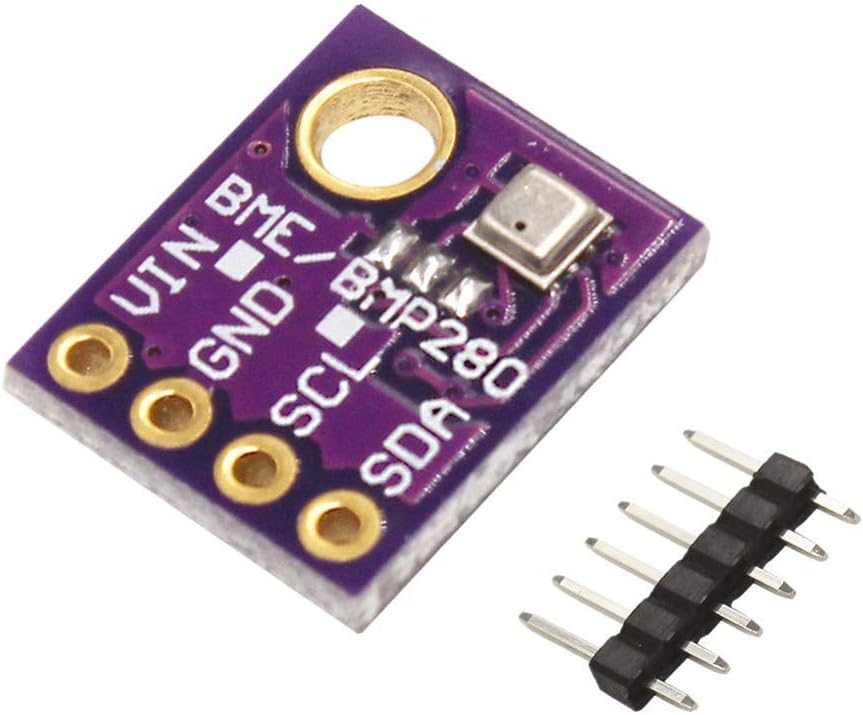
Image 4.1: Front view of the BME280 module with pin labels.

Image 4.2: Back view of the BME280 module.
4.2 I2C Wiring (Recommended for simplicity)
For I2C communication, connect the module to your microcontroller as follows:
- VIN to 3.3V or 5V (depending on your microcontroller's logic level and power supply)
- GND to Ground
- SCL to Microcontroller's SCL pin (I2C Clock)
- SDA to Microcontroller's SDA pin (I2C Data)
- SDO pin determines the I2C address: Connect to GND for address 0x76, or connect to VIN for address 0x77. Most modules default to 0x76 if SDO is left floating or pulled low.
4.3 SPI Wiring (For multiple sensors or specific applications)
For SPI communication, connect the module to your microcontroller as follows:
- VIN to 3.3V or 5V
- GND to Ground
- SCL to Microcontroller's SCK pin (SPI Clock)
- SDA to Microcontroller's MOSI pin (SPI Master Out, Slave In)
- SDO to Microcontroller's MISO pin (SPI Master In, Slave Out)
- CSB to Microcontroller's Chip Select pin (active low)

Image 4.3: Example wiring diagram for the BME280 sensor.
5. Operating Instructions
To operate the BME280 sensor, you will typically use a microcontroller and a suitable software library.
5.1 Software Libraries
For Arduino, the Adafruit BME280 Library is highly recommended. For Raspberry Pi, Python libraries like Adafruit CircuitPython BME280 are available.
5.2 Basic Operation (Arduino Example Concept)
- Install Library: Open your Arduino IDE, go to Sketch > Include Library > Manage Libraries... and search for "Adafruit BME280" to install.
- Include Header: In your sketch, include the library:
#include <Adafruit_BME280.h> - Initialize Sensor: Create an instance of the BME280 object. Important: If your module's I2C address is 0x76 (SDO pin connected to GND), you might need to explicitly initialize it with
bme.begin(0x76);as the default in some libraries might be 0x77. - Read Data: Use functions like
bme.readTemperature(),bme.readHumidity(), andbme.readPressure()to get sensor readings. - Calculate Altitude: The library often includes a function like
bme.readAltitude(SEALEVELPRESSURE_HPA), whereSEALEVELPRESSURE_HPAis the current barometric pressure at sea level for your location.
Refer to the example sketches provided with the library for detailed code implementation.
6. Maintenance
The BME280 sensor module is a robust electronic component, but proper care ensures its longevity and accuracy:
- Environmental Protection: Keep the module dry and away from direct moisture, corrosive gases, and extreme temperatures outside its operating range.
- Physical Handling: Handle the module by its edges to avoid touching the sensor element directly, as oils or debris can affect readings.
- Cleaning: If necessary, gently clean the board with a soft, dry brush. Avoid using liquids or abrasive materials.
- Storage: Store in an anti-static bag in a cool, dry place when not in use.
7. Troubleshooting
- "Sensor not found" error:
- Verify all wiring connections (VIN, GND, SCL, SDA) are correct and secure.
- Check the I2C address. The BME280 typically uses 0x76 or 0x77. Ensure your code initializes the sensor with the correct address for your module (determined by the SDO pin connection).
- Confirm your microcontroller's I2C pins are correctly configured.
- Inaccurate readings:
- Temperature: Ensure the sensor is not placed near heat sources (e.g., microcontroller, power supply) that could artificially raise its temperature.
- Humidity: Avoid placing the sensor in direct sunlight or in areas with rapid humidity changes.
- Pressure: Barometric pressure changes with altitude. Ensure you are using the correct sea-level pressure for altitude calculations.
- Check for any physical damage or debris on the sensor element.
- No readings/Module unresponsive:
- Double-check power supply (VIN and GND) to ensure the module is receiving adequate voltage.
- Inspect for any cold solder joints if you soldered the pin headers yourself.
- Try a different set of jumper wires or a different I2C/SPI port on your microcontroller if available.
8. Warranty and Support
For warranty information or technical support regarding your ACEIRMC BME280 sensor module, please refer to the retailer's return policy or contact ACEIRMC customer service directly through their official channels. Keep your purchase receipt or order details handy for any inquiries.