
1. Introduction
Thank you for choosing the ÍPEGA KP-CA144 Wi-Fi IP Camera. This manual provides detailed instructions for the installation, operation, and maintenance of your security camera. Please read this manual thoroughly before use to ensure proper functionality and safety.
2. Product Overview
The ÍPEGA KP-CA144 is a wireless IP camera designed for surveillance, featuring Wi-Fi connectivity, 720p video resolution, and advanced night vision capabilities, including full-color night vision. It is suitable for wall mounting and offers a night vision range of up to 30 meters.

Figure 2.1: Front view of the ÍPEGA KP-CA144 Wi-Fi IP Camera, showing the lens and LED array.
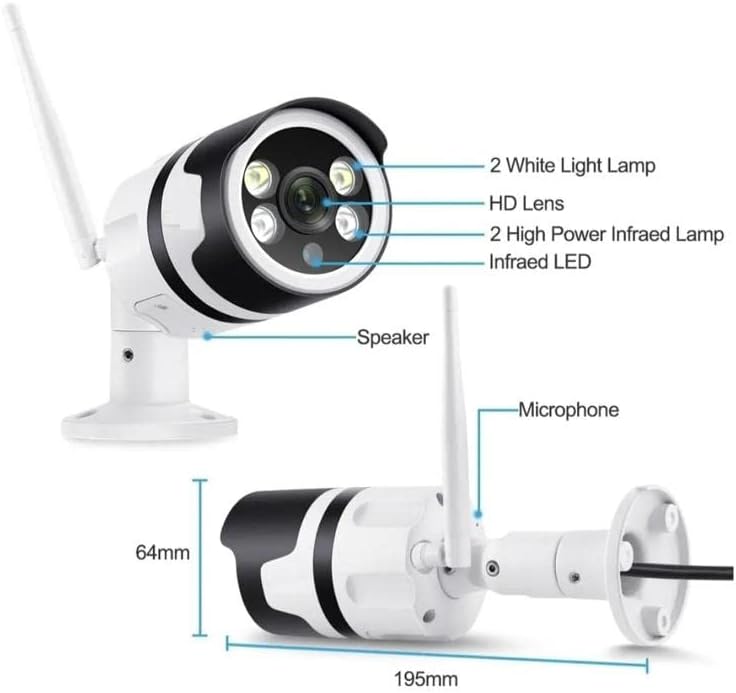
Figure 2.2: Detailed diagram of the camera components. This image highlights the 2 White Light Lamps, HD Lens, 2 High Power Infrared Lamps, Infrared LED, Speaker, and Microphone. Dimensions are also indicated: 195mm length and 64mm height.
Key components include:
- HD Lens: Captures video at 720p resolution.
- White Light Lamps (x2): Provide illumination for full-color night vision.
- High Power Infrared Lamps (x2): Enhance infrared night vision.
- Infrared LED: Additional infrared illumination.
- Speaker: For two-way audio communication.
- Microphone: For audio input during two-way communication.
- Wi-Fi Antenna: For wireless network connectivity.
3. Setup Guide
3.1 Unboxing
Carefully remove all components from the packaging. Verify that all items are present:
- ÍPEGA KP-CA144 Wi-Fi IP Camera
- Power Adapter
- Mounting Screws and Anchors
- User Manual (this document)
3.2 Mounting the Camera
The camera is designed for wall mounting. Choose a suitable location that provides the desired viewing angle and is within range of your Wi-Fi network and a power outlet.
- Mark the drilling points on the wall using the camera's base as a template.
- Drill holes at the marked points. Insert the wall anchors if necessary.
- Secure the camera base to the wall using the provided screws.
- Adjust the camera angle as needed.
3.3 Powering On
Connect the power adapter to the camera's power input port and then plug the adapter into a standard electrical outlet. The camera will initiate its startup sequence, which may include an indicator light flashing.
3.4 Network Connection (Wi-Fi)
To connect the camera to your Wi-Fi network, you will need to download the dedicated mobile application. Refer to the packaging or a quick start guide for the app name and QR code.
- Download and install the camera's companion app on your smartphone.
- Create an account and log in.
- Follow the in-app instructions to add a new device. This typically involves scanning a QR code on the camera or using an audio pairing method.
- Select your 2.4GHz Wi-Fi network and enter the password when prompted.
- Wait for the camera to connect to the network. A confirmation message or indicator light change will signify a successful connection.
4. Operating Instructions
4.1 Live View
Once connected, open the mobile app and select your camera from the device list to access the live video feed. You can view the real-time footage from your camera.
4.2 Recording
The camera supports continuous recording or motion-activated recording. Recording settings can be configured within the mobile application. Ensure a compatible microSD card (not included) is inserted for local storage, or subscribe to cloud storage services if available.
4.3 Playback
Recorded footage can be accessed and played back through the mobile app. Navigate to the playback section, select the desired date and time, and review the recordings.
4.4 Night Vision
The ÍPEGA KP-CA144 features advanced night vision with a range of up to 30 meters. It supports both infrared (black and white) and full-color night vision, utilizing its white light lamps for illumination in low-light conditions.

Figure 4.1: Comparison illustrating the difference between Full-Color Mode and Infrared Mode night vision. Full-Color Mode provides vivid, colored images in low light, while Infrared Mode offers clear black and white images.
The night vision mode can typically be set to automatic, infrared, or full-color within the camera's app settings.
4.5 Two-Way Audio
Utilize the built-in speaker and microphone for two-way audio communication. Through the mobile app, you can speak through the camera and hear audio from the camera's vicinity.
5. Maintenance
Regular maintenance ensures optimal performance and longevity of your camera.
- Cleaning: Gently wipe the camera lens and body with a soft, dry cloth. Avoid using harsh chemicals or abrasive materials.
- Firmware Updates: Periodically check the mobile app for available firmware updates. Keeping the firmware updated ensures the latest features and security patches.
- Network Stability: Ensure your Wi-Fi network is stable and provides sufficient signal strength to the camera for uninterrupted operation.
6. Troubleshooting
If you encounter issues with your ÍPEGA KP-CA144 camera, refer to the following common problems and solutions:
| Problem | Possible Cause | Solution |
|---|---|---|
| Camera offline | No power; Wi-Fi signal weak or disconnected; incorrect Wi-Fi password. | Check power connection; move camera closer to router or use a Wi-Fi extender; re-enter Wi-Fi password in app. |
| No video feed | Camera offline; app issue; network congestion. | Ensure camera is online; restart the app; check internet connection. |
| Poor image quality | Dirty lens; low light conditions; network bandwidth. | Clean the lens; ensure adequate lighting or enable night vision; check network speed. |
| Night vision not working | Night vision mode disabled; IR/white lights obstructed. | Enable automatic or specific night vision mode in app; ensure no obstructions in front of lights. |
If the problem persists, please contact customer support.
7. Specifications
| Feature | Specification |
|---|---|
| Model | KP-CA144 |
| Brand | ÍPEGA |
| Video Capture Resolution | 720p |
| Wireless Communication Technology | Wi-Fi (2.4GHz) |
| Form Factor | Bullet |
| Night Vision Range | 30 Meters |
| Lamp Type | Infrared, LED (White Light) |
| Special Features | Night Vision (Full-Color & Infrared), Two-Way Audio |
| Mounting Type | Wall Mount |
| Dimensions (Approx.) | 195mm (Length) x 64mm (Height) |
| EAN | 7898652412134 |
8. Warranty and Support
For warranty information and technical support, please refer to the documentation provided with your purchase or visit the official ÍPEGA website. Keep your proof of purchase for warranty claims.