Introduction
This manual provides essential instructions for the safe and efficient operation, maintenance, and troubleshooting of your Janome 1117 Sewing Machine. Please read this manual thoroughly before using the machine to ensure proper function and to prevent damage.
Setup
1. Unpacking and Placement
- Carefully remove the machine from its packaging. Retain all packaging materials for future transport or storage.
- Place the machine on a stable, flat surface with adequate lighting. Ensure there is enough space around the machine for comfortable operation.
2. Power Connection
- Connect the foot controller cord to the machine's power socket.
- Plug the power cord into a suitable electrical outlet. Ensure the voltage matches the machine's requirements.
- Turn on the power switch, usually located on the side of the machine.
3. Machine Overview
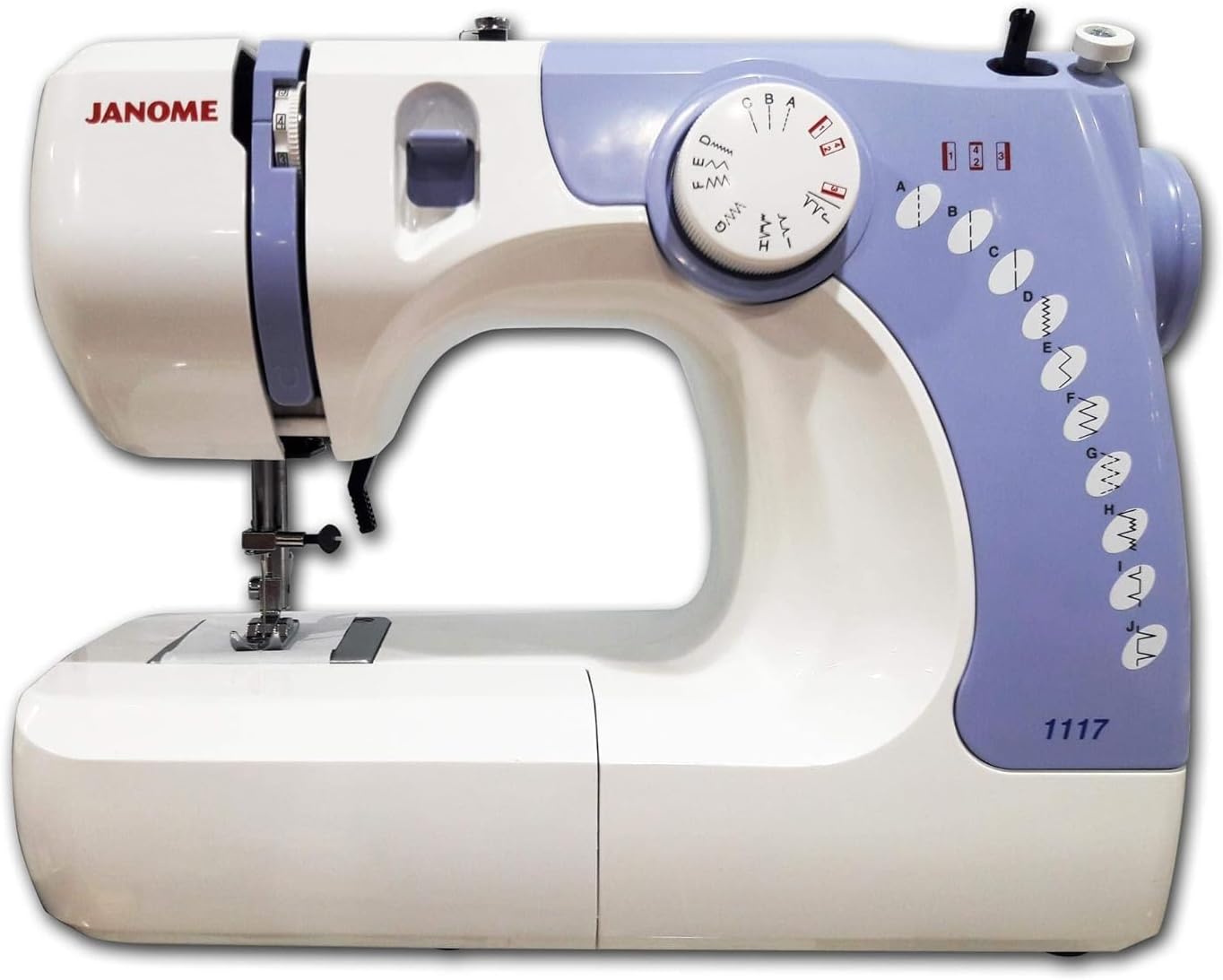
Figure 1: Janome 1117 Sewing Machine. This image displays the Janome 1117 Sewing Machine, highlighting its white and light purple casing, the stitch selector dial, tension dial, and the various stitch patterns available. The model number "1117" is visible on the lower right side of the machine.
Familiarize yourself with the main parts of the machine:
- Spool Pin: Holds the thread spool.
- Thread Guide: Directs the thread during threading.
- Tension Dial: Adjusts the thread tension.
- Stitch Selector Dial: Used to choose desired stitch patterns.
- Needle Bar: Holds the needle.
- Presser Foot: Holds fabric firmly against the feed dogs.
- Feed Dogs: Move the fabric under the needle.
- Bobbin Winder: Winds thread onto the bobbin.
Operating Instructions
1. Threading the Machine
Proper threading is crucial for good stitch quality.
- Place a spool of thread on the spool pin.
- Guide the thread through the upper thread guides as indicated by the numbered path on the machine.
- Pass the thread through the tension discs and then through the take-up lever.
- Thread the needle from front to back.
- Wind the bobbin and insert it into the bobbin case according to the machine's internal diagrams.
- Bring the bobbin thread up through the needle plate.
2. Selecting Stitches
The Janome 1117 offers various stitch patterns. To select a stitch:
- Locate the stitch selector dial on the front of the machine.
- Turn the dial to align the desired stitch pattern with the indicator mark. The available stitches are labeled A through J, including straight stitches, zigzag stitches, and decorative patterns.
- Refer to the stitch chart on the machine for visual representation of each stitch.
3. Adjusting Thread Tension
Correct thread tension is essential for balanced stitches. The tension dial is typically located on the upper front of the machine.
- Standard Tension: For most general sewing, set the tension dial to the middle range (e.g., 3-5).
- Too Loose Top Thread: If the bobbin thread appears on the top side of the fabric, increase the upper thread tension by turning the dial to a higher number.
- Too Loose Bobbin Thread: If the top thread appears on the underside of the fabric, decrease the upper thread tension by turning the dial to a lower number.
4. Sewing Basics
- Raise the presser foot lever.
- Place the fabric under the presser foot.
- Lower the presser foot lever.
- Turn the handwheel towards you to bring the needle down into the fabric, then back up. This brings the bobbin thread up.
- Hold both thread tails to the back.
- Gently press the foot controller to start sewing. Guide the fabric smoothly, do not pull or push forcefully.
- To finish, sew a few reverse stitches (if available) to secure the seam, raise the needle and presser foot, and pull the fabric away. Cut the threads.
Maintenance
Regular maintenance ensures the longevity and optimal performance of your sewing machine.
1. Cleaning
- After Each Use: Remove lint and dust from the bobbin area and under the needle plate using a small brush.
- Periodically: Unplug the machine. Remove the needle plate and bobbin case. Use the brush to clean out any accumulated lint from the feed dogs and hook area.
- Wipe the exterior of the machine with a soft, dry cloth. Do not use harsh chemicals or abrasive cleaners.
2. Needle Replacement
- Replace the needle regularly (after 8-10 hours of sewing or if it becomes bent or dull).
- Turn off the machine. Loosen the needle clamp screw, remove the old needle, and insert a new one with the flat side facing the back. Tighten the screw securely.
Troubleshooting
This section addresses common issues you might encounter. For problems not listed here, please contact customer support.
| Problem | Possible Cause | Solution |
|---|---|---|
| Skipped Stitches | Incorrect needle, bent needle, improper threading. | Replace needle with correct type/size, re-thread machine correctly. |
| Thread Breakage (Top) | Incorrect tension, poor quality thread, improperly threaded, bent needle. | Adjust tension, use good quality thread, re-thread, replace needle. |
| Thread Breakage (Bobbin) | Improperly wound bobbin, lint in bobbin case, incorrect bobbin insertion. | Re-wind bobbin evenly, clean bobbin case, re-insert bobbin correctly. |
| Fabric Not Feeding | Presser foot not lowered, feed dogs clogged with lint, stitch length set to zero. | Lower presser foot, clean feed dogs, adjust stitch length. |
Specifications
Key technical specifications for the Janome 1117 Sewing Machine:
| Feature | Detail |
|---|---|
| Brand | Janome |
| Model Number | 1117 |
| Power Source | Corded Electric |
| Type | Electronic Sewing Machine |
| Embroidery Function | Yes |
| Material | Plastic |
| Item Weight | 5.95 kg |
| Package Dimensions | 38.2 x 28.5 x 21.2 cm |
Warranty and Support
For warranty information, technical support, or service inquiries, please refer to the warranty card included with your purchase or contact your authorized Janome dealer. Keep your proof of purchase for warranty claims.
You may also visit the official Janome website for additional resources and contact information.


