
ANTOP SBS-602B
ANTOP Smart Boost Amplifier SBS-602B User Manual
Model: SBS-602B
Introduction
The ANTOP Smart Boost Amplifier, model SBS-602B, is designed to enhance the over-the-air TV signal received by your antenna. This amplifier features dual outputs, allowing you to connect your antenna to a primary TV and a second device simultaneously, such as an FM stereo, another TV, or any OTA-Ready streaming device or projector. It is compatible with TV converter boxes and digital televisions, supporting HD, 1080P, and 4K ULTRA HD resolutions. The Smart Boost system provides an easy way to adjust signal reception for optimal performance.
Package Contents

The package for your ANTOP Smart Boost Amplifier SBS-602B includes all necessary components for installation and operation. Please verify that all items listed below are present in your box:
- 1 x SBS-602B HD Smart Boost Antenna Amplifier
- 1 x AC/DC Power Adapter
- 2 x 5ft Coaxial Cables
- 2 x Wall Screws/Anchors
- 1 x Instruction/User Manual (this document)
Product Overview
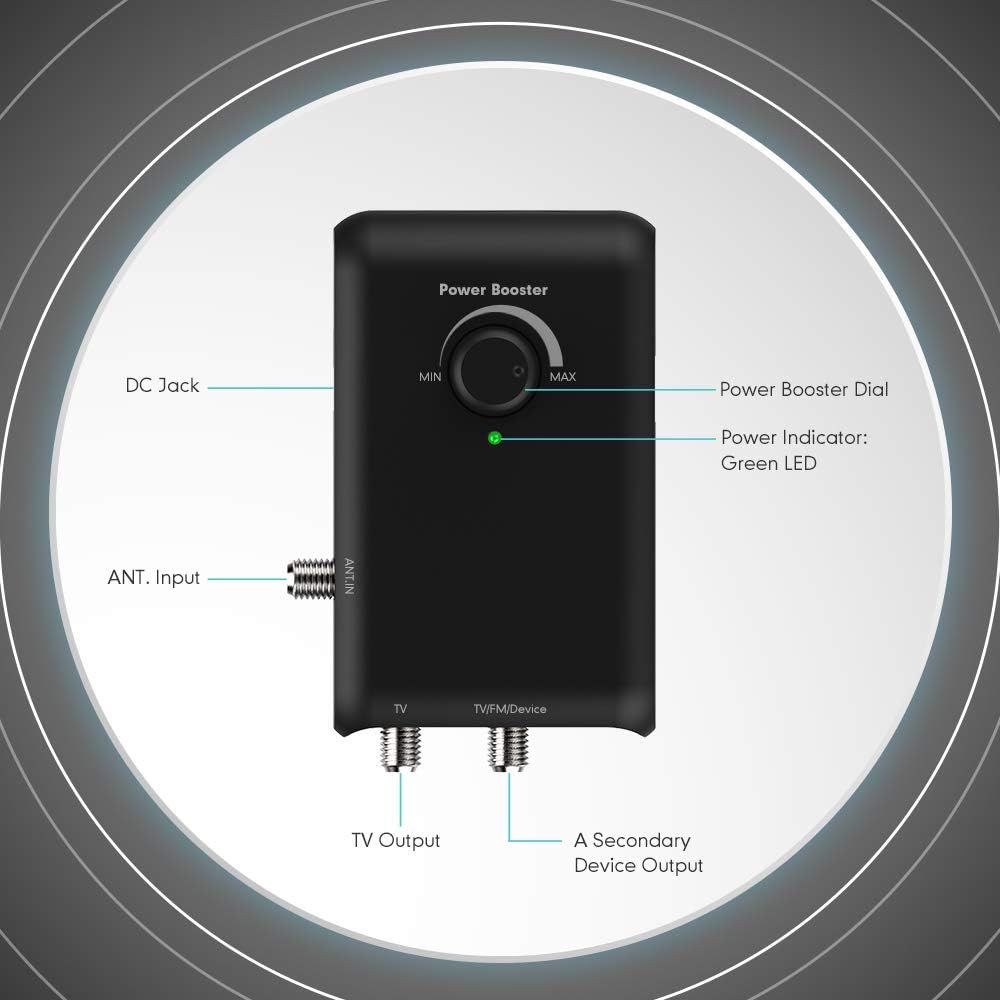
The ANTOP Smart Boost Amplifier SBS-602B features a compact design with clearly labeled ports and controls for easy setup and operation. Key components include:
- DC Jack: For connecting the AC/DC Power Adapter.
- ANT. Input: Connects to your TV antenna.
- Power Booster Dial: Adjusts the signal gain from minimum (MIN) to maximum (MAX).
- Power Indicator: A green LED light indicates the amplifier is powered on.
- TV Output: Connects to your primary television.
- TV/FM/Device Output: Connects to a second device such as an FM stereo, another TV, or an OTA-ready streaming device/projector.

Power Booster Dial
The Power Booster Dial allows you to fine-tune the amplification level. Turn the dial clockwise to increase gain and counter-clockwise to reduce gain. This helps in achieving the correct balance between short-range and long-range reception.
Built-in 4G/LTE Filter
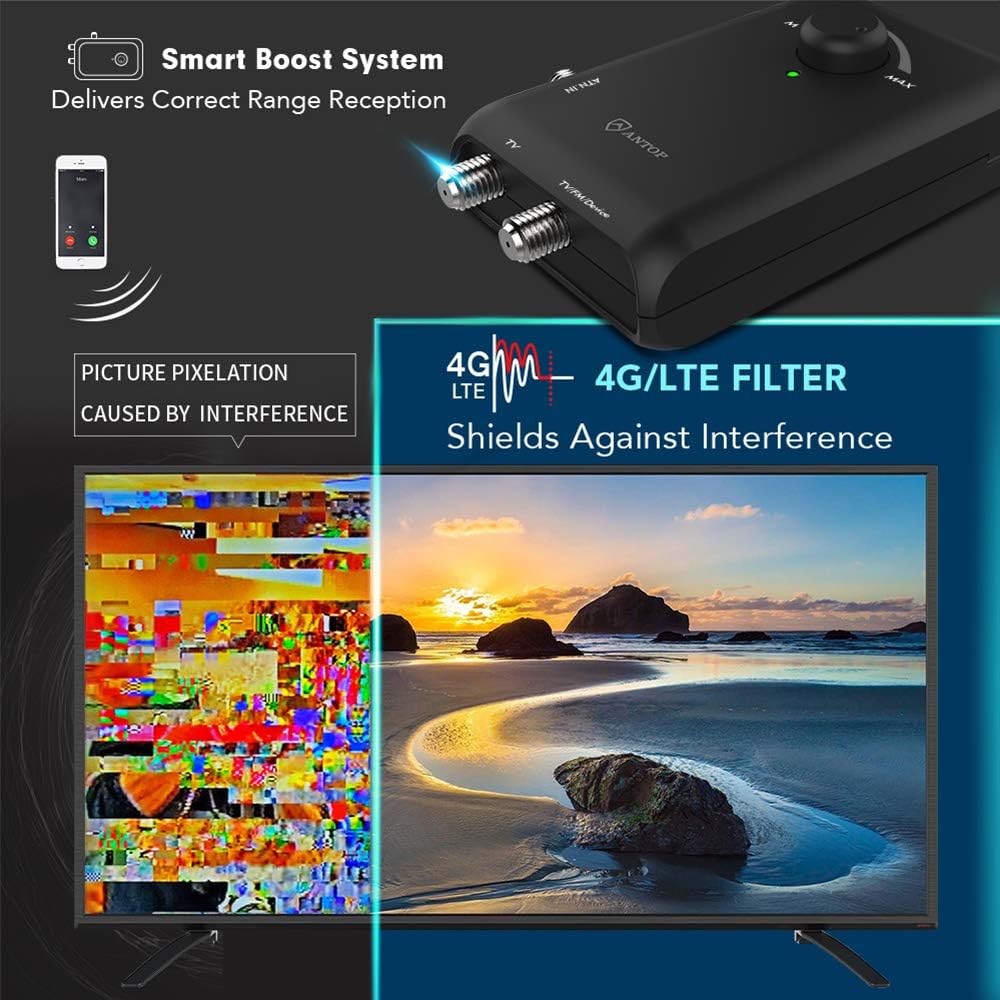
The amplifier includes a built-in 4G/LTE filter designed to block 3G and 4G wireless signals. This feature helps to ensure noise-free digital TV reception by preventing interference from mobile phone signals.
Setup Instructions
Follow these steps to properly set up your ANTOP Smart Boost Amplifier:
- Connect Antenna: Connect your TV antenna's coaxial cable to the "ANT. IN" port on the Smart Boost Amplifier.
- Connect to Primary TV: Use one of the supplied 5ft coaxial cables to connect the "TV" output port on the amplifier to the antenna input (ANT/IN or RF IN) on your primary television.
- Connect to Second Device (Optional): If connecting a second device (FM stereo, another TV, or OTA-Ready streaming device/projector), use the second supplied 5ft coaxial cable to connect the "TV/FM/Device" output port on the amplifier to the antenna input of your second device.
- Connect Power: Plug the AC/DC Power Adapter into the "DC 12V" jack on the amplifier, then plug the adapter into a standard electrical outlet. The green power indicator LED on the amplifier will illuminate.
- Positioning Tips:
- Do not place or hide your antenna in or behind any metallic objects, as this can significantly degrade signal reception.
- Keep your antenna away from any high-power consumption devices (e.g., air conditioners, refrigerators, microwave ovens) to avoid potential interference.

This diagram illustrates a typical setup connecting the amplifier to a TV antenna and a single television. Ensure all coaxial connections are finger-tight.

This diagram demonstrates the dual output capability, allowing simultaneous connection to a primary TV and a secondary device like an FM stereo or another TV.
Operating Instructions
Once the amplifier is connected, follow these steps to optimize your signal reception:
- Initial Channel Scan: After connecting the amplifier and powering it on, perform a channel scan on your television(s) or OTA-ready device(s). Refer to your TV's or device's user manual for specific instructions on how to perform a channel scan.
- Adjusting Signal Gain:
- Turn the Power Booster Dial on the amplifier to adjust the signal gain. Start with the dial at the minimum (MIN) position.
- Slowly turn the dial clockwise towards the maximum (MAX) position while monitoring your TV's signal strength meter (if available) or picture quality.
- The goal is to find the optimal balance for clear reception. Too much gain can sometimes lead to signal overload and pixelation, especially for strong local channels.
- Important Tip: Re-scan the channels on your TV or device after each significant adjustment of the Smart Boost dial to ensure the changes are registered and new channels are found.
- Regular Channel Scans: It is recommended to scan for channels monthly. This helps to find all available channels, including any newly added or changed broadcasts in your area.
Troubleshooting
If you experience issues with your ANTOP Smart Boost Amplifier, please refer to the following common problems and solutions:
| Problem | Possible Cause | Solution |
|---|---|---|
| No power indicator light | Power adapter not connected or faulty outlet. | Ensure the AC/DC Power Adapter is securely plugged into the amplifier and a working electrical outlet. Try a different outlet. |
| Poor or no signal reception | Incorrect gain setting, loose connections, antenna placement, or interference. |
|
| Pixelated picture or signal dropouts | Signal overload (too much gain) or external interference. |
|
| Only one device receives signal | Incorrect connection to the second output. | Ensure the second device is connected to the "TV/FM/Device" output and that its input is correctly selected (e.g., Antenna/Air). |
Specifications
Detailed technical specifications for the ANTOP Smart Boost Amplifier SBS-602B:
| Feature | Detail |
|---|---|
| Model Number | SBS-602B |
| Frequency Range | 47-700MHz |
| Receiving Range | FM/VHF/UHF |
| Gain | 14dB Max |
| Adjusting Range | 0~10dB |
| Output Level | 98dBuV |
| Impedance | 75Ω |
| Noise Figure | ≤3dB |
| Return Loss | >8 |
| Power Supply | DC 12V |
| Dimensions (L x W x H) | 4.60 x 2.75 x 0.98 inches |
| Weight | 12.3 ounces |
Maintenance
The ANTOP Smart Boost Amplifier SBS-602B requires minimal maintenance. Follow these guidelines to ensure its longevity and optimal performance:
- Cleaning: Use a soft, dry cloth to clean the exterior of the amplifier. Do not use liquid cleaners or aerosol sprays, as they may damage the device.
- Environment: Keep the amplifier in a dry environment, away from direct sunlight, extreme temperatures, and high humidity.
- Connections: Periodically check all coaxial cable connections to ensure they remain secure and free from corrosion.
- Storage: If storing the amplifier for an extended period, disconnect it from power and store it in a cool, dry place.
Warranty and Support
ANTOP provides a limited warranty for its products. For specific warranty terms and conditions, please refer to the warranty card included with your product or visit the official ANTOP website. For technical support, product inquiries, or assistance with troubleshooting that is not covered in this manual, please contact ANTOP customer service:
- Website: www.antopantenna.com
- Email: Refer to the ANTOP website for contact email.
- Phone: Refer to the ANTOP website for contact phone number.
Please have your model number (SBS-602B) and purchase information ready when contacting support.
Related documentsSBS-602B


Ask a question about this manual
Ask about setup, troubleshooting, compatibility, parts, safety, or missing instructions. Manuals+ will review the question and use this page’s manual context to help answer it.