
1. Introduction
Thank you for choosing the PARKVISION Mini Car Camera. This versatile camera is designed to enhance your driving safety by providing clear views from the front, rear, or sides of your vehicle. Its compact design, flexible installation options, and advanced image functions make it an ideal solution for reducing blind spots and improving maneuverability. Please read this manual thoroughly before installation and operation to ensure proper use and longevity of your device.
2. Product Features
- Multi-purpose Camera: Can be used as a front, rear, or side view camera. Offers a 130° horizontal field of view for wider coverage.
- Image Switching Functions:
- Normal/Mirror Image Switch: The camera defaults to mirror image. Cut the blue wire loop to switch to normal image.
- Up-down Flip Image Function: Adjust the image orientation based on your installation position.
- Flexible Installation: Lightweight and ultra-small design with rubber material, allowing installation on curved surfaces like outer mirrors or flat areas.
- Adjustable Lens: The lens can be rotated up, down, left, and right for optimal viewing angles.
- IP68 Waterproof Grade: Fully sealed to meet IP68 standards, ensuring reliable operation in rainy conditions.
- Wide Compatibility: Compatible with most 12V vehicles. Note: Not compatible with driving recorders, dashcam monitors, or mirror monitors.
3. Package Contents
Please verify that all items listed below are included in your package:

This image illustrates the complete package contents and a basic wiring diagram for the camera system.
- PARKVISION Mini Car Camera (Model S142)
- Power Cable (1m / 39in)
- Rubber Tube (3m / 118in)
- Video Extension Cable (6m / 236in)
- User Manual
4. Installation Guide
The PARKVISION Mini Car Camera offers flexible installation options. Follow these steps for proper setup:
4.1 Mounting the Camera
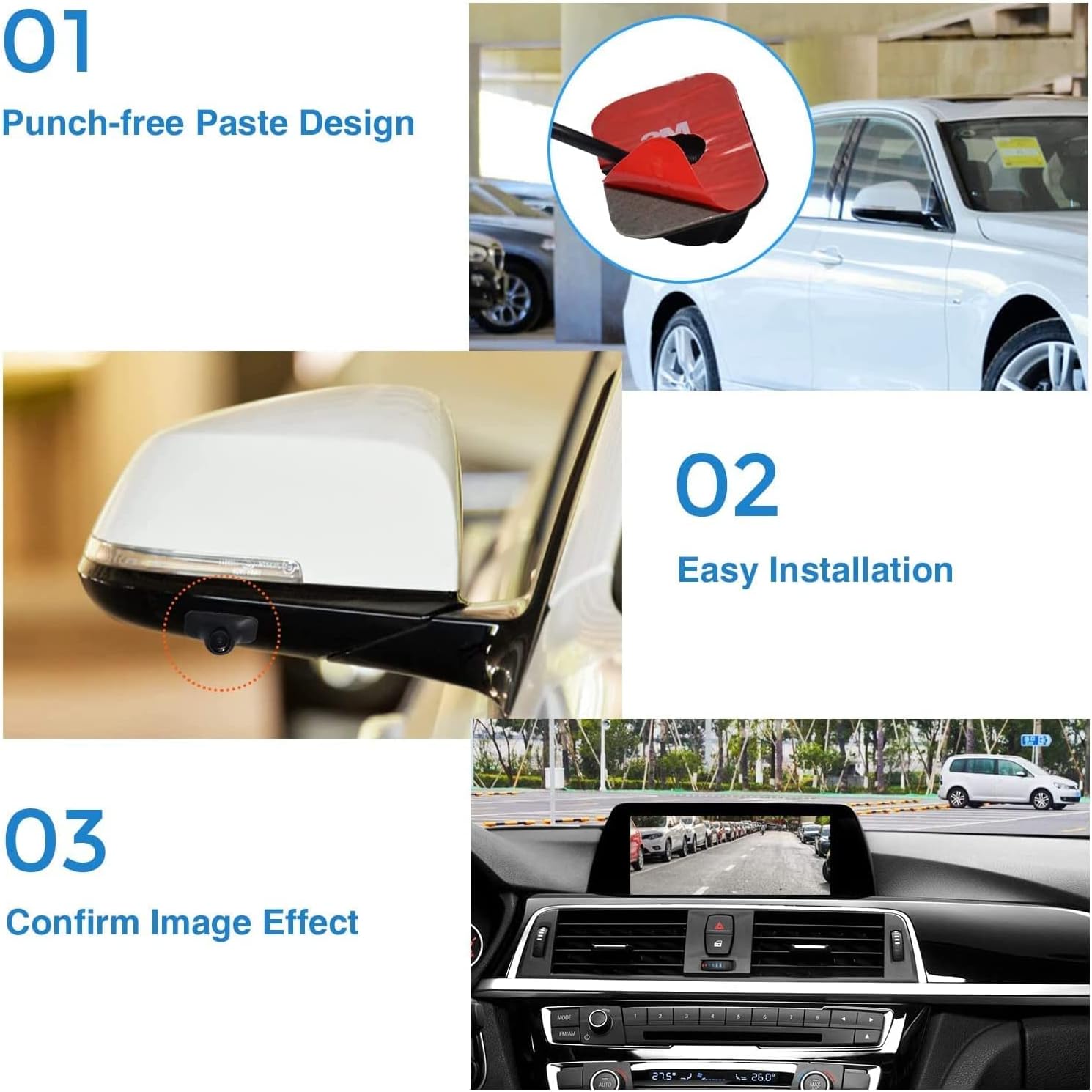
This image demonstrates the simple paste installation process and the resulting view on a car's display.
- Choose Installation Location: Select a suitable location on your vehicle for the camera. Common locations include side mirrors for side views, the rear bumper for rear views, or the front grille for front views. The camera's flexible rubber material allows it to conform to slightly curved surfaces.
- Clean Surface: Ensure the chosen surface is clean, dry, and free of dust or grease.
- Apply Adhesive: The camera features a punch-free paste design. Remove the protective film from the 3M adhesive pad on the camera's base.
- Secure Camera: Firmly press the camera onto the desired location for several seconds to ensure strong adhesion.
4.2 Wiring the Camera
This image provides a detailed wiring diagram for connecting the camera to your vehicle's monitor and power supply.
- Connect Video Cable: Connect the yellow RCA connector from the camera's video cable to the video input (usually yellow RCA) on your monitor (monitor not included). Ensure the arrow marks on the connectors are aligned when plugging.
- Connect Power:
- Black Wire: Connect the black wire to a ground (GND) point on your vehicle's electrical system.
- Red Wire: Connect the red wire to a 12V DC power source. For a rear view camera, this is typically the reverse light power (+12V). For front or side cameras, connect to an accessory power source that turns on with the ignition.
- Monitor Connection Notes:
- Standalone Type Monitor: No need to connect the 'Reverse Trigger Wire'.
- Double Din Head Unit: Connect the red wire to the 'Reverse Trigger Wire' of the head unit for automatic switching when reversing.
5. Operation
Once installed, the PARKVISION Mini Car Camera offers several functions to customize your viewing experience.
5.1 Image Mode Switching (Mirror/Normal)
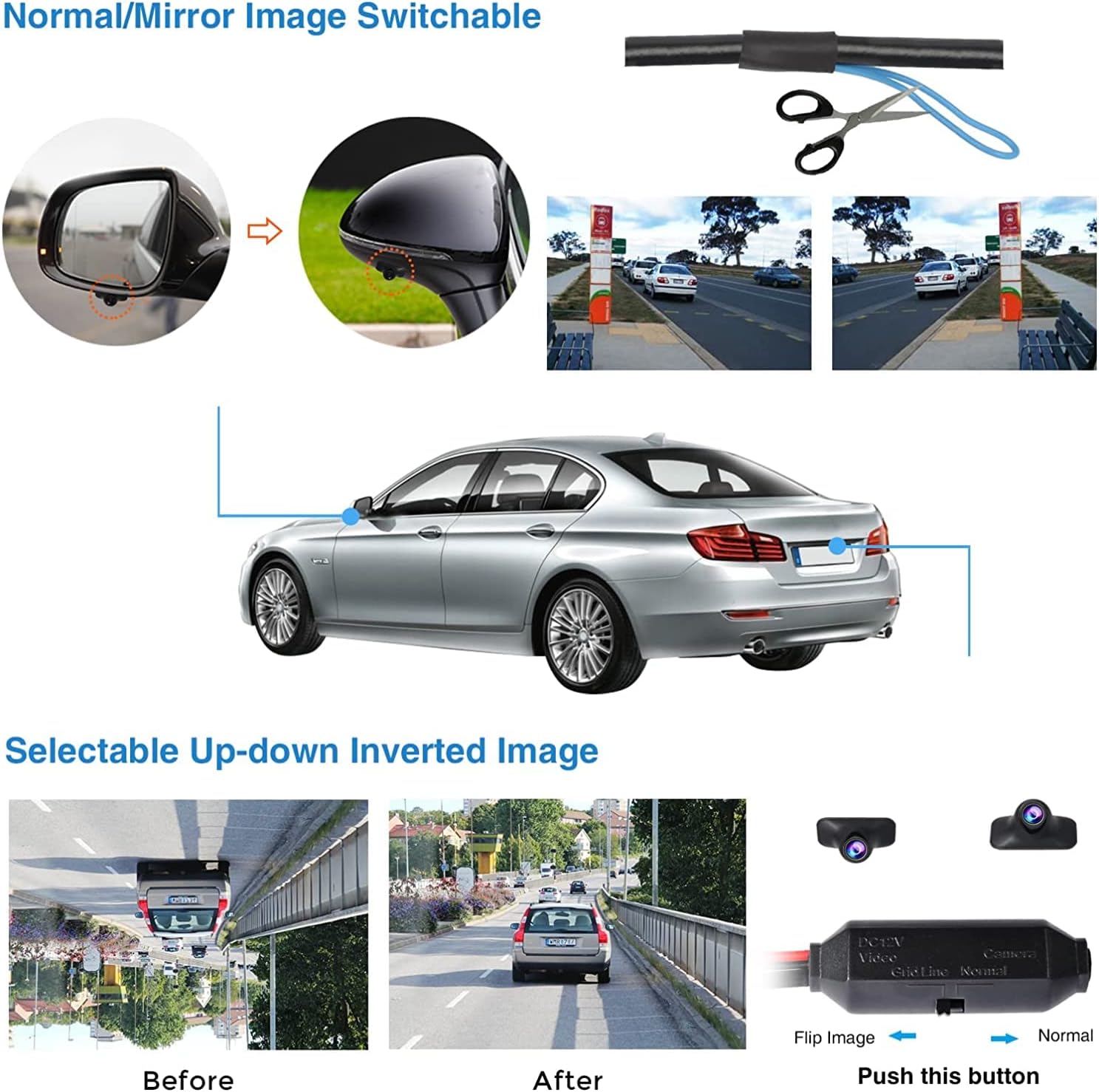
This image shows how to switch between mirror and normal image modes by modifying the blue wire.
The camera's factory default image is a mirror image, which is typical for rear view cameras. If you are using the camera as a front view camera or prefer a normal (non-mirrored) image, you can switch the mode:
- Locate the blue wire loop on the camera's cable.
- Carefully cut this blue wire loop to switch the image from mirror to normal.
5.2 Up-down Flip Image Function
This image illustrates the effect of the up-down image flip function, useful for inverted installations.
If your camera is installed in an inverted position, you can flip the image vertically to ensure correct orientation on your monitor:
- Locate the small button or switch on the camera's cable labeled 'Flip Image' or 'Normal'.
- Press or toggle this button/switch to invert the image vertically.
5.3 Lens Angle Adjustment
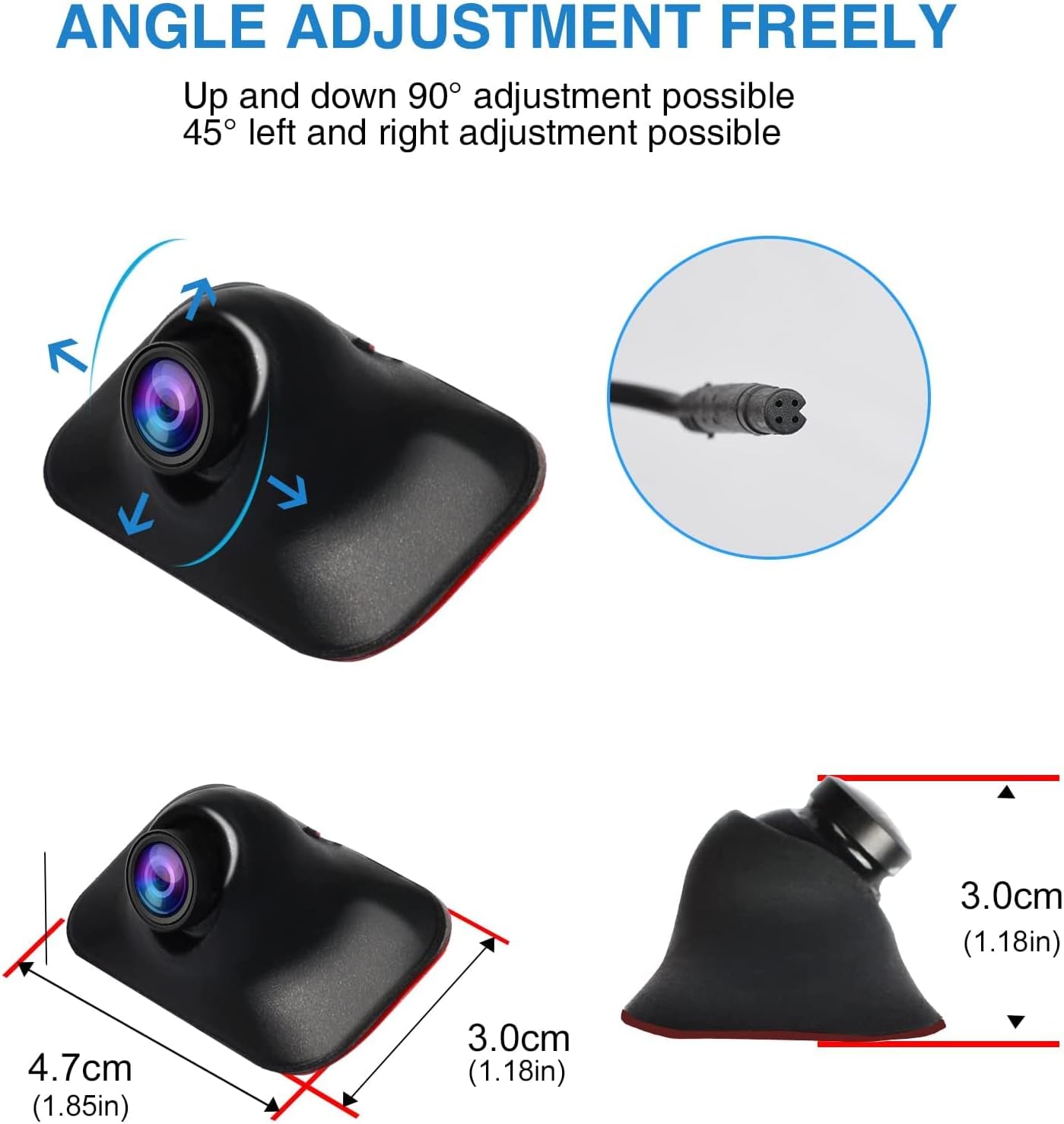
This image highlights the camera's adjustable lens, allowing for precise angle adjustments.
The camera's lens can be manually adjusted to achieve the optimal viewing angle for your specific installation and needs:
- Gently rotate the lens housing to adjust the vertical (up/down) and horizontal (left/right) angle.
- The lens allows for approximately 90° up and down adjustment and 45° left and right adjustment.
6. Specifications
| Feature | Specification |
|---|---|
| Product Dimensions | 6.46 x 3.15 x 1.81 inches (16.4 x 8.0 x 4.6 cm) |
| Item Weight | 7.3 ounces (207 grams) |
| Model Number | S142 |
| Waterproof Grade | IP68 |
| Voltage | 12 Volts DC |
| Optical Sensor Technology | CMOS |
| Lens Type | Wide Angle |
| Real Angle of View | 130 Degrees |
| Video Capture Resolution | 480p |
| Installation Type | Surface Mount (Paste) |
| Compatible Devices | Monitor (not included) |
| Operating Temperature | -30°C to 75°C (approx.) |
7. Care and Maintenance
To ensure the long-term performance and reliability of your PARKVISION Mini Car Camera, please follow these maintenance guidelines:
- Cleaning: Regularly clean the camera lens with a soft, damp cloth to remove dirt, dust, or water spots that may obstruct the view. Avoid using abrasive cleaners or solvents.
- Adhesive Check: Periodically check the adhesive mounting for secure attachment, especially after extreme temperature changes or vehicle washes.
- Cable Inspection: Inspect the wiring for any signs of wear, damage, or loose connections. Ensure cables are securely routed and not exposed to sharp edges or excessive heat.
- Water Exposure: While the camera is IP68 waterproof, avoid prolonged submersion or direct high-pressure water jets (e.g., from a pressure washer) directly onto the camera, as this could compromise the seal over time.
- Temperature: The camera is designed to operate within a wide temperature range. However, extreme and prolonged exposure to temperatures outside the specified range (-30°C to 75°C) may affect performance.
8. Troubleshooting
If you encounter issues with your PARKVISION Mini Car Camera, refer to the following common problems and solutions:
| Problem | Possible Cause & Solution |
|---|---|
| No image on monitor |
|
| Image is blurry or distorted |
|
| Image is upside down |
|
| Image is reversed (mirror image) when it should be normal, or vice versa |
|
| Camera not working in rain/water |
|
If the problem persists after attempting these solutions, please contact PARKVISION customer support for further assistance.
9. Warranty and Support
PARKVISION is committed to providing high-quality products and customer satisfaction. For any assistance you need at any time, you are always welcome to let us know.
- Product Warranty: Please refer to the warranty information provided with your purchase documentation or visit the official PARKVISION website for details on warranty coverage.
- Customer Support: For technical support, troubleshooting, or warranty claims, please contact PARKVISION customer service. Contact information can typically be found on the product packaging or the official PARKVISION website.
- Online Resources: Visit the PARKVISION Store on Amazon for additional product information and support.
