1. Introduction
This manual provides instructions for the proper setup, operation, and maintenance of your SainSmart Genmitsu CNC MPG Handwheel Controller. This device is designed to provide manual control over the XYZ-Axes of compatible Genmitsu CNC machines, enhancing precision and ease of use during various operations.
Compatible Genmitsu CNC Machines:
- Genmitsu CNC Router 4040-PRO
- Genmitsu CNC Router 4040 Reno
- Genmitsu CNC Router 3020-PRO MAX V2
- Genmitsu CNC Router 3018-PROVer V2
- Genmitsu CNC Router 3018-PROVer Mach3
- Genmitsu CNC Router 3018-MX3
2. Setup Instructions
2.1 Connecting the Handwheel Controller
The MPG Handwheel Controller is designed for plug-and-play functionality, requiring no additional drivers for operation. To connect the controller:
- Ensure your Genmitsu CNC machine is powered off.
- Locate the dedicated port for the MPG Handwheel Controller on the control board of your CNC machine. This port typically resembles a VGA connector.
- Carefully align the connector of the handwheel controller cable with the port on the CNC control board.
- Gently push the connector into the port until it is securely seated. If available, tighten any retaining screws on the connector.
- Once connected, you may power on your CNC machine. The controller should be recognized automatically.

Figure 2.1: The coiled cable and connector of the MPG Handwheel Controller.

Figure 2.2: The MPG Handwheel Controller connected to a Genmitsu CNC machine.
3. Operating Instructions
The MPG Handwheel Controller allows for precise manual movement of your CNC machine's axes. Familiarize yourself with the controls before operation.
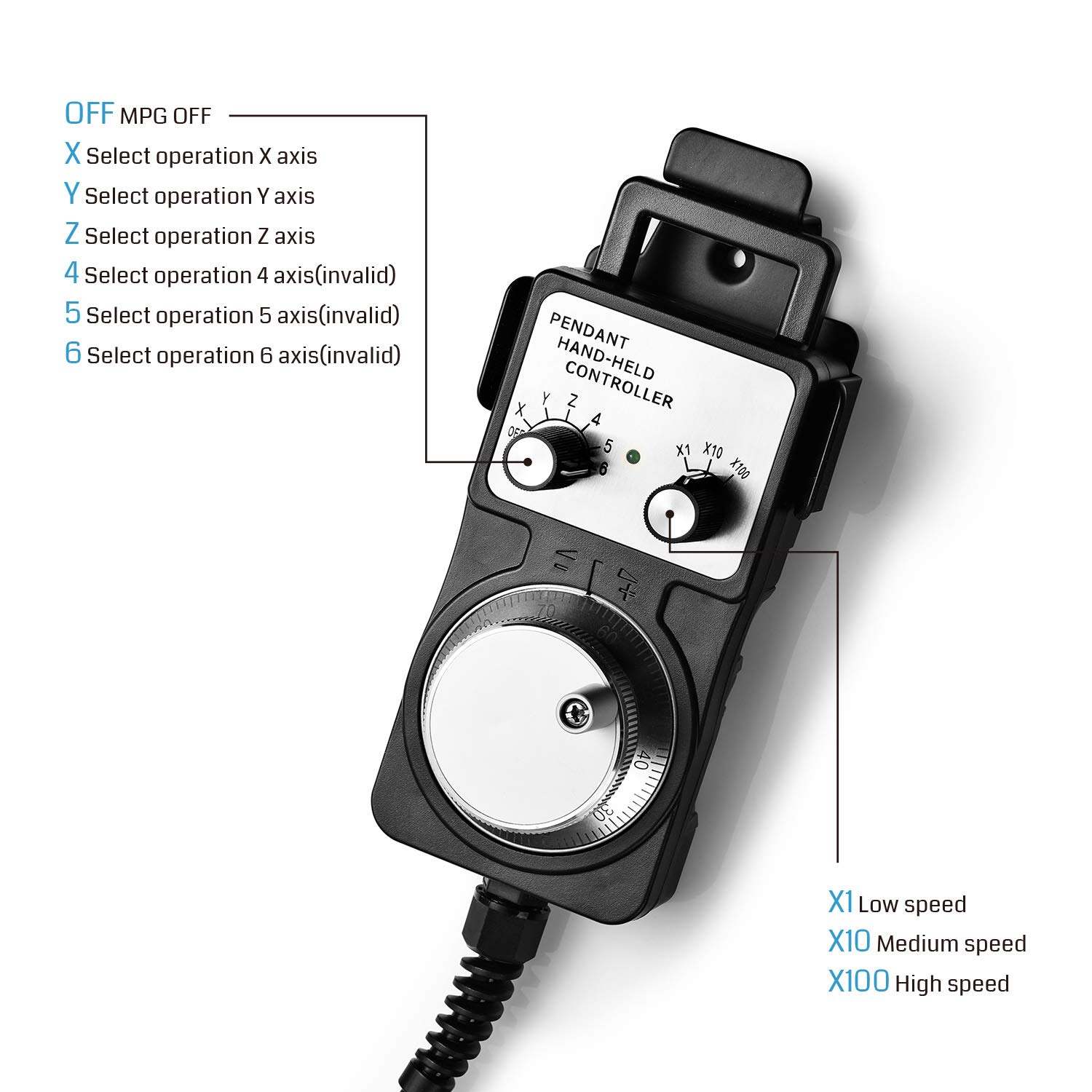
Figure 3.1: Overview of the MPG Handwheel Controller's controls.
3.1 Axis Selection
Use the left rotary dial on the controller to select the axis you wish to control. The available options are:
- OFF: MPG function is disabled.
- X: Selects the X-axis for movement.
- Y: Selects the Y-axis for movement.
- Z: Selects the Z-axis for movement.
- Note: Options 4, 5, and 6 are typically invalid for standard 3-axis CNC machines.
3.2 Speed Control (Multiplier)
The right rotary dial controls the movement speed multiplier. This allows you to adjust the sensitivity of the handwheel. The settings are:
- X1: Low speed, for fine adjustments.
- X10: Medium speed, for general positioning.
- X100: High speed, for rapid movement over longer distances.
3.3 Manual Jogging with the Handwheel
Once an axis and speed multiplier are selected, rotate the large handwheel to move the selected axis. The speed of movement is also proportional to how quickly you turn the handwheel, providing intuitive control.

Figure 3.2: The MPG Handwheel Controller in use.
4. Maintenance
To ensure the longevity and optimal performance of your MPG Handwheel Controller, follow these maintenance guidelines:
- Cleaning: Regularly wipe the controller with a soft, dry cloth to remove dust and debris. Avoid using harsh chemicals or abrasive cleaners.
- Storage: Store the controller in a clean, dry environment away from direct sunlight, extreme temperatures, and excessive moisture.
- Cable Care: Avoid sharp bends or kinks in the cable. Do not pull the cable to disconnect the controller; always grasp the connector itself.
- Inspection: Periodically inspect the cable and connector for any signs of wear or damage. If damage is found, discontinue use and contact support.
5. Troubleshooting
If you encounter issues with your MPG Handwheel Controller, refer to the following common problems and solutions:
- Controller Not Responding:
- Ensure the controller cable is securely connected to the CNC machine's control board.
- Verify that the CNC machine is powered on.
- Check the axis selection dial on the handwheel controller is not set to 'OFF'.
- Incorrect Movement Speed:
- Adjust the speed multiplier dial (X1, X10, X100) to your desired sensitivity.
- The physical turning speed of the handwheel also affects the movement rate.
- Axis Over-Travel or Unexpected Behavior:
- This issue is often related to the CNC control software (e.g., Mach3, DrufelCNC) settings rather than the handwheel itself. Consult your CNC machine's software manual for instructions on configuring limits and movement parameters.
- Ensure your CNC machine's limit switches are functioning correctly.
If these steps do not resolve your issue, please contact SainSmart customer support for further assistance.
6. Product Specifications
| Feature | Detail |
|---|---|
| ASIN | B07V35T5G6 |
| Item Weight | 1.83 pounds |
| Package Dimensions | 8.31 x 4.06 x 3.98 inches |
| Manufacturer | SainSmart |
| Date First Available | July 8, 2019 |
7. Warranty and Support
SainSmart provides a one-year manufacturer's warranty for this MPG Handwheel Controller, covering defects in materials and workmanship under normal use. Additionally, lifetime customer support is available to assist you with any questions or issues you may encounter.
For warranty claims, technical assistance, or general inquiries, please visit the official SainSmart website or contact their customer service department through the contact information provided with your product or on their website.


