
Introduction
Thank you for choosing the RovyVon Aurora A7 G4 Keychain Flashlight. This compact yet powerful EDC (Everyday Carry) flashlight is designed for versatility and convenience, offering super bright illumination, multiple modes, and a unique glow-in-the-dark feature. This manual provides detailed instructions for its setup, operation, maintenance, and troubleshooting to ensure you get the most out of your device.

The RovyVon Aurora A7 G4, showcasing its distinctive glow-in-the-dark blue casing.
Setup
1. Initial Charging
The RovyVon Aurora A7 G4 comes with a built-in 330mAh rechargeable lithium polymer battery. For optimal performance, fully charge the flashlight before its first use.
- Locate the USB-C charging port on the flashlight.
- Connect a USB-C cable (not included) to the flashlight and a compatible power source (e.g., power bank, laptop, PC, or USB wall adapter).
- The charging indicator light will illuminate during charging. Charging typically takes approximately 90 minutes.

The flashlight features convenient USB-C fast charging.
2. Attaching Magnetic Clip and Base
The flashlight includes a magnetic two-way pocket clip and a magnetic tail base, offering versatile attachment options.
- To attach the magnetic two-way pocket clip, slide it onto the body of the flashlight until it securely snaps into place. This allows for attachment to caps, pockets, or bags.
- The magnetic tail base can be attached to the bottom of the flashlight, enabling it to stick to any iron surface for hands-free use.
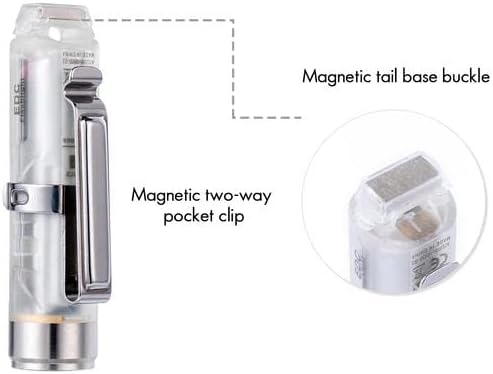
Magnetic clip and tail base provide flexible mounting options.
Operating Instructions
The RovyVon Aurora A7 G4 features a single switch for all operations, simplifying its use.
1. Main Emitter Modes
- Momentary ON: Press and hold the switch for quick access to High Bright Mode. Release to turn off.
- Turn ON/OFF: Double-click the switch to turn the main light ON. Double-click again to turn it OFF.
- Cycle Modes: When the main light is ON, single-click the switch to cycle through modes: ULTRA LOW / LOW / MED / HIGH. The flashlight has mode memory for the last used setting (excluding momentary ON).

Main emitter modes and their approximate runtimes.
Video demonstrating the RovyVon Aurora A7-G4 flashlight's brightness in a real-world night scene.
2. Sidelight Modes
The Aurora A7 G4 also features additional sidelights for various uses.
- Turn ON/OFF: Triple-click the switch to turn the sidelights ON. Triple-click again to turn them OFF.
- Cycle Modes: When the sidelights are ON, single-click the switch to cycle through modes: Low / High / Flash / 365nm UV.
- Glow-in-the-Dark (GITD) Activation: The flashlight shell glows blue in the dark. To quickly 'charge' its fluorescent shell and make it glow brighter, activate the 365nm UV sidelight mode (4 clicks to turn on UV directly from OFF).

Sidelight modes, including the 365nm UV for enhancing the glow-in-the-dark feature.
Video showcasing the benefits of the GITD case and versatile side and front emitters, including UV light.
3. Lock & Unlock Power Supply
To prevent accidental activation, the flashlight features a lock and unlock function:
- Lock: From the OFF state, rapidly click the switch five times. The light will flash to indicate it is locked.
- Unlock: Rapidly click the switch five times again. The light will flash, indicating it is unlocked and ready for use.

The compact design and versatile clip allow for multiple carry and usage options.
Maintenance
1. Charging
Regular charging is essential to maintain battery health. Charge the flashlight when the light output becomes dim or when the charging indicator signals low battery.
- Always use a standard USB-C cable and a reliable power source.
- Avoid over-discharging the battery, as this can reduce its lifespan.
2. Cleaning and Storage
To ensure longevity and optimal performance:
- Wipe the flashlight with a soft, damp cloth to remove dirt or debris. Do not use harsh chemicals or abrasive materials.
- Store the flashlight in a cool, dry place away from direct sunlight and extreme temperatures.
- If storing for an extended period, charge the battery every 3-6 months to prevent deep discharge.
Troubleshooting
| Problem | Possible Cause | Solution |
|---|---|---|
| Flashlight does not turn on. | Battery is depleted. Flashlight is in locked mode. | Charge the battery. Rapidly click the switch five times to unlock. |
| Light output is dim. | Low battery. Lens is dirty. | Recharge the flashlight. Clean the lens with a soft cloth. |
| Flashlight does not charge. | Faulty USB-C cable or power source. Charging port is obstructed. | Try a different USB-C cable and power source. Check and clear any debris from the charging port. |
| Glow-in-the-dark feature is weak. | Insufficient light exposure. | Expose the flashlight to bright light or use the 365nm UV sidelight mode to 'charge' the fluorescent shell. |
Specifications
| Feature | Detail |
|---|---|
| Brand | RovyVon |
| Model | Aurora A7 G4 |
| Light Source Type | LED |
| White Brightness (Max) | 650 Lumens |
| Power Source | Battery Powered |
| Battery Type | 330mAh Lithium Polymer (included) |
| Charging Port | USB-C |
| Charging Time | Approx. 90 minutes |
| Runtime (Moonlight) | Up to 72 hours (0.5 Lm) |
| Special Features | Magnetic, Lightweight, Rechargeable, Glow Blue (GITD) |
| Water Resistance Level | Water Resistant |
| Product Dimensions | 2.38"D x 0.61"W x 0.61"H |
| Item Weight | 0.352 ounces (approx. 0.01 kg) |
| Included Components | Magnetic Clip & Base, Batteries |
Warranty Information
The RovyVon Aurora A7 G4 Keychain Flashlight comes with a two-year warranty from the date of purchase. This warranty covers manufacturing defects and issues arising from normal use. Please retain your proof of purchase for warranty claims. The warranty does not cover damage caused by misuse, unauthorized modification, or normal wear and tear.
Customer Support
For further assistance, technical support, or warranty inquiries, please visit the official RovyVon website or contact their customer service department. Refer to the product packaging or the RovyVon brand store on Amazon for the most current contact information.
Online Resources: RovyVon Official Store on Amazon