1. Introduction
Thank you for choosing the Midea MPPDB-12HRN7-QB6 Portable Air Conditioner. This manual provides important information for the proper installation, operation, and maintenance of your unit. Please read it thoroughly before using the appliance and keep it for future reference.
This portable air conditioner is designed to provide both cooling and heating, featuring a HEPA filter for improved air quality, three fan speeds, and a convenient remote control with an integrated thermostat. It also includes a quick-connect window kit for easy setup.
2. Safety Information
Always follow basic safety precautions when using electrical appliances to reduce the risk of fire, electric shock, and injury to persons.
- Read all instructions before using the appliance.
- Ensure the power supply matches the voltage specified on the rating label.
- Do not operate the unit with a damaged cord or plug.
- Do not block air inlets or outlets.
- Keep the unit away from flammable materials.
- Always unplug the unit before cleaning or servicing.
- This appliance is not intended for use by persons (including children) with reduced physical, sensory or mental capabilities, or lack of experience and knowledge, unless they have been given supervision or instruction concerning use of the appliance by a person responsible for their safety.
3. Product Features
- Dual Filtration System: Features a HEPA filter to remove bacteria, viruses, allergens, dust, and odors, ensuring cleaner air.
- Window Kit Included: A quick-connect window kit is provided for easy installation and adaptability to various window sizes.
- 24-Hour Timer: Allows you to program the unit to turn on or off automatically within a 24-hour period.
- Follow Me Function: The wireless remote control includes a "Follow Me" function, allowing the unit to sense the temperature at the remote's location for more precise comfort.
- Powerful Dehumidification: Capable of removing up to 84 liters of moisture per 24 hours, significantly reducing humidity.
- Superior Cooling/Heating Capacity: Designed for effective cooling and heating in large rooms and spaces.
- Eco-friendly Refrigerant: Uses R290, a natural, low-carbon, and ozone-friendly refrigerant.
4. Components Included
The following components are included in the box:
- Midea MPPDB-12HRN7-QB6 Portable Air Conditioner Unit
- HEPA Filter (pre-installed or separate)
- Remote Control
- Window Kit (exhaust hose, window slider kit, adapters)
- User Manual (this document)

Figure 4.1: Midea Portable Air Conditioner Unit and Remote Control.
5. Setup and Installation
5.1 Unpacking
Carefully remove the unit from its packaging. Keep the packaging materials for future storage or transport. Inspect the unit for any damage. If damaged, do not operate and contact customer service.
5.2 Placement
Place the unit on a flat, stable surface. Ensure there is at least 20 cm (8 inches) of space around the unit for proper air circulation. Do not place the unit near heat sources or in direct sunlight.

Figure 5.1: Example of suitable unit placement in a room.
5.3 Window Kit Installation
The included window kit is essential for exhausting hot air (in cooling mode) or cold air (in heating mode) outside. Proper installation ensures efficient operation.
- Assemble the Exhaust Hose: Extend the exhaust hose and attach one end to the hose adapter and the other end to the window slider kit adapter.
- Install the Window Slider Kit: Adjust the window slider kit to fit your window opening. Secure it in place.
- Connect to Unit: Attach the hose adapter to the exhaust outlet on the back of the air conditioner unit.
- Connect to Window: Insert the window slider kit adapter into the opening in the window slider kit.
- Seal Gaps: Ensure all gaps around the window kit are sealed to prevent air leakage, which can reduce efficiency.

Figure 5.2: Window Kit installation for exhaust.
6. Operating Instructions
6.1 Control Panel and Remote Control
The unit can be operated using the control panel on the top of the unit or the included remote control. The remote control offers full functionality and includes the "Follow Me" thermostat feature.
6.2 Operating Modes
- Cool Mode: For cooling the room. Set desired temperature and fan speed.
- Heat Mode: For heating the room. Set desired temperature and fan speed.
- Dry Mode (Dehumidification): For reducing humidity. The fan speed is typically fixed in this mode.
- Fan Mode: Circulates air without cooling or heating. Select desired fan speed (Low, Medium, High).

Figure 6.1: Unit supports both cooling and heating functions.

Figure 6.2: Powerful dehumidification capability.
6.3 Setting the Timer
The 24-hour timer allows you to schedule the unit to turn on or off automatically. Refer to the remote control section in your full manual for detailed timer setting instructions.
6.4 Follow Me Function
Activate the "Follow Me" function on the remote control. The remote will then act as the thermostat, sensing the temperature at its location and adjusting the unit's operation accordingly for optimized comfort where you are.
7. Maintenance
Regular maintenance ensures optimal performance and extends the lifespan of your air conditioner.
7.1 Filter Cleaning
The HEPA filter should be cleaned regularly, typically every two weeks, or more often depending on usage and air quality. A dirty filter can reduce efficiency and air quality.
- Unplug the unit from the power outlet.
- Locate and remove the air filter(s) (usually at the back or side).
- Clean the filter using a vacuum cleaner to remove dust. For heavily soiled filters, wash gently with warm water and mild detergent.
- Allow the filter to dry completely before reinstalling. Do not expose to direct sunlight.
- Reinstall the filter and plug in the unit.
7.2 Draining Water
During dehumidification or cooling, water condensation will accumulate inside the unit. The unit has an internal self-evaporation system, but in high humidity conditions, the water tank may fill up. When full, the unit will stop operating and display an error code (refer to troubleshooting). Drain the water using the drain port at the back of the unit.
7.3 General Cleaning
Wipe the exterior of the unit with a soft, damp cloth. Do not use harsh chemicals or abrasive cleaners. Ensure the unit is unplugged before cleaning.
8. Troubleshooting
Before contacting customer service, please refer to the following common issues and solutions:
| Problem | Possible Cause | Solution |
|---|---|---|
| Unit does not turn on | No power, plug loose, timer active | Check power cord, wall outlet, disable timer. |
| Unit not cooling/heating effectively | Dirty air filter, blocked air intake/outlet, room too large, window kit not sealed, door/window open | Clean filter, clear obstructions, ensure proper room size, seal window kit, close doors/windows. |
| Water leakage | Drain plug loose, unit not level, internal tank full (in high humidity) | Check drain plug, ensure unit is level, drain water if tank is full. |
| Noisy operation | Unit not level, fan obstruction | Ensure unit is on a flat surface, check for obstructions in fan area. |
9. Specifications
Technical specifications for the Midea MPPDB-12HRN7-QB6 Portable Air Conditioner:
| Specification | Value |
|---|---|
| Model Number | MPPDB-12HRN7-QB6 |
| Brand | Midea |
| Dimensions (L x W x H) | 39.7 x 46.7 x 76.5 cm (15.6 x 18.4 x 30.1 inches) |
| Weight | 39.3 kg (86.6 lbs) |
| Power Supply | 240 Volts (AC) |
| Electrical Power | 3500 W |
| Filter Type | Double filter with HEPA system |
| Dehumidification Capacity | 84 Liters/24h |
| Refrigerant | R290 |
| Noise Level | 65 dB |
| Seasonal Energy Efficiency Ratio (SEER) | 20 |
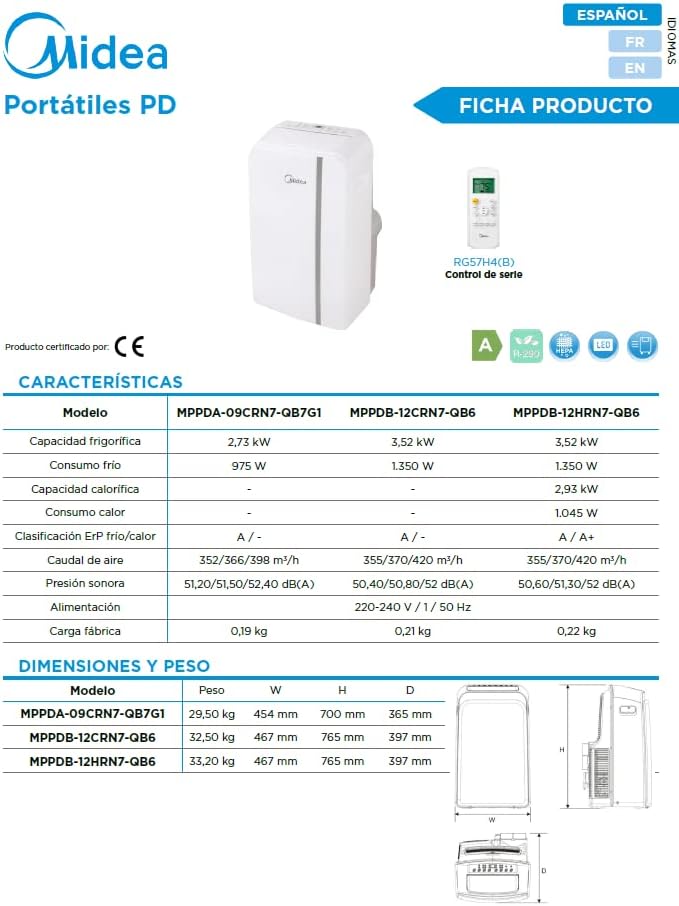
Figure 9.1: Detailed product specifications table.

Figure 9.2: Energy efficiency label.
10. Warranty and Support
Midea products come with a standard manufacturer's warranty. Please refer to the warranty card included with your purchase for specific terms and conditions, including warranty period and coverage.
For technical assistance, troubleshooting beyond this manual, or to inquire about service, please contact Midea customer support. You can find contact information on the Midea official website or your product documentation.

Figure 10.1: Midea offers extensive technical support.

Figure 10.2: Midea is a leading brand in air treatment appliances.


