
1. Product Overview
The Hanwha Techwin SBP-300WMW1 is a durable wall mount bracket designed to securely attach compatible Hanwha Techwin security cameras or other devices to a vertical surface. Its robust construction ensures stable mounting, providing optimal positioning for surveillance or display equipment. This manual provides essential information for the safe and correct installation and maintenance of your SBP-300WMW1 bracket.
2. Safety Information
Please read all safety instructions carefully before installation and use. Failure to follow these instructions may result in injury or damage to the product or property.
- Professional Installation Recommended: For optimal safety and performance, installation by a qualified professional is highly recommended.
- Check Wall Structure: Ensure the mounting surface (wall) is structurally sound and capable of supporting the combined weight of the bracket and the attached device. Use appropriate anchors and screws for the specific wall material (e.g., concrete, brick, drywall).
- Use Proper Tools: Always use the correct tools for drilling and securing the bracket to prevent damage to the bracket or the mounting surface.
- Avoid Obstructions: Before drilling, verify that there are no hidden electrical wires, water pipes, or other obstructions within the wall.
- Secure Fasteners: Ensure all screws and fasteners are tightened securely to prevent the bracket or device from falling. Do not overtighten.
- Environmental Conditions: Install the bracket in an environment suitable for its intended use. Avoid locations with excessive vibration, extreme temperatures, or corrosive substances unless the product is specifically rated for such conditions.
3. Package Contents
Verify that all components are present before beginning installation:
- 1 x Hanwha Techwin SBP-300WMW1 Wall Mount Bracket
- (Mounting hardware such as screws and anchors may be sold separately or included with the compatible device. Please check the packaging of your device.)
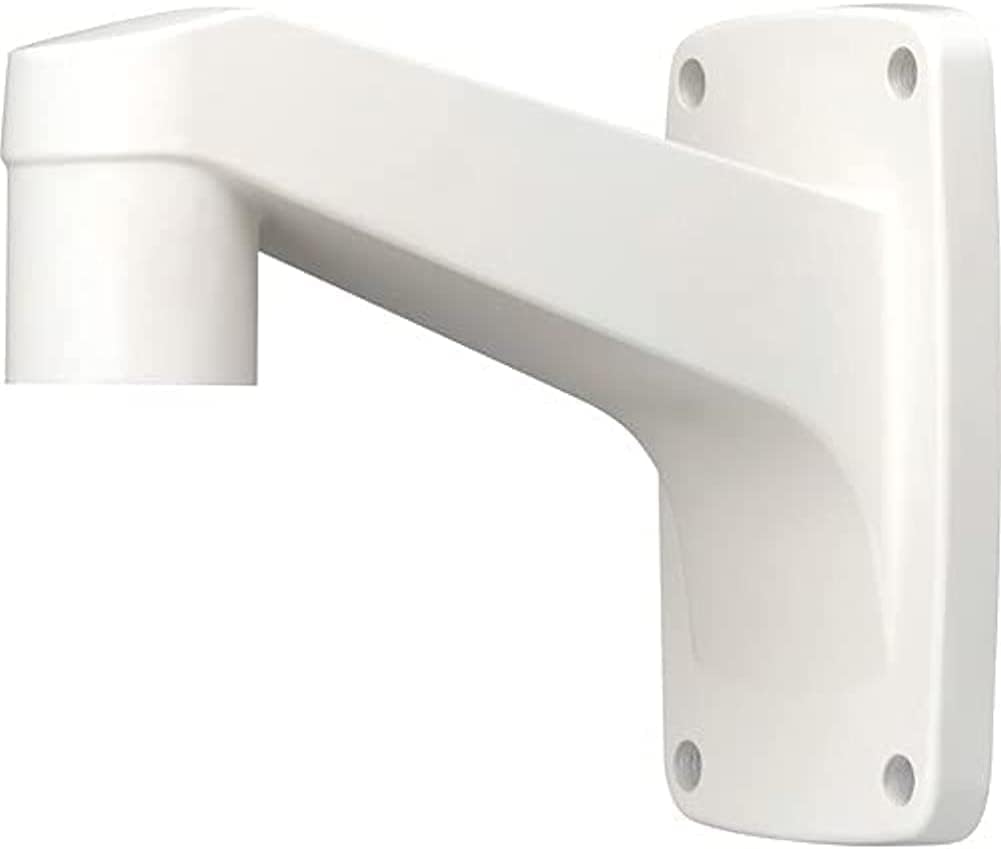
Image showing the Hanwha Techwin SBP-300WMW1 wall mount bracket, a white L-shaped bracket designed for mounting compatible security cameras or devices to a wall. It features a flat rectangular base with four screw holes for secure attachment and an arm extending outwards to support the device.
4. Setup and Installation
Follow these steps for proper installation of the SBP-300WMW1 wall mount bracket:
- Select Mounting Location: Choose a suitable wall location that provides the desired viewing angle for your camera and is structurally capable of supporting the combined weight of the bracket and the camera.
- Mark Drilling Points: Hold the bracket against the wall at the desired mounting position. Use a pencil to mark the four drilling points through the screw holes on the bracket's base. Ensure the bracket is level before marking.
- Drill Holes: Using an appropriate drill bit size for your chosen screws and wall anchors (if applicable), carefully drill holes at the marked points. The depth of the holes should match the length of your anchors/screws.
- Insert Anchors (if needed): If drilling into drywall or hollow walls, insert appropriate wall anchors into the drilled holes. For solid surfaces like concrete or brick, self-tapping screws or masonry anchors may be used.
- Secure the Bracket: Align the bracket's screw holes with the drilled holes/anchors. Insert screws and tighten them securely using a screwdriver or drill. Ensure the bracket is firmly attached to the wall and does not wobble.
- Attach Compatible Device: Once the bracket is securely mounted, attach your compatible Hanwha Techwin camera or device to the mounting arm of the SBP-300WMW1. Refer to your device's specific instruction manual for details on how to attach it to a wall mount bracket. Ensure the device is securely fastened to the bracket.
5. Maintenance
Regular maintenance helps ensure the longevity and continued performance of your SBP-300WMW1 bracket:
- Cleaning: Periodically wipe the bracket with a soft, damp cloth to remove dust and dirt. Do not use harsh chemicals or abrasive cleaners, as these may damage the finish.
- Fastener Check: Every 6-12 months, inspect all mounting screws and fasteners to ensure they remain tight. Re-tighten if necessary, but do not overtighten.
- Damage Inspection: Regularly check the bracket for any signs of damage, cracks, or corrosion. If any damage is observed, replace the bracket immediately to prevent potential failure.
6. Troubleshooting
If you encounter issues during installation or use, consider the following:
- Bracket Not Secure:
- Ensure the correct type and size of screws and anchors were used for your wall material.
- Verify that the holes drilled are not too large for the anchors/screws.
- Re-tighten all fasteners. If the issue persists, consider relocating the bracket or reinforcing the mounting surface.
- Device Does Not Fit:
- Confirm that your device is compatible with the SBP-300WMW1 bracket. Refer to your device's specific instruction manual for details on how to attach it to a wall mount bracket.
- Wobbling After Installation:
- Check all connection points, both between the bracket and the wall, and between the bracket and the device. Tighten any loose connections.
- Ensure the wall surface is flat and even.
7. Specifications
| Feature | Detail |
|---|---|
| Model Number | SBP-300WMW1 |
| Manufacturer | Hanwha Techwin |
| Item Weight | 1.76 pounds (0.8 kg) |
| Package Dimensions | 8.98 x 7.52 x 5.08 inches (22.8 x 19.1 x 12.9 cm) |
| ASIN | B07V2VPKMR |
| Date First Available | June 27, 2019 |
| Color | White |
8. Warranty and Support
For information regarding warranty coverage, technical support, or service for your Hanwha Techwin SBP-300WMW1 wall mount bracket, please refer to the warranty documentation provided with your original purchase or visit the official Hanwha Techwin website. You may also contact the seller from whom you purchased the product for assistance.
Hanwha Techwin Official Website: www.hanwhasecurity.com


