
John Deere LP1002
John Deere Grass Groomer Lawn Striping Kit LP1002 User Manual
Model: LP1002
1. Introduction
The John Deere Grass Groomer Lawn Striping Kit LP1002 is designed to enhance the appearance of your lawn by creating professional-looking striping patterns. This kit utilizes flexible bristles to gently bend grass blades, intensifying the striping effect by reflecting light at a greater angle. Its design accommodates varying ground heights, preventing scalping or berming during turns, and maintains low ground compaction due to its strong, lightweight construction.
This manual provides essential information for the safe and effective installation, operation, and maintenance of your Grass Groomer kit.
2. Safety Information
Always prioritize safety when working with lawn equipment. Read and understand all instructions before attempting installation or operation. Failure to follow safety guidelines may result in injury or damage to equipment.
- Always wear appropriate personal protective equipment (PPE), including safety glasses and gloves, during installation and maintenance.
- Ensure the lawn tractor engine is turned off, the parking brake is engaged, and the engine is cool before performing any installation, adjustment, or maintenance.
- Keep hands, feet, and clothing clear of moving parts.
- Do not modify the Grass Groomer kit or its components. Use only genuine John Deere replacement parts.
- Store the kit in a safe, dry place when not in use.
3. Components
The John Deere Grass Groomer Lawn Striping Kit LP1002 typically includes the following components:
- Grass Groomer Assembly (with flexible bristles)
- Specific Mounting Brackets (designed for 48-inch and 54-inch Edge Decks)
- Fasteners (bolts, nuts, washers)
- Height Adjustment Knobs
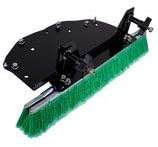
Image: The John Deere Grass Groomer kit, showing the main assembly with green bristles and black mounting plate.
4. Setup and Installation
The Grass Groomer kit is designed for simple installation using basic hand tools. No drilling is required. This kit is compatible with John Deere's 48-inch and 54-inch Edge Decks on current D100 Series Tractors, as well as previous D100 Series, LA Series, X300 Series, and X500 Series Tractors. Specific compatible models include D140, D155, D160, D170, D150, LA145, LA165, LA175, X300, X320, X324, X340, X360, X500, X530, X534, and X540.
Installation Steps:
- Prepare the Tractor: Park the lawn tractor on a flat, level surface. Turn off the engine, remove the key, and engage the parking brake. Allow the engine and deck to cool completely.
- Identify Mounting Points: Locate the designated mounting points on your tractor's 48-inch or 54-inch Edge Deck. These points are pre-drilled and do not require additional drilling.
- Attach Mounting Brackets: Secure the specific mounting brackets to the identified points on the mower deck using the provided fasteners (bolts, nuts, washers). Ensure all fasteners are tightened securely, but do not overtighten.
- Mount Grass Groomer Assembly: Attach the Grass Groomer assembly to the newly installed mounting brackets. Align the holes and secure with the remaining fasteners.
- Adjust Height: Use the two screw knobs to set the desired height of the Grass Groomer. The bristles should gently contact the grass without digging into the turf. Adjustments can be made in seconds to accommodate varying ground heights.
- Final Check: Before operation, double-check all connections and fasteners to ensure they are secure. Ensure the Grass Groomer moves freely and does not interfere with any other tractor components.

Image: An angled view of the John Deere Grass Groomer kit, highlighting the attachment points and bristle design.
5. Operation
Once the John Deere Grass Groomer is correctly installed and adjusted, its operation is integrated with your regular mowing routine. The groomer works by gently bending grass blades in the direction of travel, creating a contrasting pattern as light reflects differently off the bent blades.
- Mowing Patterns: To achieve distinct striping patterns, mow in straight, overlapping lines. Alternating the direction of each pass (e.g., north-south, then south-north) will create the most pronounced striped effect.
- Speed: Maintain a consistent, moderate mowing speed for best results. Excessive speed may reduce the effectiveness of the striping.
- Grass Condition: Optimal striping occurs on healthy, well-maintained lawns. Taller grass generally produces more visible stripes. Avoid mowing wet grass, as it can clump and reduce striping quality.

Image: A John Deere lawn tractor actively creating distinct striping patterns on a well-maintained lawn.
6. Maintenance
Regular maintenance ensures the longevity and optimal performance of your Grass Groomer kit.
- Cleaning: After each use, clean the Grass Groomer assembly to remove grass clippings, dirt, and debris. A stiff brush or hose can be used. Ensure the unit is dry before storage.
- Inspection: Periodically inspect the bristles for wear, damage, or excessive bending. While designed to be durable and flexible, severely worn bristles may affect striping quality.
- Fastener Check: Regularly check all bolts, nuts, and other fasteners to ensure they remain tight. Vibrations during operation can sometimes loosen connections.
- Storage: When not in use, store the Grass Groomer in a clean, dry environment, protected from extreme temperatures and moisture.
7. Troubleshooting
If you encounter issues with your Grass Groomer, refer to the following common problems and solutions:
| Problem | Possible Cause | Solution |
|---|---|---|
| Poor or inconsistent striping |
|
|
| Unusual noise during operation |
|
|
8. Specifications
| Model Number | LP1002 |
| Brand | John Deere |
| Material | Metal (brackets), Flexible Bristles |
| Item Weight | 40 Pounds |
| Product Dimensions (Approx.) | 22 x 22 x 22 inches |
| Compatible Deck Widths | 48-inch and 54-inch Edge Decks |
| Compatible Tractor Series | Current D100 Series, previous D100 Series, LA Series, X300 Series, X500 Series |
| Specific Compatible Models | D140, D155, D160, D170, D150, LA145, LA165, LA175, X300, X320, X324, X340, X360, X500, X530, X534, X540 |
9. Warranty Information
For detailed warranty information regarding your John Deere Grass Groomer Lawn Striping Kit LP1002, please refer to the warranty documentation included with your purchase or visit the official John Deere website. Warranty terms and conditions may vary.
10. Customer Support
If you require technical assistance, have questions about parts, or need further support for your John Deere Grass Groomer, please contact John Deere customer service or visit their official website:
Official John Deere Website: John Deere Store on Amazon
Please have your model number (LP1002) and any relevant purchase information ready when contacting support.
Related Documents - LP1002
 |
John Deere 130-185 Lawn Tractors Technical Manual Comprehensive technical manual for John Deere 130, 160, 165, 175, 180, and 185 Lawn Tractors. Provides detailed service, diagnosis, and repair procedures for experienced technicians. |
 |
John Deere 130-185 Lawn Tractors Technical Manual TM1351 This technical manual provides service and repair information for John Deere 130, 160, 165, 175, 180, and 185 Lawn Tractors. It includes general information, engine, fuel, electrical, power train, steering, brakes, safety procedures, and operational checkout details. |
 |
John Deere D100 Series Tractors Operator's Manual Comprehensive operator's manual for John Deere D100 Series tractors (models D105, D110, D125, D130, D140, D155, D160, D170), covering operation, safety, maintenance, and specifications. |
 |
John Deere Z445 Mower Maintenance Reminder Sheet for 54-Inch Edge Deck Detailed maintenance schedule and parts list for the John Deere Z445 lawn mower with a 54-inch Edge Deck, including service intervals and required parts for optimal performance. |
 |
John Deere D160 Lawn Tractor Maintenance Schedule and Parts This document outlines the maintenance schedule and required parts for the John Deere D160 lawn tractor with a 48-inch deck. It includes part numbers for filters, spark plugs, belts, and other essential components, along with recommended service intervals. |
 |
John Deere 100 Series Tractors Operator's Manual Official operator's manual for John Deere 100 Series lawn tractors, including models D100 through D170. Covers safety, operation, maintenance, and troubleshooting. |
Ask a question about this manual
Ask about setup, troubleshooting, compatibility, parts, safety, or missing instructions. Manuals+ will review the question and use this page’s manual context to help answer it.