1. Introduction
This manual provides detailed instructions for the operation and maintenance of the Godox X2T-N TTL Wireless Flash Trigger. The X2T-N is designed for Nikon cameras and features 2.4G wireless transmission, TTL autoflash, High-Speed Sync (HSS), and Bluetooth connectivity for smartphone control. Please read this manual thoroughly before use to ensure proper and safe operation.
2. Product Overview
The Godox X2T-N is a versatile wireless flash trigger offering comprehensive control over Godox flashes with the built-in X wireless radio system. It features a user-friendly interface with dedicated group buttons and an LCD display.
2.1 Key Features
- Bluetooth Connectivity: Control flash settings via the GodoxPhoto APP on your smartphone or tablet.
- TTL Autoflash Support: Fully supports TTL autoflash for automatic exposure control.
- High-Speed Sync (HSS): Achieves sync speeds up to 1/8000s.
- Multi Flash Function: Supports stroboscopic flash.
- Manual Flash Control: Precise manual power adjustment from 1/1 to 1/256 in 1/10th stop increments.
- Flash Exposure Compensation (FEC): Adjust flash output for desired exposure.
- Dedicated Group Buttons: Five separate group buttons (A, B, C, D, E) for quick group management.
- Quick Lock Hot-Shoe: Secure and easy mounting to your camera.
- LCD Display: High-definition LCD for clear parameter display.
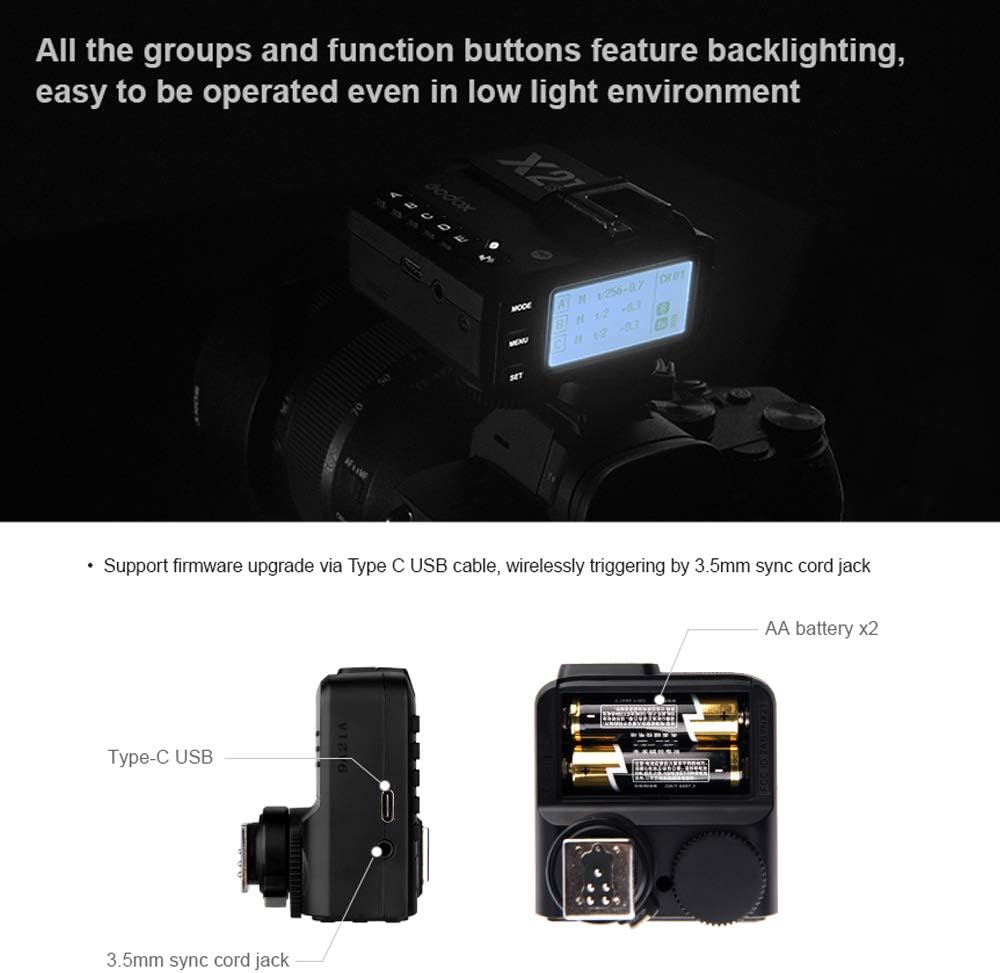
- USB-C Port: For firmware upgrades.
- 2.4G Wireless Transmission: Operating distance up to 100 meters.
- AF Assist Light: Uses visible light for improved autofocus in low light.
2.2 Component Identification


3. Setup
3.1 Battery Installation
The Godox X2T-N requires two AA batteries for operation. Open the battery compartment cover located on the underside of the unit and insert the batteries according to the polarity indicators. Close the cover securely.
3.2 Mounting on Camera
Slide the X2T-N's hot-shoe onto your Nikon camera's hot-shoe. Secure the trigger in place using the quick lock hot-shoe mechanism. Ensure it is firmly attached to prevent accidental dislodgement.


3.3 Power On/Off
To power on the unit, slide the power switch to the 'ON' position. To power off, slide the switch to 'OFF'.
3.4 Bluetooth Connection
The X2T-N features built-in Bluetooth for smartphone app control. Download and install the "GodoxPhoto" app on your phone or tablet. Enable Bluetooth on your device and within the app, then connect to the X2T-N. This allows control over flash mode, power output, modeling light, and other settings.
4. Operating Instructions
4.1 Basic Operation
- Group Selection: Use the dedicated A, B, C, D, E buttons to select individual flash groups.
- Mode Button: Press the MODE button to cycle through flash modes (TTL, Manual, Multi).
- Channel and ID Settings: The X2T-N offers 32 channels and 99 wireless ID settings. To prevent interference, ensure the channels and wireless IDs of the master trigger and slave units are set to the same values. Use the MENU button to access these settings.
- Control Wheel: Adjust parameters such as power output or exposure compensation using the control wheel.
- Backlit Buttons: All group and function buttons are backlit for operation in low-light environments.
4.2 TTL Autoflash
In TTL mode, the flash trigger automatically determines the appropriate flash output based on the camera's metering system. This provides automatic and accurate flash exposure.
4.3 Manual Flash
In Manual mode, you can precisely set the flash power output. The X2T-N allows adjustment from 1/1 full power down to 1/256 power in 1/10th stop increments.
4.4 High-Speed Sync (HSS)
HSS allows the flash to synchronize with shutter speeds faster than the camera's native sync speed, up to 1/8000s. This is useful for overpowering ambient light or using wider apertures in bright conditions.
4.5 Multi Flash (Stroboscopic)
Multi Flash mode allows the flash to fire multiple times during a single exposure, creating stroboscopic effects. Settings for frequency and number of flashes can be adjusted.
4.6 Flash Exposure Compensation (FEC)
FEC allows you to fine-tune the flash output in TTL mode, making the flash brighter or darker than the automatic setting. This is typically adjusted in 1/3rd stop increments.
4.7 Modeling Lamp Control
The X2T-N allows for global and individual modeling light power control for compatible Godox flashes.
4.8 Firmware Upgrade
The X2T-N supports firmware upgrades via its USB-C port. Visit the official Godox website for the latest firmware and instructions.
4.9 Triggering Functions

5. Maintenance
- Keep the device dry. Do not handle with wet hands or immerse in water.
- Avoid extreme temperatures. Do not expose to direct sunlight or store in very hot or cold environments.
- Clean the device with a soft, dry cloth. Do not use solvents or harsh chemicals.
- Remove batteries if the device will not be used for an extended period.
6. Troubleshooting
- Flash not firing:
- Ensure the trigger is securely mounted on the camera's hot-shoe.
- Check that the batteries in both the trigger and flash unit are charged and correctly inserted.
- Verify that the trigger and flash unit are set to the same channel and wireless ID.
- Confirm that the flash unit is powered on and in receiver mode.
- Interference issues:
- Use the channel scan function to find a clear channel.
- Change the wireless ID to avoid conflicts with other nearby systems.
- Bluetooth connection problems:
- Ensure Bluetooth is enabled on both the X2T-N and your smart device.
- Restart the GodoxPhoto app and the X2T-N.
- Check for app updates.
7. Specifications
| Feature | Specification |
|---|---|
| Model | X2T-N |
| Compatible Cameras | Nikon cameras |
| Power Supply | 2 * AA batteries |
| Flash Mode | TTL, Manual, Multi |
| High-Speed Sync (HSS) | Yes, up to 1/8000s |
| Flash Exposure Compensation | Yes |
| Manual Power Adjustment | 1/1 to 1/256 in 1/10th stop increments |
| Wireless Transmission | 2.4G wireless |
| Wireless Range | Approx. 100 meters |
| Groups | 5 (A, B, C, D, E) |
| Channels | 32 |
| Wireless ID | 01-99 |
| Bluetooth | Yes, for APP control |
| Firmware Upgrade | USB-C port |
| Item Weight | 5.9 ounces (approx. 167g) |
| Package Dimensions | 4.25 x 4.21 x 2.83 inches |
| Manufacturer | GODOX |
| Date First Available | July 9, 2019 |
8. Warranty and Support
For warranty information and technical support, please refer to the documentation included with your product or visit the official Godox website. Contact customer service for assistance with product issues or inquiries.


