
SoloWIT QC35 / QC35 II Replacement Earpads
SoloWIT Replacement Earpads Instruction Manual
For Bose QuietComfort 35 (QC35) & Quiet Comfort 35 II (QC35 ii) Headphones
Introduction
This manual provides comprehensive instructions for the installation and maintenance of your SoloWIT Replacement Earpads. Designed to restore comfort and sound quality, these earpads offer a renewed listening experience for your compatible Bose headphones.
Compatibility
SoloWIT Replacement Earpads are compatible with the following Bose headphone models:
- Bose QuietComfort 35 (QC35)
- Bose QuietComfort 35 II (QC35 ii)
- Bose QC2
- Bose QC15
- Bose QC25
- Bose Ae2 / Ae2i / Ae2w
- Bose SoundTrue Around-Ear / SoundTrue Around-Ear II
- Bose SoundLink Around-Ear / SoundLink Around-Ear II

Figure 1: Visual compatibility chart for SoloWIT earpads.
Package Contents
Your SoloWIT Replacement Earpads package includes:
- 1 Pair of SoloWIT Replacement Earpads (Left and Right)
- 1 Pair of Scrims (L/R marked)
- 1 Plastic Installation Tool
- 1 User Guide (this manual)

Figure 2: Contents of the SoloWIT Replacement Earpads package.
Product Features
SoloWIT earpads are engineered for enhanced comfort and acoustic performance:
- High-Grade Protein Leather: Offers a soft and delicate feel, ensuring comfort during extended listening sessions.
- High-Density Foam: Provides excellent noise isolation and enhances bass response for a richer audio experience.
- Durable Construction: Features stitching on the inside seams for long-lasting durability.
- Precise Fit: Designed for flawless installation and a complete seal around the ear.
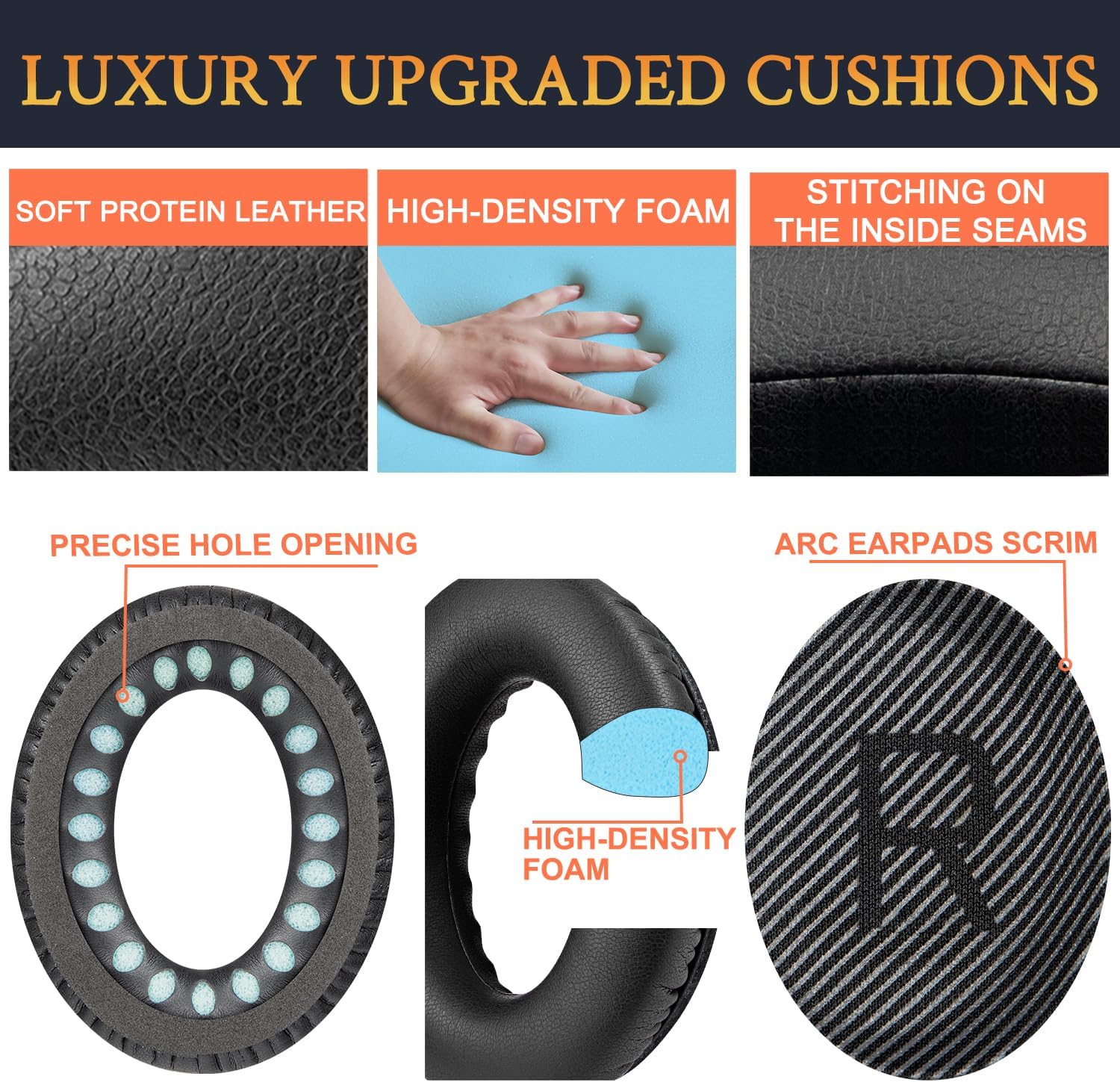
Figure 3: Exploded view of earpad construction highlighting materials.

Figure 4: Comparison of SoloWIT premium protein leather earpads with general leather earpads.
Installation Guide
Follow these steps to replace your headphone earpads. The process typically takes about 5 minutes.
- Remove Old Earpads: Gently pull off the old earpads from your headphones. They are usually held in place by clips or adhesive.
Video 1: Demonstration of removing old earpads from Bose headphones. This video shows the process of detaching the worn-out earpads, revealing the internal structure of the headphone cup.
- Clean Headphone Surface: Ensure the surface where the new earpads will attach is clean and free of any old adhesive or debris.
- Install New Scrims: The package includes new scrims (L/R marked). Carefully peel off the backing from the adhesive side of the scrim and align it with the internal speaker opening, ensuring the 'L' and 'R' markings match the left and right headphone cups. Press firmly to secure.
Video 2: Official SoloWIT installation guide for earpads. This video demonstrates the full installation process, including attaching the new scrims and snapping the earpads into place, ensuring a secure fit.
- Attach New Earpads: Align the new earpad with the mounting points on the headphone cup. Use the provided plastic installation tool to gently push the edges of the earpad under the clips around the headphone rim. You should hear a distinct "click" as each section snaps into place, ensuring a secure fit. Work your way around the entire earpad until it is fully seated.

Figure 5: New SoloWIT earpads and the included installation tool.
- Repeat for Other Side: Perform the same steps for the other headphone cup.

Figure 6: Headphones with newly installed SoloWIT earpads, appearing refreshed.
Care and Maintenance
To ensure the longevity of your SoloWIT Replacement Earpads:
- Wipe the earpads regularly with a soft, damp cloth to remove sweat and oils.
- Avoid using harsh chemicals or abrasive cleaners, as these can damage the protein leather.
- Store your headphones in a cool, dry place away from direct sunlight and extreme temperatures.
- Do not expose earpads to sharp objects that could puncture or tear the material.
Troubleshooting
If you encounter any issues during or after installation:
- Earpads not snapping into place: Ensure all old adhesive or debris is removed. Re-align the earpad carefully and apply even pressure with the installation tool around the entire rim.
- Reduced noise isolation or sound quality: Verify that the earpads are fully sealed around the headphone cup. A proper seal is crucial for optimal noise cancellation and bass response. Check that the scrims are correctly placed and not obstructing the speaker.
- Discomfort: Allow a few days for the earpads to conform to your ears. If discomfort persists, ensure they are installed correctly and not twisted.
Specifications
| Attribute | Detail |
|---|---|
| Brand | SoloWIT |
| Material | Protein Leather, High-Density Foam |
| Color | Black |
| Item Weight | 1.41 ounces |
| Product Dimensions | 5.91 x 4.72 x 2.76 inches |
| UPC | 767912084237, 716852538164 |
| Manufacturer | SoloWIT |
Warranty and Support
SoloWIT is committed to developing professional and ergonomic earpads. If you experience any issues with your purchase or require assistance, please contact us for replacements or support.
For customer service, please visit the SoloWIT Store on Amazon.
Ask a question about this manual
Ask about setup, troubleshooting, compatibility, parts, safety, or missing instructions. Manuals+ will review the question and use this page’s manual context to help answer it.