1. Introduction
The Elenzk EK-001-30W is a Hardened Gigabit PoE Injector designed to connect IEEE 802.3 af/at PoE devices, such as cameras and access points, with a non-PoE LAN switch over distances up to 100 meters. Both the Ethernet port (to switch) and the PoE Out port (to PoE device) support 10/100/1000Base-TX and comply with IEEE 802.3ab. The PoE Out port is compliant with IEEE 802.3 af/at. This POE adapter provides an integrated power solution with a 12~48VDC wide range voltage input.

Figure 1: Elenzk Industrial Gigabit PoE+ Injector (Model LNK-INJ301)
2. Product Features
- Power Input: 12~48VDC (Terminal Block).
- PoE Standard: IEEE802.3 af/at compliant.
- Data Rate: Supports 10/100/1000 Base-T.
- Installation: Designed for DIN-Rail and Wall-mount installation.
- Industrial Grade: Operates in harsh environments from -40°C to 80°C (-40°F to 176°F).
- Protection: Features 6KV lightning protection.
- Ports: 1 RJ45 Ethernet Data Input Port + 1 RJ45 Power Over Ethernet Output Port (Data + Power).
- Power Pin Assignment: 4/5(+), 7/8(-).
- Indicators: Extensive LED indicators for PoE diagnostics.
- Dimensions (WxDxH): 95*70*30 mm (3.74*2.76*1.18 inches).
- Weight: 0.25Kg (0.55Ib).
- Casing: Aluminum Case.
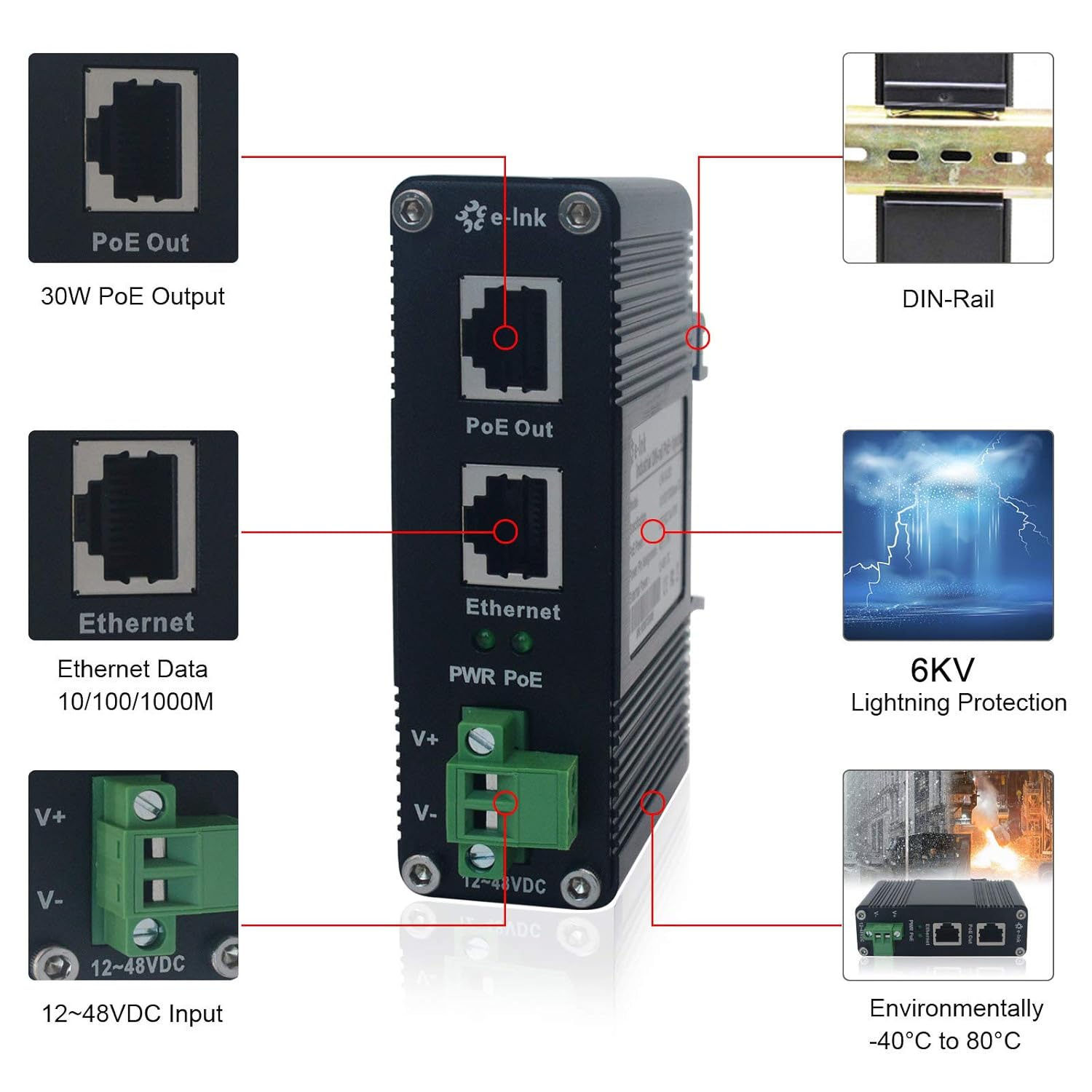
Figure 2: Key features and interfaces of the PoE Injector, including PoE Out, Ethernet, DIN-Rail compatibility, 6KV lightning protection, and wide operating temperature range.

Figure 3: The industrial-grade design allows operation in extreme temperatures from -40°C to 80°C.

Figure 4: The injector is equipped with 6KV lightning protection for enhanced durability.
3. Setup and Installation
The Elenzk PoE Injector supports both DIN-Rail and Wall-Mount installation, providing flexibility for various deployment scenarios. Ensure the mounting surface is stable and secure before installation.
3.1 Power Connection
Connect a 12~48VDC power supply (purchased separately) to the terminal block on the injector. Observe the correct polarity: V+ for positive and V- for negative. The power input is designed for a wide voltage range to accommodate different power sources.

Figure 5: The injector provides 30W PoE output with a wide voltage range of 12-48VDC for high availability applications.
3.2 Network and PoE Device Connection
- Connect your non-PoE LAN switch or network device to the Ethernet port of the injector using a standard RJ45 Ethernet cable.
- Connect your PoE-compatible device (e.g., IP camera, wireless access point) to the PoE Out port of the injector using another standard RJ45 Ethernet cable. This port will supply both data and power to the connected PoE device.

Figure 6: Example application diagram showing the PoE injector connecting a switch to various PoE devices like wireless APs, IP phones, and PoE IP cameras in a surveillance center setup.
3.3 Visual Guide: PoE Test and Connection
Video 1: This video demonstrates the PoE test procedure and how to connect a PoE camera to the PoE injector, illustrating the power and data transmission process.
4. Operating Instructions
Once the power supply and network cables are correctly connected, the PoE injector will automatically detect and provide power to the connected IEEE 802.3 af/at compliant PoE device. The LED indicators on the unit will provide status information:
- PWR LED: Indicates power status. Lit when power is supplied.
- PoE LED: Indicates PoE power delivery status. Lit when power is being supplied to the PoE device.
- Ethernet LED: Indicates network link and activity on the Ethernet port.
No further configuration is typically required for basic operation. The injector functions as a plug-and-play device for extending PoE capabilities.
5. Maintenance
The Elenzk Industrial Gigabit PoE+ Injector is designed for durability and minimal maintenance. Its aluminum casing and hardened design allow it to operate reliably in demanding environments.
- Cleaning: Periodically clean the exterior of the unit with a soft, dry cloth. Do not use liquid or aerosol cleaners.
- Environment: Ensure the operating environment remains within the specified temperature range of -40°C to 80°C (-40°F to 176°F).
- Ventilation: While designed for passive cooling, ensure adequate airflow around the unit, especially if installed in an enclosed space.
- Cable Integrity: Regularly inspect all connected cables for damage or wear. Replace any damaged cables immediately.
6. Troubleshooting
If you encounter issues with your Elenzk PoE Injector, refer to the following common troubleshooting steps:
- No Power (PWR LED Off):
- Verify the 12~48VDC power supply is connected correctly and is functioning.
- Check the power connections to the terminal block for secure contact and correct polarity.
- No PoE Output (PoE LED Off, but PWR LED On):
- Ensure the connected device is IEEE 802.3 af/at compliant.
- Check the Ethernet cable connecting the PoE Out port to the device for damage or improper connection.
- Verify the PoE device is functioning correctly and not drawing excessive power.
- No Network Connection (Ethernet LED Off):
- Check the Ethernet cable connecting the Ethernet port to your LAN switch/network device.
- Verify the LAN switch/network device is powered on and functioning.
- Intermittent Connection:
- Inspect all cables for damage.
- Ensure all connections are secure.
- Check for environmental factors like extreme temperature fluctuations or electromagnetic interference.
If problems persist after attempting these steps, please contact Elenzk customer support.
7. Specifications
| Attribute | Value |
|---|---|
| Model Number | LNK-INJ301 |
| Product Dimensions (WxDxH) | 95 x 70 x 30 mm (3.74 x 2.76 x 1.18 inches) |
| Item Weight | 0.25 Kg (0.55 Ib) |
| Power Input | 12~48VDC (Terminal Block) |
| PoE Standard | IEEE802.3 af/at |
| Data Link Protocol | Gigabit Ethernet (10/100/1000 Base-T) |
| Power Pin Assignment | 4/5(+), 7/8(-) |
| Operating Temperature | -40°C to 80°C (-40°F to 176°F) |
| Lightning Protection | 6KV |
| Casing | Aluminum Case |
| Compatible Devices | Internet Protocol Camera, Wireless Access Points, etc. |
| UPC | 823540894799 |

Figure 7: Detailed dimensions of the Elenzk PoE Injector.
8. Warranty and Support
The Elenzk Industrial Gigabit PoE+ Injector comes with a 5-Year Warranty, ensuring long-term reliability and peace of mind.
For technical support, troubleshooting assistance, or warranty claims, please contact Elenzk customer service. Refer to the product packaging or the official Elenzk website for the most current contact information.


